By Selena KomezUpdated on May 22, 2026
Normally, your downloads on the official Disney+ app will expire. Luckily, there are quite a few powerful Disney Plus downloads can help you download your favorite Disney+ videos forever. TunesBank Disney+ Downloader acts as a helpful tool, allowing you to store Disney Plus movies from various locations worldwide, including the US, Japan, France, Germany, Spain, and more. It’s designed for easy use, even for those not well-versed in computers. No Disney Plus app is required; simply sign in your Disney+ account in its built-in web browser, then you can access the whole library. Browse, open, add, and download the Disney+ video in just a few clicks! That’s it!
Moreover, this useful tool is able to help you download Disney Plus movies and shows to MP4 or MKV files on your computer. You can then transfer them to a USB drive, SD card, external hard drive, or any other device to enjoy them as much as you like. TunesBank simplifies the process of downloading almost any Disney Plus video, even in locations without internet access. Rest assured, it’s a secure and dependable program, ensuring your computer remains safe from any harmful viruses or threats.
TunesBank Disney+ Downloader can help you bypass official download limits on Disney+, and save Disney Plus videos in MP4 or MKV formats for convenient offline viewing on various devices like mobile phones, tablets, or Windows/Mac computers. Its robust downloading capabilities are the result of a range of features, making it one of the leading Disney Plus video downloaders. Let’s explore these features together!
Save Almost All Disney+ Content as Local Files:
Love Marvel and Star Wars? TunesBank lets you download your favorite superhero epics and galactic adventures from Disney+ as permanent local MKV or MP4 files to build your offline collection. No need to worry about streaming expiration or internet connection any more!
Download Unlimited Disney+ Videos to Computer Locally:
TunesBank Disney+ Downloader allows users to download an unlimited number of Disney+ movies and TV series directly to their local computer, ensuring that they can enjoy their favorite content without any limitations or restrictions.
Built-In Web Browser to Simplify Download Process:
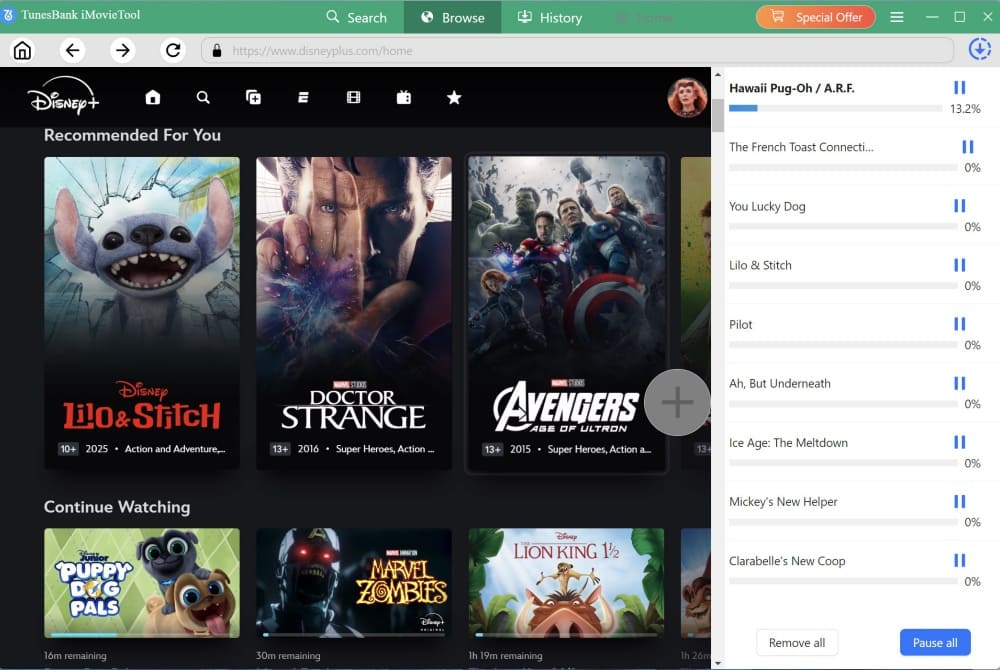
TunesBank features an embedded browser that lets you browse Disney+ library directly within the app. Just log into your account, find the TV series or movie you want, and click to +” to add it to your download queue. No more copying and pasting URLs – everything happens seamlessly in one place.
Download Disney Plus Movies and TV Series to MP4/MKV (720P):
Users can save their favorite Disney Plus movies and TV series in high-quality MP4 or MKV formats, ensuring an optimal viewing experience at 720P resolution, with vivid and crisp visuals that capture the essence of the original content.
Keep Audio Tracks and Subtitles in Multiple Languages:
TunesBank Disney+ Downloader ensures that all audio tracks and subtitles are preserved during the download process, allowing users to enjoy their favorite Disney Plus content in their preferred language, fostering inclusivity and accessibility for a diverse audience.
Remain 5.1 Audio & AD Audio for Superior Playback:
The software maintains the integrity of the original audio quality, including the immersive 5.1 audio and AD (Audio Description) audio, enabling users to experience superior playback that fully captures the immersive sound design and storytelling elements of the Disney Plus content.
Download Subtitles In Three Formats:
Choose exactly how you want subtitles embedded! This smart tool also supports soft subtitles (toggle on/off), external SRT files (editable and shareable), or hard subtitles (permanently burned into the video). This flexibility ensures you enjoy DisneyPlus movies and shows in any language, on any device, without hassle.
100% Safe and Stable, User-Friendly Interface, No Ads:
TunesBank Disney+ Downloader prioritizes user safety and satisfaction, providing a secure and stable downloading environment. With its user-friendly interface, users can navigate the software effortlessly, without any intrusive advertisements, ensuring a seamless and uninterrupted downloading experience.


Here is a comprehensive step-by-step guide for downloading Disney Plus movies onto your Windows PC or laptop using the TunesBank Disney+ Downloader. Let’s dive right in and get started.
Step 1. Run TunesBank Disney+ Video Downloader & Log In
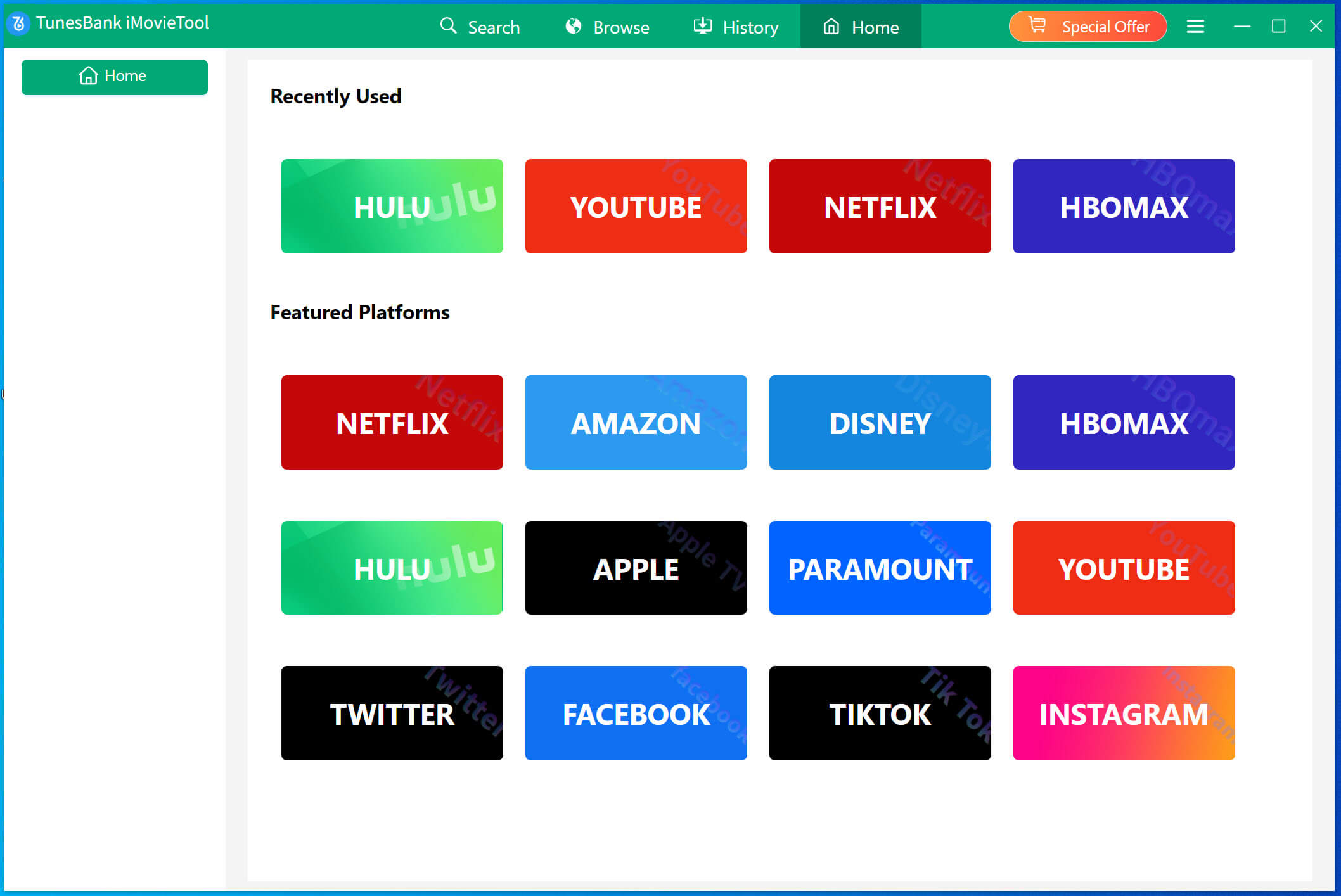
Commence the process by downloading, installing, and launching the TunesBank iMovieTool Video Downloader on your Windows PC or Mac. On the main screen, select “DISNEY”
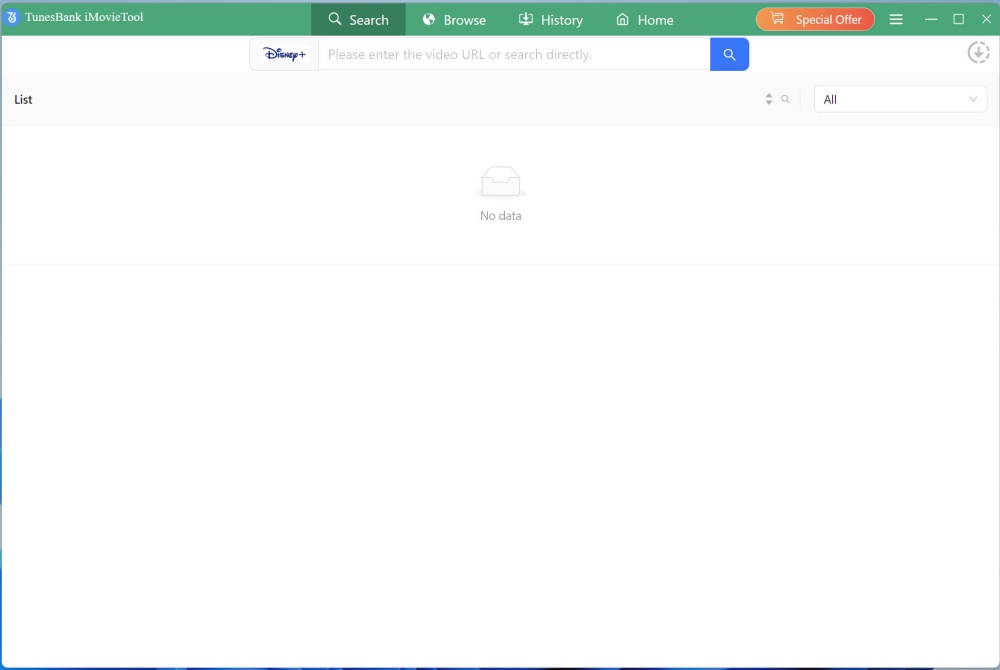
Then, you will enter the TunesBank Disney+ Downloader.
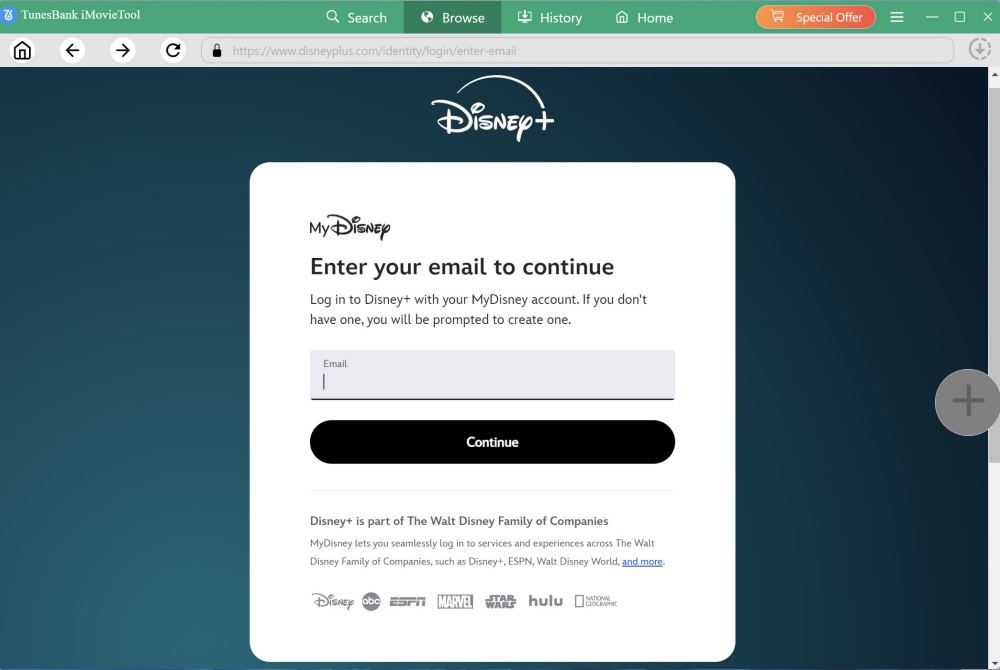
Following that, proceed by logging into your Disney+ account.
Step 2. Customize Output Settings
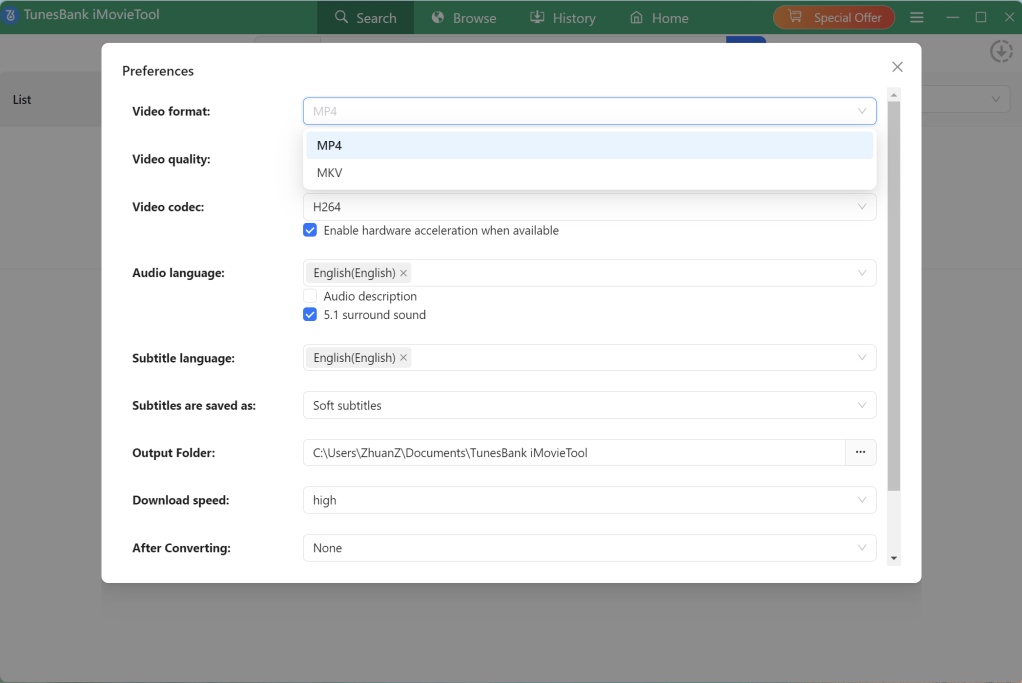
Before downloading, click the “Menu” bar, conveniently positioned in the upper right corner. And choose “Preference” option. You can define your preferred video format (MP4/MKV), video codec (H264/H265), video quality, set the output destination, and personalize your desired audio track and subtitle language.
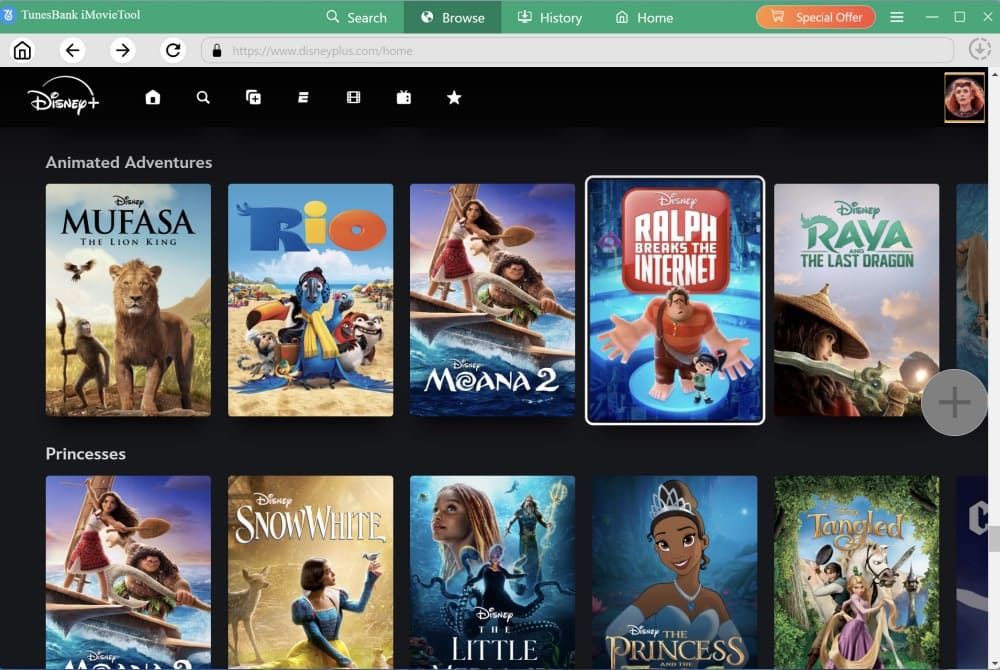
Step 3. Browse Disney+ Videos Online
TunesBank provides users with a smart methods for adding Disney+ movies and series to the application for download. Tap “Browse” tab, you can browse the whole library and see different catalog.
Step 4. Add Disney+ Video
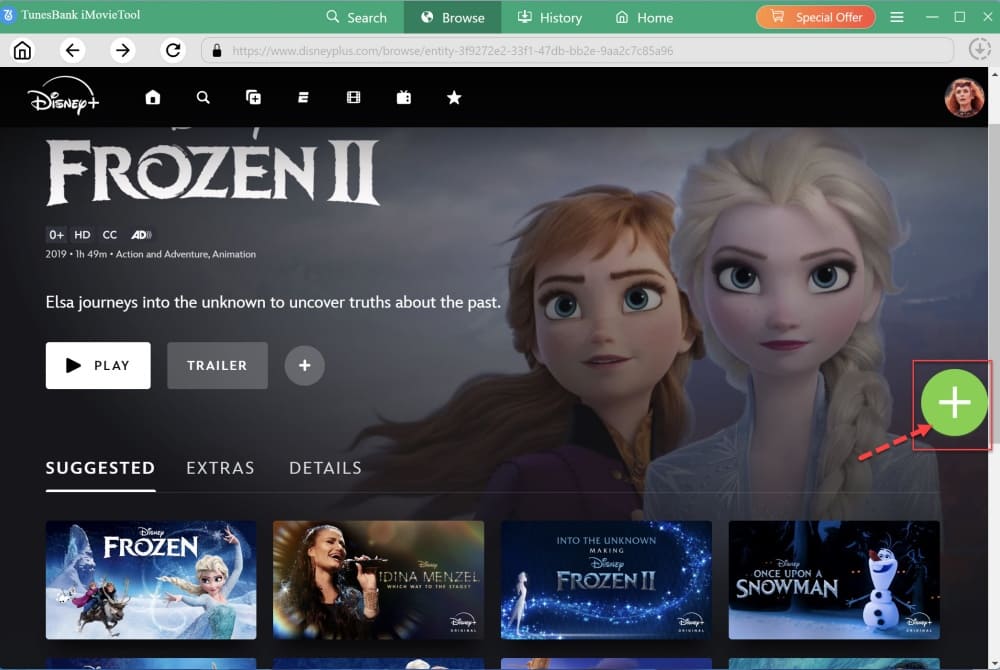
Browse online until you find the target movie or show. Then open the video detail page, a green “+” icon will appear in the right side. Click it.
Step 5. (Optional) Set Single Video Output Settings
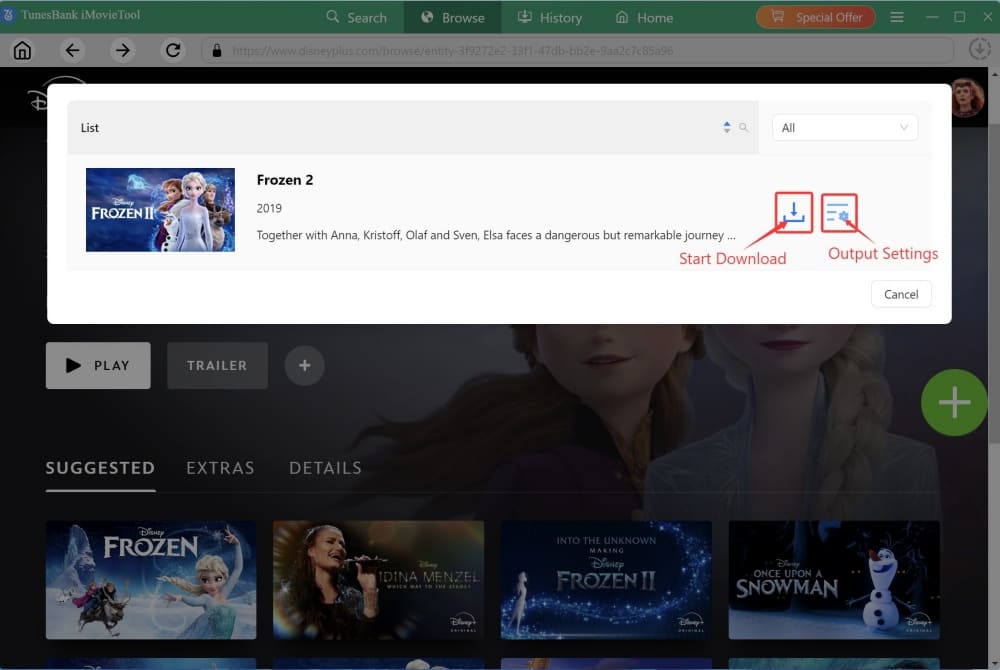
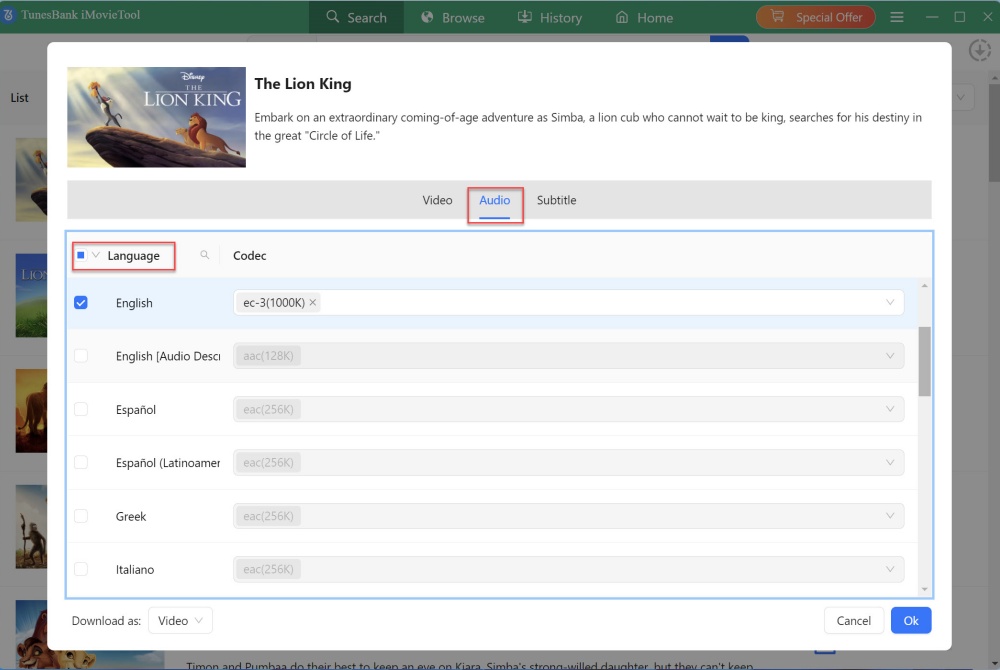
A pop-up window will pop up, click the “Gear” icon, this lets you adjust single video settings (resolution, audio, subtitles). Confirm your choices.
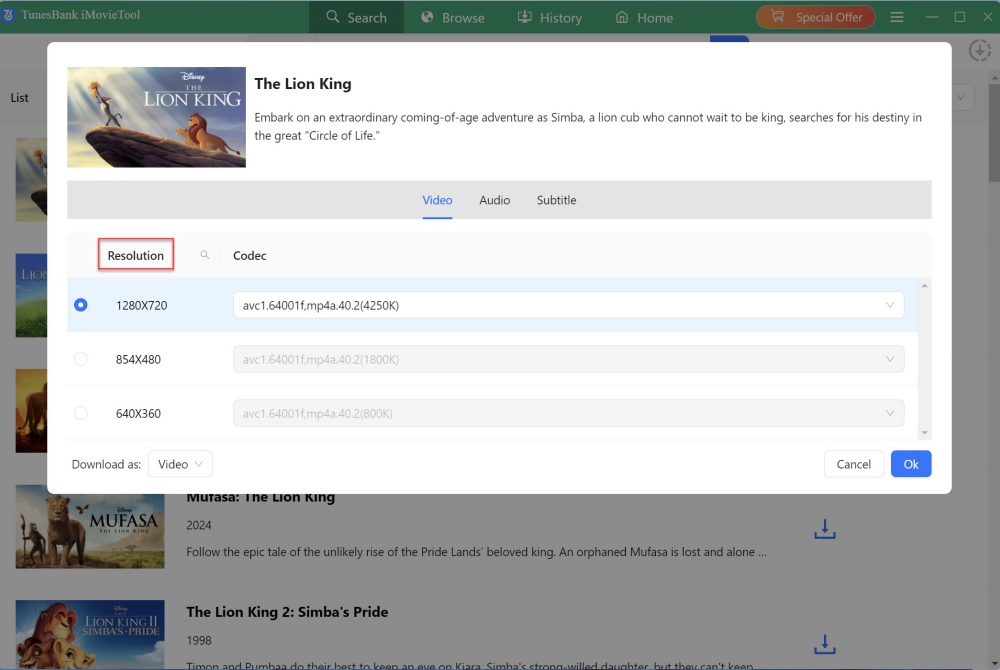
For example, tap “Video” tab, choose the highest video resolution to download Disney+ video.
Or, switch to “Audio” tab, here you can choose English or other audio languages to output the video.
Step 6. Start to Download Disney+ Video to MP4 on PC
Then commence the download process by selecting the “Download” icon. During the process, you can pause, resume, or batch add more movies or shows.
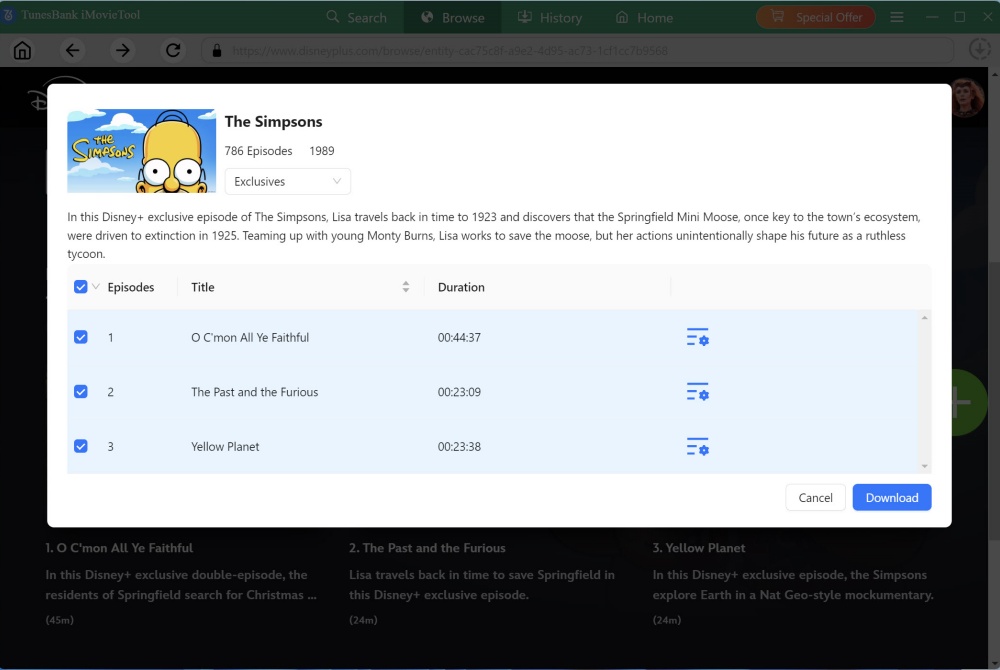
When dealing with TV shows, the program will showcase a detailed roster of all seasons and episodes. You can choose specific episodes as per your liking or opt for a bulk download of the entire series. The hit on “Download” button.
Step 5. View the Downloaded Disney+ Videos
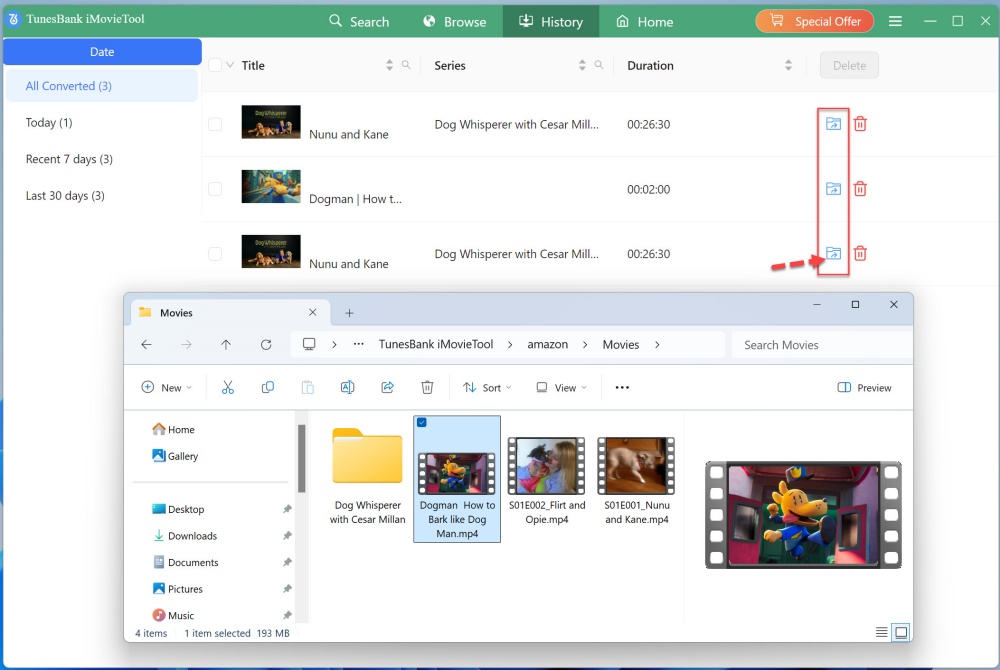
Once the download process is finished, you can navigate to the “History” section to review the Disney+ movies that have been successfully downloaded in either MP4 or MKV format. To access the output folder, simply click on the “Blue Folder” icon located next to the title.
Pros:
Cons:
TunesBank Disney+ Downloader lets you download Disney Plus without any restrictions. It has a free version that allows you to try all its features. But the free version only lets you download the first six minutes of each video. To get the full videos, you need to buy a paid license.
Monthly Plan: US$29.95 per month (with a 15-day Money-Back Guarantee)
Yearly Plan: US$59.95 per month (with a 15-day Money-Back Guarantee)
Single Lifetime Plan: US$89.95 for a lifetime (with a 30-day Money-Back Guarantee)

In conclusion, with its high-quality outputs, reliable performance, efficient operation, and diverse output features including multilingual options, TunesBank Disney+ Downloader provides a simple and user-friendly solution for downloading Disney Plus movies and shows to MP4/MKV. Considering these factors, it is a sensible choice if you want to overcome the downloading limitations imposed by the official platform and enjoy a more seamless Disney Plus video playback experience offline. Begin your exciting Disney journey by using TunesBank Disney+ Downloader today!
Prompt: you need to log in before you can comment.
No account yet. Please click here to register.
 (No Ratings Yet)
 Loading...






No comment yet. Say something...