All posts by DHZ

The 5 Most Annoying Features Of iOS 10 And How To Fix Them

There are a lot of cool new features that came out with the recent release of iOS 10. But there are also some cruddy, stinky and annoying features. Let’s take care of that, here are the 5 Most Annoying Features of iOS 10 and Fixes for each of them.
ios 10 apps


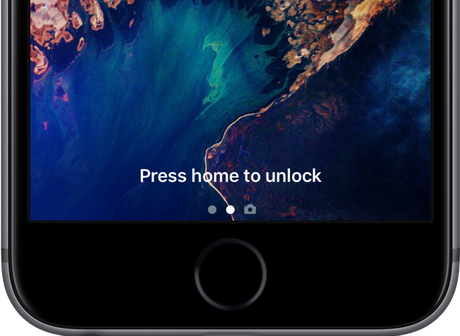
1. Turn Off The “Press To Unlock” Feature
press to unlock

It’s easily the number one thing that bothered me about updating my phone to iOS 10, now there  is an added step of pressing the home button to unlock your phone. I struggled through it for a couple of weeks before realizing that it’s a feature that you can shut off! Since the “swipe to unlock” feature is completely gone this will only work if you have your Touch ID setup. Here’s the fix…

Settings > General > Accessibility > Home Button > Rest Finger To Open “On”

Then toggle the “rest finger to open” section to green. Your phone will now unlock with the Touch ID feature rather than an annoying extra push of the home button.

2. Turn Off Text Messages On Lock Screen
turn off SMS on lock screen

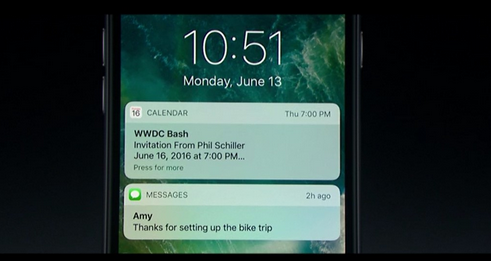
For a guy like me who always has his phone on him, I kind of enjoy the new feature that displays emails and text messages on the home screen. It even gives you the option to reply to those text messages without unlocking your phone. That said though, most of my messages are fart jokes and funny GIFs I’m sending to Meatsauce so who really cares. But if you’re one of those people who handles really important business and sends a lot of secret text messages, you might want to shut this off. Here’s the fix…

Settings > Touch ID & Passcode > Enter PIN > Reply With Message “Off”

3. Turn Off Default iMessage Apps
turn off default imessage apps

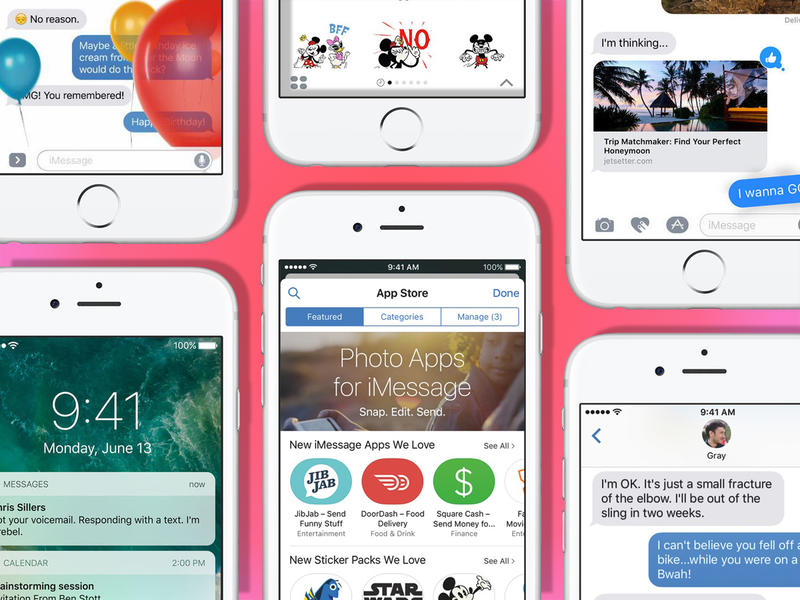
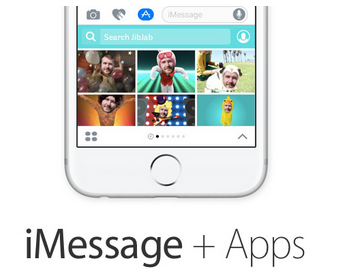
For the first time in like ever iMessage got a big overhaul with iOS 10 and while some of the features are cool, others are annoying and just in the way. For some apps on your phone, and ancillary presence will appear within iMessages to allow use within your iMessage strings. If you don’t enjoy these features it becomes annoying.

Open a Message string > Hit The App Icon > Hit the four circles on the bottom left > Tap on store > Then hit Manage and turn off Automatically Add Apps.

4. Handwriting App Opens Every Time You Go Landscape Orientation
handwriting app

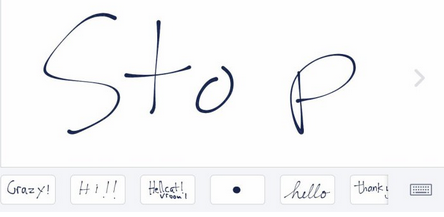
The new handwriting feature is kind of cool if you’re one of the 2% of people who use a stylus, if not it’s probably annoying you already. So turn it off.

Rotate your phone into landscape orientation mode so that handwriting mode opens, press the keyboard icon on the bottom right and it will switch to keyboard mode.

5. Waste Of Space Default Apps Can Now Be Deleted
delete apps

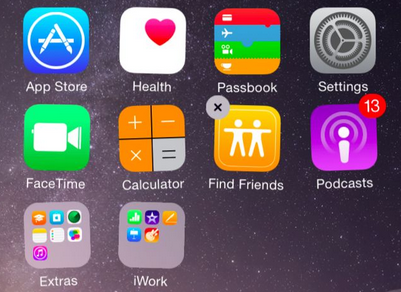
It used to be that the stock apps that come already installed on your phone could not be deleted. This caused you to tuck them away in an unused folder but it also took up space on your phone and that’s just a waste. Well, you can delete them now…sort of…

Delete these apps the same way that you delete any other app. Press and hold down on the up until they wiggle and then hit the “x” in the corner to remove it. Note – this won’t actually delete the app, it simply hides it. So no free space, but out of sight out of mind right?

Related Article:

Top 3 New Features in iOS 10 You Should Know

How to Restore Deleted Data on iPhone after iOS 10 Update

How to Jailbreak iOS 10 on iPhone without Losing Data

How to Downgrade iPhone from iOS 10 to iOS 9

How to Safely Backup iPhone before Upgrading to iOS 10

How to Transfer Samsung Contacts to Google Pixel

Jumping from the Galaxy Note 7 to the Google Pixel
Owners of the Galaxy Note 7 are in a dreadful position.Samsung discontinued the phone after weeks of disaster:Some handsets overheated and exploded, the company tried to replace them, and then the new devices suffered the same problems.Simply put, it’s now irresponsible, even dangerous, to own a Note 7.Now comes the task of replacing it, which isn’t as simple as it sounds.Indeed. Google’s upcoming flagship phone sounds like a great replacement for the Note 7 if you can wait for it to drop. There’s a smaller version called the Pixel, but if you had a Note 7, chances are you’ll dig the beefier XL.

How to Move Contacts from Samsung Galaxy to Google Pixel

Since you need to return the Samsung device now — seriously, do not put yourself or others in harm’s way by continuing to use the Note 7 — you’ll have to use another mobile device to replace the recalling one.We are going to explain how to transfer contacts from Samsung Galaxy Note 7/S3/S4/S5 to Google Pixel.Here’s how to move contacts, photos,text messages,and other data between Android.

Phone Transfer, making the switch from Samsung to Google Pixel become an easy task.With the Phone Transfer Tool,you are allow to sync Samsung contacts to Google Pixel in easy steps.The Samsung data are sent by wireless to Pixel phone easily via Phone Transfer,including contacts,SMS,photos,videos,music,call logs,calendars,apps(WhatsApp/Line/Viber/Kik),apps data.In addition,this program help to transfer file between mobile device even though they are running different operating system,such as Android OS system,iOS system,Symbian OS system.

d_win d_mac

Part 1: Copy Contacts from Samsung to Google Pixel via Bluetooth

You can use Bluetooth to transfer contacts between Samsung Galaxy and Google Pixel phones.
From the home screen of Samsung Galaxy device, press Contact.
Make sure to highlight add new items, and then press OPTIONS.
Scroll to send a contact, and then press the center button (Note: if the Bluetooth is enabled, a prompt will appear. Click Yes, then press the center button.)
Scroll to the preferred contact, and then press the center key to select.(Tip: if you want to transfer all contacts, press SELECT ALL.)
Scroll to the preferred contact, and then press the center key to select.
After that, press continue.
Press SEND.
The Samsung phone will search for available devices.
Scroll to the Google Pixel devcie and send.
To send a contact, press SEND.
Receive file transfer on receiving device in accordance with any tips.

All selected contacts are transferred completely.

Part 2: Transfer Contacts from Samsung to Google Pixel in one click

Step 1.Run Program and Connect Device to Computer
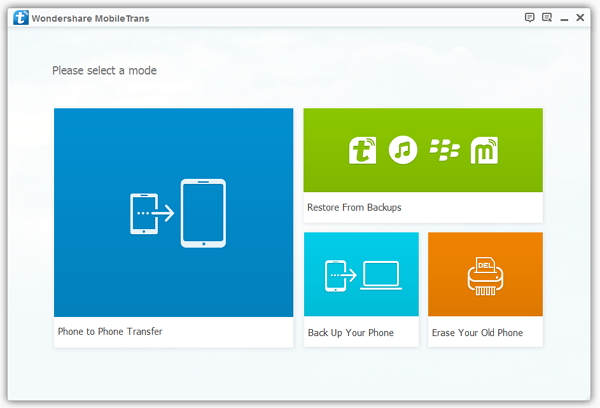
First of all,please run Phone Transfer on computer and connect both two devices with computer.Choose “Phone to Phone Transfer” option.

transfer samsung contacts to pixel

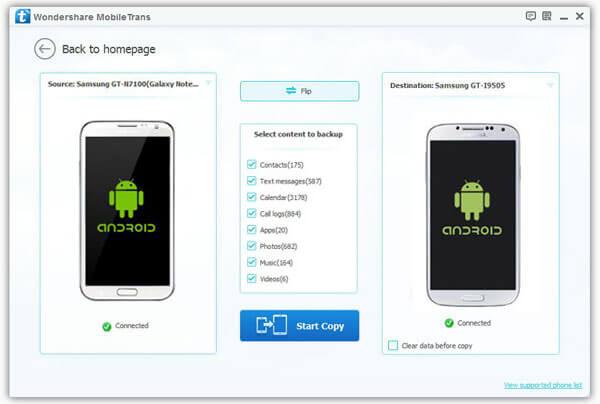
Step 2.Select Contacts File to Transfer between Devices
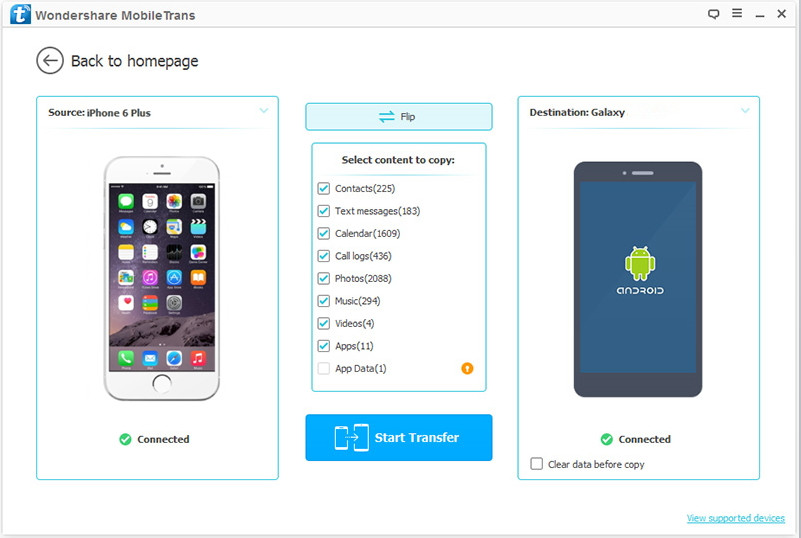
You are allow to select more than one file for transferring, contacts,SMS,photos,videos,music,call logs,calendars,apps(WhatsApp/Line/Viber/Kik),apps data are included.If you need to sync contacts between Android only,just click “Contacts” file.

transfer samsung contacts to pixel

Note:Make sure the Samsung and Pixel phone are on the right position,as the source device and target device,the Samsung should be on the left and Pixel phone on the right.If they are not on the correct place,just click “Flip” to exchange it.

Step 3.Copy Samsung Contacts to Pixel Phone
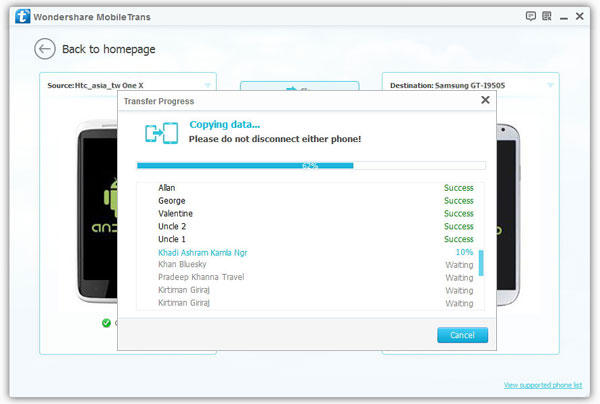
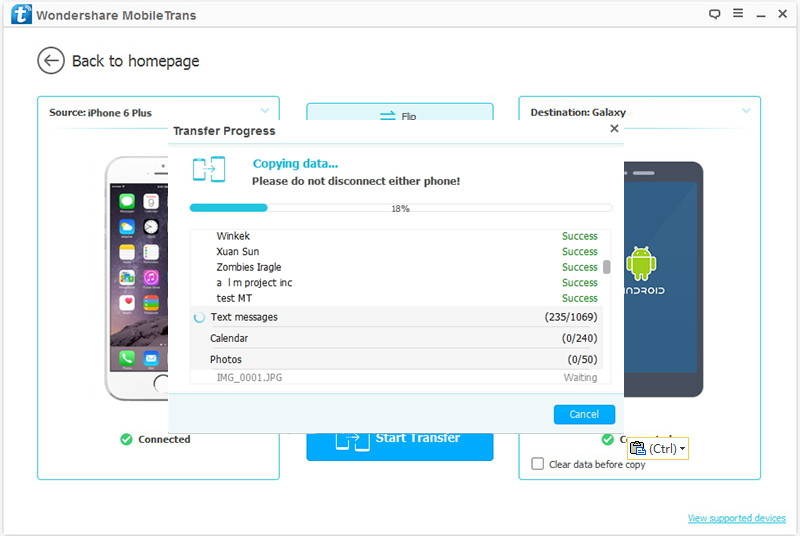
When everything is ready,simply click “Start Copy” to begin the data transfer process.

transfer samsung contacts to pixel

Only 3 easy steps,your Samsung contacts now is finished transferring to your new Google Pixel phone.What’s more,Phone Transfer enable to backup data on device,restore backup to device completely.

Extra tips:How to Backup Samsung Galaxy Note 7 Data before Recalling
How to Safely Backup and Restore Samsung Data
d_win d_mac

Related Article:

How to Transfer Samsung Data to Pixel
How to Transfer Android File to Pixel

How to Transfer iPhone Data to Pixel
How to Recover Deleted Contacts from Pixel

How to Recover Deleted Data from Pixel
How to Backup & Restore Data on Google Pixel Phone

How to Recover Deleted Data from Galaxy S7/S7 Edge on Mac

[Summary]:You using Macbook and Galaxy S7 and want to find a Samsung Galaxy S7 Data Recovery for Mac to recover deleted files from Samsung phone on Mac without backup?We will recommend you a poerful Android data recovery(Mac) to scan and restore deleted data from Samsung Galaxy S7 and S7 Edge on Mac,including contacts,text messages,photos,videos,call logs and WhatsApp apps data on your Galaxy S7.

samsung s7 data recovery for Mac

Hey!Please pay attention.Samsung Galaxy S7 phone now is getting your focus.You can’t live without water or your smartphone,which is why the Galaxy S7 have a certified water-resistant rating.They repel spills, splashes and dunks without a bulky protective case.Running out of memory shouldn’t be a thing.The Galaxy S7 feature big screens in incredibly slim designs that fit comfortably in the palm of your hand.It’s the first smartphone camera with Dual Pixel technology features an autofocus that’s so incredibly fast and seamless.With fast wireless charging,the Galaxy S7 power up from 0 to 100% in no time.

Data Lost or Delete Data on Samsung Galaxy S7

Have you ever met the problem about losing your files on your Samsung Galaxy S7(Edge) phone suddenly by deleted mistake?Indeed,many might unconsciously wipe the phone data as we are easy to make mistakes in daily life.What can we do to prevent this from happening?What does it take to restore the deleted data from a Samsung device, such as Samsung Galaxy S7(Edge),S6,S5 and Note 5, Note 4? It is pretty simple to answer these three questions.

How to Restore Deleted File from Samsung Galaxy S7(Edge)

Android Data Recovery for Mac enable to directly restore deleted data from Samsung Galaxy S7(Edge) on Mac,such as contacts,messaging,photos,videos,audio,call logs,calendars,notes,apps(WhatsApp/Viber/Line/Kik),apps data,etc,.You are allow to recover deleted file on Android device by this powerful program after losing data under any circumstances like deleted mistake,factory resetting,Android system update,Android rooting,device broken/damaged, and so on.Supports 6000+ Android device models & various Android OS.The applicable Android device for example Samsung (Galaxy S7/S6/S5/S4,Galaxy Note 7/5/4/3,A 9/A8/A7),HTC(One M8/M9),Google Nexus(5X,9),Pixel(XL),Motorola,Lenovo,LG,ZTE.Gratefully?Just select the right version to download for a free try.

d_win d_mac

How to Restore Deleted Data from Samsung Galaxy S7(Edge) on Mac

Step 1.Connect Samsung Phone to the Computer
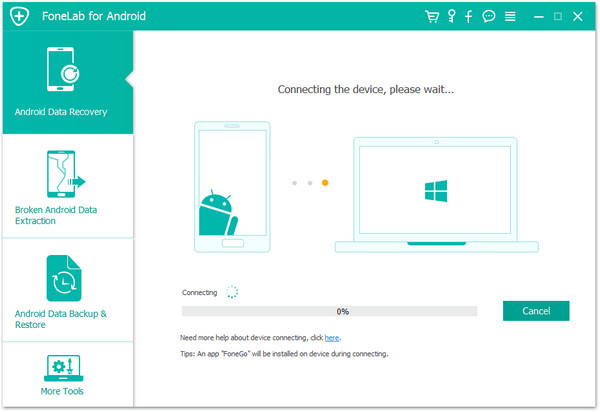
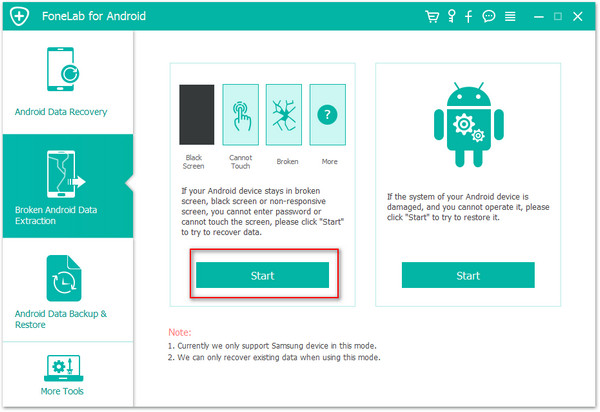
After you installing and lunching the Android Data Recovery on the computer,you could see the main window below.Please connect your Samsung Galaxy S7 phone to the computer via an USB.

restore samsung galaxy s7 data on mac

Step 2.Enable USB Debugging on Samsung Device
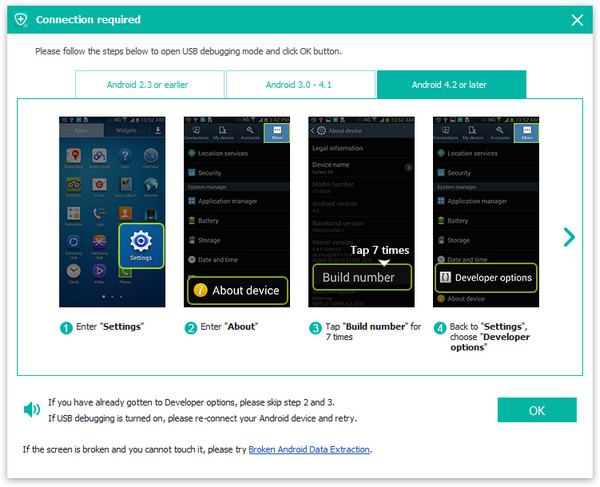
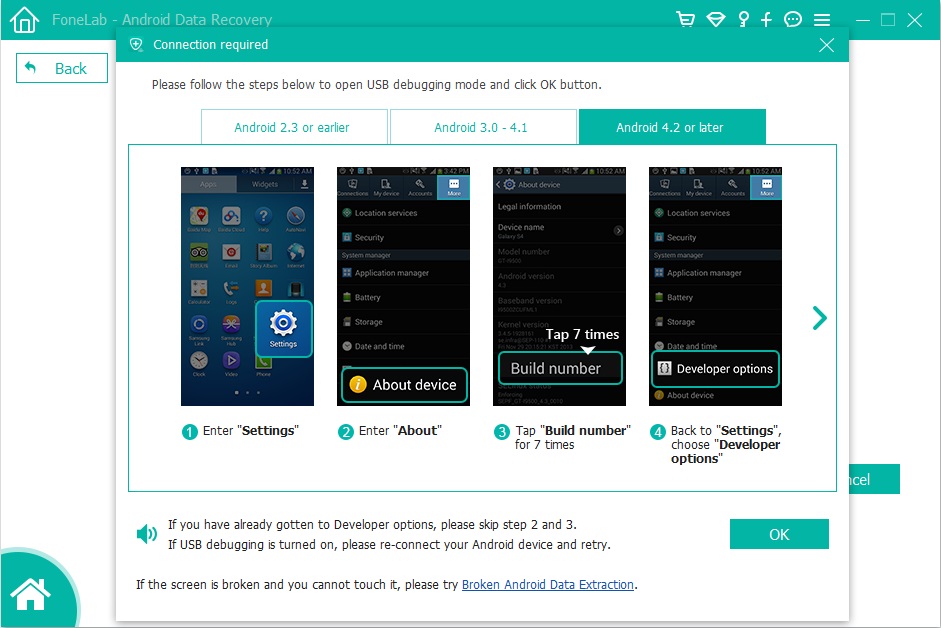
If your Samsung device isn’t detected by the program, you should enable USB debugging on your phone.Check what Android OS is your Samsung and then choose the right way to open USB debugging follow the steps:

restore samsung galaxy s7 data on mac

Step 3.Select File to Scan on Samsung
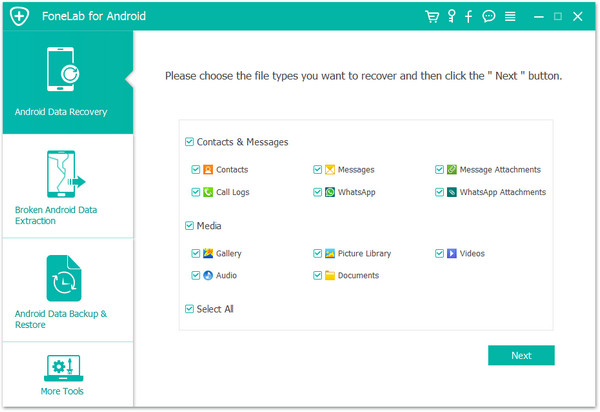
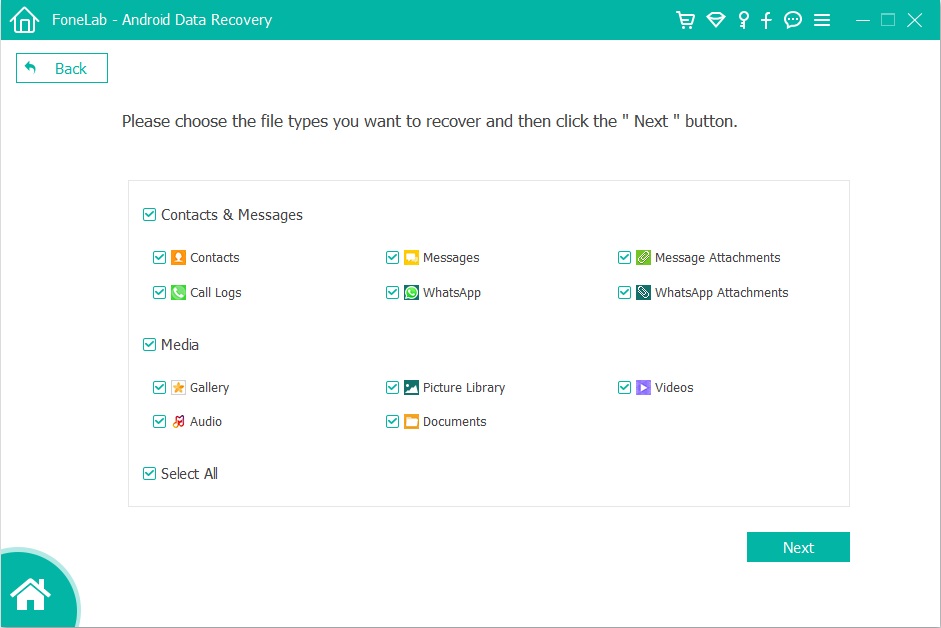
Different types of Samsung files can be chose to be scan and this scan step will save your time for data recovery.If you lost almost all types of Samsung data,you can click “Select all” to have all your Samsung data scanned.Then tap ”Next” to go on.

restore samsung galaxy s7 data on mac

Step 4.Allow to Scan and Analyze Data on Samsung
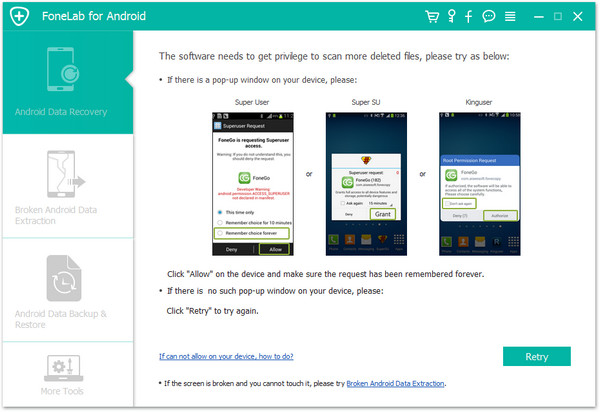
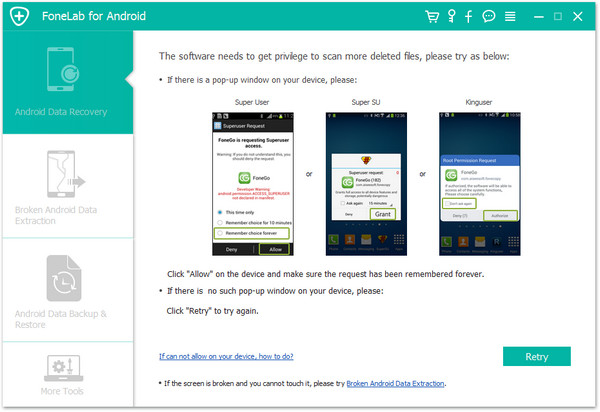
Once your device is detected by the program, you’ll get a window as follow on your device.Tap “Allow” to permit the program to scan your device for deleted data.

restore samsung galaxy s7 data on mac

Now the program begin to scan and analyze data on Samsung.

Note:Please make sure that the battery of Samsung is more than 20% charged.

Step 5.Preview and Restore Deleted Data from Samsung Galaxy 7
After finishing the scanning process,a list of recoverable files that have been found from your Samsung will be shown.In addition,there will be a preview window of files where you can preview the contacts, SMS and photos from Samsung device.Mark the data you want and click “Recover”. You can selectively save them on your computer.

restore samsung galaxy s7 data on mac

d_win d_mac

Related Article:

How to Recover Deleted Data from Samsung Galaxy on Mac

How to Backup and Restore Files on Samsung Galaxy S7

How to Recover Deleted Contacts from Samsung Galaxy on Mac

How to Recover Deleted Text Messages from Samsung Galaxy on Mac

How to Recover Deleted Data from Samsung Galaxy S7/S6/S5

2 Ways to Recover Deleted Photos from Samsung Galaxy S7/S6/S5

How to Transfer iPhone Contacts to Pixel

Google’s re-entering the smartphone market with its Google Pixel phone, announced on October 4, 2016. The Pixel phone presents an impressive feature set that could grab the attention of undecided users.Google CEO, Sundar Pichai, went as far as to say that the next evolution of computing is moving from “mobile-first to AI-first,” with its new Google Assistant.Google is a software and services company through and through despite its new focus on hardware. So it’s only fitting that we shift our gaze from the specs sheet and look instead at what really makes the handsets tick.There are 10 key features that we feel make Google Pixel phones stand out from the crowd.

When you switch from iPhone to the Google Pixel phone,it not only a change of brand but also a change of its entire operating system.Switching operating system may result in file and format incompatibility.It makes the transfer of private data such as contacts,text messages a tricky process as you need to convert the file format that from iOS system to Android system.How to transfer iPhone data to Android Pixel with easy steps?

How to Copy iPhone Contacts to Google Pixel

You need the Phone Transfer Tool,absolutely help to transfer iPhone contacts to Google Pixel phone without data loss,besides contacts,text messages,photos,videos,call logs,calendars,music,apps,apps data are also supported to transfer by program.Phone Transfer is strongly recommended for freely transferring file between iPhone,Android phone,Nokia phone,Blackberry phone.Various of Android device are compatible with Phone Transfer,such as Samsung (Galaxy Note 7/5/4/3,Galaxy S7/S6/S5/S4,A 9/A8/A7),HTC(One M8/M9),Google Nexus(5X,9),Pixel(Xl),Motorola,Lenovo,LG,ZTE,etc,.

d_win d_mac

How to Sync iPhone Contacts to Google Pixel

Step 1.Install Phone Transfer and Run it
Firstly you should install and run this Phone Transfer tool on your computer.Then, the primary window appears.Select the “Phone to Phone Transfer” mode and click Start.

transfer iphone contacts to google pixel

Note: You need to install iTunes on your computer.

Step 2.Connect iPhone and Pixel Phone to the Computer
After that,connect your iPhone and Pixel phone to the one-click phone transfer tool at the same time.The program will automatically detect your devices once they’re connected. And the devices will appear in the places of “Source” and “Destination” separately.

transfer iphone contacts to google pixel

Note:You are allowed to change the places of two devices by clicking “Flip” when you need it.

Step 3.Move Contacts from iPhone to Pixel Phone
As you see, you are allowed to transfer contacts, text messages, photos,videos,calendars, music,etc,.Click the “Contacts” file and Click “Start Copy” to transfer files.Keep your both devices are connected during the transfer process.When it finishes, click “OK” to end it.

transfer iphone contacts to google pixel

Note:This program supports iPhone running iOS 10/9/8/7, including iPhone 7,iPhone 6S(Plus),iPhone 6(Plus),iPhone SE,iPhone 5S/5C/5 and more.Android devices running Android 7.0 and lower are well supported.

d_win d_mac

Related Article:

How to Transfer iPhone Data to Pixel

How to Transfer Samsung Data to Pixel

How to Transfer Android File to Pixel

How to Recover Deleted Contacts from Pixel

How to Recover Deleted Data from Pixel

How to Backup & Restore Data on Pixel

Transfer Data from Samsung Galaxy Note 7 to iPhone 7

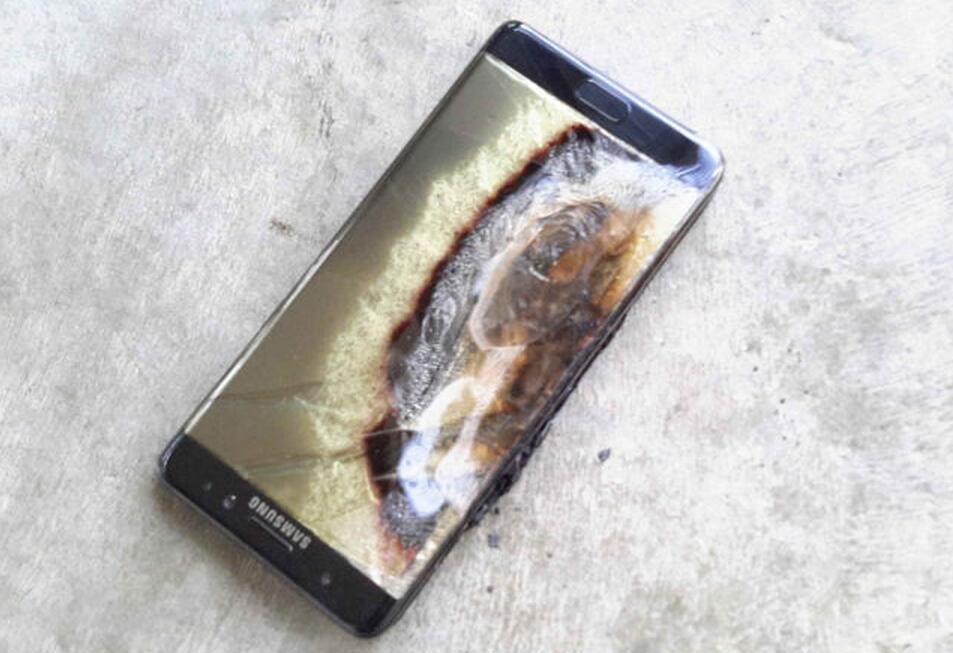
Samsung Galaxy Note 7 Burning Accident and Recalled
Samsung has stopped production of its Galaxy Note 7 smartphone after a series of explosions in the original and replacement models surface.Samsung’s engineers, on a tight deadline, initially concluded the defect was caused by faulty batteries from one of the company’s suppliers. Samsung, which announced a recall of the Note 7 devices in September, decided to continue shipping new Galaxy Note 7s containing batteries from a different supplier.

note 7 recall

Samsung Users Focus on iPhone 7 after Note 7 Recalled
After the Samsung Galaxy Note 7 fire burning accident happened again,Samsung company had announced that recall all Note 7 device and payed for the users.However,after lots of Samsung users sent the disable device to Samsung,they should buy a new mobile device for replace.According to the report,most of them focus on the Apple iPhone 7,for its outstanding features and the high security.

Completely Copy Samsung Galaxy Note 7 File to iPhone 7

Before recalling your Samsung Galaxy Note 7 phone to Samsung company,you’d better backup data for Samsung Galaxy Note 7 to avoid losing your personal data after Samsung recalled.When you get the new Apple iPhone 7 you just wanna switch your Samsung data to the new iPhone 7 in order to keep your data on Apple safely.

To directly transfer data from Samsung Galaxy Note 7 to iPhone 7,you are advised to use Phone Transfer,which is an excellent data transfer tool to transfer data between Samsung Galaxy Note 7 and iPhone 7 without data loss,besides support to transfer data between Android device,iOS device,Symbian device.The transferable file including contacts,text messages,photos,videos,call logs,calendars,music,apps(WhatsApp,Viber,Line,Kik),apps data.Furthermore,Phone Transfer enable to backup data from mobile device to computer,restore backup to device effectively.

d_win d_mac

Applicable Device:
iOS Device:iPhone 7(Plus),iPhone 6S(Plus),iPhone 6(Plus),iPhone SE,iPhone 5S/5C/5,iPad Air,iPad Pro,iPad Mini,iPad 4/3/3,etc,.

Android Device:Samsung (Galaxy Note 7/5/4/3,Galaxy S7/S6/S5/S4,A 9/A8/A7),Motorola,HTC(One M8/M9),Google Nexus(5X,9),Pixel(Xl),Lenovo,LG,ZTE,etc,.

Sync Data from Samsung Galaxy Note 7 to iPhone 7

Step 1.Run Program and Connect Device
– Run Phone Transfer on your computer.
– Choose “Phone to Phone” Transfer mode.
– Connect Samsung and iPhone to the computer with the USB cable and wait for detecting.
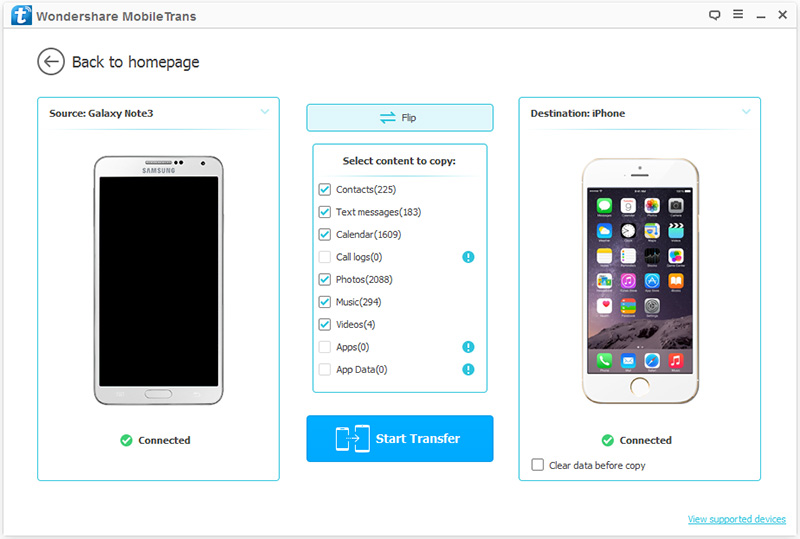
– Ensure Samsung and iPhone is respectively set as Source and Destination.If not, click the Flip button and exchange their place.

samsung to iPhone 7 data transfer

Step 2.Choose File to Transfer
Now you are allow to select the file to transfer from Samsung Galaxy Note 7 to iPhone 7:contacts,text messages,photos,videos,call logs,calendars,music,apps,apps data;just click it and then tap “Start Copy”.(You can click more than one file to transfer in one time.

transfer samsung galaxy note 7 data to iPhone 7

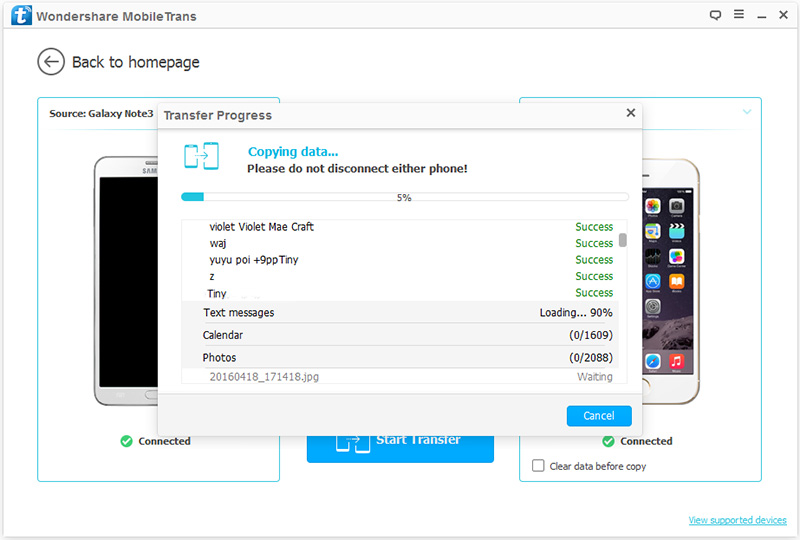
Step 3.Start Copying Samsung Data to iPhone 7
Once you clicking the “Start Copy” button,the program will begin to the data transfer process automatically.It will finish in a coffee time,please wait for a moment.

transfer samsung galaxye note 7 data to iPhone 7

d_win d_mac

Related Article:

How to Backup and Restore Samsung Data

3 Ways to Backup and Restore Samsung Galaxy Note 7

How to Permanently Erase Samsung Data before Recalling

How to Transfer Samsung Data to iPhone 7

How to Fix a Frozen iPhone in iOS 13/12/11

“Apple released the iOS 13, the problems come for most iOS users after iOS 13 update, my iPhone XS was frozen after iOS 13 update, how to fix a frozen iPhone in iOS 13?”

One big benefit for users of Apple iOS compared with Google’s Android is they’re able to update their devices to the latest version of the software each year. But iOS often has bugs when it first hits the market, making it prudent for users to wait a few days before downloading. Before downloading a software update, users should also be sure their iPhone are backed up. If they have to restore the devices, they’ll be able to recover all of their contacts/photos/messages and other items.

Fix a Frozen iPhone in iOS 13

Extra tips:How to Backup iPhone Data before Update

When download a new iOS on your iPhone, you may encounter the bad situations for example iPhone get frozen during/after iOS 13 update.Generally,it takes a long time to return iPhone to normal state.But it may always stuck the bricked for endless hours if you don’t get a correct way to repair it.

How to Fix iPhone Freezes During/After iOS 13 Update

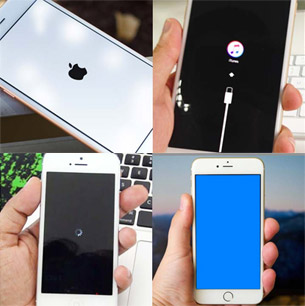
To fix iPhone freezes during/after iOS 13 update and restore iPhone to normal state,you can try iOS System Recovery, which is an useful tool to restore iPhone system to normal when iPhone frozen during/after iOS 13 update,perfectly help to repair iPhone system to normal state and return it to normal in minutes.What’s more,this outstanding program assist you to fix iOS system stuck issues like iPhone stuck in Recovery/DFU Mode, iPhone stuck at “Connect to iTunes” screen, iPhone stuck on black/white screen, iPhone stuck on Apple logo screen, etc,.To be clarified that it can’t cause any data loss while repairing the operating system of iOS device. iOS System Recovery is fully compatible with iOS 13, iOS 12, iOS 11, iOS 10, iOS 9 or lower.

d_win d_mac
d_win d_mac

Part 1:Restore iPhone System to Normal after iOS 10 Update with Home+Power Button

Once your iPhone freezes and stuck during/after update to new iOS 10, the easiest way to repair it is to perform hard reboot.That requires no extra and complicated operation, but uncertain to work. Hold Home and Power buttons simultaneously until the iPhone restarts automatically.Once the iPhone changes from the frozen state to a normal state you are succeeded.If it doesn’t work well, move to next part.

Part 2:Easy Steps to Fix a Frozen iPhone to Normal without Data Loss

Step 1.Download and Install iOS System Recovery
Download and install iOS System Recovery on your computer.After that,connect your iPhone to the computer by using USB cable.

Step 2.Choose Repair Mode of iOS System Recovery
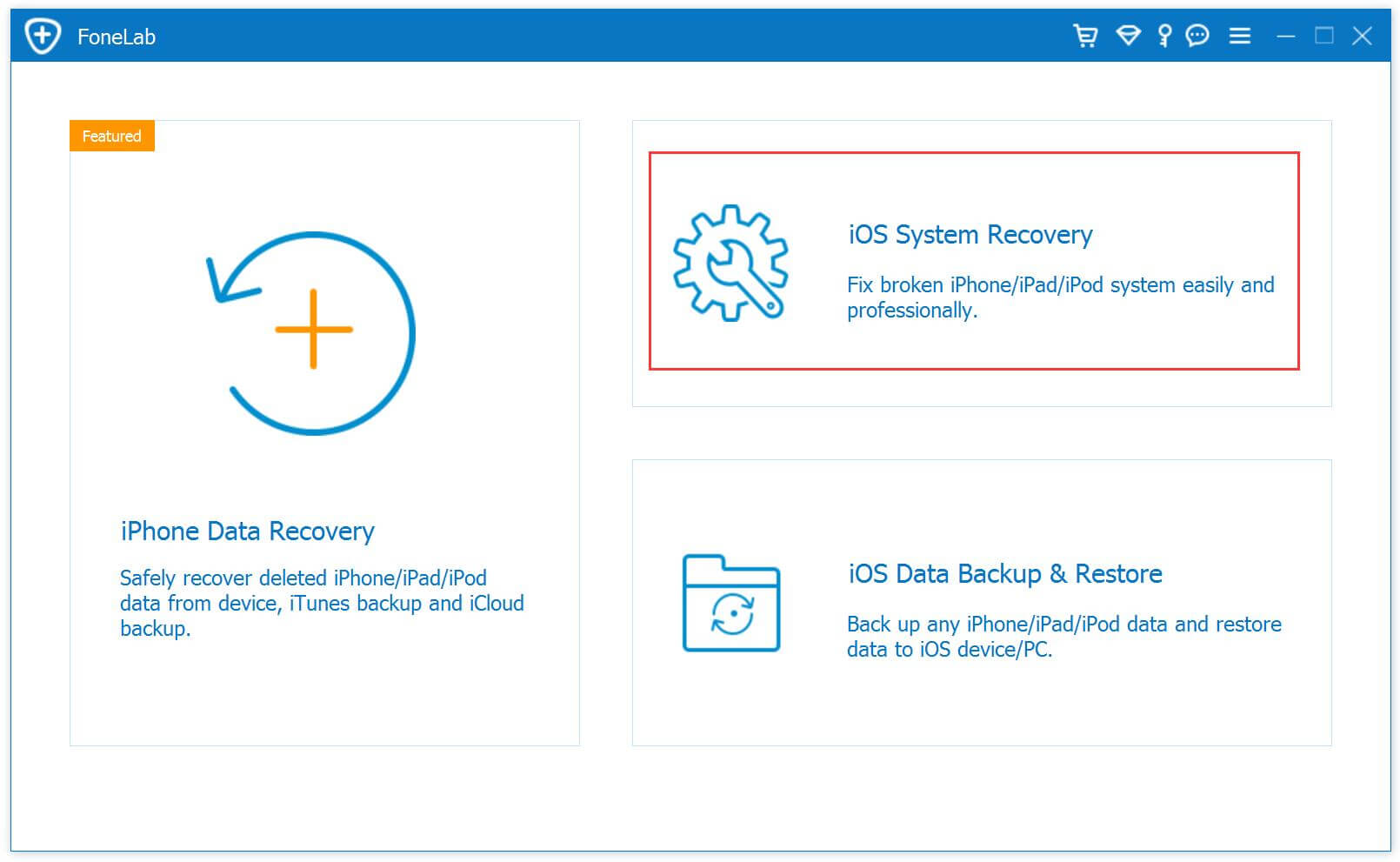
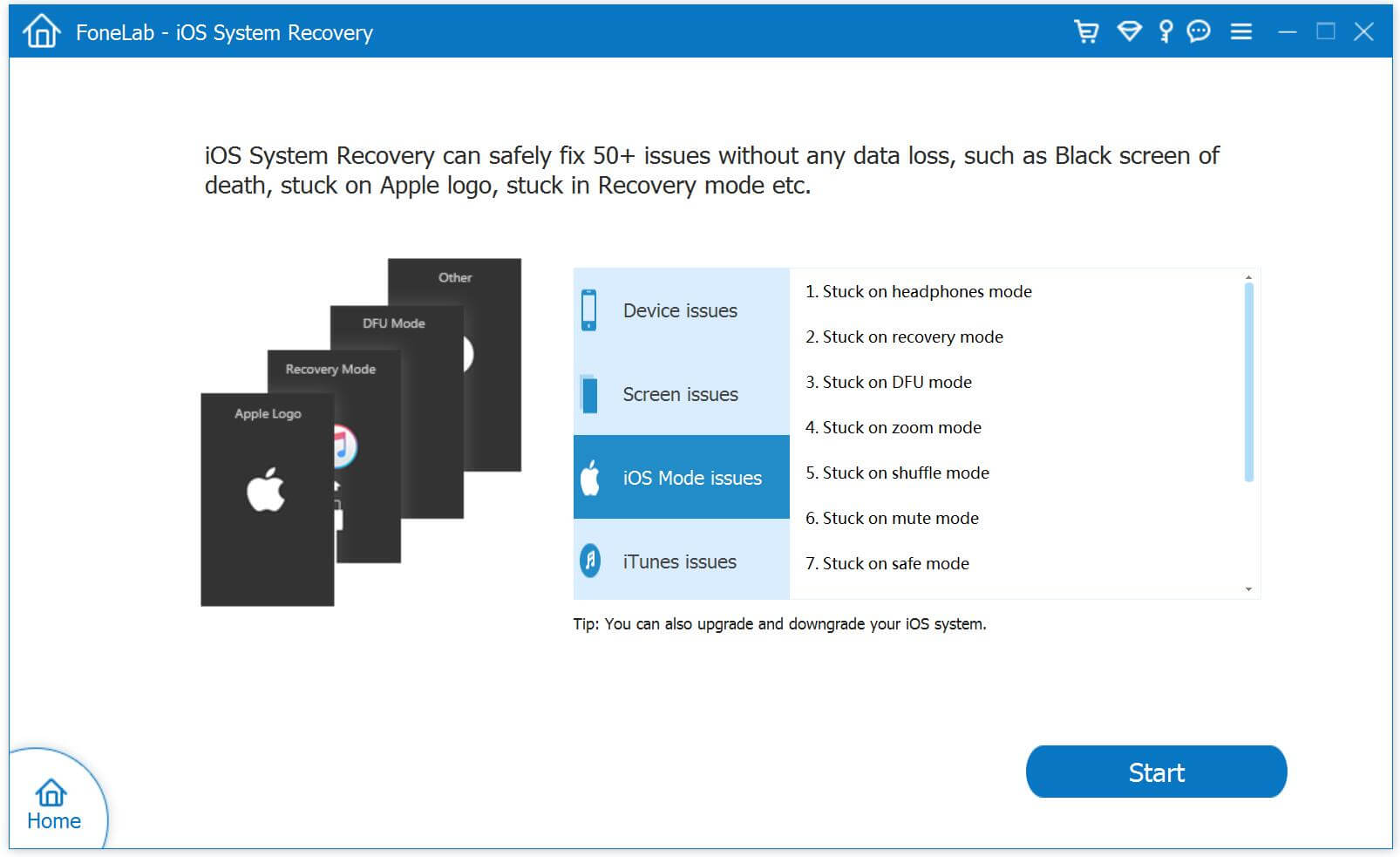
Click the “iOS System Recovery” option under the “More tools” in the program main page.And then you can see some notes displayed in the window.If you have no problem with all the notes here,click “Start”button.

iOS System Recovery

restore iPhone system to normal

Regard: Please pay attention that after fixing the issue-restoring iPhone system to normal,your iPhone will be updated to the latest version.And if it is jailbroken iPhone,it will be updated to none jail-broken phone.

Step 3.Download Official Firmware for iPhone
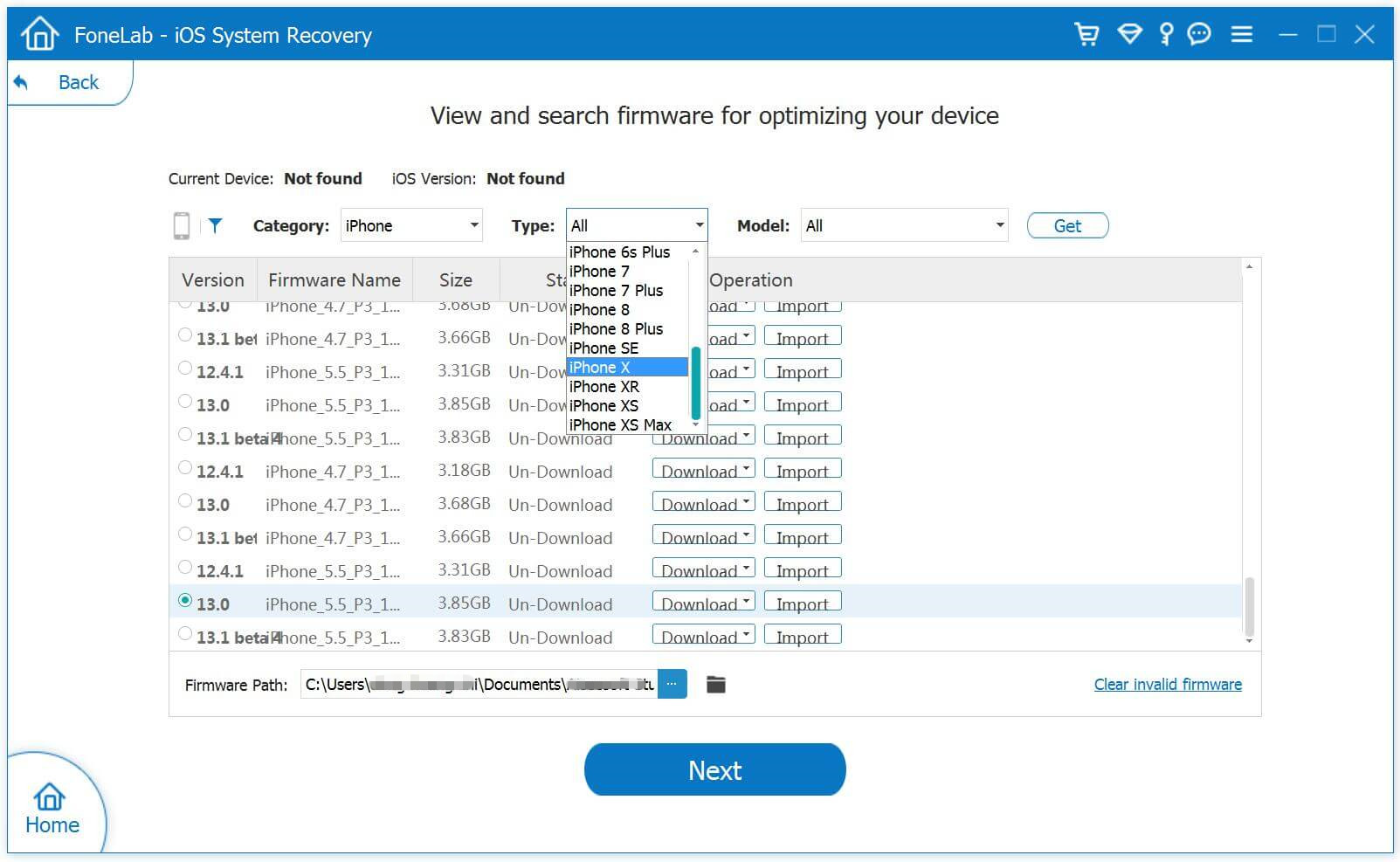
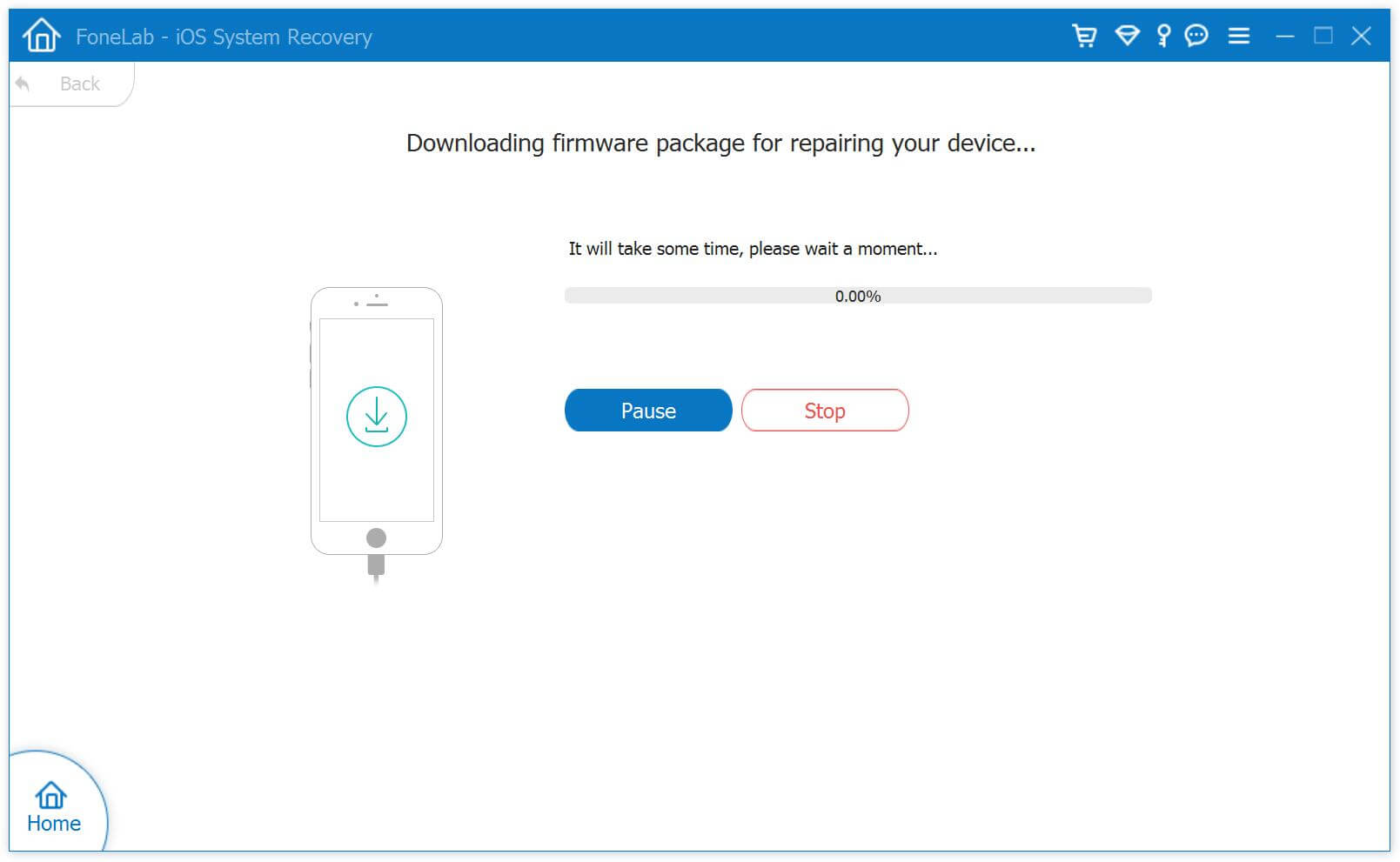
In this step,the official firmware download link for your iPhone will be provided.iOS System Recovery will detect your iPhone very soon,offering the latest iOS version for you to download.You should download the firmware by clicking “Download”button.If you have downloaded it before,then here you just need to choose “Already downloaded” to browse your computer to locate it.

select your iPhone model

download the firmware and saved on iPhone

Step 4.Fix iPhone to Normal
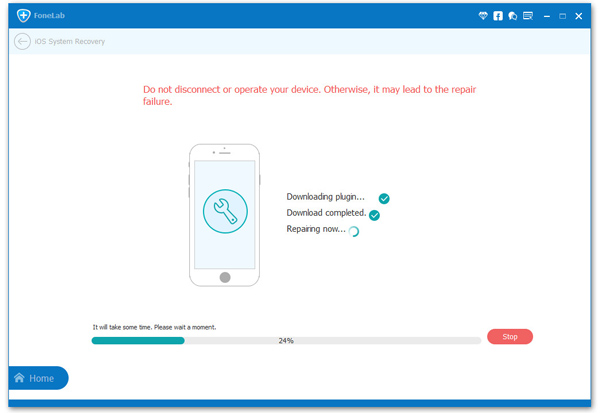
When the firmware downloading is end,iOS System Recovery will continue to get your iPhone out of abnormal mode in a few minutes,you just need to wait for your iPhone to restart.

restore iPhone system to normal

d_win d_mac
d_win d_mac

Related Article:

How to Fix iOS 10 iPhone Running Slow Issue

How to fix Bug on iPhone after iOS 10 Update

Restore iPhone System to Normal without Firmware Update to iOS 10

2 Ways to Fix iPhone Stuck in Recovery Mode After iOS 10 Update

How to Fix iPhone Stuck on Red iTunes Logo After iOS 10 Update

How to Fix Bricked iPhone after iOS 10/iOS 9 Update

How to Recover Deleted Contacts from Google Pixel

“Who has the new Pixel phone?I had bought the Google Pixel phone last weekend,however unfortunately I was deleted all the phone number on it by mistake operation.Now I just wanna get back the deleted contacts from my Android.Any opinions for the Pixel data recovery?”-Eva Wen

Meet Pixel.The power of Google, at your fingertips. Every touch, every interaction, every moment- made easy.Comes with a 5-inch FHD AMOLED display, 2770 mAh battery.The Google Pixel comes in 32, and 128GB.Available in Quite Black, Very Silver, and Really Blue.

recover-deleted-contacts-pixel

Nowadays,people like to save the name and phone numbers on mobile device that in order to contact someone more convenient.No offense,the contacts stored on mobile device can be deleted by different situations.Just like those phone number was deleted by mistake.Thankfully,there is a workaround to restore deleted contacts on Google Pixel phone easily.

How to Restore Deleted Contacts on Pixel

Android Data Recovery is a great help to restore deleted contacts from Google Pixel phone in a short time,it has got a feature that restore deleted data on Android,including contacts,photos,videos,messages,call logs,documents,apps(WhatsApp,Viber,Kik,Line),apps data,etc,.This popular Android data recovery tool is applicable to most brands of Android,such as Google Pixel(Pixel XL),Google Nexus(Nexus 9,Nexus 5X),Samsung(Galaxy S7/S6/S5,Note 5/4/3),LG,HTC,Motorola,Lenovo,ZTE,Xiaomi,Huawei and so on.

d_win d_mac

Hope you will get all your deleted contacts on Pixel Android phone by following this guide below.Once you finish the recovery, please do share your opinion/feedback with us. Connect with us at Google+,Facebook,Twitter.We would love to read your feedback.

How to Recover Deleted Contacts on Pixel

Step 1.Connect Pixel Phone to Computer
Firstly please connect your Pixel phone to computer and run Android Data Recovery on computer.

run android data recovery

Step 2.Enable USB Debugging on Pixel
After connecting your Pixel to the computer,now your should enable USB debugging on Pixel.Here you have three ways to do it according to different Android OS version.

enable usb debugging on pixel

Step 3.Select Data You Want to Scan on Pixel
Select contacts to scan by program,and click “next” to scan.Here you are allow to select more than one file to scan on your device,such as contacts,gallery,videos,audio,documents and more.

select contacts to scan from pixel

When you see the window below,you should tap “Allow” to allow the program to scan your pixel,then turn back to the computer and click on the “Start” button to continue.

allow program to scan pixel

Now Android Data Recovery will begin to scan for deleted contacts and analyze the data on Pixel device.The process will take you a few minutes.

analyze data on pixel

Step 4.Preview and Restore Deleted Contacts from Pixel
Once the program scanning completed,you can find your deleted contacts on the preview,check the file you want and click “recover” and save them on your computer.

recover deleted contacts on pixel phone

d_win d_mac

Related Article:

How to Recover Deleted Data from Pixel

How to Recover Deleted Photos on Pixel

How to Backup & Restore Data on Pixel

How to Transfer iPhone Data to Pixel

How to Transfer Android Data to Pixel

AT&T and T-Mobile Consider Stopping All Samsung Galaxy Note 7 Sales after phones caught fire

AT&T halting Samsung Galaxy Note 7 sales
Samsung Galaxy Note 7 cell phone battery overheating and explosion scandal, the Samsung company the exchange the new Note 7 as Note 7s,and now the incident is the second round of fermentation. As the new replacement mobile phone also has problems, all four US mobile operators issued a recall order, allowing the replacement again. In addition AT & T is considering the permanent sale of this phone.

samsung Galaxy Note 7 explosion

AT&T halting Samsung Galaxy Note 7 sales following multiple fires

Two of America’s largest wireless providers suspended their replacement programs for the Samsung Galaxy Note 7 this weekend following reports of “safe” replacement phones igniting. In separate statements, AT&T and T-Mobile announced on Sunday that they would continue to accept Note 7s to be exchanged but would only replace them with other devices.

Samsung Note 7s have been recalled after phones caught fire

AT & T, Verizon, T-Mobile and Sprint announced on Friday that if the user gets a new replacement phone for Note 7 and is concerned about a recurring problem, it can be sent back to the carrier , Replacing a completely different smart phone.

Just two days ago, a new US consumer, Note 7 to replace the phone, the United States Southwest Airlines flight, there has been overheating of the battery burning problem. At present, the US Consumer Product Safety Commission has replaced the phone again to investigate the issue.

A Verizon spokeswoman said all Verizon customers worried about the security of their new phones could take them back and replace one of the other phones.

Sprint said that the replacement of other mobile phone for a certain period of time, that is, the official investigation to replace the problem of mobile phone battery during the period, the user can replace any retail stores are selling models.

Prior to the battery-explosion scandal, Samsung Electronics sold 2.5 million Note 7 handsets worldwide, including one million in the United States, and the US government agencies have issued a formal recall order. But the outside world did not think that the replacement of the new phone will still be a problem.

On Friday, the US Consumer Product Safety Commission said that in the investigation of new cell phone battery failure has not made new progress.

AT&T Said to Consider Stopping All Samsung Galaxy Note 7 Sales

Repeated failures, but also to the US mobile operators battered. According to Bloomberg News, AT & T is considering whether to completely stop selling Samsung Note 7 phones, which means that if there are other Note 7 battery failure occurred, AT & T will not continue to replace Note 7 phone, but a unified replacement to Other models of mobile phones.

AT & T is expected to make a decision on whether to permanently Stopping Samsung Note 7 Sales

AT & T is one of the largest US telecom operators. US media pointed out that if AT & T permanently discontinued Note 7, will cause a domino effect in the US market, other operators will be a permanent moratorium on the phone, which means that Samsung Electronics will be forced to withdraw in the US market this problematic product.

This is the most serious history of Samsung’s smart phone failure and recall events, Samsung products to the image of a huge blow. Alleged that the failure of the problem is the Samsung lithium battery suppliers in the production process there have been a rare process problems, and the original supplier is also a Samsung Group of brothers.

The recall will give Samsung Electronics a billion dollars in economic losses.

According to media reports, Samsung Electronics may be released ahead of the Galaxy S8 high-end flagship phone to save Note 7 caused by the passive situation. In accordance with the practice in previous years, Samsung will be released in the spring S series flagship machine, and in the autumn release Note series flagship mobile phone, Note series is mainly for the fall of Apple’s new mobile phone market.

Read More:

How to Backup Data before Recalling Samsung Galaxy Note 7

Permanently Erase Data on Samsung Galaxy Note 7 before Recalling

Transfer Data from Samsung Galaxy Note 7 to iPhone 7(Plus)

How to Transfer Data from Android to Samsung Galaxy S7/S6

Transfer Data from Samsung Galaxy Note 7 to Google Piexl

Google Pixel vs Apple iPhone 7: What’s the Difference

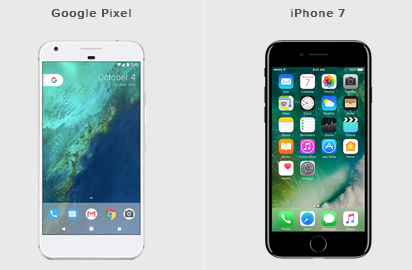
Google announced the Pixel and Pixel XL at its October event, replacing the Nexus line-up with a couple of premium and desirable devices running pure Android.The Pixel is the smaller of the two smartphones and its price tag puts it in iPhone territory. The question is, how does it compare to Apple’s latest model?Read on for the differences and similarities between the Google Pixel and Apple’s iPhone 7.

Google Pixel vs Apple iPhone 7

Google Pixel vs Apple iPhone 7: Design
-Both premium designs with fingerprint sensors
-iPhone 7 smaller, slimmer, lighter and waterproof
-Pixel has headphone jack and USB Type-C

The Google Pixel and Apple iPhone 7 look different as you would expect, but both offer solid, premium, well-built designs. The Pixel opts for a combination of aluminium and glass, with a fingerprint sensor on the rear, while the iPhone 7 is all about aluminium and places its fingerprint sensor within the Home button on the front. The iPhone 7 is water and dust resistant to IP67, while the Pixel is only IP53, meaning it cannot be submerged.

The headphone jack is removed on the iPhone 7 in favour of stereo speakers positioned either side of the Lightning port, while the Pixel has down-firing speakers either side of the USB Type-C port, but it keeps the headphone jack intact at the top. There are no physical buttons on the front of Pixel.

The Pixel measures 143.8 x 69.5 x 8.6mm and weighs 143g, while the iPhone 7 is smaller, lighter and slimmer, measuring 138.3 x 67.1 x 7.1mm and weighing 138g.

Google’s phone comes in Very Silver, Quite Black and Really Blue, though the latter is not coming to the UK. Apple’s phone comes in Rose Gold, Gold, Silver, Black and Jet Black.

Google Pixel vs Apple iPhone 7: Display
-Pixel has larger, crisper display
-iPhone 7 has 3D Touch for more functionality
-Pixel uses AMOLED, iPhone 7 uses LCD

The Google Pixel has a 5-inch display with a 1920 x 1080 pixel resolution for a pixel density of 441ppi. It is protected with Corning Gorilla Glass 4 and it uses AMOLED technology, which should mean rich and vibrant colours.

The Apple iPhone 7 has a 4.7-inch LCD display with a 1334 x 750 resolution, resulting in a pixel density of 326ppi. Based on the numbers, that would mean the Pixel will offer sharper and crisper images, but the iPhone 7’s display is very good, even if the resolution is slightly lower than its competition.

The iPhone 7 also has 3D Touch, which is Apple’s version of a pressure sensitive display. Users will get access to different features and functions based on the force with which they press.

Google Pixel vs Apple iPhone 7: Camera
-Both have 12MP rear sensors, but iPhone has wider aperture
-Pixel has higher resolution front camera, but iPhone again has wider aperture
-iPhone 7 has optical image stabilisation

The Google Pixel has a 12.3-megapixel rear camera offering an aperture of f/2.0 and 1.55µm pixels. There is video stabilisation, phase detection autofocus and laser detection autofocus all on board, along with a dual-LED flash.

The Apple iPhone 7 also has a 12-megapixel rear camera with a slightly wider aperture of f/1.8. It has optical image stabilisation and phase detection autofocus, as well as a quad-LED flash.

In terms of the front-facing snappers, the Pixel has an 8-megapixel f/2.4 sensor with 1.4µm pixels, while the iPhone 7 has a 7-megapixel f/2.2 sensor with a Retina Flash.

Google Pixel vs Apple iPhone 7: Hardware
-Both quad-core processors, but Pixel has more RAM support
-Both available in 32GB and 128GB models, but iPhone also comes in 256GB
-Pixel has bigger battery capacity

The Google Pixel and the Apple iPhone 7 both feature a quad-core processor under their hoods. The Pixel opts for the Qualcomm Snapdragon 821 with 4GB of RAM support, while the iPhone 7 features Apple’s A10 Fusion chip and embedded M10 motion coprocessor and there is 3GB of RAM support.

The Pixel is available in 32GB and 128GB storage options and the iPhone 7 is available in 32GB, 128GB and 256GB options. Neither device offers microSD storage expansion.

In terms of battery, the Pixel has a 2770mAh capacity, while the iPhone 7 is thought to be quite a bit smaller at 1960mAh.

Google Pixel vs Apple iPhone 7: Software
-Pixel runs vanilla Android
-iPhone 7 runs iOS
-Both have personal assistants

The Google Pixel runs on Android 7.1 Nougat and it features Google Assistant built-in, accessed via a long press of the home button in the new launcher. It’s a pure Android experience so it doesn’t feature software bloatware like a Samsung or Sony for example.

It brings with it all the latest features Google has to offer through Android and for those of you who are Google users and have Google accounts, you should get a seamless experience.

The Apple iPhone 7 runs on iOS 10, which brings with it all the latest features Apple has to offer. In terms of personal assistant, you get Siri, who is accessed via a long press of the physical Home button on the front of the device.

For those of you who have Macs or use other Apple devices, the iPhone 7 will deliver a seamless experience across all your devices.

Google Pixel vs Apple iPhone 7: Price
-Both start at £599

Both the Google Pixel and Apple iPhone 7 start at £599 for the 32GB model. Add another £100 and you’ll be able to get your hands on a 128GB model of either.

The iPhone 7 is also then offered in a 256GB model, as we mentioned, which costs a further £100 for a price of £799.

Google Pixel vs Apple iPhone 7: Conclusion
The Google Pixel and Apple iPhone 7 are very closely matched in terms of specs and price.

The Pixel trumps the iPhone in terms of display size and resolution, RAM, battery capacity and front-facing camera resolution. The iPhone trumps the Pixel in terms of physical size, waterproofing, display functionality, storage options, and we know it has a fantastic camera, while the Pixel still needs to prove itself.

Ultimately, the decision between these two devices will come down to which design you prefer and which platform you prefer. Both are solid in their builds and likely to be solid in their performance too. We will update this feature when we have reviewed the Pixel in full.

Read More:

Apple Released iPhone 7 in China Debut

The Google Pixel Phone is Exactly what you Wanted

How to Recover Deleted Data from Pixel

How to Transfer iPhone Data to Pixel

How to Transfer Android Data to Pixel

How to Backup & Restore Data on Pixel

With Pixel Phones, Google Requires a New Retail Strategy

Google unveiled new hardware from Pixel smartphones and smart speakers to wireless routers on Tuesday. It was a year-long odyssey that involved design, supply chain negotiations and the search for a manufacturing partner.

Now the Alphabet Inc. unit must grapple with the equally daunting challenge of getting the gadgets to consumers. It has a history of retail strategies that either struggled or never got off the ground, according to people familiar with the company’s retail efforts. What’s more, it’s inexperienced dealing with returns and recycling. And unlike rival Apple Inc., the company lacks its own stores where it can showcase hardware as it pleases and instead relies on other companies’ in-store displays.

google-pixl

This time, the stakes are higher because the latest gadgets are vehicles for Google’s digital assistant, a key product that is chasing Amazon.com Inc.’s Alexa and Apple’s Siri.

“We view go-to-market as a clear hurdle to wide acceptance, which will require investments in brand, marketing and distribution to overcome,” UBS analyst Eric Sheridan wrote in a note to investors.

Google is selling the new Pixel phones at Verizon Communications Inc. and Best Buy Co. stores in the U.S., via its own online store, a temporary physical store in New York City and through its wireless service Project Fi. It’s working with a small number of other wireless carriers and retailers in countries including Germany and India. Google Home, the new speaker, is available at Best Buy, Wal-Mart Stores Inc. and Target Corp. stores, in addition to Google’s online store.

Cutting distribution deals with a handful of carriers and retailers isn’t enough, according to Forrester Research analyst Thomas Husson. “Google will have to up its customer-service game and do many more distribution partnerships,” he said.

Many of Google’s past efforts at selling hardware have fizzled. When the company started its Nexus brand in 2010 it planned to market the phones online only, but sales never took off. About 200,000 of the first Nexus model sold, short of Google’s target of several million units, according to a person who worked on the device.

Then there was Android Silver. Kicked off some time in 2014, the internal project was designed to sell high-end Android handsets with partners to compete with Apple. Google set up a retail lab for the effort, claiming an entire building near its Mountain View, California headquarters, according to former employees. But it never got off the ground. Nikesh Arora, Google’s sales chief at the time, drove the initiative. When he left in July 2014, Android Silver was shelved. One former Google executive called it a boondoggle.

The former Googlers didn’t want to be identified discussing private information. A Google spokeswoman declined to comment.

Apple Envy

Such experiments are a contrast to Apple stores that are the envy of the retail industry. Apple considers the iPhone in terms of the product’s complete life cycle, from leaving the factory to when customers stop using the device. Apple offers a recycling program through physical and online stores.

Google’s new smartphone unit approached potential wireless carrier partners early this year, according to a person familiar with the situation. Some carriers peppered Google executives with questions about handling phone returns and technical support, the person said. At the time, Google did not appear ready to take on these aspects of the phone hardware business, according to this person.

Google executives on the hardware team say the company is on a “journey,” gaining experience and capabilities with each smartphone generation. And Apple only began touting the iPhone’s full life cycle after a few generations.

Google Event

On Tuesday, as a Google event began in San Francisco, new hardware chief Rick Osterloh reassured the audience that the company was serious about the move. “We’re in it for the long run,” he said.

About nine months after initial talks with carriers, Google rolled out its flavor of technical support: Pixels have built-in chat support where customer-service reps can take over smartphone screens to identify problems.

Google will be responsible for returns and recycling and is building a supply chain that can re-absorb faulty and rejected devices, Osterloh said in a recent interview.

Osterloh will be partly judged by how many devices Google sells, a contrast to the Nexus program which showcased Android features for other handset makers to adopt. But the executive was still cagey about the company’s sales aspirations.

“In markets where we do business, we’re definitely going to want meaningful share,” he said. “But it’s highly unlikely that the primary driver will be to be in every market with as high as possible volume.”

Google still sees software as its edge, rather than retail distribution and customer service. The company spent more time on Tuesday talking about the digital assistant baked into its new gadgets, and how they work together.

If Google can get millions of people relying on its assistant, the company may be able to compete with Apple’s devices, according to Brian Blau, an analyst at Gartner.

“The AI assistant will give them something that Apple has enjoyed for many years: Lock-in to the system,” he said.

Read More:

Goodbye, Nexus! Hello, Pixel Phone

The Google Pixel Phone is Exactly what you Wanted

How to Recover Deleted Data from Pixel

How to Transfer iPhone Data to Pixel

How to Transfer Android Data to Pixel

How to Backup & Restore Data on Pixel