All posts by DHZ

Best YouTube Music to MP3 Converter Review

Summary
4kFinder YouTube Music Converter the the best YouTube Music to MP3 Converter in 2023. Read this review, which show you its features and tutorial, help you download and convert YouTube Music to MP3 with ease. After that, you can use YouTube Music on more ways without official limitations.

In the recent years stream music become a daily thing, you may enjoy music on some hot music streaming platforms, like YouTube Music. As a service offers different kinds of music for entertainment, the flow functionality that lets you find any music genre of interest. That makes it being one of the most popular music streaming platform and stands shoulder to top music giants Spotify, Apple Music, Tidal, etc,. If you are a YouTube Music Premium user, you are allowed to listen to ad-free music, listen to music in the background on authorized device, and download music from YouTube Music channel for offline playback.

However, since its music copyright protection, there are some music listening limitations for all YouTube Music users. For example, you are not able to play YouTube Music on any devices like MP3 player. Because all music contents from YouTube Music are encrypted audio files, which can’t be downloaded and saved as local files. Though you can download music from YouTube Music, all downloads will be inaccessible once YouTube Music subscription ends. To break all this limitations, you need a YouTube Music to MP3 Converter for help. In this post we will introduce the best YouTube Music to MP3 Converter in detail and review it from all aspects. If you are looking for a music converter, read it carefully and it must give a great help for you.

Overview of 4kFinder YouTube Music Converter

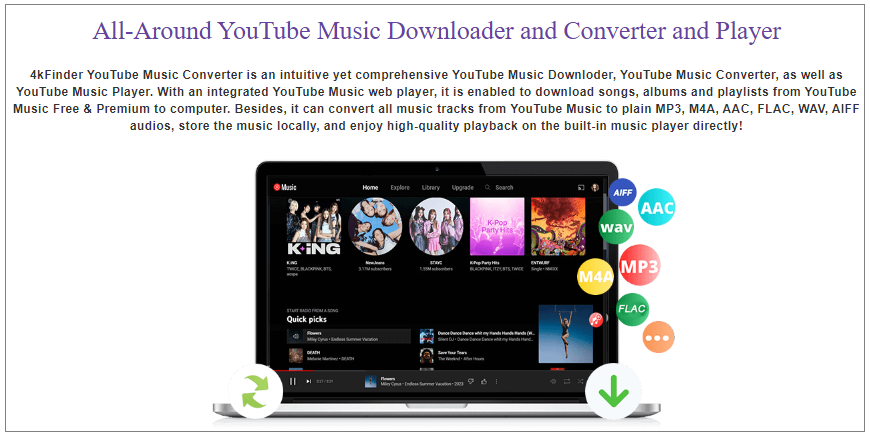
4kFinder YouTube Music Converter is a professional tool that helps to download YouTube Music to computer as local files. It applies the technique of accessing the official YouTube Music web player via an embedded browser. 4kFinder as the best YouTube Music to MP3 Converter, it is special designed for converting YouTube Music to MP3. At present, it covers 6 types of output audio formats, except MP3, M4A, WAV, AAC, AIFF, FLAC are included. It is designed to download YouTube Music with 100% audio quality. All the songs metadata and ID3 tags will be kept. In this way, you can get YouTube Music as local files forever, no matter you have a YouTube Music Premium account or not. What’s more, you are allowed to play YouTube Music on any devices or media players freely.

best youtube to mp3 converter

d_win d_mac

Main Features of 4kFinder YouTube Music Converter

In this part we are going to show you some main features of 4kFinder in detail, so that you can learn more about it.

Download YouTube Music to Computer Locally
As its music contents protection rules, all YouTube Music are encrypted files, it safely avoid anyone using YouTube Music outside of its official way. All music you access from YouTube Music are cache files, instead of local files. Even though you can download music from YouTube Music under a paid account, the downloads will be unplayable after your subscription ends. After output music as local files, you are allowed to use YouTube Music on more ways like common music files.

Convert Music to 6 Types of Output Audio Formats
To meet different users’ needs, 4kFinder supports converting YouTube Music to 6 types of audio formats, including MP3, M4A, WAV, AAC, AIFF, FLAC. MP3 is widely used format, be compatible with most devices or media players. AAC and FLAC are suit for output music and record to CD, it will keep lossless audio quality. After that, you can offline playback YouTube Music on more ways, being more convenience in life.

Download YouTube Music with 100% Audio Quality
To make user get a perfect music listening experience, 4kFinder is cable of downloading YouTube Music with 100% audio quality. With its help, you can download YouTube Music to MP3 in 128kbps, 192kbps, 224kbps, 256kbps (same as original quality), or even up to 320kbps high quality, no matter you are a YouTube Music Premium user or Free user, improving your listening experience.

Keep All Metadata and ID3 tags
For better music management of user, 4kFinder keep all metadata and ID3 tags in output music files, including Cover, Title, Artist, Album, Artwork, Track Number and more. It is built-in music manager, before conversion, you are allowed to organize output file name by Artist, Album, Artist/Album, or Album/Artist. After conversion, you can preview music files that sort by Data/Artist/Album. It’s good for managing your music library.

Download YouTube Music with 10X Faster Speed
With advanced design, 4kFinder features with batch download YouTube songs/albums/playlists with 10X faster speed. After a coffer time, you will get output music files with lossless audio quality and ID3 tags kept. Besides, you can add music to download list as more as you like while downloading. A fast music downloading speed will make you get excellent user experience.

Play YouTube Music on Any Devices and Media Players
Things won’t be so difficult when you meet 4kFinder. It is powerful enough to download and convert YouTube Music to MP3 and other general audio formats files. As a result, user can play YouTube Music on any devices and media players without limitations. For instance, MP3 player, smartphone, tablet, Sonos, PSP, Xbox one, wearables, smart TV; iTunes, VLC Media Player, Windows media player, QuickTime Player; and more. So that you can enjoy YouTube Music anywhere at anytime.

Tutorial to Download and Convert YouTube Music to MP3

Here is the tutorial show you how to download and convert YouTube Music to MP3 with easy steps, 4kFinder is available for both Windows and Mac system. Please install, download and run 4kFinder software on your computer first.

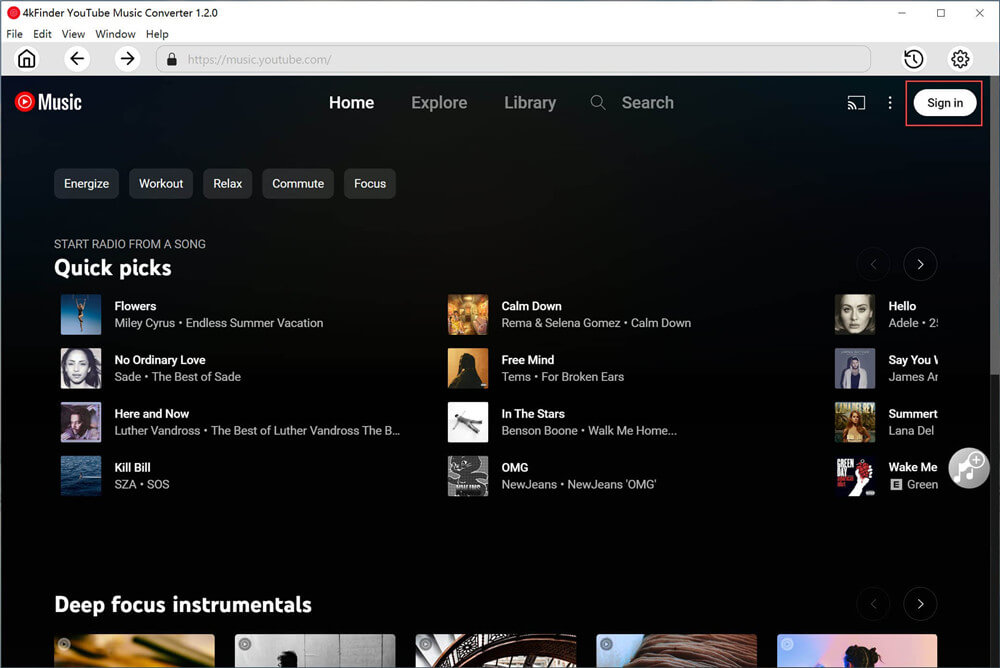
Step 1. Log In YouTube Music Account
Please log in your YouTube Music account with its built-in YouTube Music web player.
login youtube music account

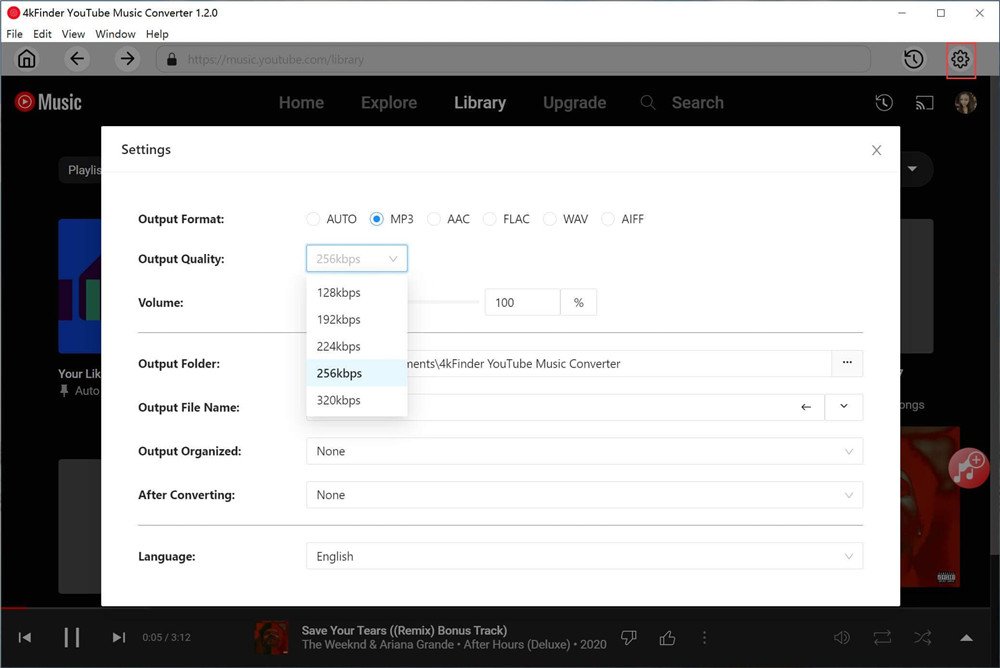
Step 2. Tap MP3 as Output Format
Click Option button to set output format for downloaded YouTube Music, there are six formats options for your selection: M4A(default), MP3, AAC, FLAC, WAV, AIFF. Please tap “MP3” option. Also, you can customize output folder, output quality, output file name and more settings if you need.
customize output settings

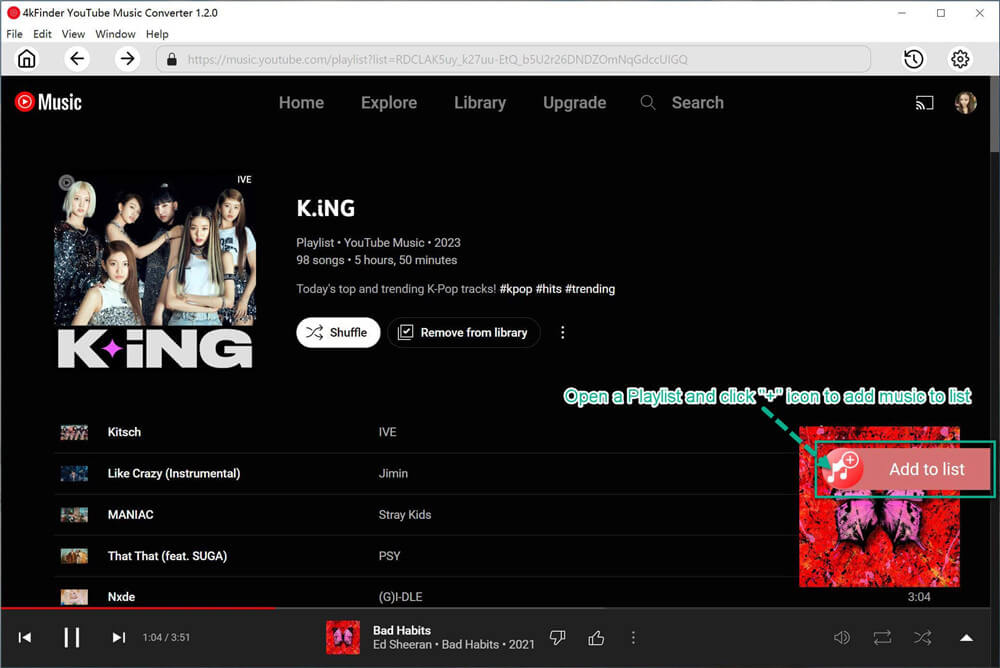
Step 3. Add YouTube Music in Web Player
In its built-in web player, you can browse or search to add the songs, albums or playlist you want to download from YouTube Music. To add music to download list, click an album or a playlist contain the music contents you want, then click the red icon to load items in it.
add youtube music to list

When you click an album/playlist, all songs in it will be selected by default. You can unselect some items you don’t want in the tickbox.
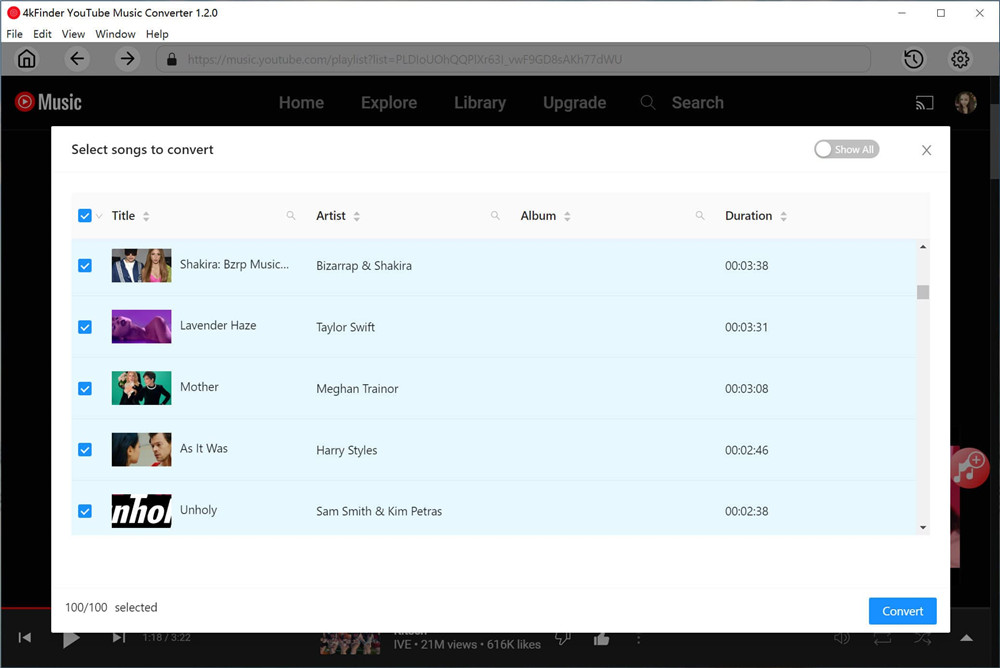
select youtube music songs

Step 4. Download and Convert YouTube Music to MP3
Finally, click “Convert” button to begin downloading and converting YouTube Music to MP3 with original music quality & ID3 tags kept.
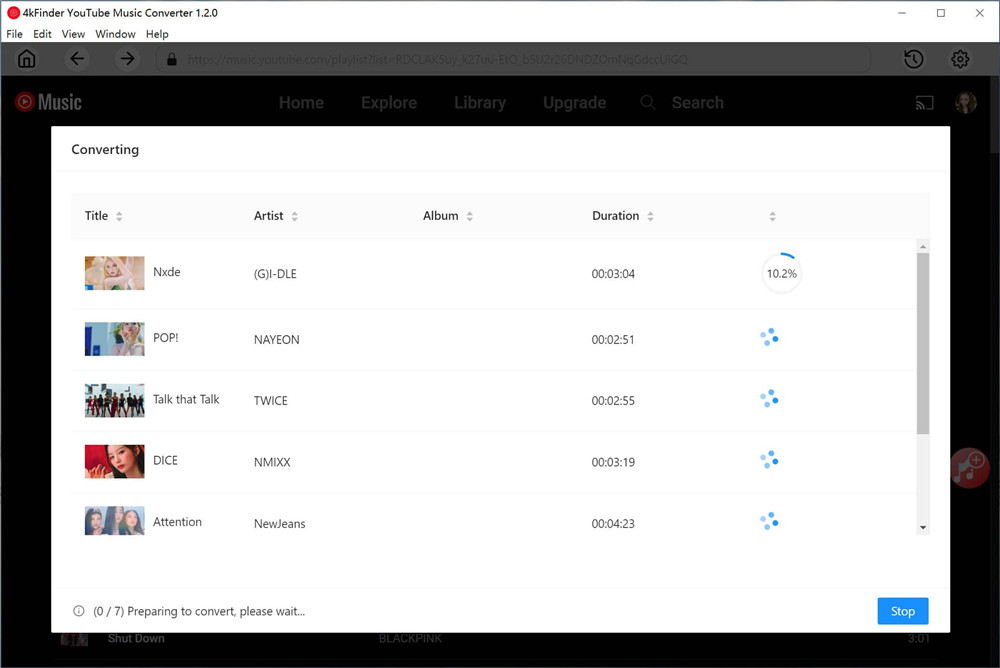
convert youtube music mp3

Step 5. Preview YouTube Music
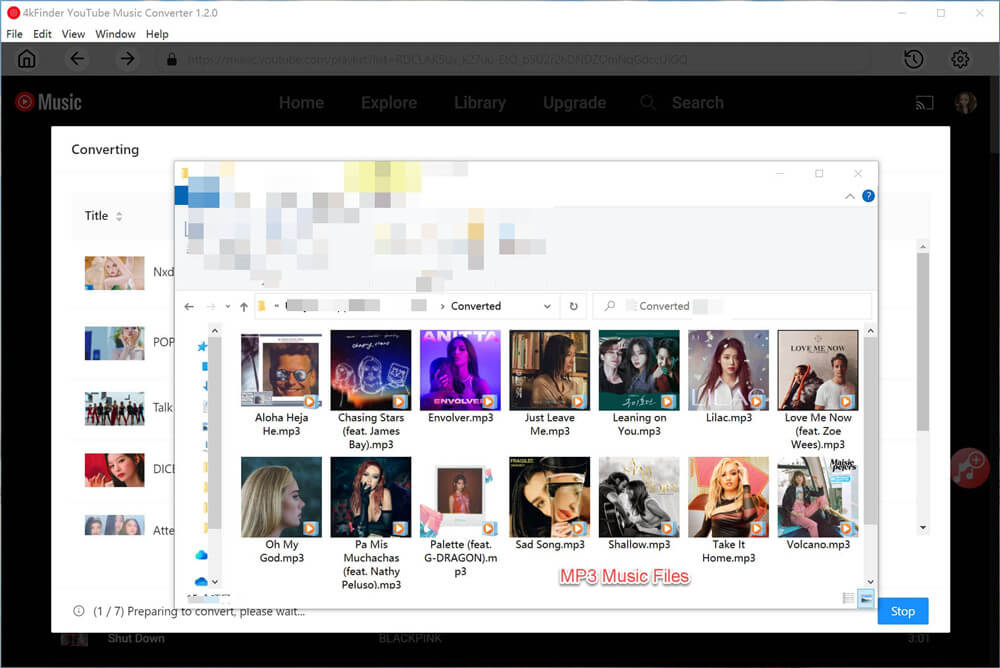
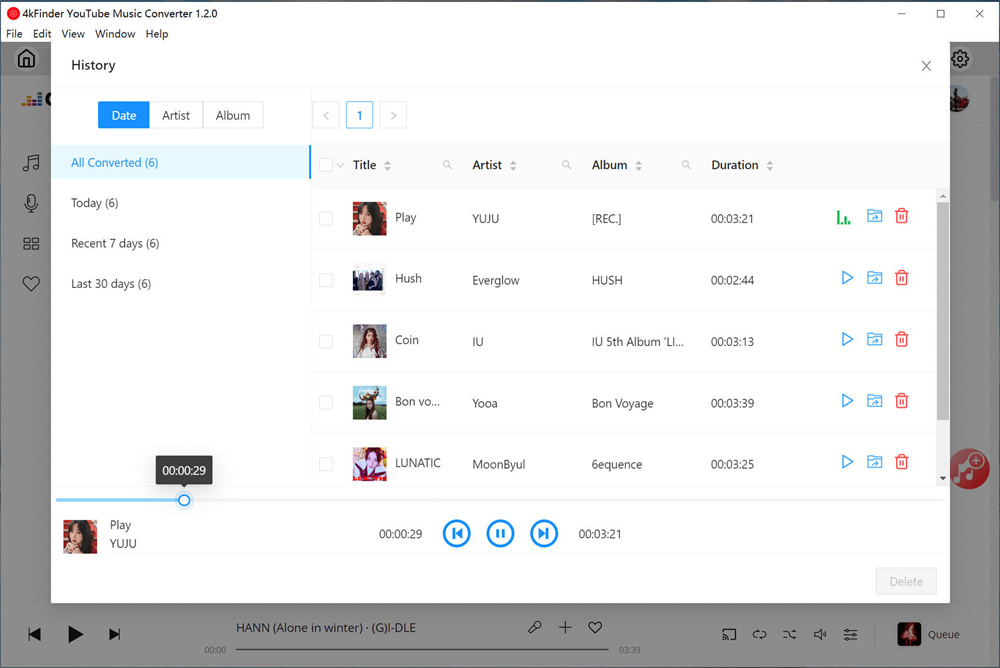
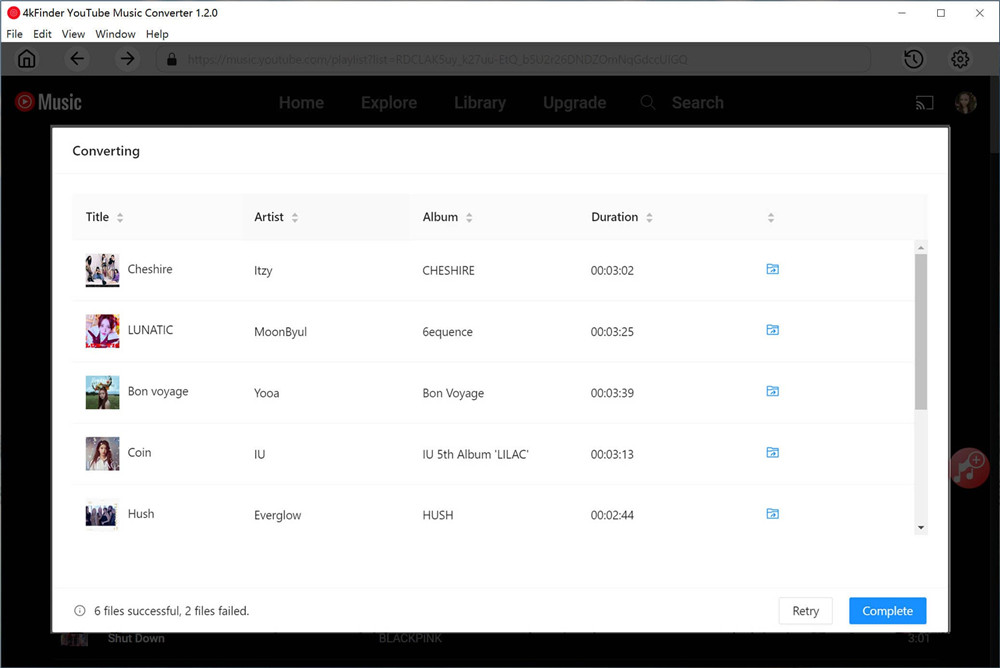
Once the music downloading finishes, click the blue folder icon to preview the output YouTube Music songs in MP3. It list YouTube Music by Date/Artist/Album with music manager. Or you can play YouTube Music offline with its music player directly.
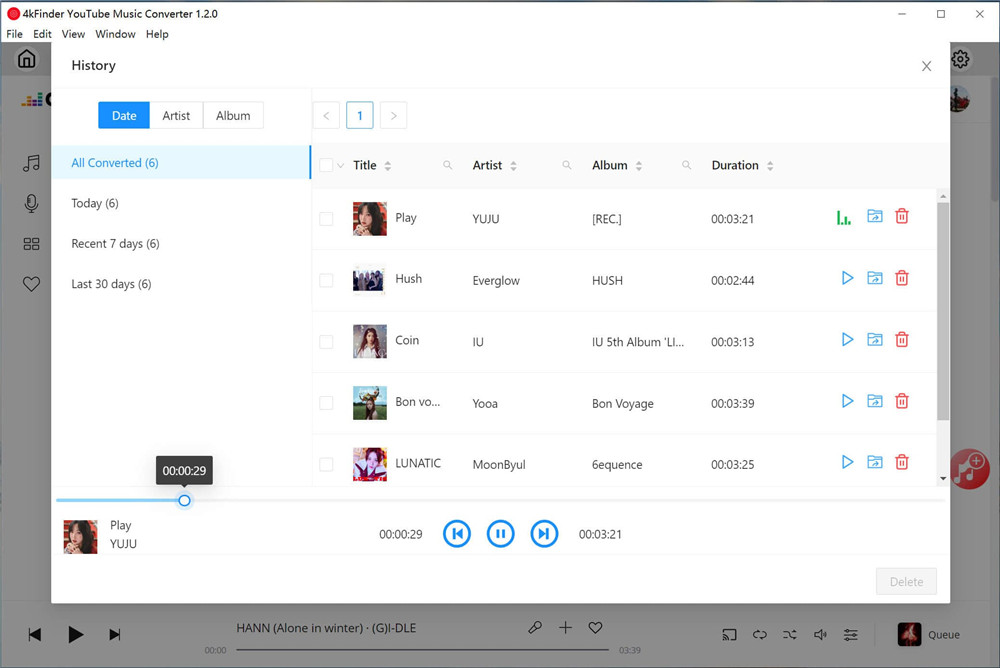
view converted songs

d_win d_mac

Final Words

Technically, the best YouTube Music to MP3 Converter you can choose is 4kFinder YouTube Music Converter. We’ve picked the best YouTube Music to MP3 Converter in 2023 and listed its features and tutorial for you. It will help you download and convert YouTube Music to MP3, M4A, WAV, AAC, AIFF, FLAC with lossless quality at 10X faster speed. Moreover, high audio quality and ID3 tags are keeping in the output music files. It’s an all-in-one music downloader and converter, which built-in music web player, music player and music manager. After using it, you can use YouTube Music on more ways without any official limitations. You can now decide if it suits you most and start exporting music from YouTube Music to your local computer!
Best YouTube Music to MP3 Converter

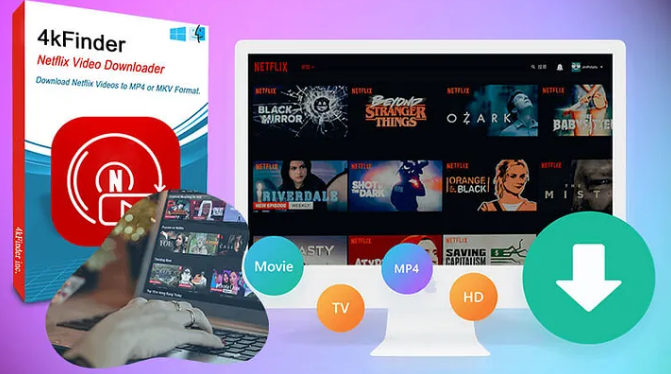
4kFinder Netflix Video Downloader: Improve Netflix Videos Offline View Experience

Summary
Read this post then you will learn how to download Netflix videos to MP4 losslessly via 4kFinder Netflix Video Downloader, which is released to improve Netflix Videos offline and comfortable viewing experience.

Netflix is the most popular streaming videos platforms, which offers an extensive collection of TV shows, movies, and documentaries. If you want to stream Netflix videos offline without Netflix app or its web player, you need to download and convert NFV videos to MP4 firstly. However, how to convert NFV to MP4? This post will teach you a easy way to download Netflix videos to MP4 losslessly, it’s the best way to save your favorite Netflix shows and movies for offline viewing on any devices — MP4 player.

4kfinder

Overview 4kFinder app

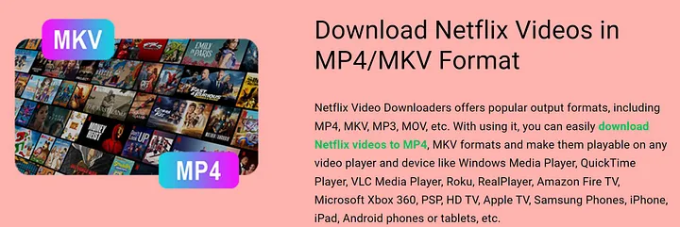
With 4kFinder Netflix Video Downloader, you can download Netflix video to MP4 and MKV format, so that you’re able to watching your favorite movies offline. This software is particularly beneficial for individuals who live in areas with a poor internet connection or those who are constantly on the move. After downloading Netflix videos to MP4, you can play videos on any MP4 players.

netflix video downloader

d_win d_mac

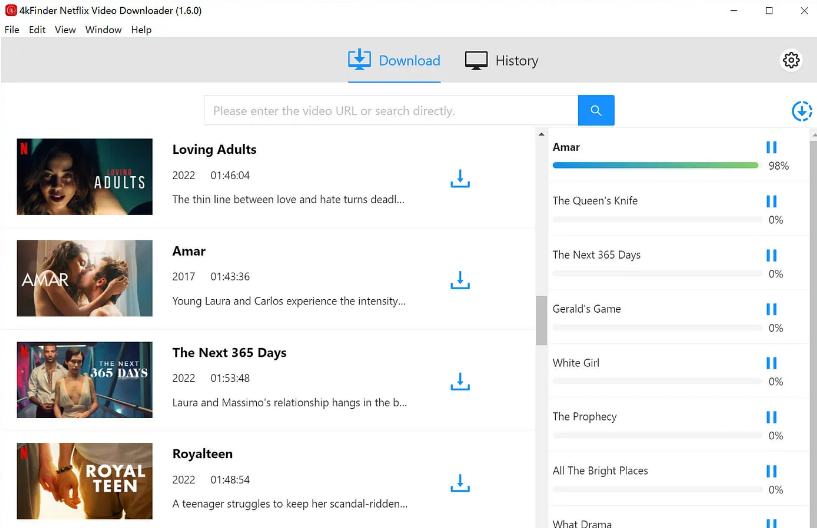
4kFinder is easy to use, with a user-friendly interface that allows users to download Netflix videos with just a few clicks. Users need only copy and paste the Netflix video URL into the software and click the download button. The software then automatically analyzes the video’s URL and provides the user with the option to download the video in either MP4 or MKV format. The software can also download videos with subtitles and multiple audio tracks, allowing users to enjoy videos in their preferred language.

4kFinder Netflix Video Downloader is compatible with both Mac and Windows operating systems and supports the latest Netflix version. The software can download videos in HD 1080p, making it suitable for various devices. Additionally, the software can download multiple videos simultaneously, making it an efficient tool for users who need to download multiple videos.

We are excited to release 4kFinder Netflix Video Downloader, a software that provides a solution to one of the most significant challenges that Netflix users face. With our software, users can now download their favorite shows and movies and watch them offline, even without an internet connection. We designed the software to be easy to use, efficient, and compatible with various devices and operating systems.” said Jane Smith, the product manager of 4kFinder.

One of the most significant advantages of 4kFinder Netflix Video Downloader is its lossless video downloading feature. The software can download videos from Netflix without any quality loss, providing users with a high-quality video that is similar to the original. The software achieves this by retaining the original video and audio quality, ensuring that users enjoy a premium viewing experience.

In addition to the lossless feature, 4kFinder Netflix Video Downloader offers users several benefits. The software is secure, ensuring that users’ data is protected during the downloading process. The software is also regularly updated to keep up with the latest Netflix updates and to provide users with the best downloading experience. Moreover, 4kFinder provides excellent customer support, with a dedicated team of experts available to assist users with any issues or queries.

4kFinder app Key Features:

Convert Netflix Videos to MP4/MKV

As we all know that all Netflix videos are NFV format, if you want to enjoy Netflix videos on other devices without using Netflix app, you need to convert Netflix NFV to MP4. 4kFinder Netflix Video Downloader not only can download movies and TV shows from Netflix, but also can convert Netflix videos to to 1080p MP4/MKV, so you can transfer and play them on any devices.

download netflix to mp4

Save Your Favorite Videos Forever

With this 4kFinder Netflix video downloader, you can quickly save Netflix TV shows and movies to MP4 or MKV on your computer, all downloaded videos saved as local files. Even if you cancel your Netflix subscription, you still can play the downloaded TV shows and movies offline.

download neflix video as mp4

Save Videos from all Netflix Regional Sites

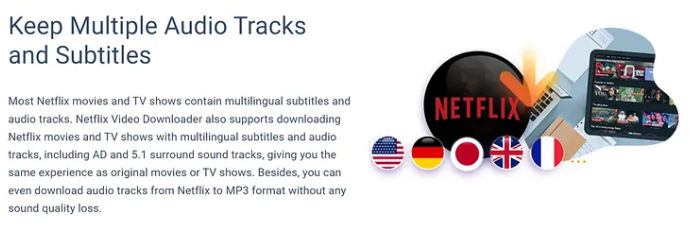
The 4kFinder app can helps you save Netflix movies and videos from various regional sites, including the US, Germany, Japan, UK, and France. Only 3 simple steps, you can downloading videos from Netflix web player.

netflix features

Adjust Output Audio and Video Quality

-Before downloading your favorite Netflix movies and TV shows, you can setting the output video and audio quality.
-For output video quality: 1080p and 720p options are available
-For output audio quality: You can choose Atmos, EAC3 5.1 or AAC 2.0.

keep audio tracks

Get High Video Quality (Up to 1080P)

To improve your videos viewing experience, you can save Netflix videos in 1080P quality. Of course, it you want to save time for downloading process, you can select more lower output video quality: 240P or 720P.

download netflix to 4k resolution

Play Netflix Videos on Any Device

After saving Netflix videos as MP4 or MKV format, you can play the downloaded Netflix videos on any device freely, such as a Android smartphone, Android tablet, PC, Mac, iPhone, iPad, iPod touch, PS4, etc,.

play netflix video on any devices

Pricing of 4kFinder Netflix Video Downloader

4kFinder Netflix Video Downloader is available for Windows and Mac computer. It offers trial version which only allows users to convert the first six minutes of each video file.

If you want to download a full movies and TV shows from Netflix in batch without limitation, you need to purchase an license code and activate the program to unlock all restrictions and download complete Netflix video files.

4kFinder Netflix Video Downloader offers lifetime plan, please purchase a lifetime activation code, even if you want to change your computer in the future, you can still use this software forever.

Lifetime Plan (One-time payment): USD 89.95 for a lifetime and 1 PC/1 Mac

Note: To celebrate the release of 4kFinder Netflix Video Downloader, 4kFinder is offering a special discount of 30% on the software. Users can take advantage of this offer by visiting the 4kFinder website and purchasing the software using the discount code “AF2GRF”.

Free Download 4kFinder Netflix Video Downloader:

d_win d_mac

About 4kFinder

4kFinder is a software developer dedicated to providing the best video downloading solutions. The company is committed to developing easy-to-use and efficient software that enables users to download videos from various streaming platforms, including Netflix, Amazon Prime Video, Hulu, and more. The company has a dedicated team of experts who work to ensure that users have the best downloading experience.

4kFinder Netflix Video Downloader

4kFinder YouTube Music Converter Review: Your Best Tool Download YouTube Music without Premium

Summary
4kFinder YouTube Music Converter is well designed to help both YouTube Free and Premium users to download YouTube Music songs without Premium, and convert YouTube Music to MP3, M4A, AIFF, AAC, FLAC and WAV format with great quality and fast speed.

YouTube Music is a popular streaming music and music video platform. With a YouTube Music account, users can access millions of tracks, songs, playlists, albums, music videos, podcasts, and more. It is convenient to have YouTube Music installed, but sooner or later, you will find YouTube Music converter is a necessity. It comes into handy when you want to download YouTube Music without Premium, listen to YouTube Music offline for free, save to USB drive, burn to CD, or transfer your favorite YouTube music to any other device and so on.

Our team take the time to research, analyze and now introduce you the best YouTube Music converter tool, named 4kFinder YouTube Music Converter. Here we will introduce this converter in depth, with its feature, highlights, price, user guide, pros and cons.

A Brief Introduction of 4kFinder YouTube Music Converter

4kFinder is a leading media software company in the market. Three years ago, 4kFinder released a video downloader, named 4kFinder Video Downloader, which got well received by many users. It is able to download online videos and audios from 1000+ sites. Recently, this company has launched its latest product – 4kFiner YouTube Music Converter.

4kFiner YouTube Music Converter is an all-in one music downloader, converter and player for users to download music, songs, albums, playlists, and podcasts from YouTube Music without a Premium account.

youtube music downloader

4kFiner YouTube Music Converter offers a comprehensive solution that not only can download music from YouTube Music, but also allows users to convert YouTube Music to any format they desire. To bringing high-quality music experience for all music lovers, it is capable of converting YouTube music into different audio formats like MP3, M4A, AAC, WAV, FLAC and AIFF, but with zero quality loss. Thus, users can transfer and enjoy YouTube Music on any devices offline, such as Sony Walkman, Sandisk MP3 player, iPod Nano/Shuffle/Classic, PSP, PS3, PS4, Android phones, iPhone, iPad, Xbox, etc.

d_win d_mac

Top Features of 4kFiner YouTube Music Converter

#1. Download YouTube Music Songs without Premium
If you want to download YouTube Music without paying for the membership, 4kFinder YouTube Music Converter is a good choice, it is designed with the intent to parse streaming music from YouTube and convert the tracks to multiple audio formats like M4A, MP3, FLAC, and WAV.

It ensures to freely share and transfer the downloaded music tracks to any devices like MP3 player, iOS devices, Android devices, car players, PS4, and more, so that users can listen to downloads songs offline at any time.

#2. Convert YouTube Music to Popular Formats
4kFinder YouTube Music Converter supports a wide range of audio formats, including MP3, M4A, AAC, WAV, FLAC and AIFF. After launching the program and login with your YouTube Music account, then choose a output format you need in the setting interface, simply drag a album or the entire playlist for adding it to the converting list and select music tracks you want to download, and the program start music conversion in 10X speed.

#3. 100% Lossless Music Quality
It has the ability to download and convert YouTube Music with 25kbps original quality. Better yet, the converter lets you download YouTube Music tracks to MP3 at the highest quality, up to 320kbps. The program also allows users to set up AAC as the output format at 512 kbps to keep the music files, improving your listening experience.

customize youtube music quality

#4. Keep ID3 Tags & Metadata Info
4kFinder YouTube Music Converter provides the advantage of preserving the ID3 tags of the songs and albums being downloaded, which is particularly helpful when downloading multiple files. The inclusion of details such as the song title, artist, album, genre, and year, among others, streamlines the download process and saves time.

keep youtube music id3 tags

#5. Faster Speed and Batch Conversion
4kFinder YouTube Music Converter offers a fast download speed of up to 10 times the regular speed, significantly reducing the download time and making the entire process more efficient and hassle-free. Besides, it allows users to download and convert YouTube Music songs in batches. Users can add multiple songs to the conversion list at one time. Of course, the real downloading speed also depends on the network condition and hardware of the computer.

#6. No YouTube Music App Needed
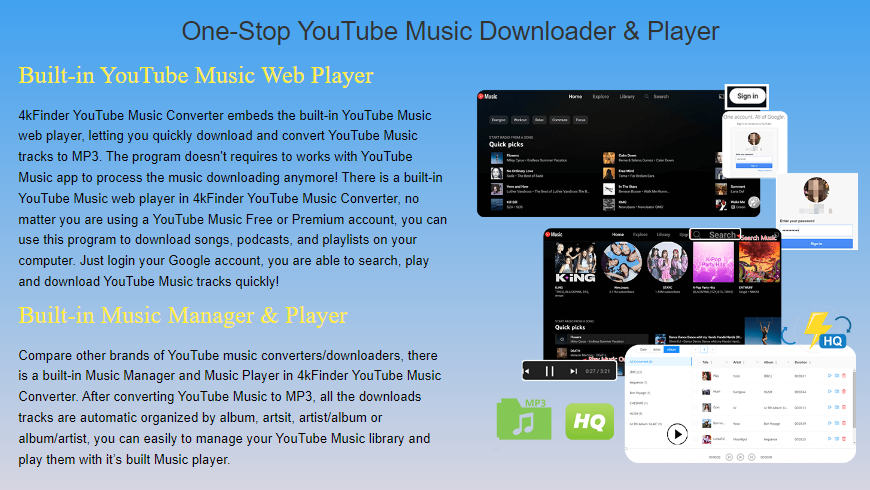
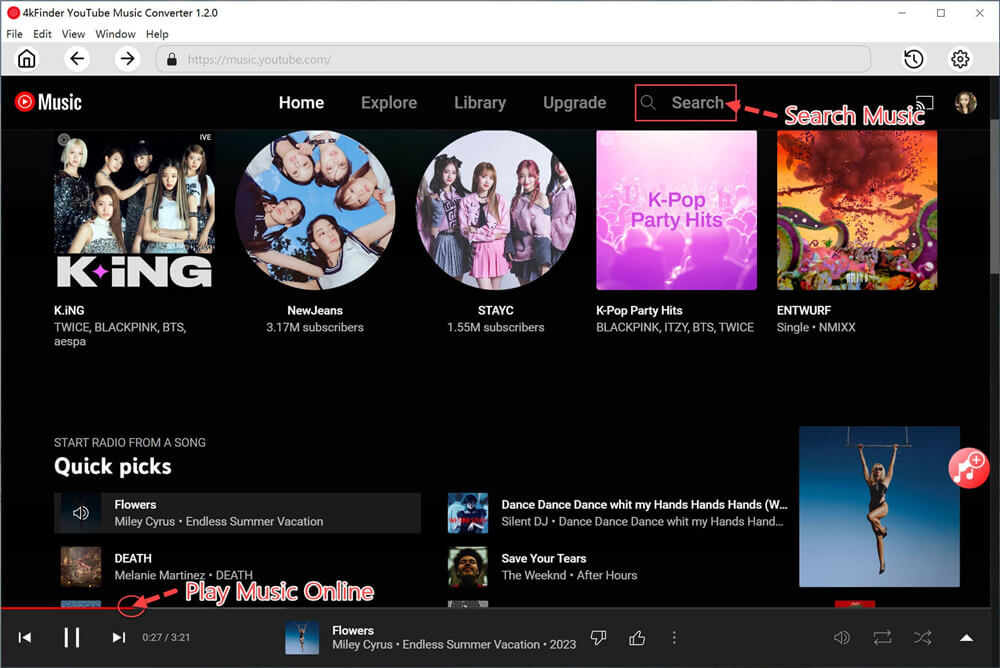
4kFinder YouTube Music Converter is equipped with a built-in YouTube Music web player, no YouTube Music app installation needed, just log in your YouTube Music account, you are able to download the whole album/playlist in batch with fast speed. With this tool, either YouTube Free users nor Premium users can download songs, playlists, and albums from YouTube Music web player. Just login your YouTube Music account, you can access, browse, search and play music online, and even directly download them for offline listening in the program.

youtube music player

#7. Built-in Music Manager and Music Player
To give you better music experience, this great tool also comes with a built-in Music Manager and Music Player in the program. Once the YouTube Music download completes, all the downloaded songs are organized by Artist, Album, Artist/Album or Album/Artist, this function for you easily to mange your music library. Moreover, you are able to play YouTube Music downloaded songs with it’s built-in Music player, no need to install the YouTube Music app or other music app.

sort output youtube songs

#8. User-Friendly Interface
The software has a simple and intuitive interface that makes it easy to use, even if you’re not tech-savvy. Every one can use it to download and convert online music, just login your account, you’re able to directly download YouTube Music to MP3 for offline playback, no need to install other app.

#9. Multiple Languages Supported
4kFinder YouTube Music Converter not only has a user-friendly design, but also supports multiple languages. Currently, it supports multiple languages, including English, Spanish, Chinese, French, Japanese, and German.

Compatibility and Pricing of 4kFinder YouTube Music Converter

4kFinder YouTube Music Converter program is available for Windows and Mac computer, including Windows 7/8/8.1/10/11 (64bit), and Mac OS X 10.11 or later. It offers 30-days free trial for news users. The free trial version only allows users to convert the first three minutes of each song. To its powerful functions and rich features, users can upgrade to Premium plan.

  • 1-Month Subscription: $14.95 for 1 PC/Mac
  • 1-Year Subscription: $59.95 for 1 PC/Mac
  • Single Lifetime License: $79.95 for 1 PC/Mac

How to Download YouTube Music to MP3 Without Premium?

– Launch the converter, login to YouTube Music Free or Premium account.
– Click “Gear” icon to customize output settings for music tracks.
– Open any song/album/playlist and add to the list.
– Click “Convert” button to download and save YouTube Music songs as local MP3 files.

convert youtube music to mp3

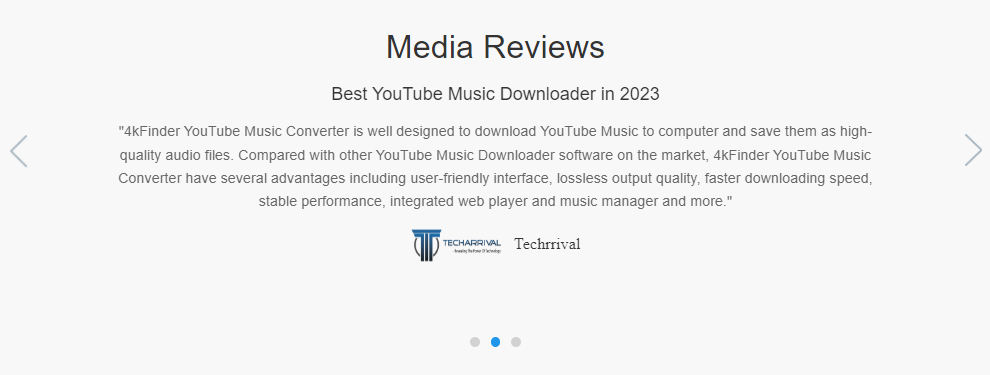
Media Review of 4kFinder YouTube Music Converter:

media review of youtube music converter

Pro:

  • It has an easy-to-use user interface.
  • Built-in YouTube Music web player.
  • Offers a variety of output formats.
  • Preserve original quality of YouTube Music songs.
  • Download and convert songs in batch, and possess super-fast speed.
  • Remain the full ID3 tags from YouTube Music track.
  • Helps you manage the output songs by artist or album.
  • Cons:

    • Not free, but offers free trial.
    • Only available on desktop, no mobile version.

    Conclusion

    With the growing demand for music streaming and downloading platforms, 4kFinder has identified the need for a reliable and efficient music downloader that can cater to the needs of music enthusiasts. 4kFinder YouTube Music Converter is an intuitive downloader for music, songs, albums, playlists, and podcasts from YouTube Music, it not only can hep users download music from YouTube Music, but also allows you quickly convert YouTube Music to MP3, M4A, WAV, AAC, FLAC and AIFF at ease. So that users can transfer YouTube Music to any devices for offline listening without an internet connection. Now you can download this tool and test its performance.

    d_win d_mac

    4kFinder YouTube Music Converter Review

    How to Download YouTube Music to MP3

    Summary
    Want to download YouTube Music to MP3? In this detail guide, we will show you the best way to download YouTube Music to MP3 with a professional third-party tool for YouTube Free and Premium user.

    YouTube Music is a popular music streaming platform that caters to music video enthusiasts. It is available for iOS, Android, and desktop web players, offering millions of songs, albums, playlists, artist-based radio, and exclusive music videos that are not available on other platforms. Much like Spotify, YouTube Music also offers a free ad-supported service.

    However, to enjoy uninterrupted, ad-free music listening with offline downloads, you can upgrade to the YouTube Music Premium. The offline downloads are essentially cached streams and not saved as individual songs. YouTube Music currently streams at 128kbps AAC with Normal quality settings. Premium users have access to High quality, which streams at 256kbps AAC. However, YouTube Music has never been saved as MP3 and is not compatible with MP3 players. Unfortunately, there is no official way to download YouTube Music to MP3. But not to worry, we can recommend a professional tool that can download YouTube Music to MP3 with ease.

    Best Tool – 4kFinder YouTube Music Converter

    We highly recommend 4kFinder YouTube Music Converter as a professional tool for downloading and converting YouTube Music to MP3. With its specially designed features, you can easily download tracks, albums, and playlists from YouTube Music with a high quality of up to 320kbps in MP3 format. Additionally, this tool can also convert YouTube songs to M4A, AAC, WAV, FLAC, and AIFF formats at blazing speeds up to 10x faster.

    Additionally, 4kFinder YouTube Music Converter is that it lets you download YouTube playlists using either YouTube Music’s free or Premium accounts. This means you can download your favorite songs for offline listening without the YouTube Music app, and it’s completely free. This powerful tool uses innovative technology to save songs from YouTube Music directly to your computer, making it easy for you to transfer and play them on any device without limits.

    Top Features of 4kFinder YouTube Music Converter

    • Support YouTube Free and Premium accounts.
    • Download tracks/albums/playlists from YouTube Music.
    • Convert YouTube Music to MP3, M4A, AAC, FLAC, WAV and AIFF lossless.
    • Up to 10x faster conversion speed in batch.
    • Keep ID3 tags and metadata information after conversion.
    • Download Music from YouTube to computer and keep them forever.
    • Built-in YouTube Music web player, no need to install extra apps.
    • Compatible with Windows & Mac.

    d_win d_mac

    Note: To get started, you can download the free trial version and install it on your computer. It’s important to note that the trial version allows you to convert the first minute of three tracks to test its features.

    Tutorial: How to Download YouTube Music to MP3

    Step 1. Launch & Login Your Music Account
    Once the program has been installed on your computer, open the 4kFinder YouTube Music Converter and proceed to click on the “SIGN IN” button. You will then need to log in to your YouTube Music account, whether it is the Free or Premium version.

    login youtube music account

    Step 2. Choose Output Format
    To modify the output format, please navigate to the “Settings” option in the upper corner. A settings window will appear, presenting you with various output format options such as MP3, M4A, AAC, FLAC, WAV, and AIFF. Please select the MP3 format from the list to proceed.

    customize output settings

    Step 3. Add Songs/Albums/Playlists to List
    The converter comes equipped with a built-in YouTube Music Web Player, which enables you to seamlessly search, stream and add songs directly within the platform.

    search youtube music

    To add any song, album or playlist to the converting list, simply open it and click on the red “+” icon. This will add the selected item(s) to the list and allow you to convert them as desired.

    add youtube music to list

    Step 4. Select YouTube Music Songs
    As shown in the screenshot below, the conversion panel will automatically load all songs contained within the selected album or playlist. Unselect the songs you don’t like.

    select youtube music songs

    Step 5. Start to Download YouTube Music Songs to MP3
    Once you have selected the songs you wish to convert, simply click on the “Convert” button to commence the download process, converting your YouTube Music selections into MP3 format.

    convert youtube music mp3

    Step 6. View the Converted YouTube Music Songs
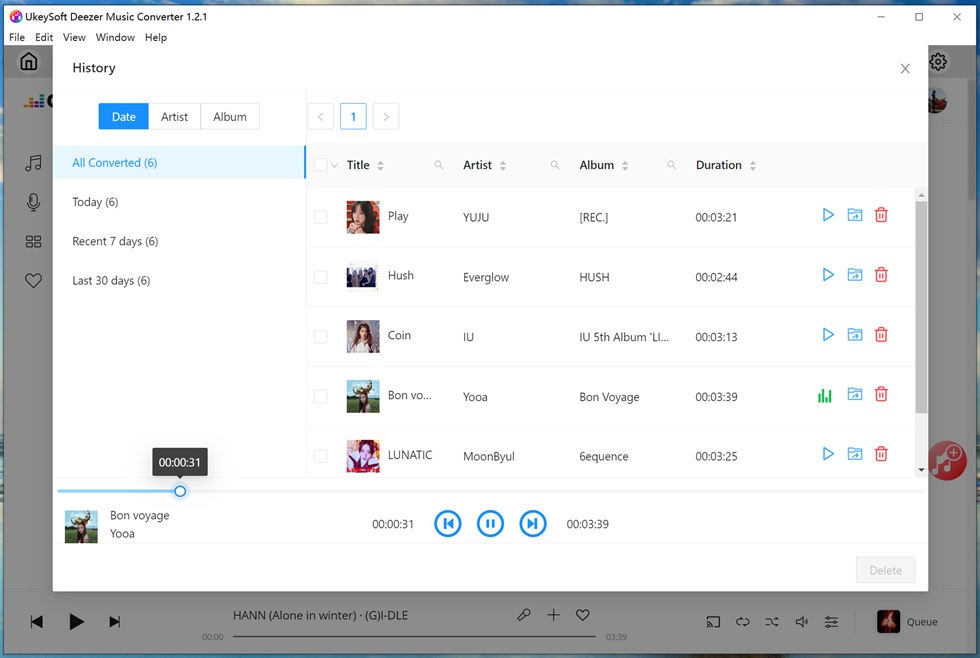
    Once the conversion process is finished, you may access your converted YouTube songs by selecting the “History” option. Within the History menu, you can sort your converted songs by Date, Artist, or Album to locate them easily. You may also use the blue folder icon to quickly navigate to the output files for your converted YouTube music.

    view converted songs

    Step 7. Play Music Offline with Built-in Music Player
    With the built-in Music Manager & Player, you can conveniently access a built-in Music Player to play your downloaded songs offline, without the need for additional music players or the YouTube Music app.

    d_win d_mac

    Conclusion

    Overall, 4kFinder YouTube Music converter is a perfect fool for YouTube Music users to download YouTube Music to MP3. Its user-friendly interface ensures ease of use, with efficient song downloading capabilities and support for batch conversions. Additionally, it preserves the ID3 tag of the downloaded songs, ensuring a seamless music listening experience.

    Download YouTube Music to MP3

    Best Deezer Music Downloader to Download Deezer to MP3

    Summary
    This review focus on helping user to know everything about the best Deezer downloader in 2023 – UkeySoft Deezer Music Converter, use it to download Deezer to MP3. So that user can play Deezer Music songs with freedom.

    Deezer is a well-known platform with online music streaming service for all users. You can ideally listen to music, radio, and podcasts using a Free account. However, to enjoy music without ads, and download your favorite music on Deezer for offline playback with no restriction, a Deezer Premium account is required. However, even if you get a paid Deezer account, there are some limitations. For example, you can’t play Deezer Music on any devices/players without logging Deezer, the downloaded music files will be disappear after subscription ends. It means that you are only allowed to listen to Deezer within Deezer app under authorization.

    Have you ever searched for best Deezer Music downloader to download Deezer Music to MP3 for offline listening without restriction? If yes, you can focus on this post. Among so many Deezer Music downloaders in the market, seldom of them are workable and even worse, bring ads and risk to computer. A professional Deezer Music Downloader should have some excellent features: high-quality output, fast conversion speed, batch downloading, user-friendly interface, and so on. Let’s look into the recommended best Deezer Music Downloader. UkeySoft Deezer Music Converter, which is a friendly Deezer Music downloader. After reading the follow passages, you will know everything about this perfect music downloader.

    Part 1. Introduction of UkeySoft Deezer Music Converter

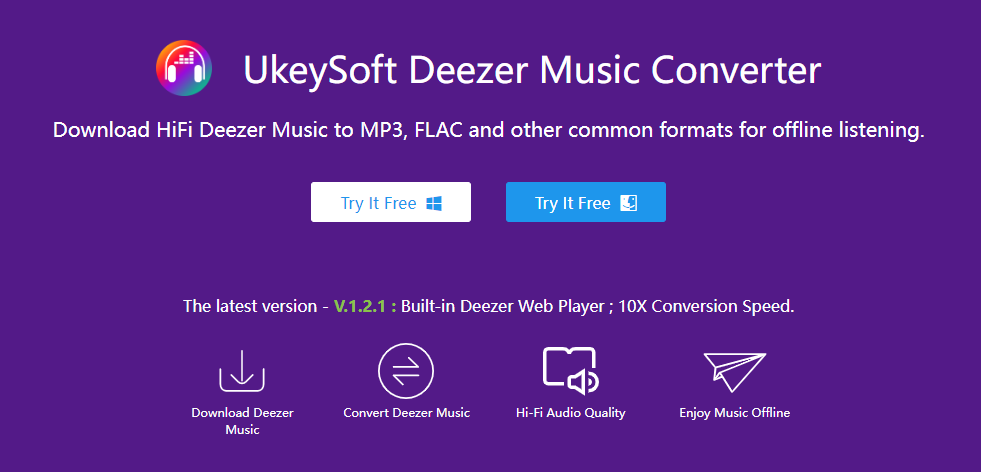
    UkeySoft Deezer Music Converter is an all-in-one music converter & downloader, works on both Windows and Mac computer. This tool allowing users to quickly download tracks, playlists, albums, podcasts from Deezer to computer as local files. Download and convert Deezer Music MP3 and other general audio formats such as M4A, AAC, WAV, FLAC, AIFF with fast speed. With advanced encoding technology, this software export Deezer Music with lossless quality, while retaining the ID3 tags for further organization. In the latest update, it is embedded with music web player, music player and music manager. As a result, user will get Deezer Music forever even without subscription, play Deezer Music on any devices/players without limitations.

    ukeysoft deezer music converter

    d_win d_mac

    Part 2. Main Features of UkeySoft Deezer Music Converter

    In this section, we will show you a detailed review of UkeySoft Deezer Music Converter, so that you can have a thorough understanding of this tool and choose whether to use it or not. Let’s check the main features of UkeySoft software.

    General Output Format
    UkeySoft software supports general output formats, including MP3, M4A, AAC, WAV, FLAC, AIFF. MP3 is a widely compatible audio format that can be played on a majority of devices or players. Apart from MP3, it can output other audio formats to meet all needs for user. The formats of AAC and FLAC will keep lossless audio quality, and save as smaller file size.

    Ensure Lossless Conversion Quality
    UkeySoft software ensure nearly 100% lossless sound quality for music playing after conversion. By default, the output format is M4A and the bitrate 256 kbps. But this tool provides you with more selection of output audio quality, like 128kbps, 192kbps, 224kbps, 320kbps, 384kbps, 448kbps, 512kbps.

    Fast Conversion Speed
    Because UkeySoft software is an online tool, its download and conversion speed is largely decided by the Internet connection and server status. When you have a stable network, you can download Deezer songs smoothly and swiftly with 10X faster speed. Besides, it does provides batch conversion service for user, make the conversion being more efficient.

    Keep original ID3 tags and Metadata Information
    During the conversion, the ID3 tags and media metadata information will be preserved, such as Track Title, Album, Artist, Artwork, Track Number, and Year. After conversion, you may sort the converted files by Artist, Album, Artist/Album, Album/Artist. So that you could manage the music collection conveniently after downloading.

    User-Friendly Interface
    UkeySoft software is an easy-to-grasp tool requiring no extra apps installation and registration. A simple operating interface, non advertisements, especially those pop-ups. It is so simple for users even the new beginner.

    Embedded with Music Web Player, Music Player & Music Manager
    In the latest version of UkeySoft software, it is embedded with Deezer Music web player, music player & music manager. It is strive to make you get a great user experience in Deezer Music conversion.

    Play Deezer Music on Any Devices/Players Offline
    With the help of UkeySoft Deezer Music Converter, you can achieve offline listening Deezer Music without Deezer app. It means that all Deezer Music downloads can be transferable without Deezer limitations. So that you can listen to Deezer Music offline across different devices and players. For instance, smartphone, tablet, MP3 player, game player, smart TV, wearables, Sono; VLC media player, Windows media player; etc,.

    Get Deezer Music Forever with Freedom
    After music conversion, user can get Deezer Music forever forever, never worry about losing music after subscription expires. It will not need a Premium account, you can listen to Deezer Music offline. All the music contents can be playable on compatible devices/players. In other words you are allowed to use Deezer Music with more freedom.

    Part 3. Tutorial of Download Deezer Music to MP3 Easily

    In this part we will show you the tutorial to download Deezer Music to MP3 with easy steps. Now please download UkeySoft Deezer Music Converter on your PC/Mac computer first.

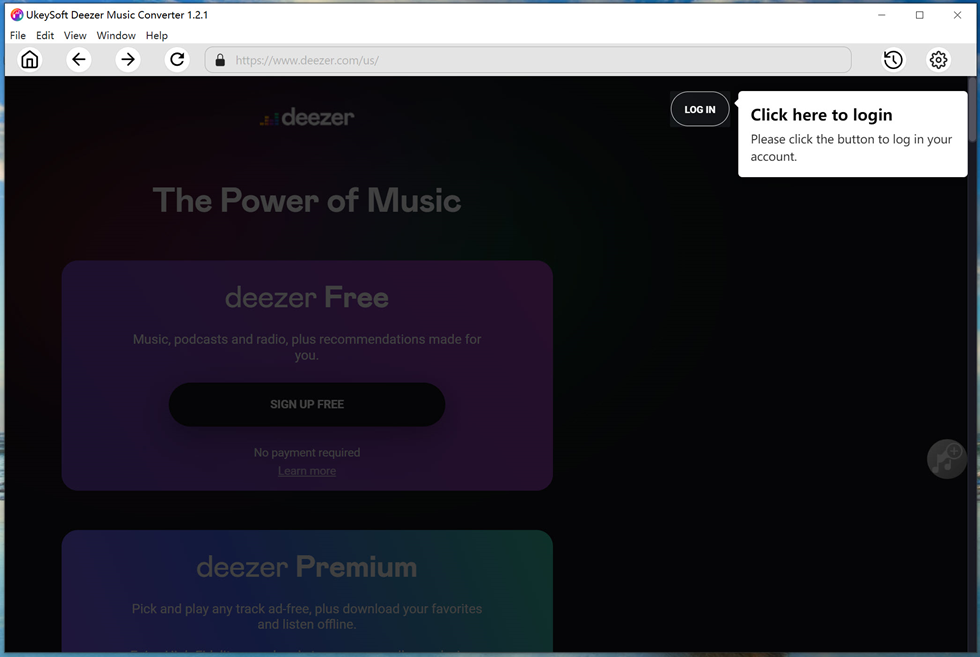
    Step 1. Log In Deezer Account
    Click “LOG IN” button in the upper right corner of home page, to log in your Deezer account.

    login deezer account

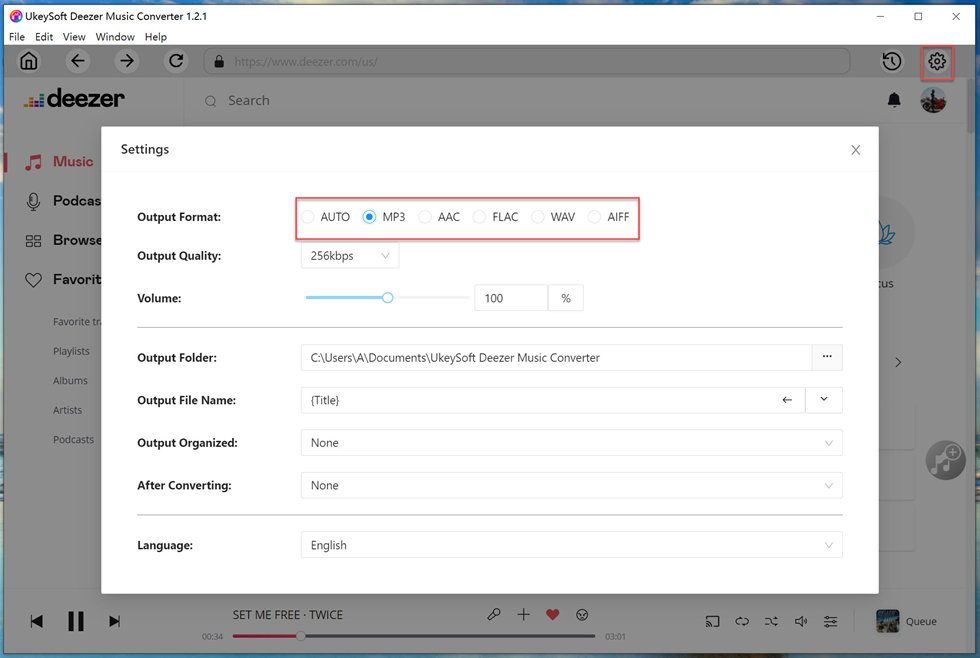
    Step 2. Customize Output Settings
    There are 6 output formats for selection: M4A (default), MP3, AAC, FLAC, WAV, AIFF. To download music to MP3, tap “MP3” option. In this step, you can customize more output settings, like output quality, volume, output folder, output file name, etc,.

    output setting

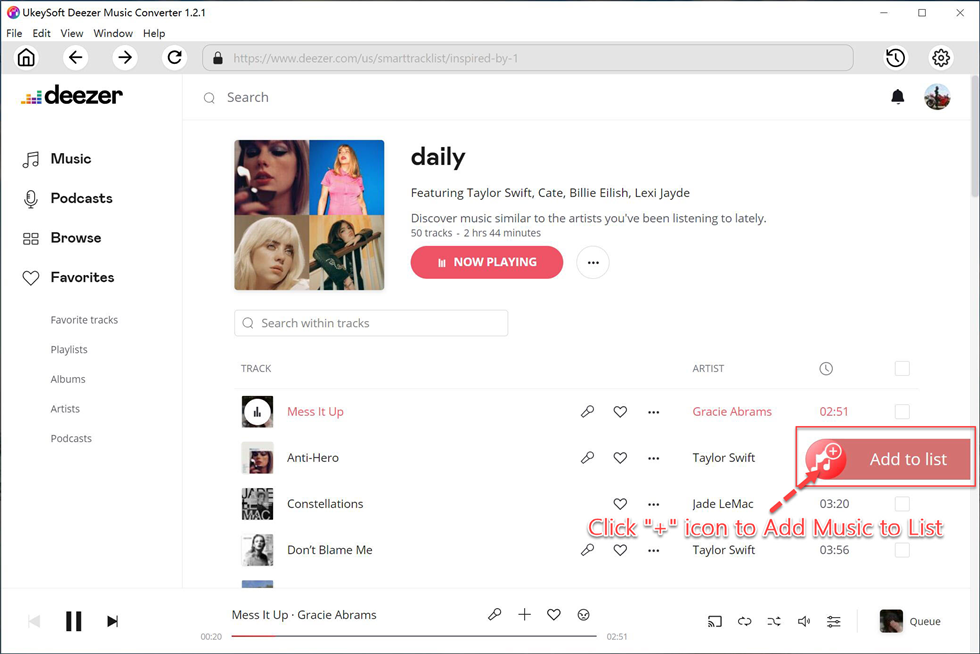
    Step 3. Add Deezer Music
    Click the playlist or album including the songs you want to conversion list, then click red icon “Add songs”, it will show all items in it for you.

    add deezer music to list

    When you select a playlist/album, all items in it will be selected by default. You could unclick some items you don’t want in the checkbox.

    select deezer songs

    Step 4. Download Deezer Music to MP3
    At last, click “Convert” button to begin downloading selected songs to MP3. All output music files will be exported with its lossless audio quality and all ID3 tags.

    download deezer music to mp3

    Step 5. Preview Deezer Music
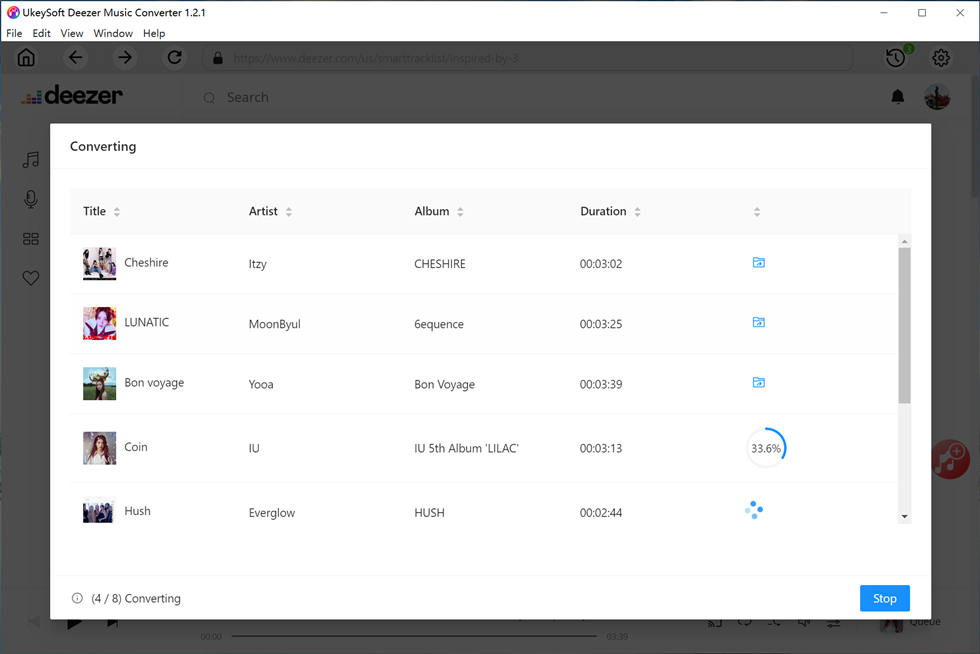
    The whole music conversion will be end with 10X faster speed. Once it is done, click blue folder icon to preview the downloaded songs in MP3. Also, you can play the music offline directly via its music player.

    preview deezer songs

    d_win d_mac

    Part 4. Pros and Cons of UkeySoft Deezer Music Converter

    After testing UkeySoft Deezer Music Converter, I found something about it I like and I don’t like.

    What I Like:

    1. Easy to use, user-friendly interface, and I think nobody will have trouble using this software.
    2. Variety of general audio formats output, e.g. M4A (default), MP3, AAC, FLAC, WAV, AIFF.
    4. The software is very stable, and the conversion speed is super faster than other music converters.
    5. The output quality of music files is the same as the original one.
    6. Convenient to manage music library as it save all original ID3 tags and metadata info for Deezer Music.
    7. There is no need to install Deezer Music or other extra apps, since it is embedded with music web player, even music player & music manager.

    What I Don’t Like:

    1. This tool only works for Windows and Mac computers, with no Linux, iOS, and Android versions.
    2. Need to pay for using. But the trial version is free, and user can use it to convert the first 3 minutes of each song.

    Part 5. Price of UkeySoft Deezer Music Converter

    1)Monthly Subscription Plan: USD 14.95 for one month and 1 PC/1 Mac

    2)Yearly Subscription Plan: USD 59.95 for one year and 1 PC/1 Mac

    3)Lifetime Plan (One-time payment): USD 79.95 for a lifetime and 1 PC/1 Mac

    Final Words

    This is the review of the best Deezer Music downloader in 2023. After comparing its several features, you may have an idea of choosing this tool or not. All in all, UkeySoft Deezer Music Converter is a powerful yet user-friendly music converting tool for all Deezer Music users. With its help, you’ll be able to download any Deezer Music songs to MP3 or other general audio formats with high audio quality output. If you’re satisfied with this tool, you can subscribe for one month for $14.95 on one computer. But I guess its lifetime plan could be much better of $79.95 for one computer, and user will enjoy lifetime free updates and tech support.

    d_win d_mac

    If you have any problems about UkeySoft Deezer Music Converter, welcome to send email to UkeySoft Support Team: support@ukeysoft.com. You will be answered as soon as possible.

    Best Deezer Music Downloader

    Best YouTube Music Converter – Convert YouTube Music to MP3

    Summary
    Here is the best YouTube Music Converter review for you with features, pricing, pros, and cons, & detailed guides on how to convert YouTube Music to MP3. You will be able to keep YouTube Music forever and listen to them anytime with the help of it. Please don’t miss it.

    If you want to play YouTube Music on MP3 player, backup and save YouTube Music to USB drive, consider converting YouTube Music to MP3. Well, YouTube Music Converter can help you make this dream come true. But you may have no idea about what is the best YouTube Music Converter on the market. Here we will show you a comprehensive review of the best YouTube Music Converter, named 4kFinder YouTube Music Converter. You will find 4kFinder YouTube Music Converter features, pros and cons, price, and other details. More importantly, you will learn how to convert YouTube Music to MP3 for offline playing on all your devices.

    Part 1. Why Do You Need YouTube Music Converter?

    YouTube Music is a separate music app split from the popular video site YouTube, and it is also a popular streaming music platform. By registering an account, users can stream millions of songs, albums, singles, MVs, live performance on YouTube Music app or web player. But you can’t access any content without an internet connection, unless you have a Premium account. Only the Premium subscribers are allowed to download YouTube Music for offline listening.

    But the problems are that all YouTube Music users can only play YouTube Music within the app. Even the Premium subscribers are unable to take any downloaded song out the app to other platforms or devices. This is where we need a professional YouTube Music Converter to convert YouTube music to MP3. In this way, people can keep YouTube Music songs forever, and enjoy them offline anytime, anywhere. There are many YouTube Music Converter and Downloader tools in the market, 4kFinder YouTube Music Converter stands out with its powerful features and performance.

    Part 2. A Detailed Review on 4kFinder YouTube Music Converter

    4kFinder YouTube Music Converter is a professional yet user-friendly music downloader and converter tool. Whether you are using YouTube Premium or not, it assists you to download songs, albums, playlists, singles from YouTube Music to computer locally. This awesome tool is specially designed to download and convert any YouTube Free and YouTube Premium to MP3, M4A, AAC, FLAC, WAV, AIFF audio formats with lossless music quality.

    To make YouTube music conversion straightforward and smoothly, 4kFinder YouTube Music Converter not only works at 10X faster than other brands, but also embeds the YouTube Music Web Player inside of itself. With it, users can directly search, add, choose and download any song without the YouTube Music app installed.

    Moreover, it supports to customize output file name, and classify YouTube Music by artists or albums for easy management. To make YouTube music download straightforward and smoothly, 4kFinder YouTube Music Converter embeds the YouTube Music Web Player inside of itself where you can directly add and download songs or playlists in batch.

    Next, let’s check its features in depth.

    Highlighted Features of 4kFinder YouTube Music Converter

    #1. Integration with YouTube Music Web Player
    Through embedding the YouTube Music Web Player, the 4kFinder YouTube Music Converter allows users to access, stream, convert and download all music content in the music library, even using the YouTube Music free accounts. During the entire conversion process, the YouTube Music app is not required.

    #2. Mainstream Output Formats Available
    YouTube Music encrypts music tracks in AAC format and is only accessible within the YouTube Music app. 4kFinder YouTube Music Converter gives you different options when converting your YouTube Music tracks. You can use it to convert YouTube Music to MP3, M4A, AAC, FLAC, WAV, AIFF. Thus, you’ll be able to transfer and play YouTube music on any device, player.

    #3. Keep Original Quality and ID3 Info
    When it comes to choosing a music platform, most people focus on sound quality. The same is true when choosing a music converter. YouTube Music only offers Premium subscribers at highest 256kbps. With 4kFinder, now even the Free users have opportunity to convert YouTube music to MP3 at 320kbps high quality, or even 512kbps (in AAC format). Besides, it will also help preserve the ID3 tags info, like title, cover, album, artist, etc.

    #4. 10X Accelerated Conversion Speed
    To boost efficiency, 4kFinder YouTube Music Converter uses an advanced acceleration technology to ensure the fastest music conversion possible. It can run at 10X super-fast speed. It allows users to add and convert full playlist or album with just one click, which helps save a lot of time.

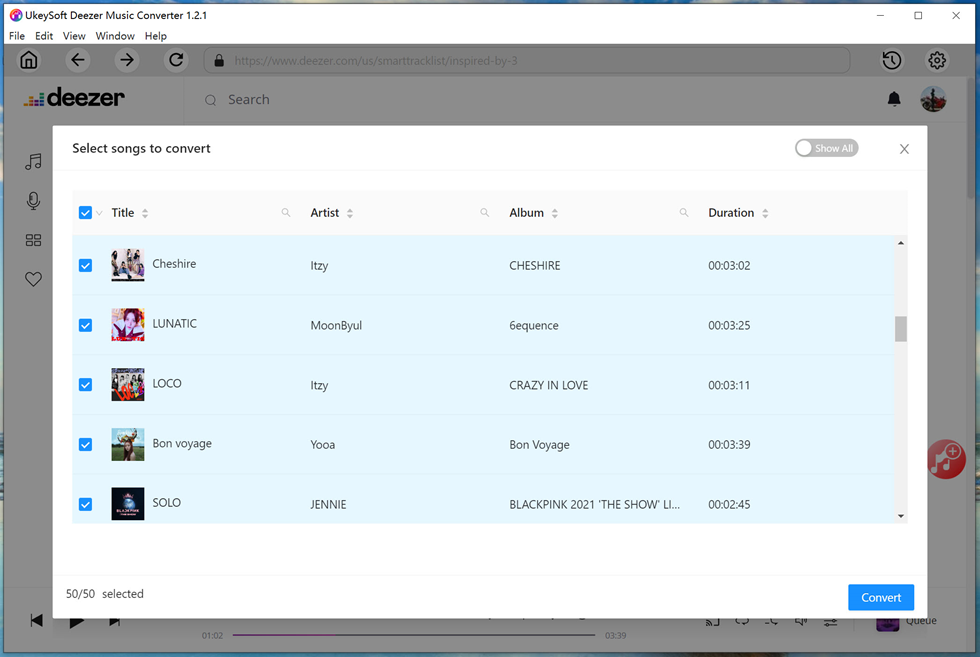
    #5. Built-in Music Player and Music Manager
    Thanks to its built-in music manager, you can organize converted YouTube Music songs by Artist, Album, Artist/Album, Album/Artist to build your own music library. After conversion, you can also classify the converted YouTube Music songs by Date, Album or Artist. Moreover, users can directly play the converted songs on the tool!
    Is 4kFinder YouTube Music Converter Free?

    4kFinder YouTube Music Converter is a paid software, but a free trial version is also available. With the free trial, users can convert the first 3 minutes of each song for 30 days. If you like the tool after testing it, you can buy the full version at the following prices:

    4kFinder YouTube Music Converter is a paid software, but also offers free trial version. With free trial, users can convert the first 3 minutes of each song for 30 days. If you like the tool after testing it, you can buy the full version at the following prices:

    – Monthly Subscription Plan: $14.95 for 1 PC/1 Mac
    – Annual Subscription Plan: $59.95 for 1 PC/1 Mac
    – Lifetime Plan (One-time payment): $79.95 for 1 PC/1 Mac

    Pros & Cons of 4kFinder YouTube Music Converter

    Pros:

    ● Offers easy operation to convert YouTube Music.
    ● Download and grab YouTube Music tracks without Premium.
    ● Supports various audios formats such as MP3, M4A, AAC, WAV, FLAC, AIFF.
    ● Doesn’t need to install YouTube Music app at all.
    ● Provides high quality settings to convert YouTube Music songs with lossless quality.
    ● Supports batch conversion of YouTube music, 10X faster speed.
    ● Built-in YouTube Music web player, music player, music manager.

    Cons:
    ● Not free, and no mobile version.
    ● Free version only lets you convert less than 3 minutes of each song.

    Part 3. How to Convert YouTube Music to MP3?

    d_win d_mac

    Step 1. Open 4kFinder YouTube Music Converter
    First, you need to download and install the 4kFinder YouTube Music Converter on your desktop and log onto your YouTube Music account, either Free or Premium.

    login youtube music account

    Step 2. Choose WAV Format for YouTube Music
    Click the “Gear” icon to open the settings window. Select MP3 as the output format. To make the better or lossless YouTube Music quality, choose 320kbps in “Output Quality” option. Besides, you may also customize the output folder, output file name and more.

    customize output settings

    Step 3. Add YouTube Music Tracks/Playlist
    Open any song, album or playlist and click on the red “+” icon on the right side.

    add youtube music to list

    4kFinder will add the whole playlist/album songs to the converting list. Select the songs you want to convert.

    select youtube music songs

    Step 4. Start Converting YouTube Music to MP3
    Finally, click the “Convert” button to start converting the YouTube Music songs you chose in Step 3 to MP3 format.

    convert youtube music mp3

    Step 5. Get the Downloaded YouTube Music WAV Songs
    Once the conversion is done, you can find the converted YouTube Music songs by clicking “History” (a clock icon).

    convert youtube music finished

    Or click the “Blue Folder” icon to quickly locate the output folder of YouTube Music.

    youtube music mp3 files

    Conclusion

    YouTube Music is a great music platform and app. But it is hard to play YouTube Music on other players. With the best YouTube Music Converter, it becomes easy to convert YouTube Music to MP3 and save them as local files. So that you could enjoy your favourite music tracks on any device you have. 4kFinder YouTube Music Converter is highly recommended if you are looking for the best YouTube Music converting tool. Download it and give it a try, you will be satisfied!

    d_win d_mac

    Best Pandora Music Downloader

    Best Pandora Music Downloader to Download Music from Pandora Free

    Summary
    Do you want to download music from Pandora Free? In this software review, we will show you a full review of the best Pandora Music Downloader. You can use it to download songs, albums, playlists & podcasts from Pandora Free/Plus/Premium to MP3, M4A, AAC, FLAC, WAV, AIFF audios with lossless quality at high speed.

    Pandora Music is an emerging streaming music service for music and radio streaming in the United States. It now has over 6.2 million active subscribers, including Pandora Plus ($4.99 / month) and Pandora Premium ($9.99 / month). Unfortunately, Pandora Free users cannot enjoy Pandora music without the internet or mobile data. They are only allow to stream Pandora music online. In that case, you need a little help from a Pandora Music Downloader to download music from Pandora Free, so you can listen to your preferred Pandora songs anytime you want.

    But, with so many of Pandora music downloaders (some known as Pandora music converter, or Pandora audio recorder) out there in the market, how do you choose the best one? We’ve done the research for you and gone through all the highs and lows of the top Pandora Music Downloaders. In this review, we will discuss what UkeySoft Pandora Music Converter is and why it can be the best Pandora Music Downloader.

    1. Why UkeySoft Pandora Music Converter?

    Pandora Music is an excellent app, and it allows users to listen to music tracks, albums, podcasts just by accessing an app. This requires you have an smooth and stable internet connection. If you want to listen to Pandora music offline, a paid subscription is needed. But the problem is that all users (Pandora Free or Paid) can only access Pandora music on the official app or web player. This is where we need UkeySoft Pandora Music Converter, which enables us to download Pandora songs to MP3 for free. Thus, users can keep them on all music devices offline forever.

    UkeySoft Pandora Music Converter is a trustworthy and excellent Pandora music download helper for all users. Whether you have Pandora Premium or not, it enables you to download songs, playlists, albums or podcasts from Pandora web player to computer for free. Apart from this, it can download and convert Pandora songs MP3, AAC, M4A, WAV, FLAC or AIFF audios at 10X faster speed. By adopting advanced technology, it will preserve the original music quality and ID3 tags, giving a lossless offline playback experience. And users can keep the downloaded Pandora songs forever, and use, open, enjoy, transfer them without limitations.

    2. Advantages of UkeySoft Pandora Music Converter

    You can also choose to download songs by subscribing to Pandora Plus or Pandora Premium, but it won’t allow you to download and save the songs on all of your devices. The UkeySoft Pandora Music Converter is committed to downloading Pandora songs to local computer. Thus, users can enjoy their favorite music tracks anytime, anywhere. Moreover, it has more advantages than the built-in downloader of Pandora, including:

    * Download Pandora songs to computer, which is almost impossible with Pandora member accounts.
    * The Pandora songs can be downloaded in various audio formats.
    * Listen to Pandora music offline on MP3 players, Apple iPods, Xbox, PSP, Zune player, car player, smart speakers and more portable devices.
    * Save and backup Pandora songs to USB disk, SD card, external drive, etc.
    * Burn Pandora songs to CD, or upload to Google Drive, OneDrive, etc.
    * Use Pandora songs as video BGM, or add them to DJ software for mixing.
    * Keep Pandora songs forever even after you cancel/stop the Plus or Premium subscription.

    3. Features of UkeySoft Pandora Music Converter

    ● Non-Premium Available – The program can download songs from Pandora for free. Whether you are using Pandora Free, Pandora Plus or Premium account, you can use it to download and save Pandora audios offline.

    ● Built-in Pandora Web Player – It allows users to quickly browse, search, access, stream and download Pandora music with its in-built Pandora web player.

    ● Offers Multiple Formats – This professional Pandora Music Downloader tool enables users to download and convert Pandora Music tracks to popular audio formats, including MP3, M4A, AAC, WAV, FLAC and AIFF.

    ● Lossless Music Quality – UkeySoft Pandora Music Converter can download Pandora songs to different audio formats with original sound quality and even better. 192 kbps is considered the highest audio quality for Pandora Premium subscribers. But UkeySoft offers common 256kbps, higher 320kbps in MP3, even 512kbps in AAC format.

    ● Faster Speed – Compared with traditional audio recorders with single download and 1:1 speed, this tool can do multiple download tasks at the same time, and runs at up to 10X faster-decoding process.

    ● Music Manager – To improve your music experience, it offers a free music management feature. It allows users to classify the output Pandora songs by Artist, Album, Artist/Album, Album/Artist.

    Once you’ve got UkeySoft Pandora Music Converter installed on your computer (Windows 11/10/8.1/8/7, Mac OS X 10.9 or higher), let’s see how to use it to download Pandora songs to MP3 for free.

    d_win d_mac

    4. How to Download Music from Pandora Free?

    Step 1. Log in Pandora Account
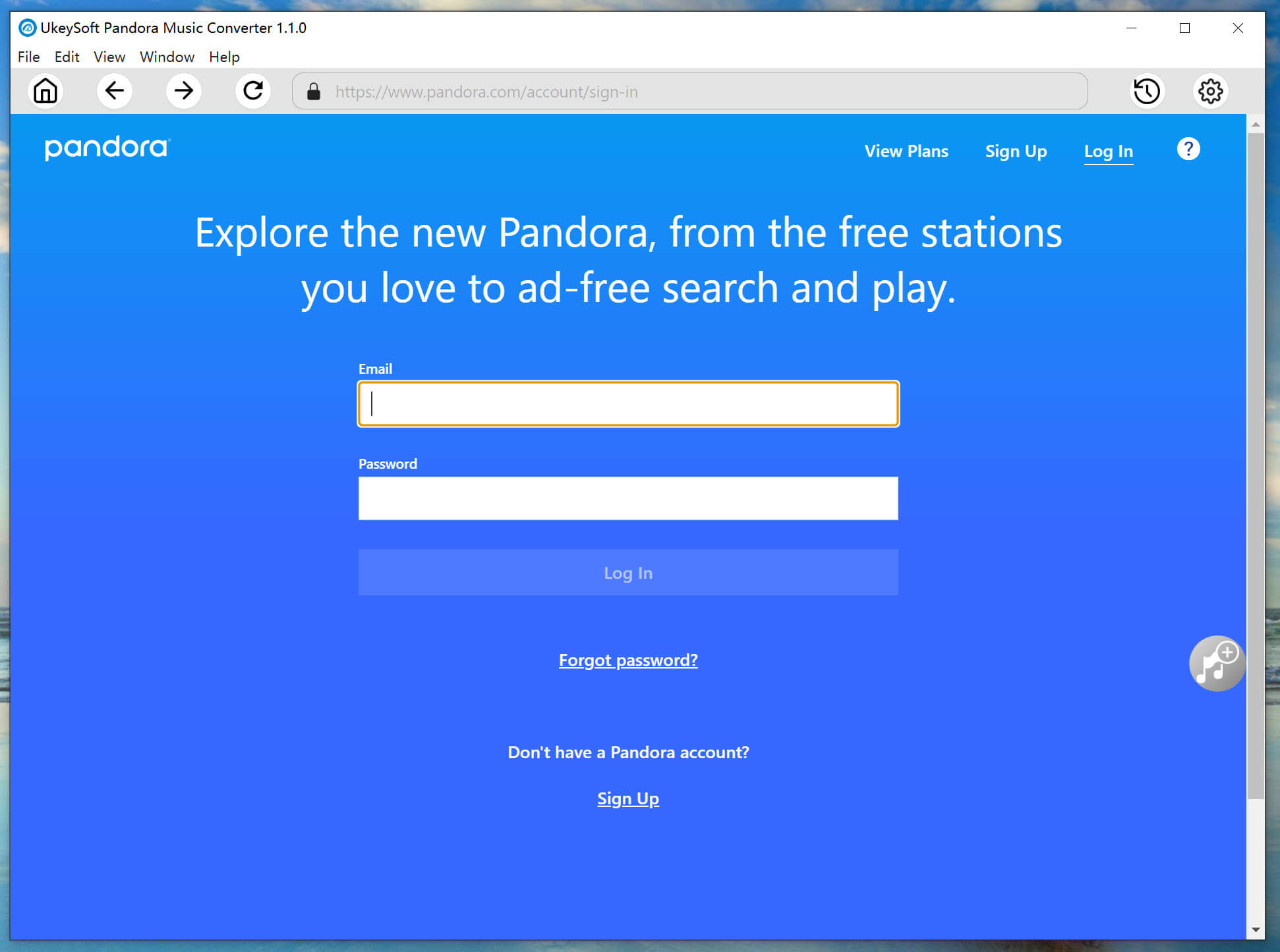
    After installation, start the UkeySoft Pandora Music Converter on desktop. You will need to log in your Pandora account, either free or premium.

    login pandora account

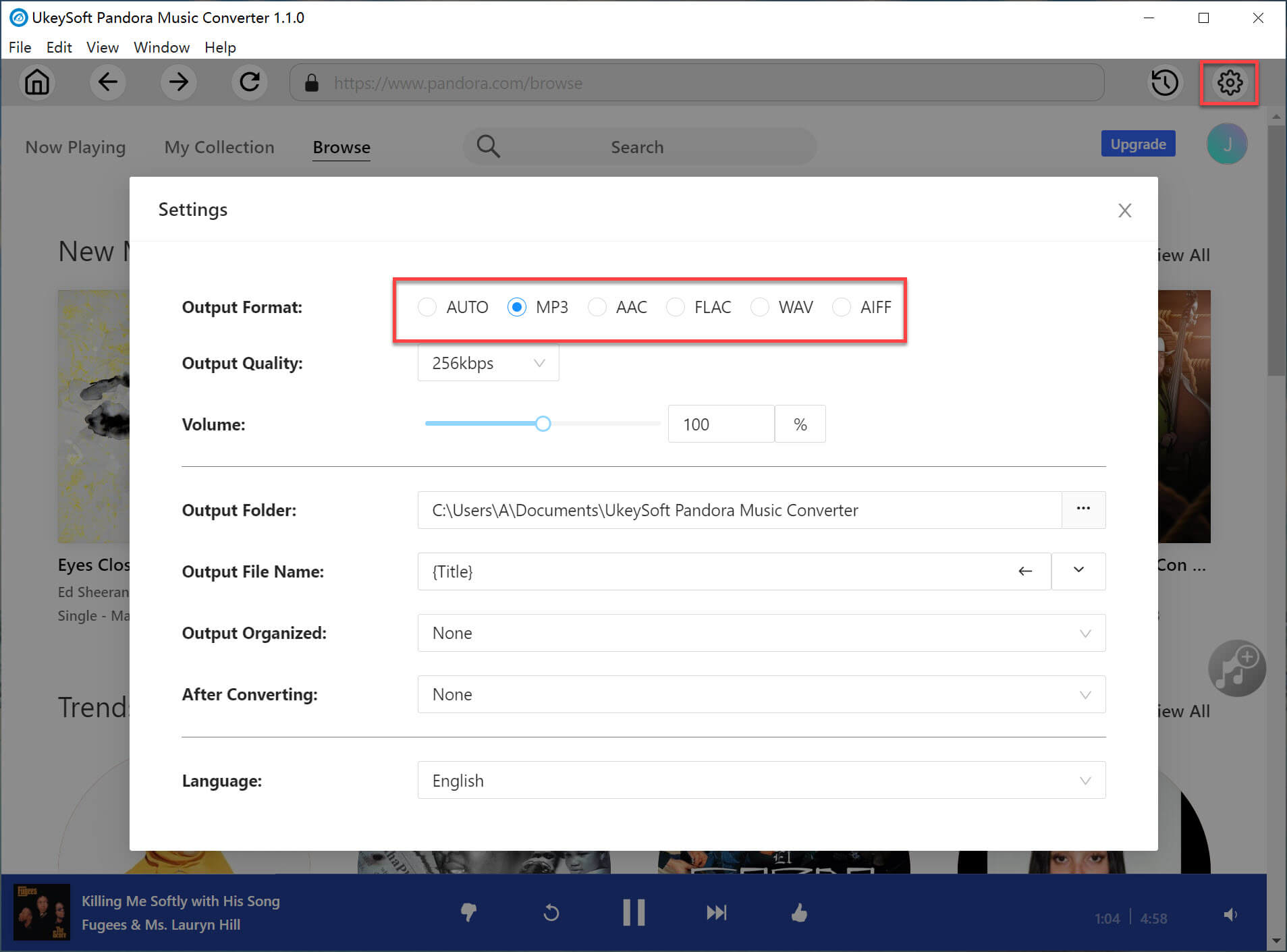
    Step 2. Customize the Output Settings
    Next, open the setting window by clicking on the “Gear” icon in the upper right corner. From where you can customize the output format (default AUTO M4A, MP3, AAC, FLAC, WAV, AIFF), output quality, output folder, output file name, and more.

    output setting

    Step 3. Add Pandora Songs
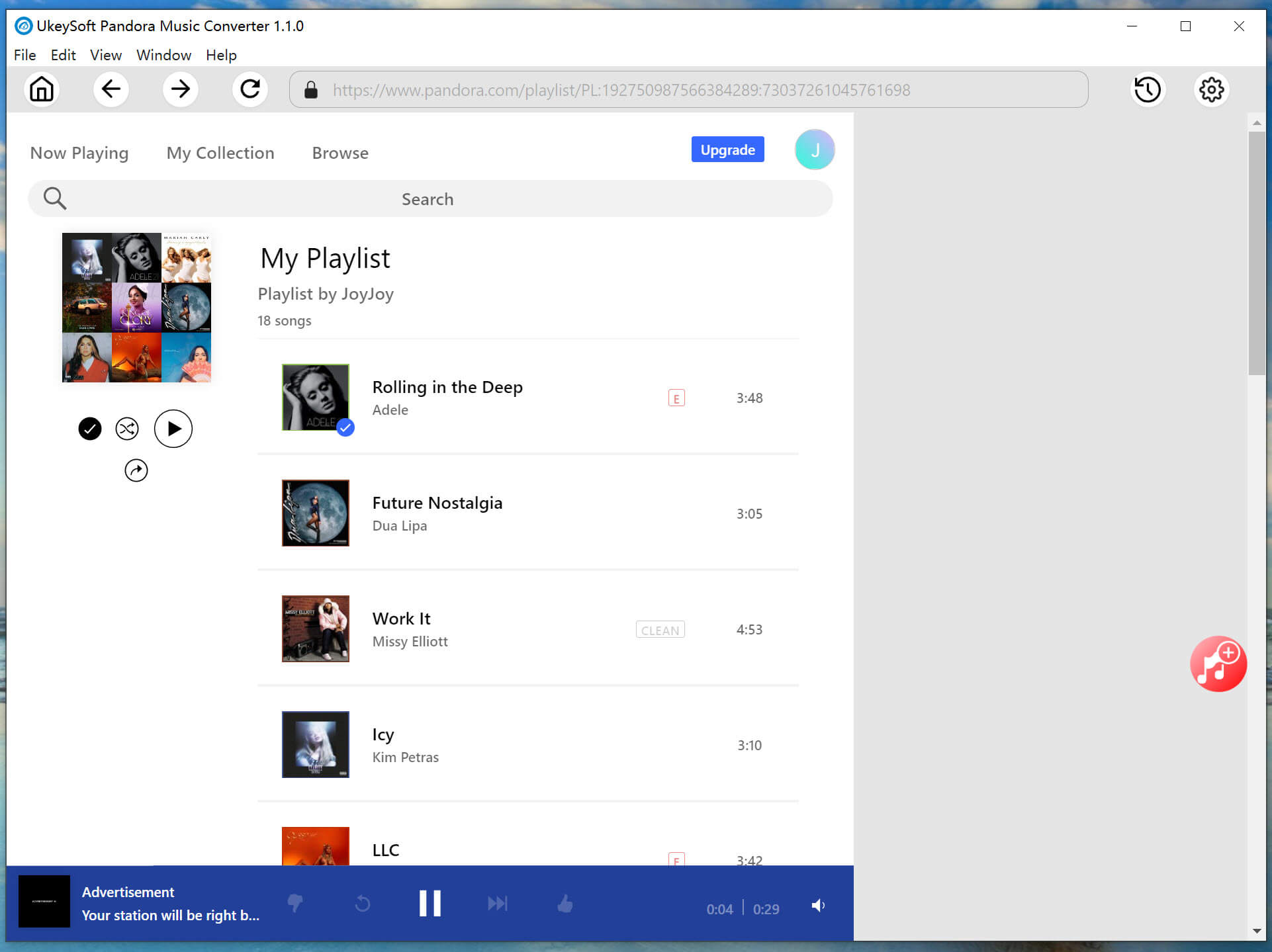
    On the home page, you can search for any song, album, playlist or podcast. Then open any song or playlist and click the “+” in right side.

    add pandora music playlist

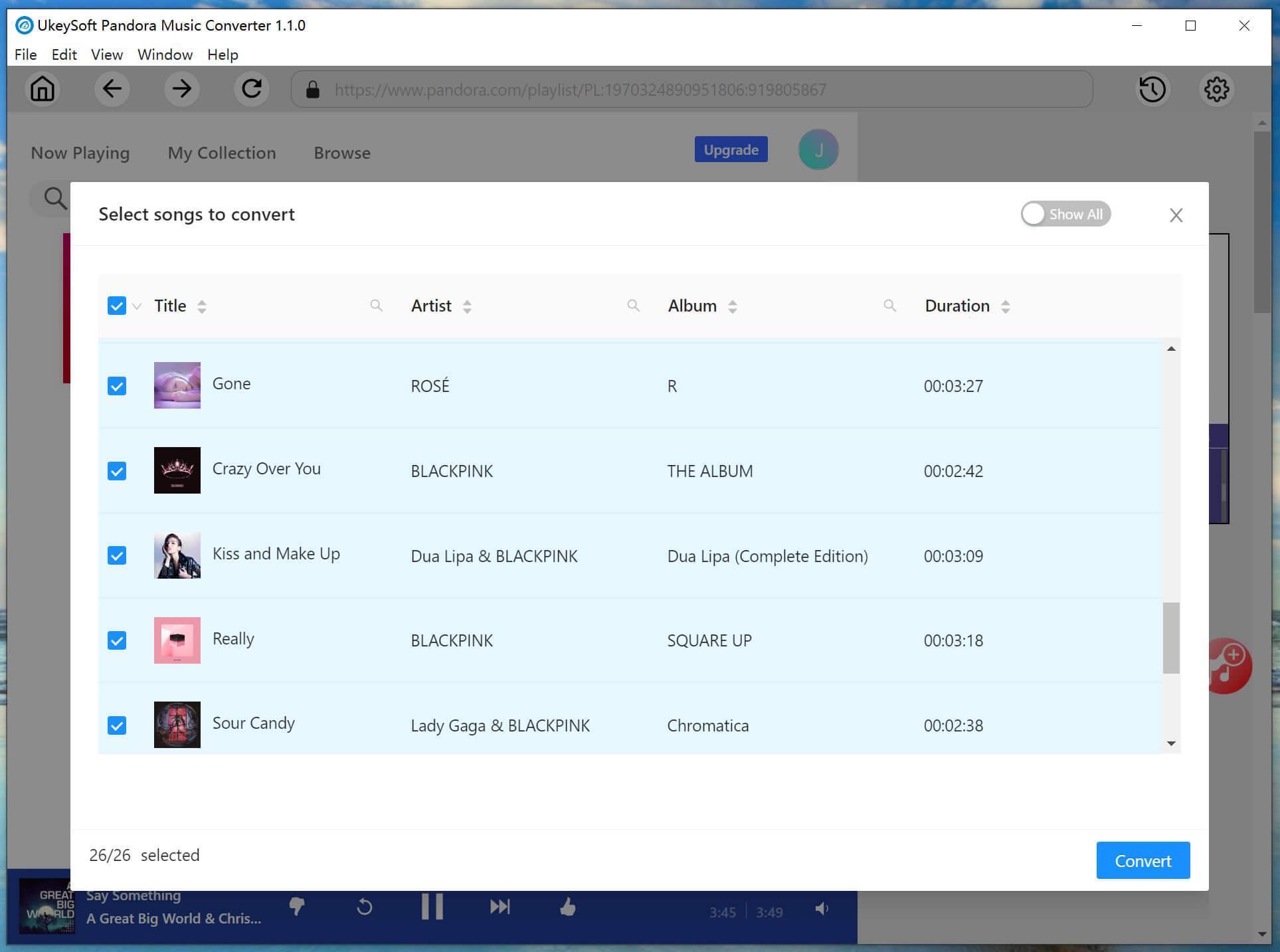
    In the converting list, select and confirm the Pandora songs you want to download.

    select pandora music

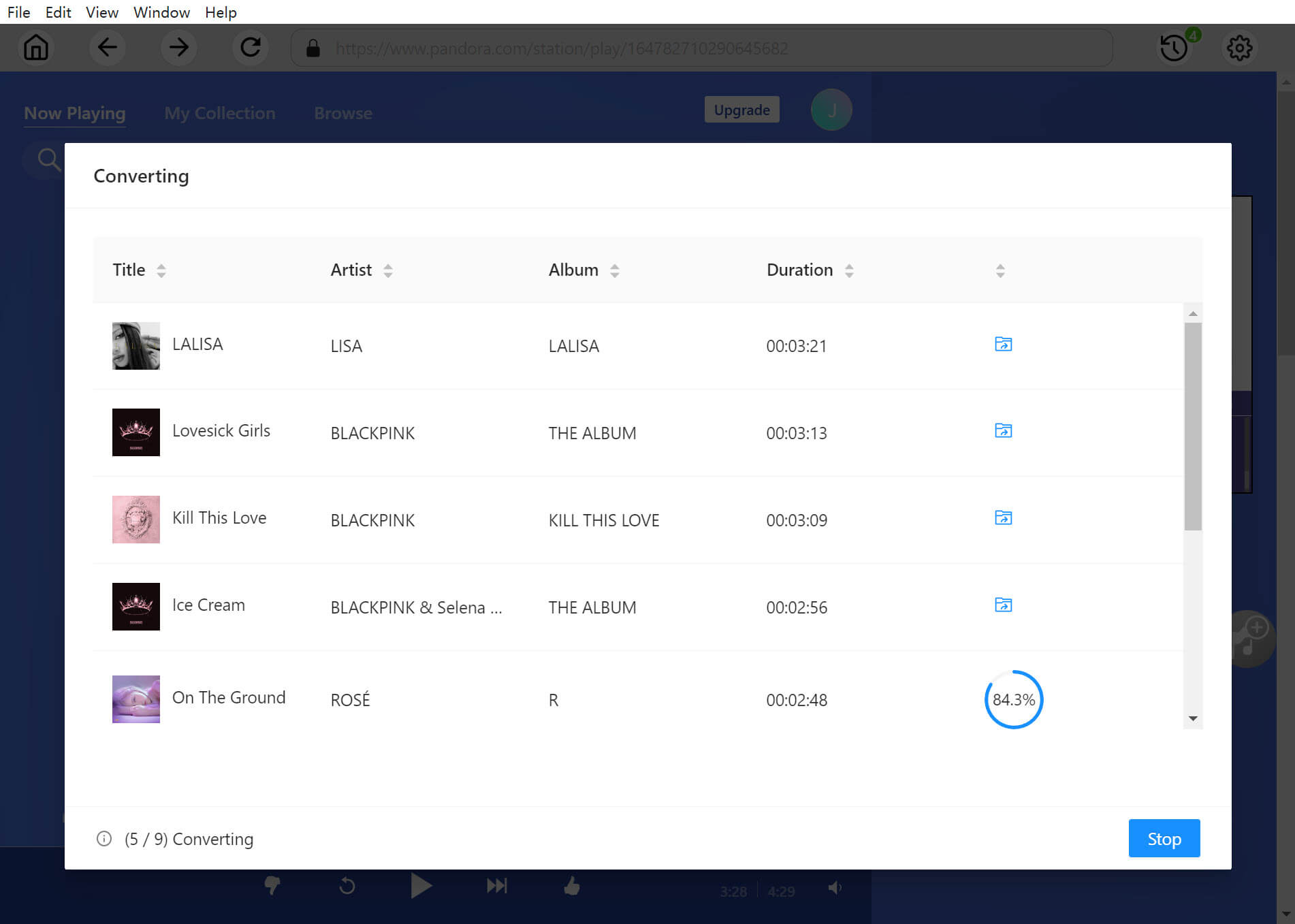
    Step 4. Download Pandora Music to MP3
    If everything is set well, hit on the “Convert” button to start downloading music from Pandora Free to MP3. The downloading process will take a few minutes.

    download pandora music to mp3

    Step 5. Get the Downloaded Pandora Songs
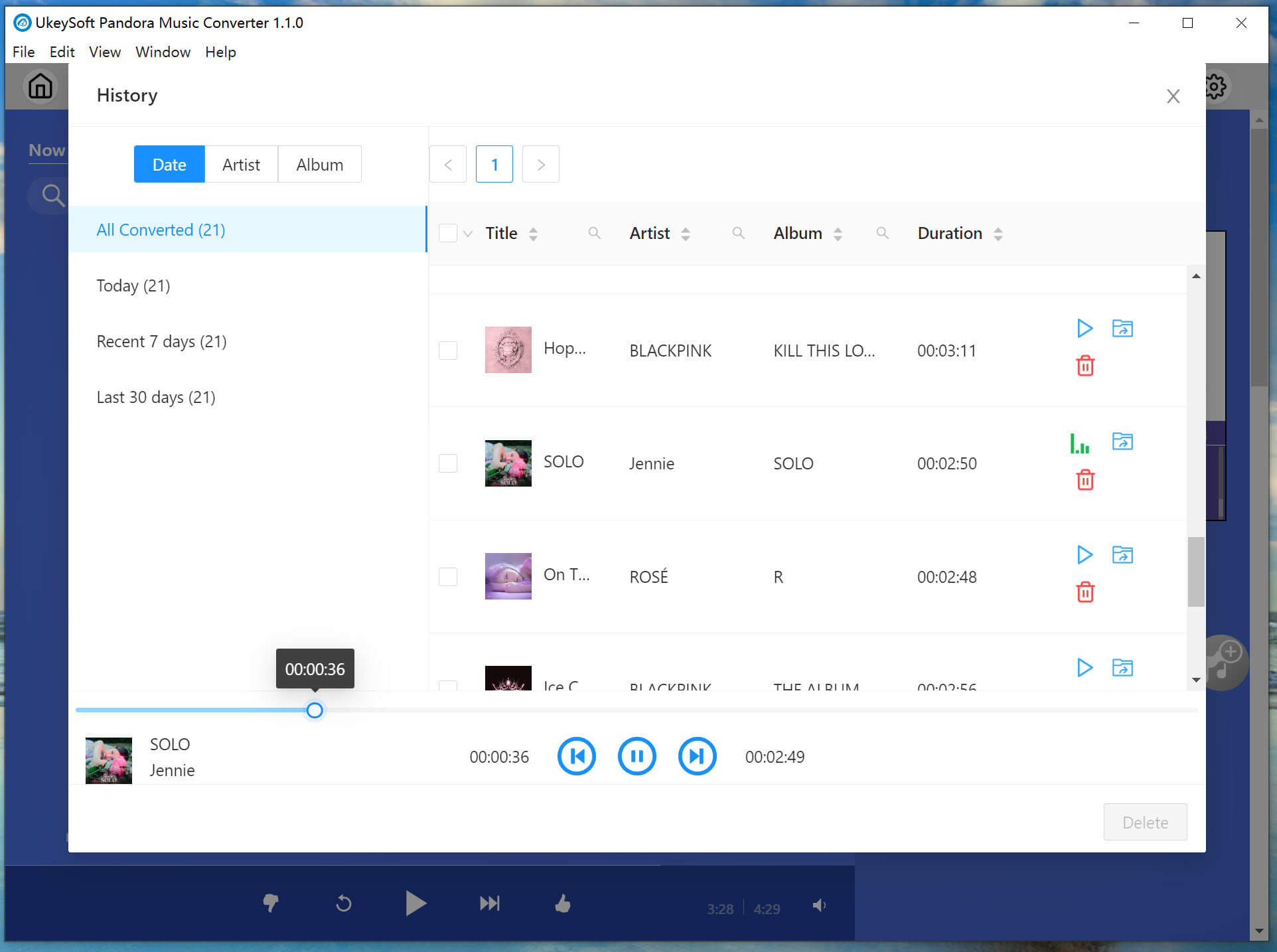
    When finished, click on the “History” icon > “blue folder” icon to preview all downloaded Pandora songs. They are saved with full ID3 tags kept. You can play these Pandora songs offline directly with its built-in music player.

    pandora music conversion history

    5. What I Like

    • Easy to use, and simple interface.
    • No Pandora Plus or Premium needed.
    • Fast, and supports batch download.
    • Lossless output audio quality.
    • Allows to customize output audio parameter.
    • Keep ID3 tags and sort output songs.
    • Built-in Pandora Web Player and Music Player.

    6. What I Don’t Like

    • Not free, but offers free trial.
    • A desktop software, no mobile version.

    Conclusion

    To download music from Pandora Free, UkeySoft Pandora Music Converter can help with that. With its lossless sound quality, fast speed, user-friendly design and more great features, it becomes the best Pandora music downloader. It assists you to download Pandora music to MP3, M4A, FLAC, AAC, WAV, AIFF audio formats and make them playable on any device, player. Now, download this software and check it for yourself!

    d_win d_mac

    Best Pandora Music Downloader

    How to Download Deezer Song/Playlist to MP3

    Summary
    If you want to download Deezer playlists to MP3, this article is for you. Here you will meet the best Deezer Music Downloader and learn how to download Deezer songs, playlist to MP3 with lossless quality.

    How do I download Deezer songs to MP3? I want to put Deezer songs on SanDisk MP3 Player. Any suggestion?”

    Nowadays, we all like to enjoy music on music streaming services. Most music streaming services focus on providing users with the best possible music quality. People can access music by signing up for a music streaming service. With a free account, we can stream millions of songs and podcasts for free or by paying a monthly subscription fee. For instance, you can sign up for Deezer to start its 30-days free trial. During the Premium free trial, you can enjoy all features like a Premium subscriber, such as download music from Deezer for offline listening. After that, you can continue your Premium subscription by paying a $10.99 monthly fee.

    However, even you’ve paid, you can still only access all Deezer music content in the Deezer Music App or Web Player. To play Deezer music freely, the best solution is to download Deezer songs to MP3. In this post, we will introduce you the best Deezer Music Downloader. You can use it to download song/playlist to MP3 with lossless audio quality. Let’s go!

    Best Tool to Download Deezer Playlists to MP3

    Is it possible to play Deezer music on MP3 player? How to download Deezer playlist to MP3? These are common questions from many Deezer users. UkeySoft Deezer Music Converter comes into rescue. It and helps all users download tracks, albums, playlists and podcasts from Deezer without a Premium account. What’s more, it enables users to download and convert Deezer songs & playlist to several audio formats, including MP3, M4A, AAC, FLAC, WAV, AIFF. UkeySoft handles the conversion at a 10X faster rate.

    Not only that, it lets users download Deezer songs to MP3 without touching any audio quality. With a built-in Deezer Web Player, users can search, add and download any song without the Deezer app. In addition, it allows uers to sort the output Deezer songs by artist, album.

    Key Features of Deezer Music Converter:

    • Download Deezer songs, albums, playlists, podcasts with Free account.
    • Download Deezer songs & playlists to computer locally.
    • Convert Deezer songs to MP3, M4A, FLAC, AAC, WAV, AIFF.
    • Remain Deezer music with lossless audio quality.
    • Keep full ID3 tags like title, album, track number, cover, etc.
    • Batch download Deezer music at a 10× faster speed.
    • Built-in Deezer Web Player, Music Player, no Deezer app needed.
    • Transfer the downloaded Deezer songs to any music platform, app, player, device.

    d_win d_mac

    Guide: How to Download Deezer Songs, Playlist to MP3

    Step 1. Open UkeySoft Deezer Music Converter
    First, download and install the UkeySoft Deezer Music Converter on your computer (Mac or PC). Launch the prorgam, log in your Deezer Free or Premium account.

    login deezer account

    Step 2. Customize the Output Settings
    Click the “Settings” icon in the upper right corner, and then you can customize the output format, output quality and more settings. Here choose MP3 format for Deezer songs.

    output setting

    Step 3. Add Deezer Songs/Playlists to Converter
    Browse the Deezer song or playlist you want to download. Then open any song or playlist, and click the “+” icon in the right side.

    add deezer music to list

    All songs in the playlist will be selected by default. You can unselect the songs you don’t like.

    select deezer songs

    Step 4. Start Downloading Deezer Songs to MP3
    Once successfully importing Deezer songs, hit on the “Convert” button to start downloading and converting Deezer songs to MP3 audios.

    download deezer music to mp3

    Step 5. Find Downloaded Deezer MP3 Songs
    After the downloading process is completed, you can click the “History” > “Blue Folder” icon to find the output Deezer MP3 songs.

    download deezer songs to mp3 completed

    Now get this powerful tool and use it to download Deezer songs, playlists to MP3 at fast!

    d_win d_mac

    Download Deezer Song/Playlist to MP3

    How to Download Pandora Music to MP3 for Free

    Summary
    This post will show you the best solution to download Pandora Music to MP3 for free, so that you can keep Pandora Music as local files forever, and use Pandora Music on more ways without limitations.

    Just like Apple Music, Spotify, Amazon Music Unlimited, etc, Pandora is another well-known music streaming service which provides lots of streaming music for users. Pandora provides two membership service: free membership and subscription membership. Pandora free members can enjoy Pandora music with ads and Pandora subscription users can enjoy more function while listening music without limitations, like no ads, high music quality, music download for offline playback, etc,. However, both Pandora free users and subscribed users can only enjoy Pandora music within America area and Pandora subscribed users can only enjoy Pandora offline playback within Pandora app.

    The problem is that you can’t transfer Pandora Music anywhere or play them with other music players other than Pandora because all Pandora Music songs are special protection. All music contents you access from Pandora Music is encrypted audio file, which means that you are not allowed to use them without Pandora authorization. Even more, all the downloads from Pandora will be inaccessible when music subscription expires. To play Pandora Music out of America area, keep Pandora Music forever without worrying about losing them after the subscription ends, and use Pandora Music on more ways in life without limitations, you could download Pandora Music to MP3 for free and save them as local files on your computer.

    Tool is Designed for Downloading Pandora Music Locally

    UkeySoft Pandora Music Converter is your ultimate music converter for Mac/Windows. It allows you to download Pandora Music to computer locally, while downloading Pandora Music to MP3, M4A, AAC, WAV, AIFF, FLAC. If you care about music quality and music download speed, UkeySoft software is the best choice for you, no matter if you’ve subscribed to Pandora Premium or not. It will keep original audio quality and all ID3 tags in output music files, to make you get a great music listening experience. This tool is built-in Pandora Music web player. What you need to do is to log in your Pandora Music account and then get your entire playlist downloaded in one click. With advanced design, the download speed will reach 10X and even faster, that will save you much time. As a result, you get Pandora Music forever without subscription, play music on any area not only America. Besides, you are able to transfer and play Pandora Music on any devices offline without limitations. What’s better, you can use Pandora Music on more ways in life conveniently.

    Features of UkeySoft Pandora Music Converter

    • Download Pandora Music to computer locally
    • Download Pandora Music to MP3, M4A, AAC, WAV, AIFF, FLAC
    • Work for all Pandora Music users
    • Keep original audio quality and all ID3 tags
    • Built-in Pandora Music web player
    • 10X faster music download speed
    • Get Pandora Music forever without subscription
    • Play music on any area not only America
    • Transfer and play Pandora Music on any devices offline
    • Use Pandora Music on more ways in life

    d_win d_mac

    How to Download Pandora Music to MP3 for Free

    Step 1. Log in Pandora Account
    To begin with, download, install and run UkeySoft Pandora Music Converter on the PC/Mac computer. Then log in your Pandora account in its home page, by clicking “Log In” icon.

    login pandora account

    Step 2. Customize the Output Settings
    Click on the “Settings” icon in the upper right corner to customize the output format (M4A, MP3, AAC, FLAC, WAV, AIFF), output quality (up to 320kbps), output folder, output file name, and more depend on your needs. To download Pandora Music to MP3, tap “MP3” option.

    output setting

    Step 3. Add Pandora Songs
    Open any playlist or album in Pandora web player, which contain the songs you want to download to MP3.

    add pandora music playlist

    Once you click a playlist or an album, all items in the playlist/album will be selected by default. Just cull some items you don’t need.

    select pandora music

    Step 4. Download Pandora Music to MP3
    Finally, click on the “Convert” button to start downloading Pandora Music to MP3. The music conversion will end with only some minutes, and output music with its original music quality and all ID3 tags.

    download pandora music to mp3

    Step 5. Preview Pandora Music
    Once the music download completes, click on blue folder icon to preview all Pandora Music songs in MP3. Also, you can play Pandora Music offline directly in its built-in music player.

    pandora music conversion history

    d_win d_mac

    Conclusion

    There are various reasons you decide to download music from Pandora Music to MP3 files, but one of the primary reasons should be listening to music with more freedom. This page shows the best music downloader from UkeySoft that is capable of exporting Pandora audio to computer locally at 10X super-fast speed with zero quality loss. After that you can listen to Pandora Music offline without any limitations. It’s worth trying!

    Download Pandora Music to MP3 for Free

    iPhone 14/13/12/11 Won’t Turn on or Is Frozen [Fix Now!]

    Summary
    iPhone 14/13/12/11 won’t turn on or is frozen? What to do if iPhone 14 won’t turn on? Here we have prepared some tricks for you to fix iPhone 14/13/12/11 won’t turn on or is frozen. You can fix a frozen or unresponsive iPhone via hard reset, or using an iOS system repair tool, no any data loss!

    Apple released iPhone 14 series on September, 2022, including iPhone 14, iPhone 14 Plus, iPhone 14 Pro, iPhone 14 Pro Max. Compared to iPhone 13, 12, 11, the iPhone 14 series have more excellent battery life, faster low-light performance and higher-quality photos and more. But there are a lot of questions about the brand-new iPhone 14 series, such as iPhone 14 is frozen and won’t turn on. Today, we are not going to compare the differences among iPhone 14, 13, 12, 11, but we will focus on how to fix iPhone 14/13/12/11 won’t turn on or is frozen problems. You will get some tricks here to fix iPhone 14, 13, 12, 11 not turning on issue, and fix a frozen iPhone 14, 13, 12, 11 at all.

    Way 1. Hard Reset iPhone to Fix iPhone 14/13/12/11 Won’t Turn on or Is Frozen

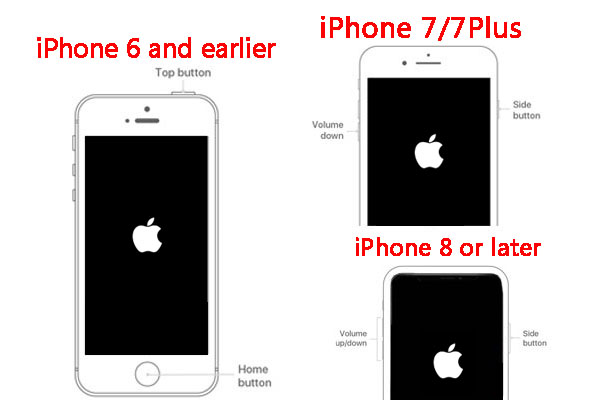
    If your iPhone is frozen and won’t turn on, you can do a force restart or hard reset to wake it up. Follow the simple steps below:

    On an iPhone 14/13/12/11/XR/XS/X/8/SE 2nd gen/SE 3rd gen:
    Press and quickly release the volume up button.
    Press and quickly release the volume down button.
    Press and hold the side button until the Apple logo appears.

    On an iPhone 7 or iPhone 7 Plus:
    Hold the Sleep/Wake button and the Volume down button at the same time.
    Release both buttons until the Apple logo appears on the screen.

    On an iPhone 6, 6s, 6s Plus, SE 1st gen:
    Press and hold the Home button and the Sleep/Wake button.
    When the Apple logo appears, release both buttons.

    hard reset iphone

    Way 2. Fix iPhone 11/12/13/14 Won’t Turn On or Is Frozen via iOS System Recovery (No Data Loss)

    Another safe and impressive method is to use a third-party iOS system recovery tool. With a third-party iOS system recovery software, you can repair most iOS system issues. Here we highly recommend the U.Fone iOS System Recovery.

    U.Fone iOS System Recovery is sophisticated yet professional program that can help to fix many minor software-related issues, including frozen iPhone, iPhone won’t turn on / off, iPhone keep restarting, or iPhone stuck in recovery mode, DFU mode, Apple logo, black/white/blue screen, etc.

    It has a simple and user-friendly interface. You can use it to fix iPhone 14/13/12/11 won’t turn on or is frozen issues without any data loss. Besides that, it also enables you to upgrade or downgrade your iPhone without jailbreak.

    Here are the specific steps to fix iPhone 14, 13, 12, 11 won’t turn on or is frozen with U.Fone – iOS System Recovery.

    Step 1. Download and Install Program
    Click the Download button below to get the program for computer. Once downloaded, install and start the program.

    d_win d_mac

    Step 2. Go to iOS System Recovery
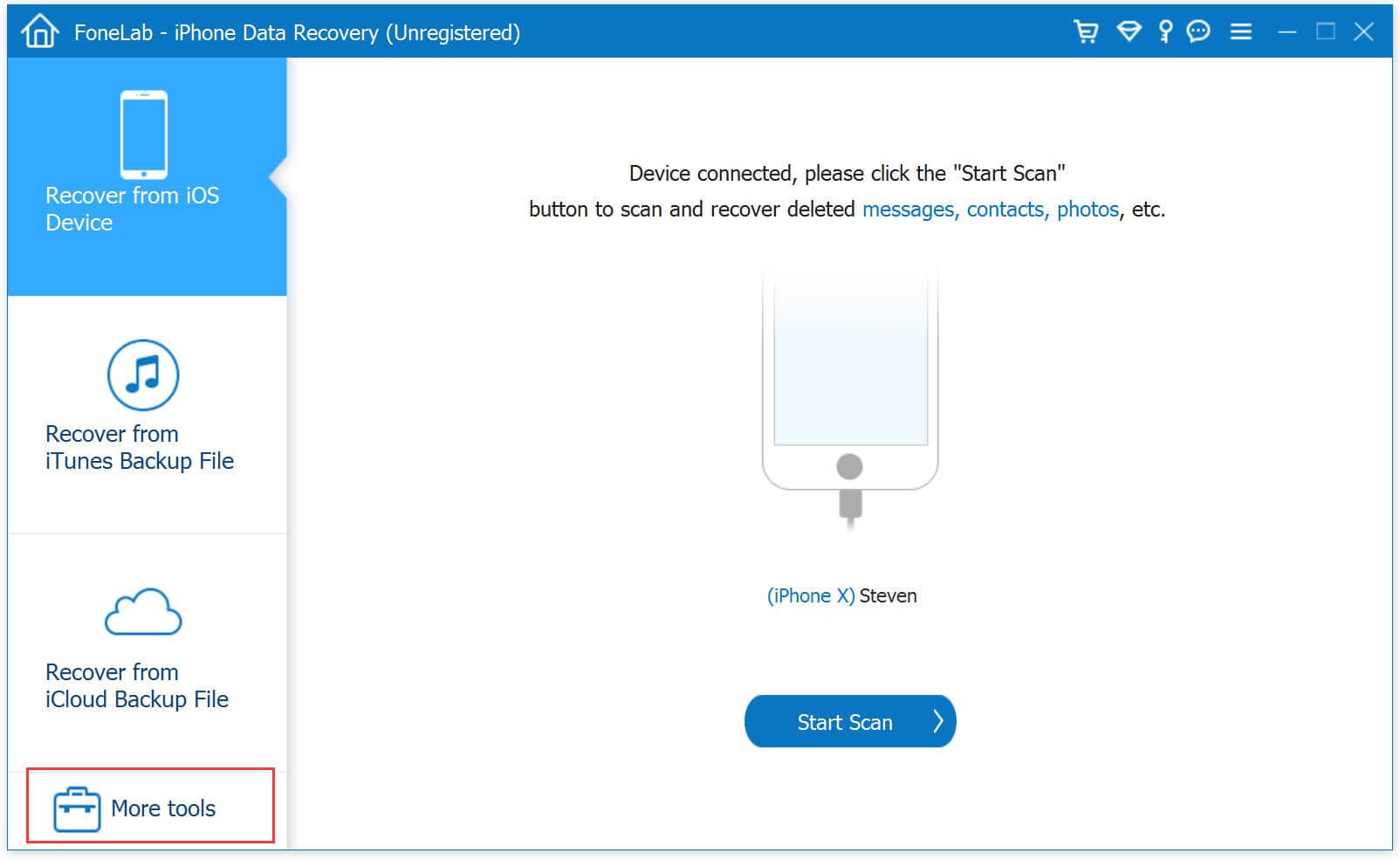
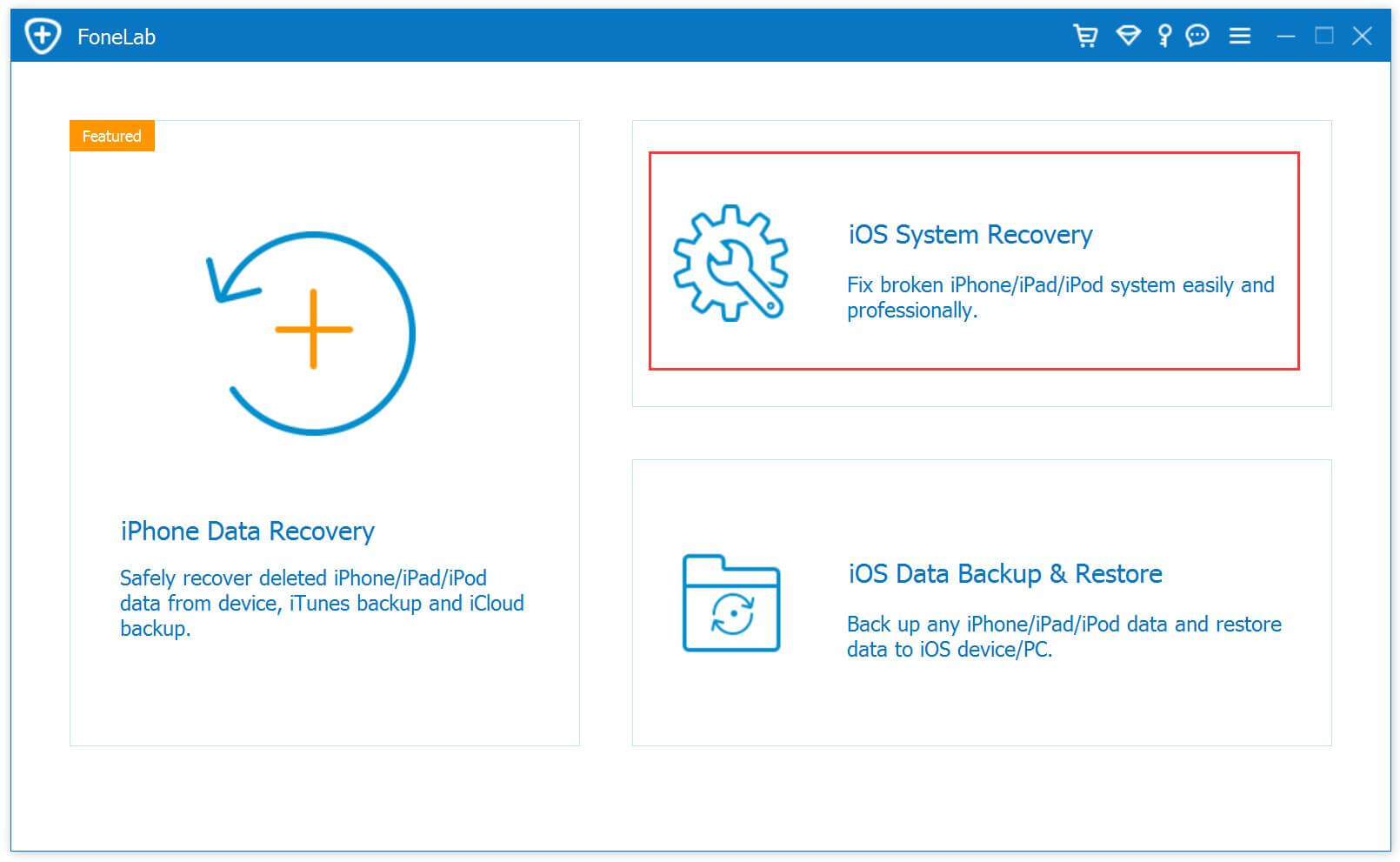
    On the main screen, click “More tools” in the left, and you’ll now get access to 3 functions.

    iOS System Recovery tool

    Click “iOS System Recovery” function.

    select iOS System Recovery

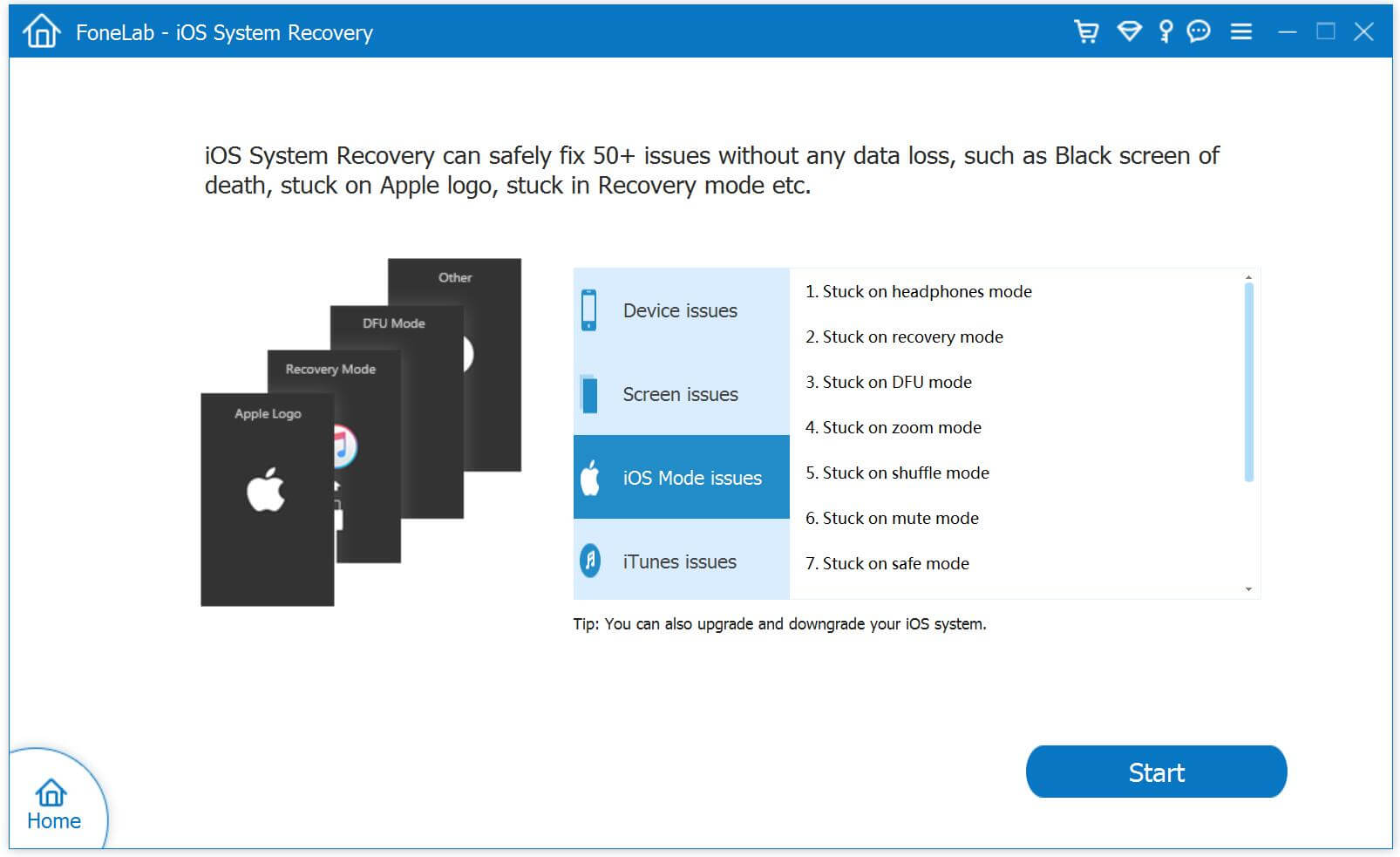
    As you can see, it can fix 50+ iOS system issues. Here choose “iOS Mode issues” and click “Start” button.

    select iOS Mode issues option

    Step 3. Connect iPhone 14/13/12/11 to Computer
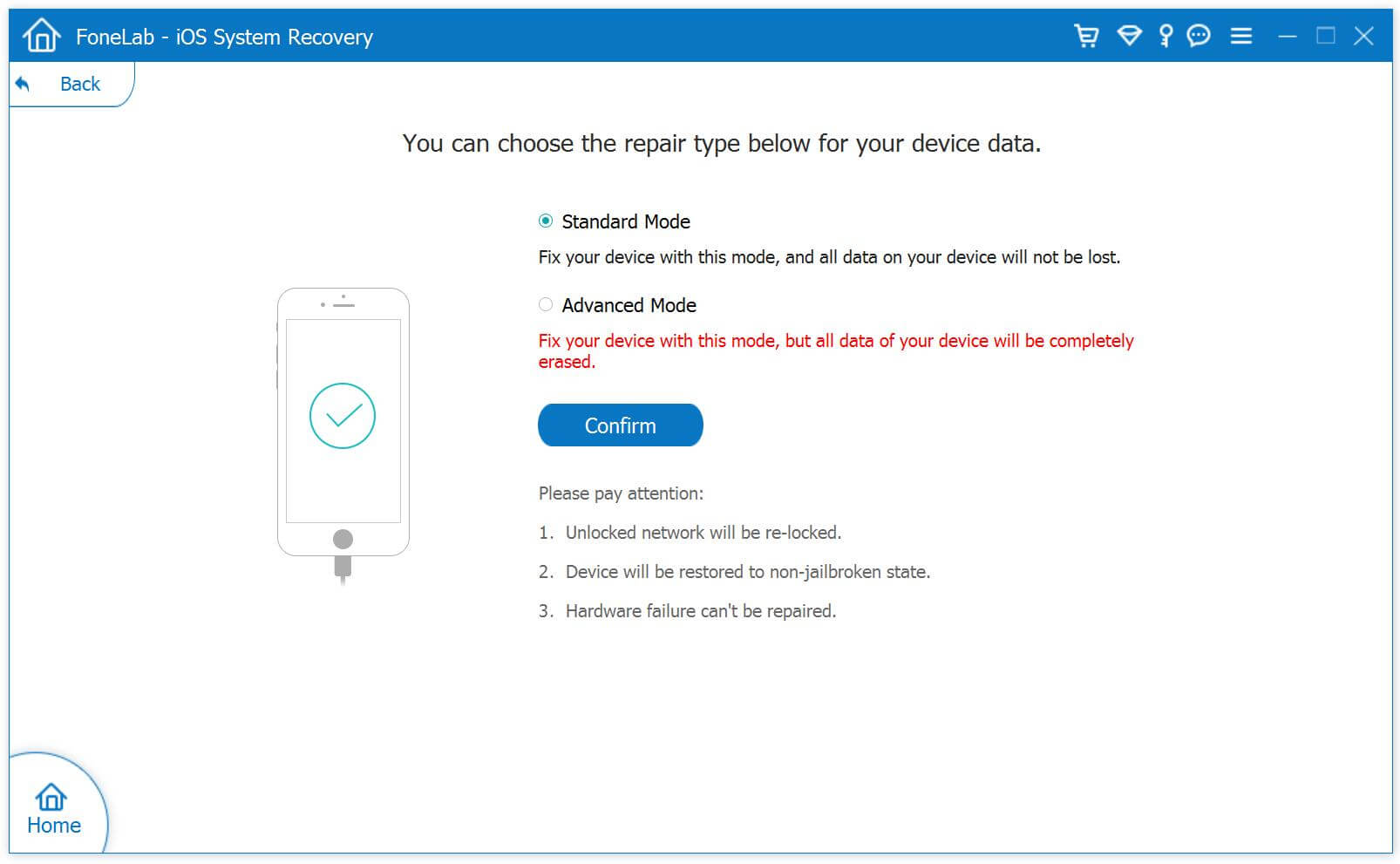
    Next, connect your iPhone 14/13/12/11 to computer using an Apple USB cable. It will detect your device and show you 2 repair types.

    select Standard Mode

    To fix iPhone is frozen and won’t turn on issue without data loss, you need to choose “Standard Mode”.

    Step 4. Optimize iOS System (Optional)
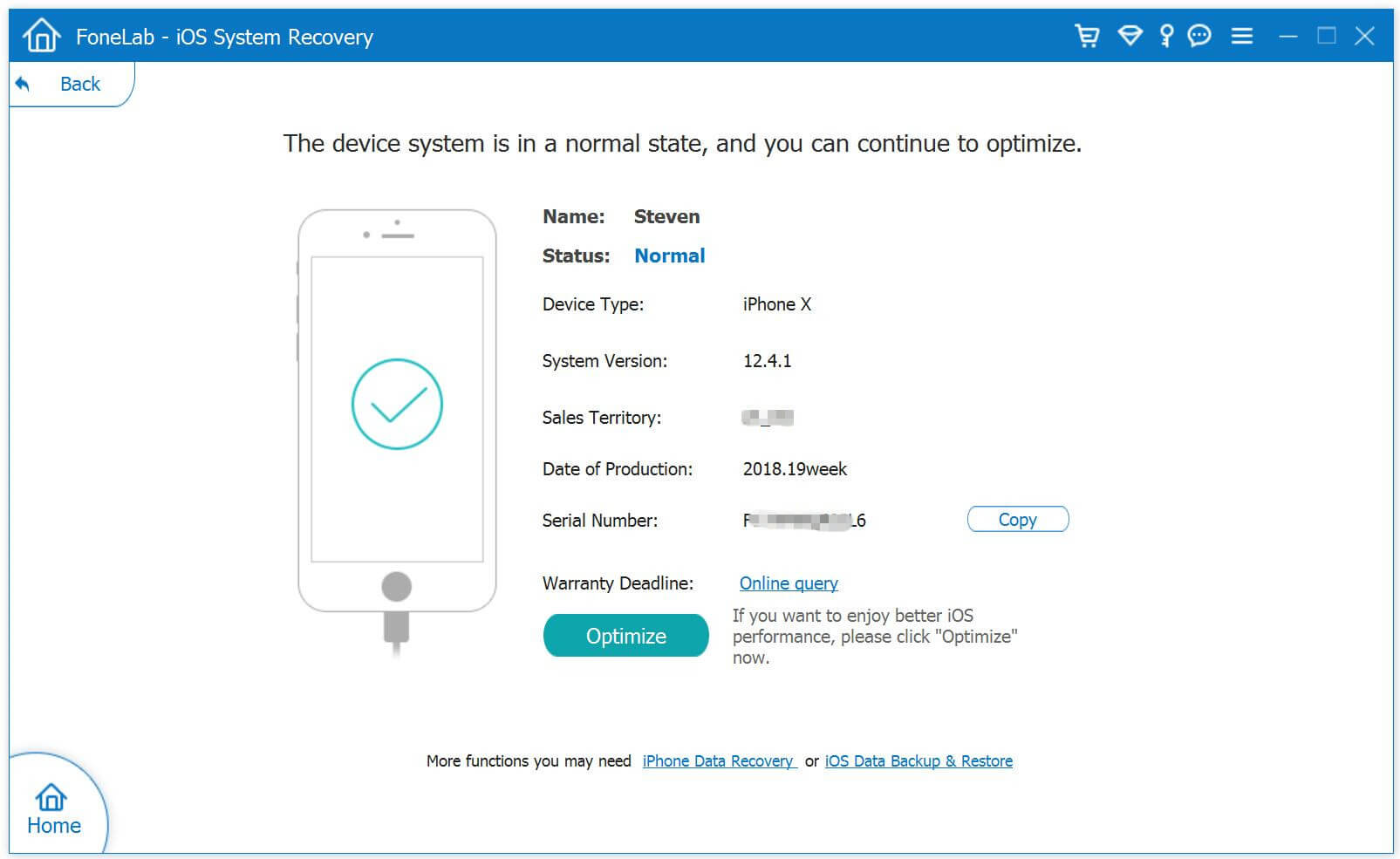
    As the picture shown below, it will detect and analyze your iOS device. In this step, you are able to optimize iOS System. You can click “Optimize” to update your iPhone, or just skip this step.

    Optimize iOS System

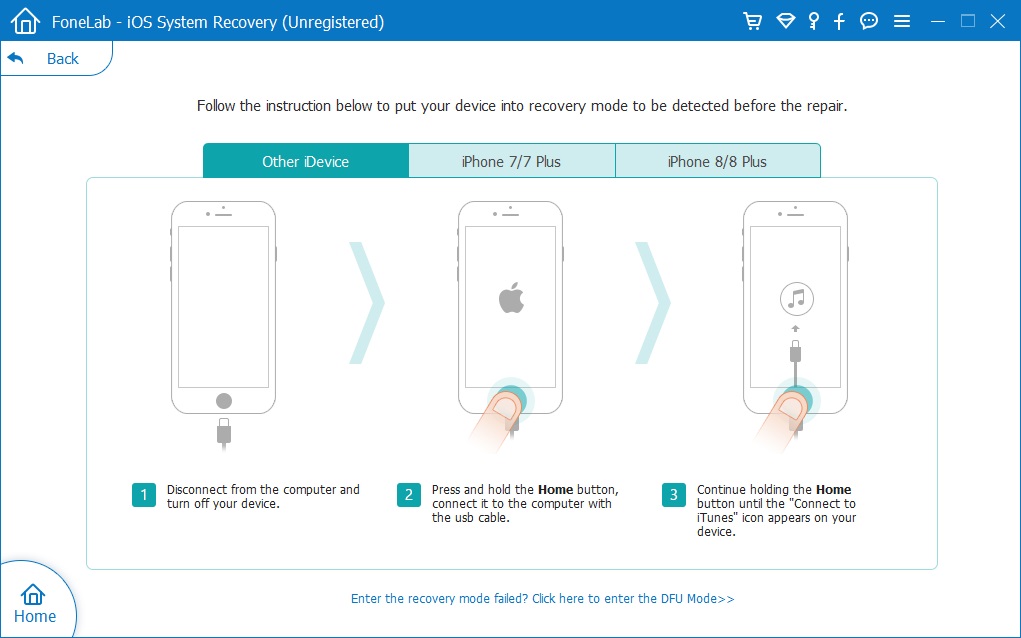
    Step 5. Enter Recovery Mode
    Then follow the on-screen instructions to put your iPhone 14/13/12/11 into recovery mode manually.

    enter recovery mode

    Step 6. Download Firmware Package
    It will then display the firmware package on the screen, select the one to match your iPhone.

    select Firmware package

    Click “Download” button to download the matched firmware package corresponding to your iPhone.

    Download Firmware package

    Step 7. Fix a Frozen iPhone or iPhone Won’t Turn On
    At last, click “Repair” button to repair iPhone 14/13/12/11 back to normal.

    fix iphone 14 won't turn on

    When finished, you can open your iPhone and enjoy all iOS features with ease.

    The Bottom Line

    Here are 2 effective ways to help you wake up your iPhone 14 won’t turn on or is frozen. You can do a hard reset or use an iOS system repair tool to fix a frozen or unresponsive iPhone 14, 13, 12, 11. Pick the one you like!

    d_win d_mac

    iPhone 14/13/12/11 Won’t Turn on or Frozen