All posts by DHZ

How to Recover Data from iPhone in Recovery Mode

“Hi,my iPhone 6S was suddenly get into the Recovery Mode when I connect it to computer via USB one day,then iTunes prompt me that restore the device to factory reset.However,I am afraid of doing it because I haven’t backup the contacts,photos and more other data on my iPhone.Are there any ways to restore my personal data from the iPhone which stuck in Recovery Mode?Please let me know ASAP.” – Sharon

Nowadays since iPhone play an important role in daily life that people like to use it to sent SMS,take photos,or many other personal actions.The panic is understandable when finding their device somehow stuck in recovery mode. If we can’t handle it properly, all precious content, like photos and messages will be erased.Here is the available way to fix your abnormal iPhone and restore data from iPhone which stuck in recovery mode.They also work for iPad and iPod.

Part 1: Fix iPhone in Recovery Mode without Data Loss

Now here is a software that our strongly recommend for you-iOS System & Data Recovery, that claims to fix iPhone stuck in recovery mode without losing data and return it to normal state when this happens.More importantly,this software help to fix several iPhone system abnormal situations,such as iPhone stuck in Apple logo,iPhone stuck at “connect to iTunes” screen,iPhone stuck in DFU mode,etc,.

Focus on the Features of iOS System & Data Recovery:
-Fix with various iOS system issues like Recovery Mode, white Apple logo, black screen, looping on start, etc,.
-Restore iPhone system to normal state without data loss.
-Work for all models of iPhone, iPad and iPod touch.
-Fully compatible with Windows 10 or Mac 10.11, iOS 10 or lower.

d_win d_mac

Step 1.Run Program and Select iOS System Recovery Option
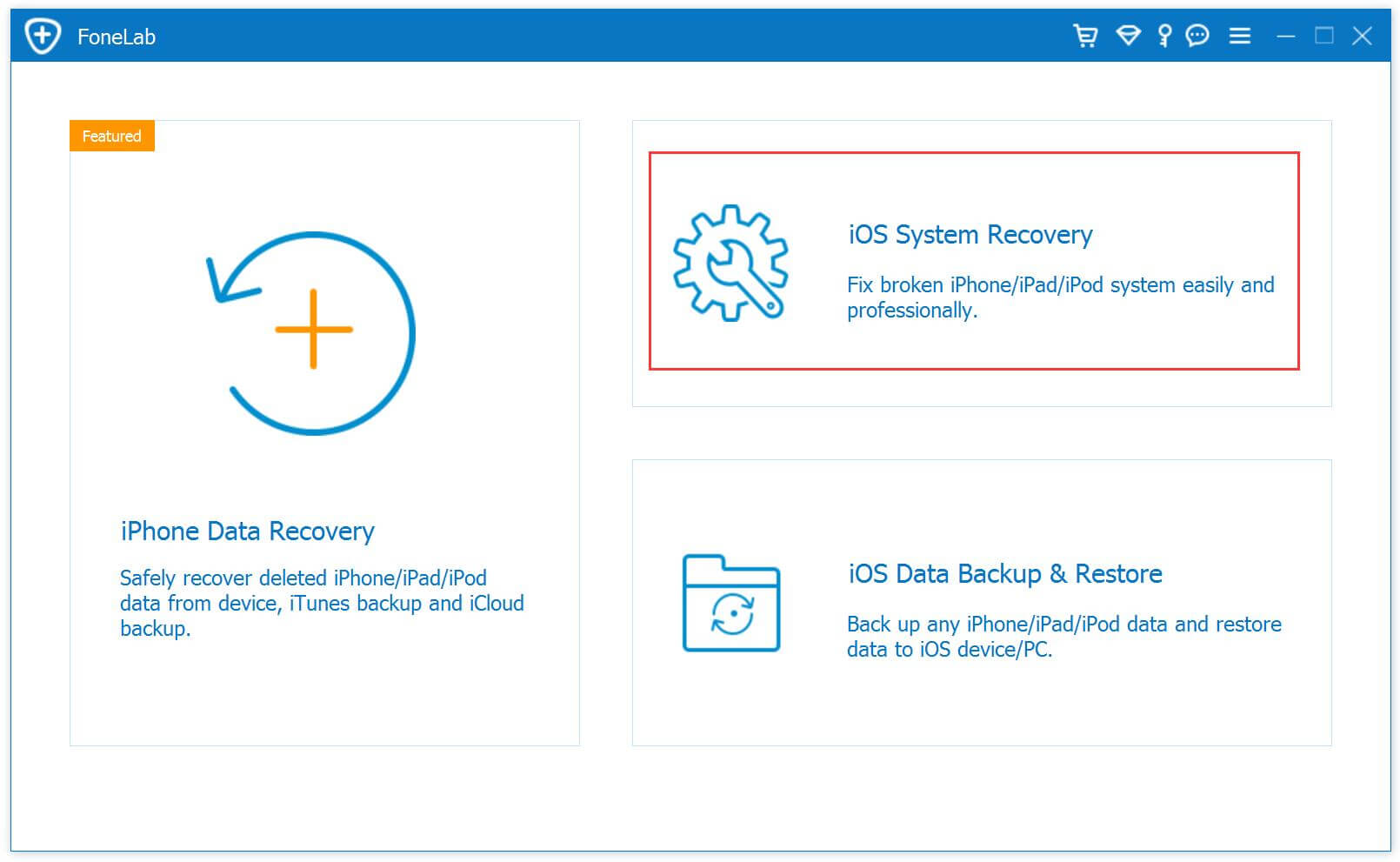
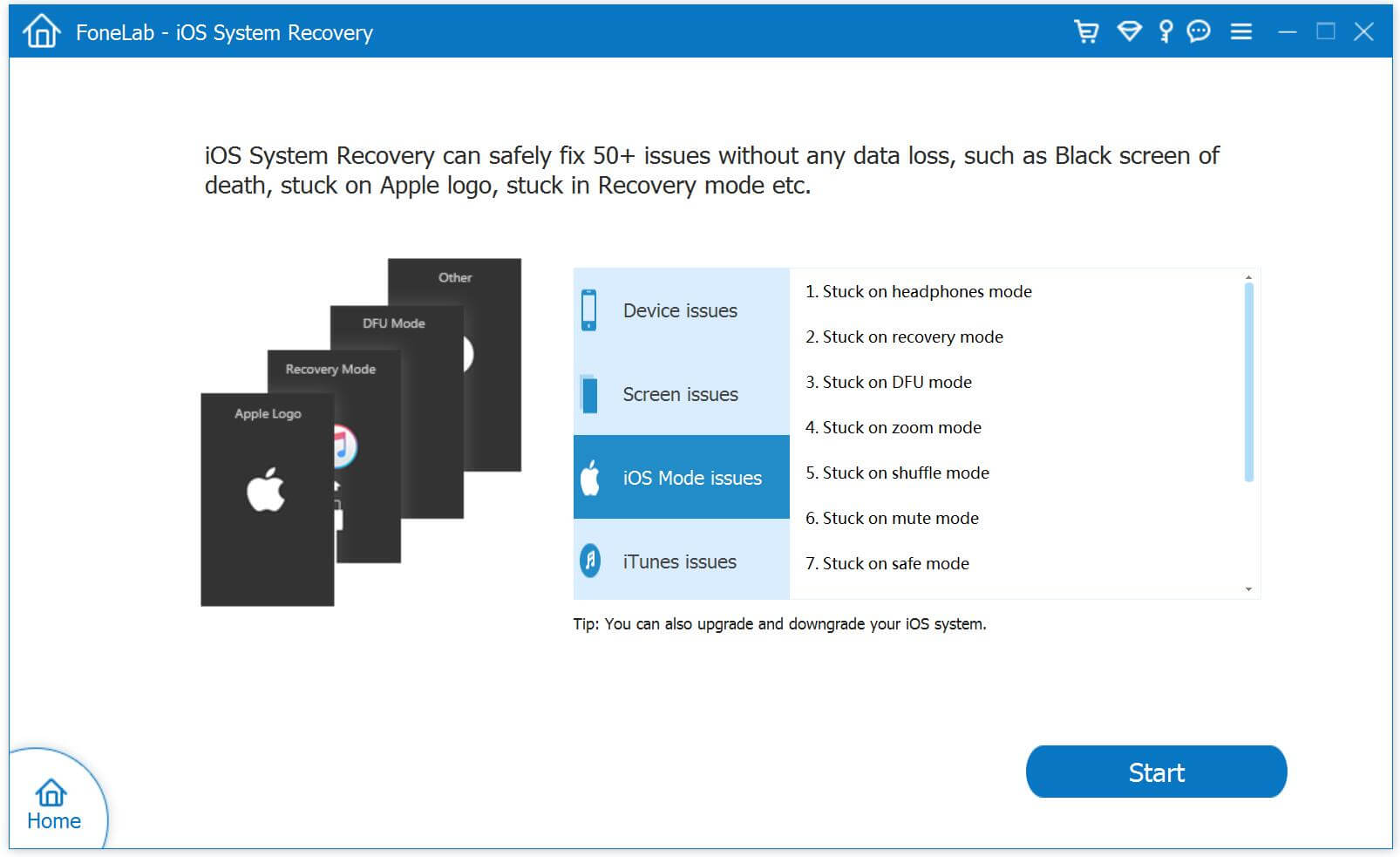
Launch iOS System & Data Recovery and click on the “iOS System Recovery” tab from “More Tools” on the software interface. Connect your iPhone to computer via USB cable. The software should detect your iPhone soon. Click “Start” to initiate the process.

iOS System Recovery

fix iphone stuck in recovery mode

Step 2.Download and Select Firmware for iPhone
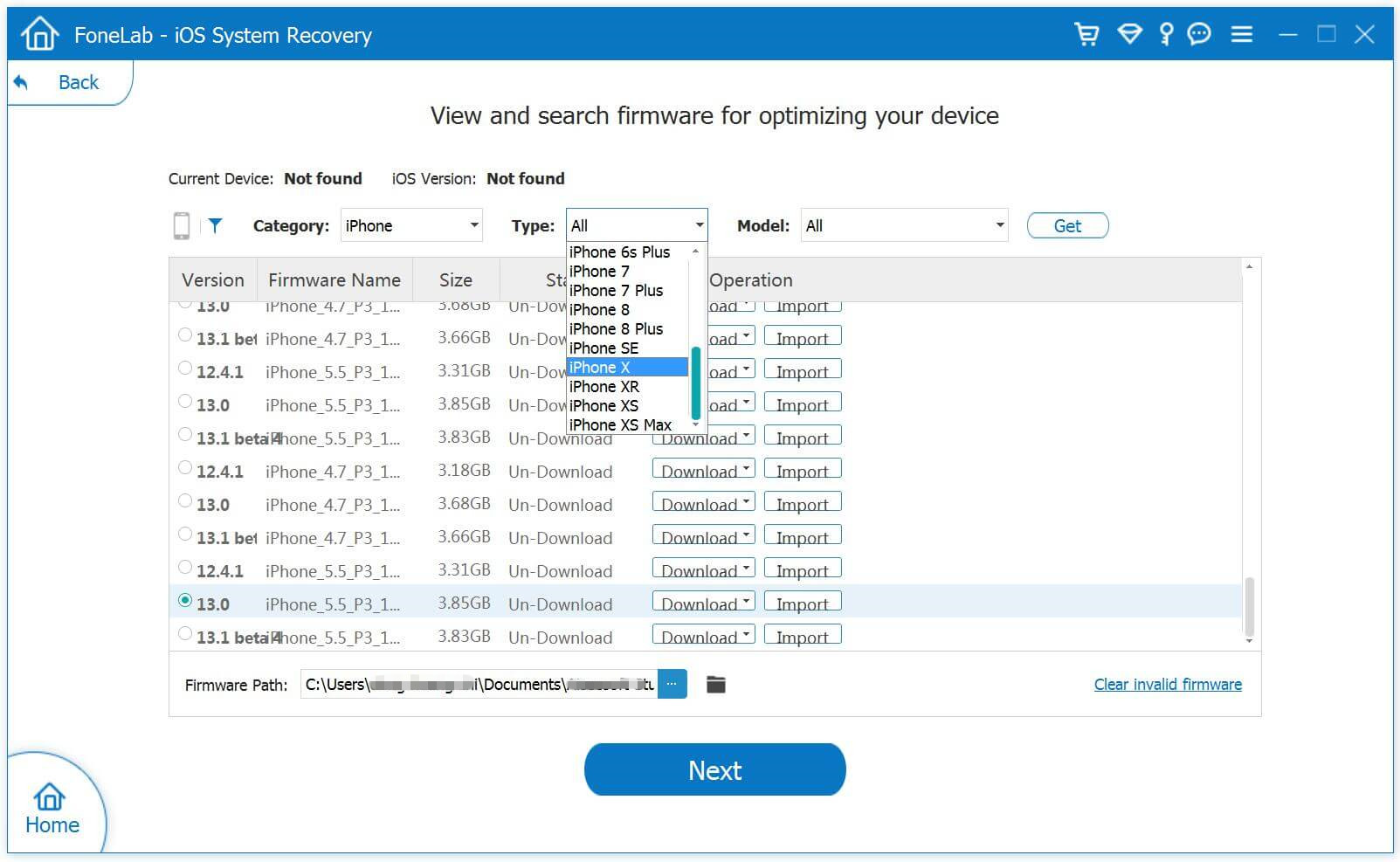
You will need to download the right firmware for your iPhone to fix the device.iOS System & Data Recovery should be able to recognize the model of your iPhone, suggest which iOS version that is best for your iPhone for you to download.

select your iPhone model

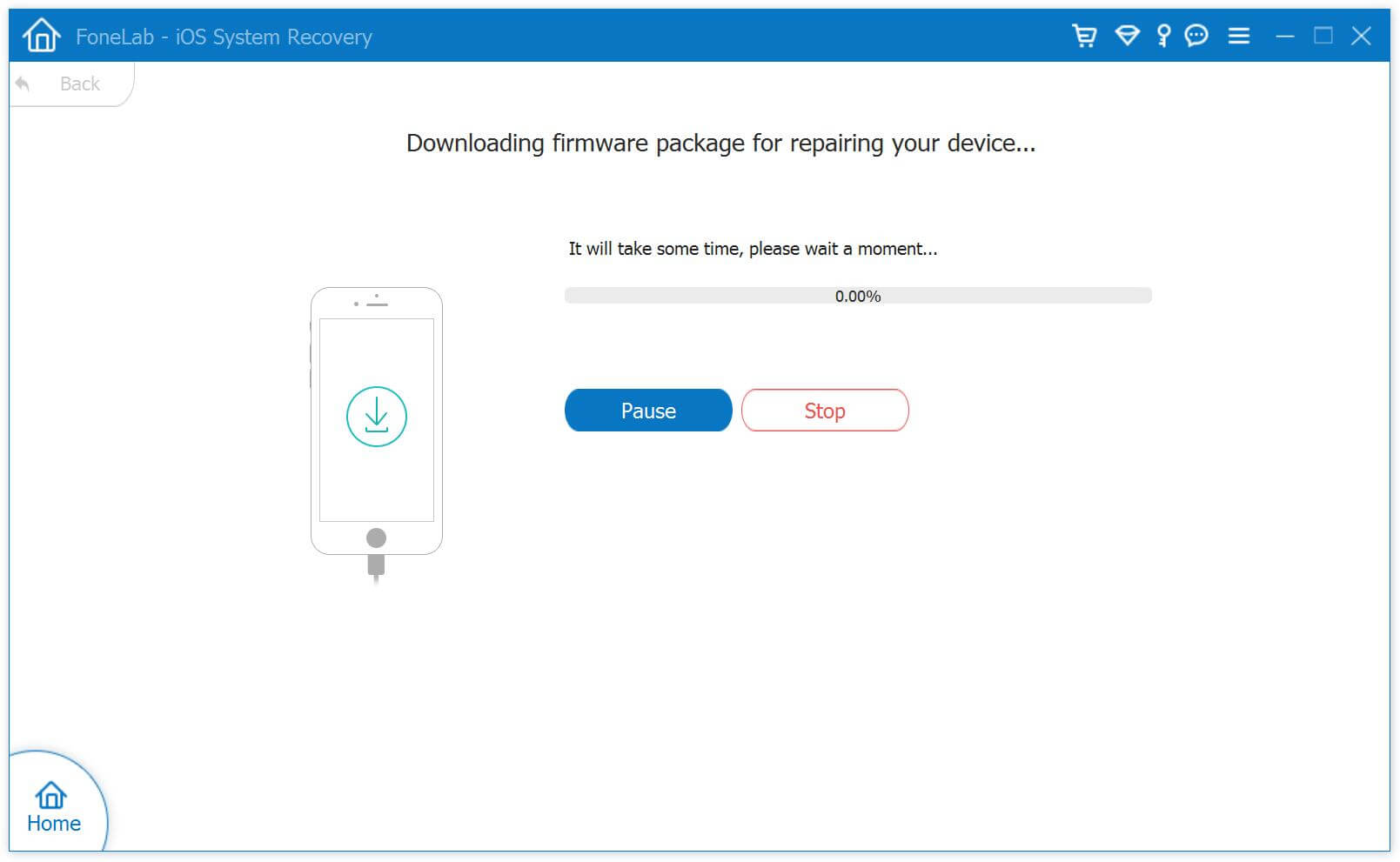
Click on “Download” and wait until the software finishes downloading and installing it to your iPhone.

download the firmware for iPhone

Step 3.Fix your iPhone Stuck in Recovery Mode
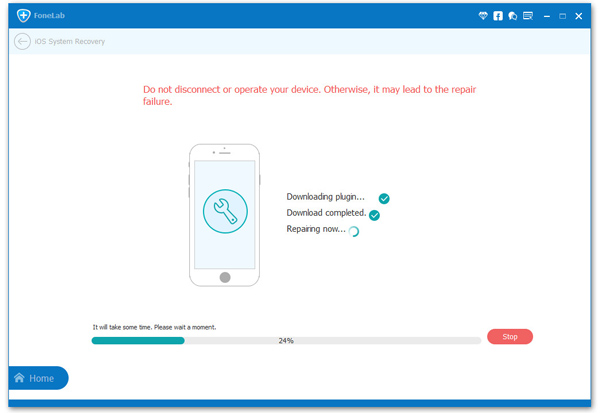
Once download is complete, the software will continue to repair your iPhone, get it out of Recovery Mode. It should take a few minutes. The software will restart you iPhone to normal mode.

fix iphone stuck in recovery mode

d_win d_mac

Part 2: Restore Data from iPhone which Stuck in Recovery Mode

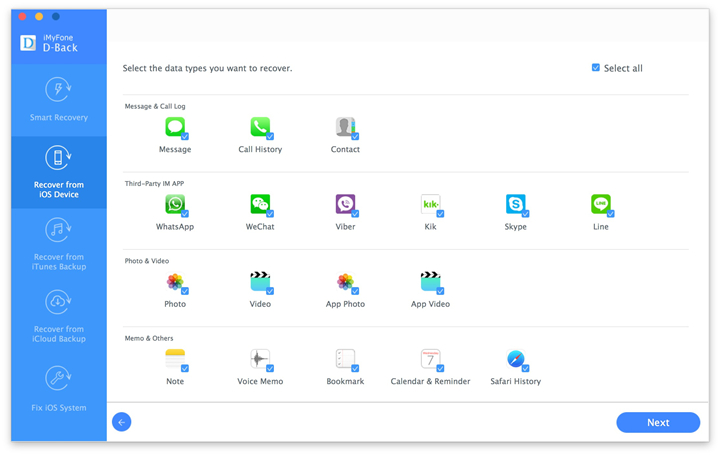
The best solution that help to restore data from your iPhone which stuck in recovery mode is using iPhone Data Recovery.With this wonderful software,you are able to restore data from iPhone which stuck in recovery mode,such as contacts,messages,photos,videos,call logs,notes,calendars,WhatsApp messages & attachments,etc,.

What’s More about iOS System & Data Recovery Feature You should Know:
-Recover data from iPhone in Recovery Mode fastly and easily.
-Recover photos, videos, contacts, messages, notes, call logs, and more types of data.
-Recover data from iPhone which get into different stuck:iPhone stuck in Apple logo,iPhone stuck at “connect to iTunes” screen,iPhone stuck in DFU mode,so on.
-Compatible with latest iOS devices.
-Preview and selectively recover what you want from iPhone stuck in Recovery Mode.

d_win d_mac

Step 1.Run Software and Connect iPhone with Computer
Launch the software on your computer.Connect your iPhone to your Mac or PC with an USB cable. It should be able to automatically detect your iPhone and have the “Recover from iOS Device” tab active in the window.

scan data on iphone

Tips: Before running iOS System & Data Recovery, you are supposed to download the latest version of iTunes. To avoid the automatically sync, don’t launch iTunes when running iOS System & Data Recovery.

Step 2.Scan iPhone Data
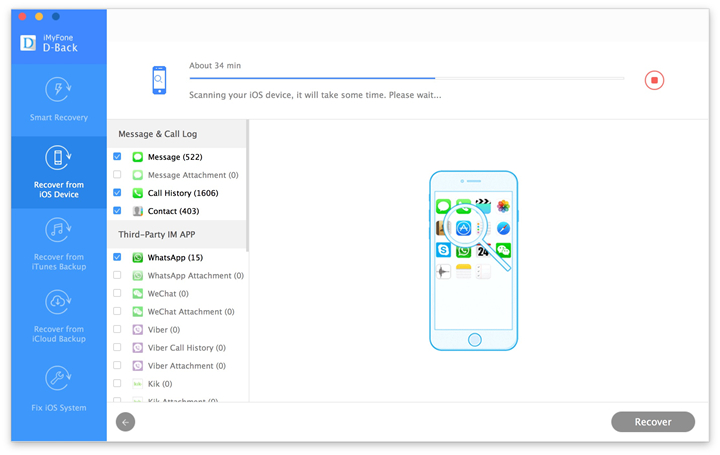
Click on the “Start Scan” button to start scanning your iPhone for lost/deleted or existing data. The software will take several minutes to complete. While it is end, you will be able to see retrievable data in a list. If you found a specific data that you want during this process, just click “Pause” to stop the process.

restore data from iphone stuck in recovery mode

Step 3.Preview and Recover Data from iPhone in Recovery Mode
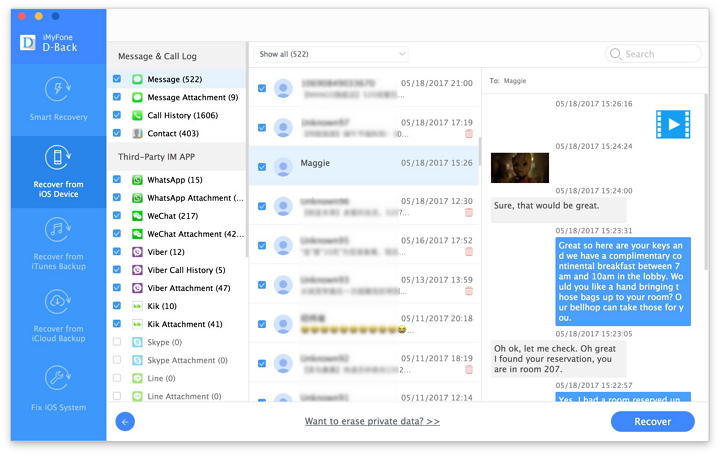
You should be able to see a list of retrievable items after the software has finished scanning your iPhone.There are several filter options to help you find data that you want. To have a look at what each file contains, click on the file name to see what it is.

restore data from iphone stuck in recovery mode

Once you have identified the data that you want to recover, check on the boxes next to the filenames. After selecting all that you need, click the “Recover” button. To recover it directly to your iPhone, click on “Restore to device” and if you’d like to recover them to your computer, you can just click on “Export to PC”.

d_win d_mac

Related Articles:

How to Restore iPhone System to Normal after iOS 10 Update

How to Enter & Exit iPhone Recovery Mode

How to Restore iPhone System to Normal

How to Get iPhone 7/SE/6S/6/5S/5 out of Recovery Mode

How to Manage iPhone on the Computer

Restore iPhone Data in Recovery Mode

iOS Data Recovery

Recover Your iPhone iPad Lost Data
Now, Even without Backups

Compatible with iOS 11 & iPhone X/8 (Plus)

Recover Lost Data Now

How to Recover Call Logs from Broken Android

“Help!My Samsung phone was broken,it suddenly powered off automatically for no reason just right now,when I powered it on again,the call logs on it was gone.OMG,I forgot to save my business client phone number which was in the call logs.If I miss this client it will lead to a great loss on my business.How can I get back the deleted call logs from my broken Android?Thanks advance!”-Tracy

Android devices play an important role in our daily life, for instance, the photos, videos, messages, contacts, call logs,of course all of these are of great significance to our intimate social communication. However, we always encounter some unexpected occasions, such as call logs are deleted from the broken Android device, especially those for business purpose. We may feel depressed for fear that it may make us miss important commercial opportunity and ignite the unnecessary troubles for us.However,it no doubt that there are still chance to restore the deleted call logs or other personal data from the broken Android device.Just read the passages following,we will give you the best solution to rescue your data on broken Android.

Recover Deleted Call Logs on Broken Android

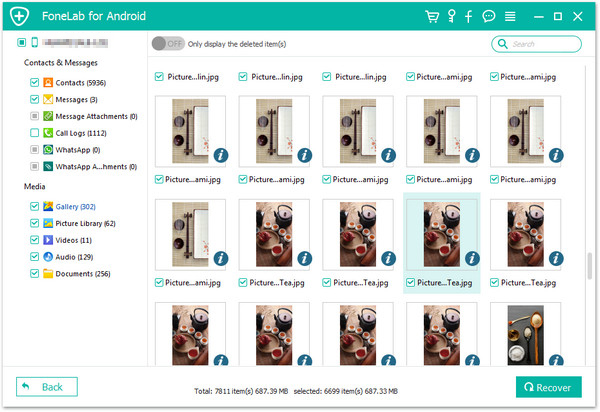
Fortunately,a powerful data recovery program: Broken Android Data Recovery, which can help you restore deleted call logs from broken Android easily in a simply way.Android Broken Data Recovery support to recover data from broken Android device,including call logs,photos, videos, contacts, messages, audio,WhatsApp messages & attachments and documents.Broken Android Data Recovery is applicable for various of broken Android device,such as water damaged Android,broken screen Android,black screen Android,or other broken circumstances of Android.

d_win d_mac

How to Retrieve Deleted Call Logs from Broken Android

Step 1.Run Broken Android Data Recovery on PC or Mac
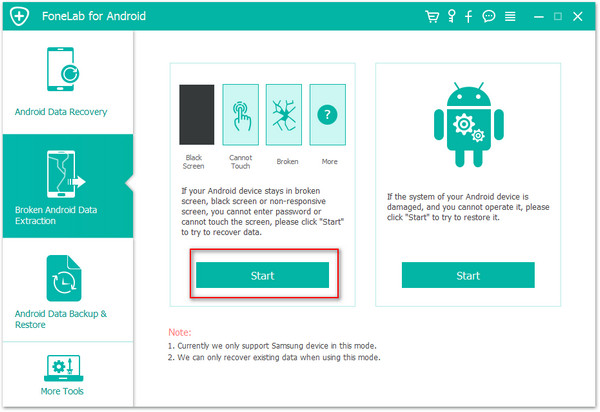
After downloading,launch the program on your computer.Then, choose “Broken Android Data Extraction” in the homepage of the program.

connect-broken-android-to-pc

Step 2.Select the File Types to Restore from Broken Android
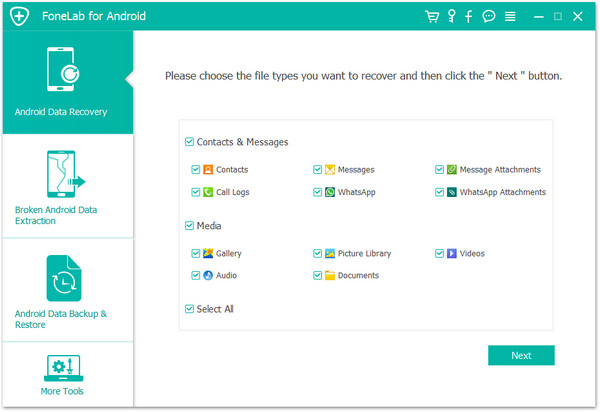
You’ll be taken to a screen with all kinds of supported file types that you can recover from your broken device.Select the type of files you want to recover. “Select All” is tick by default.Then, click the “Next” button.For call logs recovery,click “Call History”.

scan-data-broken-android

Step 3.Choose a Phone Fault Type
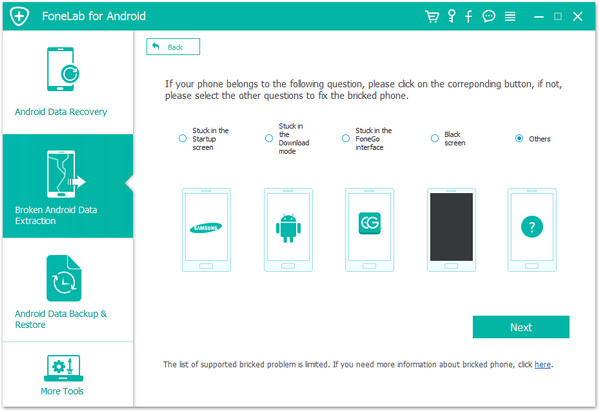
In this step,you should select a phone fault type. Select the option at the left or right side which depend on your Android.

Choose-android-Broken-Types

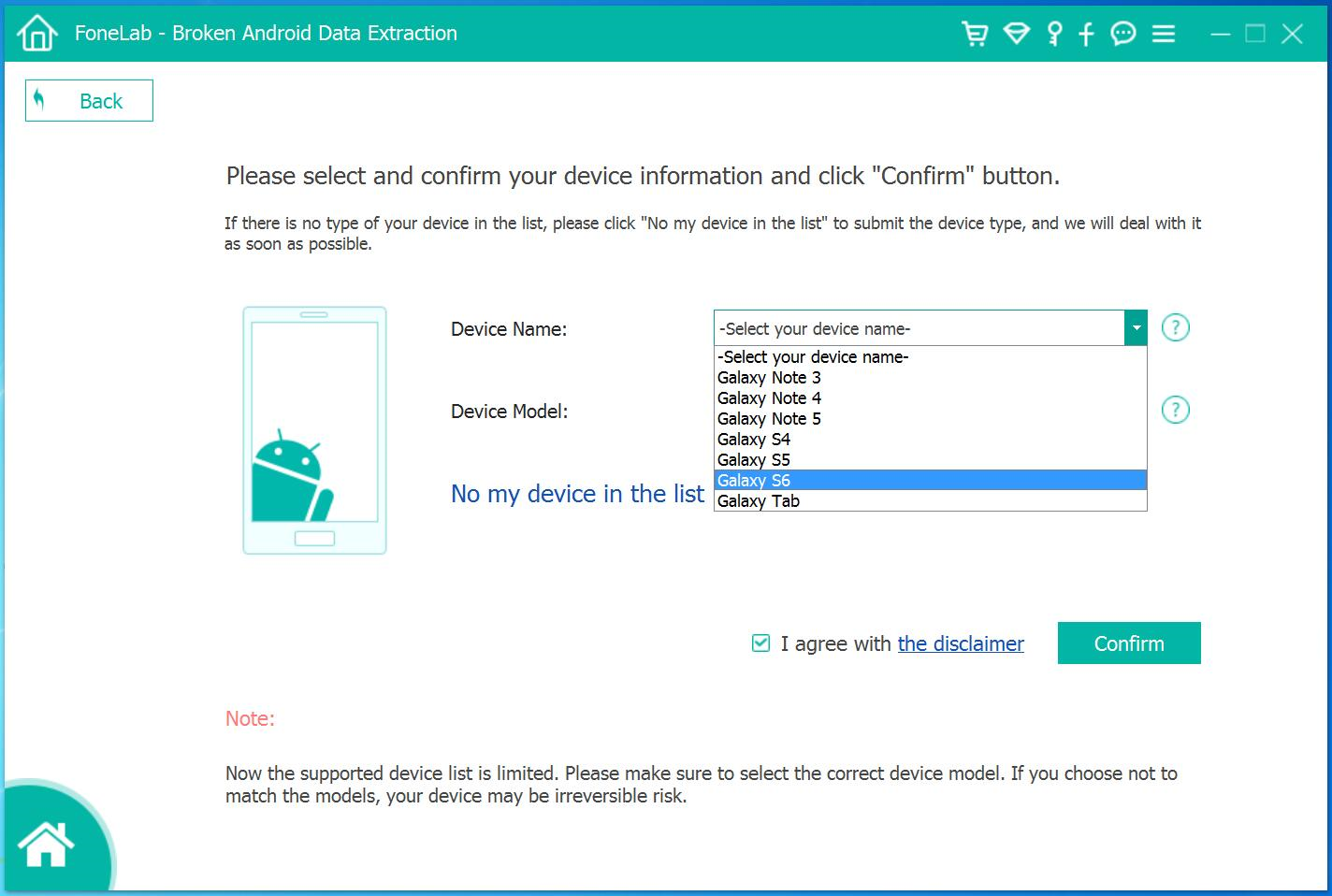
Step 4.Select the Model of your Android
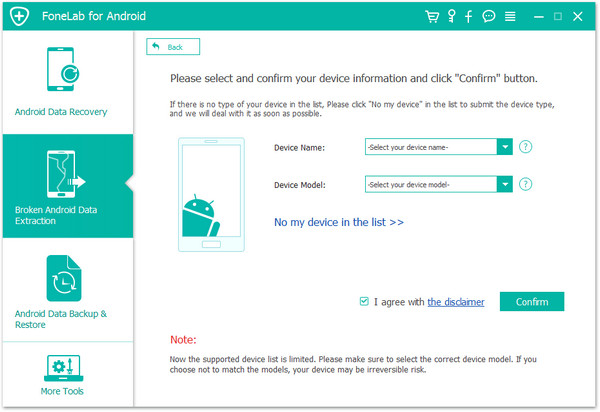
Please select your device’s name and model.If you are not sure of the mobile phone model you own, hit the “How to confirm the device model” to check it.

select-broken-android-model

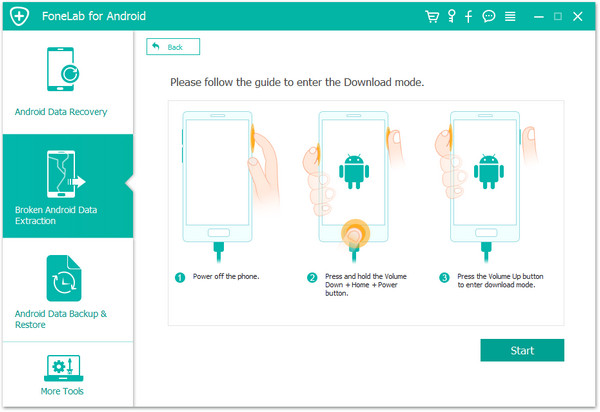
Step 5.Enter Broken Android into Download Mode
After you choose the phone name and model, you will be asked to get your Android device into the Download Mode.Just follow the three steps displayed on the window to finish it.

Tips:You should connect your Android device with computer once entering Android into download mode.

enter-download-mode-broken-android

Note:After you finished the steps of the guide above and hit the “Start” button, the countdown will display on the phone screen in the program to tell you the process status.

Step 6.Analyze Data on Broken Android
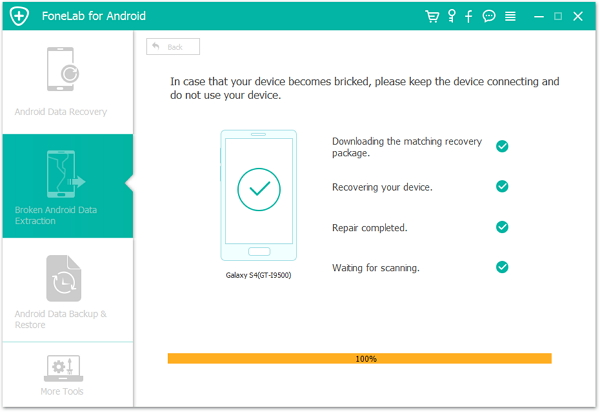
Once entering into download mode for Android,the program will download recovery package your broken Android.

download recovery package for broken android

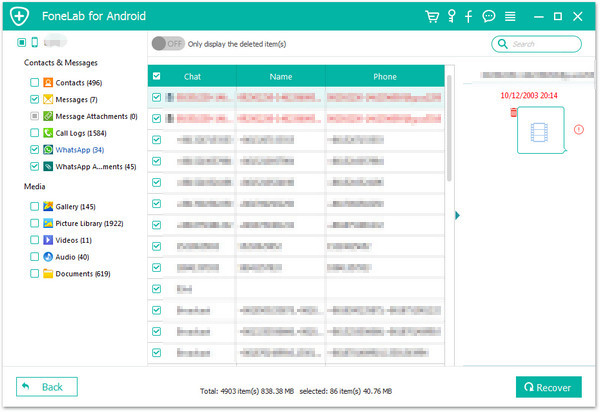
Step 7.Restore Deleted Call Logs from Broken Android
Upcoming screen shows all files recoverable from the broken device.Preview them one by one and mark down those you need.At last,click “Recover” to save the selected data on your computer.

recover-call-logs-broken-android

d_win d_mac

Related Article:

How to Recover Data from Broken Android

How to Restore Photos from Broken Android

How to Recover Data from Broken Screen Android

How to Recover Data from Black Screen Android

How to Recover Documents from Broken Android

“Yesterday I was slipped my Android phone to the ground carelessly when I was taking something in the supermarket.Now this phone is power off and it still nothing at all when I try to power it on.Now the most urgent matters is that extract my data from this broken Android,the contacts,SMS,documents.Any ways suggestions?”-Cathy

Are you familiar with Android broken data recovery? In the eventuality that when your Android device get broken like Samsung Galaxy slipped to the ground and the phone screen was unfortunately broken, or you cannot unlock your phone for the malfunction of touch screen. What are you going to do next? Let it alone and abandon all your memories like photos, videos, as well as contacts and messages,even the documents? Or find the available way to extract/retrieve data from the broken Android? If I were you, I would definitely choose the later since the personal data are priceless. Nevertheless, how to recover data/documents from broken Android device with easy steps?

Recover Documents on Broken Android

Broken Android Data Recovery can help to complete the broken Android data recovery effectively,enable to extract and restore documents from broken Android completely.For example the broken screen Android,black screen Android,water damaged Android.Not only documents,but also the contacts,messaging,photos,videos,audio,WhatsApp messages & attachments,call logs,are supported.In addition,Broken Android Data Recovery allow to recover data from Android device after losing data due to accidental deletion, device formatting, restoring to factory settings, rooting, system error or virus invasion,etc,.More importantly, it is compatible with almost all Android smartphones and tablets brands, such as Samsung, HTC, Motorola, Sony, Google, LG ,Huawei and so on.

d_win d_mac

How to Restore Documents from Broken Android

Step 1.Run Broken Android Data Recovery
Firstly,you need to download and launch Broken Android Data Recovery on PC and you will see the option”Broken Android Data Recovery“,then connect the broken Android to computer with USB cable,and click “scan it” button.

connect broken android to pc

Step 2.Select the File Types to Restore
Now you should select the files you need to recover from broken Android.Including all file of recovery option from Android(Contacts,Call History,Gallery,Messaging,etc,).

scan broken android

Step 3.Select the Fault Type of Broken Android Phone
Before recovering your broken Android phone,there are two options to choose from the system- “touch cannot to used or cannot enter the system” as well as “Black screen (or the screen is broken)”.You need to choose the appropriate one depends on your phone.

choose broken types

Step 4.Select the Model of Your Phone
Select the proper version of the Android as well as the exact model you are using.

select device model

Step 5.Enter Download Mode on Android
· Hold the Power key to power off the Phone
· You next have to press the volume down key,the Power key as well as the Home key at the same time
· Next up leave all the keys and press the volume up key to enter the download mode of the phone

broken android download mode

Step 6.Analysis of the Broken Android Phone
You should connect your Android to computer again and the Broken Android Data Recovery will automatically detect it.

After entered the “Download mode”, the program will start to download “recovery package” for it,it will take you a few minutes,please wait patiently.

When the downloading is end,the selected data from broken Android will be list.

scanning data broken android

Step 7.Preview and Recover Documents from Broken Android
You are allow to preview all deleted/lost or existing data before recover them on Android,Including the detailed messages,photos,videos and more types of files.Then just click “Recover”Option to complete the data recovery process.

recover documents broken android

d_win d_mac

Related Article:

How to Recover Data from Broken Android

How to Recover Photos from Broken Android

How to Recover Data from Water Damaged Android

How to Recover Lost Data from Broken Samsung Galaxy

How to Backup and Reset iPhone 6S before Recalling

Summary:If your iPhone 6S suddenly power off itself,you can recall it to the Apple store,before the recalling,you should backup and remove all your data on your device.This article is showing you the best way to backup and erase data and setting from iPhone 6S without restoring before recalling.

News about Recalling iPhone 6S
It seems Apple has run into its own smartphone battery troubles. Days after the company launched an iPhone 6 Plus repair program for units impacted by so-called “touch disease” faults, a new initiative activated on Sunday seeks to replace a batch of iPhone 6S batteries causing unexpected device shutdowns.

iphone-6s-recall

Apple has promised to replace the batteries in what it says are “a very small number” of iPhone 6S handsets that have suffered sudden shutdowns.Over the weekend, the company confirmed rumours coming out of China that some customers were seeing their phones unceremoniously switch off.Unlike the battery problems with the Samsung Galaxy Note 7, which saw some handsets unexpectedly go up in flames, Apple has insisted that its iPhone 6S recall doesn’t represent “a safety issue.”

Part 1:How to Backup Data for iPhone 6S before Recalling

The iPhone 6S gain the highly evaluation from Apple users.However,lately iPhone 6S has finally revealed details about its battery recall.As previously reported, all customers are entitled to a replacement, repair or refund.If you plan to recall the iPhone 6S or buy an new iPhone 7,I remind you do remember to backup data for your device.There are several options available for backing your iPhone 6S data.

iOS Backup & Restore Tool,which is an useful data manage tool here we strongly recommend for you,which permits to backup data from iPhone 6S to computer safely,as well as restore data from backup files on iPhone directly.This predominate data manage program is helpful for backup and restore various files on iPhone,including contacts,SMS,photos,videos,notes,call logs,calendars,apps,WhatsApp & attachments and other personal documents.It offers full support for iPhone 7, iPhone 6,iPhone 6S,iPhone SE/5S/5C/5,iPhone 4S/4 and iPad,iPod.It works with all iOS versions, including iOS 10 or lower.

d_win d_mac

Step 1.Run the Program on Computer and Connect iPhone to Computer
After launching iOS Backup & Restore Tool on computer,click on “More Tools”option in main page of this program,select “Device Data Backup & Export”option from the tool list.Then use the USB cable to connect your iPhone to computer.By default,iOS Backup & Restore Tool will automatically detect your iPhone soon.

iPhone data backup and restore

Note:If you have used iOS Backup & Restore Tool to backup your device before,you can click on “To view the previous backup file” to view the previous backup files list.

Step 2.Select File Types to Backup from iPhone
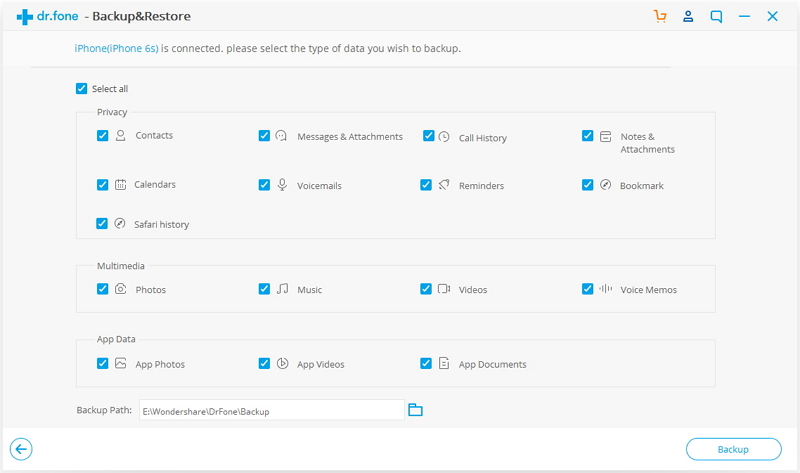
Once your iPhone is connected successfully,iOS Backup & Restore Tool will detect the file types on your device automatically.Then program will display all the supported data,like Photos & Videos, Messages & Call Logs, Contacts, Memos and other data.You can select the file types to backup.One or more are allows.Then click on “Backup”button.

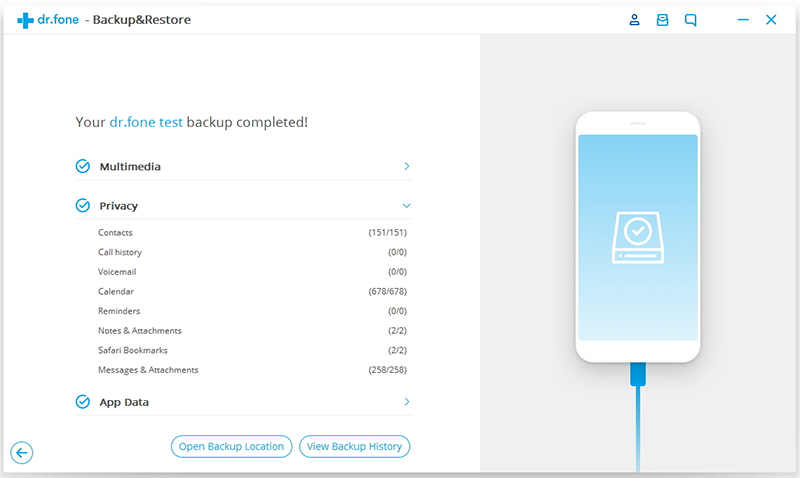
backup iPhone data to computer

It only will take a few minutes on the whole backup process,depending on the data storage on your iPhone.

backup files from iPhone to pc

d_win d_mac

Part 2:How to Perform Factory Reset on iPhone 6S before Recalling

Before recalling the iPhone 6S,you may need to perform the factory reset on your device,in order to wipe the personal files and settings on it.Now we are going to show you how to complete the factory reset on iPhone 6S before recalling.

Step 1: Backup iPhone data  first.

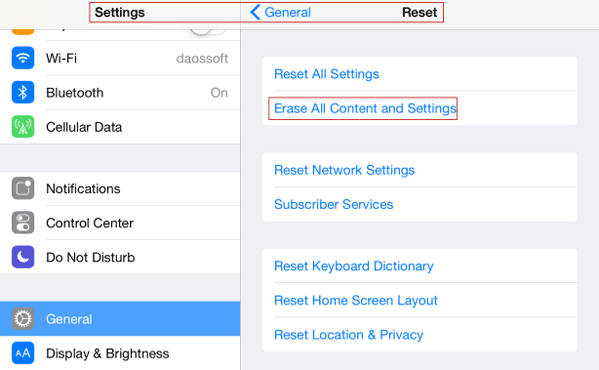
Step 2: Navigate to Settings – General – Reset – Erase All Contents and Settings.

erase-iphone-contents-in-iphone-settings

Step 3: Type passcode in pop-up dialog.

Step 4: Continue and follow prompt message to delete all data and settings on iPhone.

Part 3:How to Delete All Data and Settings on iPhone 6S Permanently before Recalling

As you know,perform the factory reset on iPhone 6S which can’t remove the data and settings permanently,the deleted data can be restored by some professional data recovery.If you are worry about exposing your privacy to someone,you should better erase your data from iPhone 6S via the iOS Data Eraser before recalling.

iOS Data Eraser is the most professional tools that allows you to 1 Click ultimate privacy protection in order to prevent identity theft when disposing of your iOS devices,for example recalling your iPhone 6S.With the help of iOS Data Eraser, you are allow to delete all data and setting from iPhone 6S without restoring, includes contacts, messages, photos, apps, account info, videos, passwords and other personal data stored on your iDevices and ensure that 100% nothing recoverable even if use the third party data recovery tool.

Features of iOS Data Eraser:
* Erase all data from iPhone/iPad/iPod, including text messages, contacts, videos, photos, account info, password, etc;
* 3 levels of data erasing for your choice and your can choose to overwrite the existing data with random files.
* Works with all iPhone, iPad and iPod series, including Jailbroken iPhone and carrier-locked iPhone.
* Protect your personal information by removing it permanently and preventing them from being recoverable.

d_win d_mac

Step 1.Install iOS Data Eraser software

Download the program from below download link and double-click the file to begin installation process. After that, the software will be opened automatically and a shortcut will display on computer desktop.

erase iPhone data

Step 2. Connect iPhone to Computer and Select Right Earsing Option

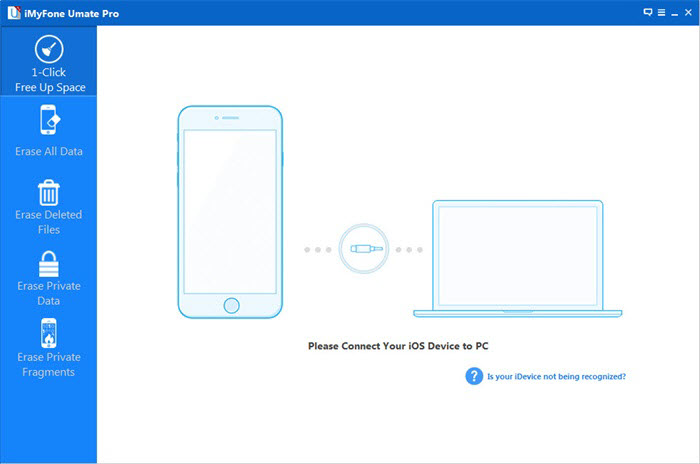
Connect the iPhone to computer via USB cable. The program will detect the device once it was well connected. Then you can proceed to the next step. However, if the program can’t detect the device, please make sure iPhone USB driver and iTunes are installed properly on the computer.

erase iphone data without restored

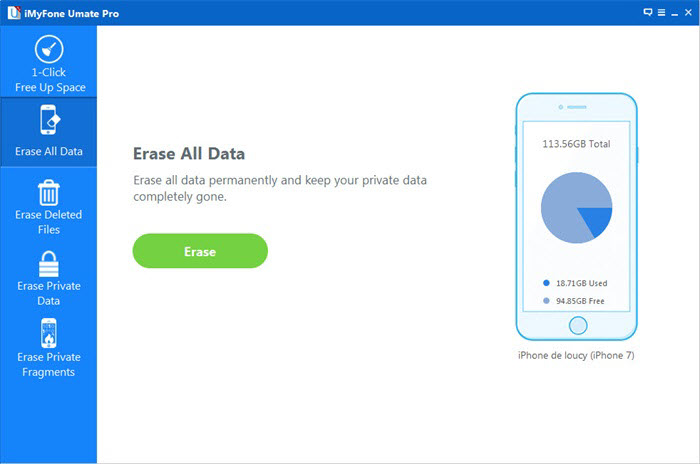
Note: The program offers 4 erasing option for your different demands: “EXPRESS CLEANUP”, “ERASE PRIVATE DATA”, “ERASE DELETED FILES” and “ERASE ALL DATA”. You can select the appropriate option and give it a try. As we want to erase everything stored on the iPhone, so the first method is preferred in this case. Select Erase All Data from the sidebar, which leads to the next step.

Step 3.Start Analyzing and Scanning the Data on iPhone

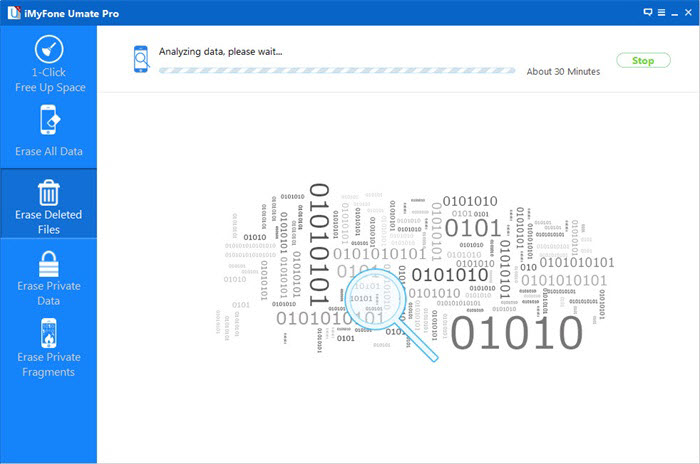
In this step, it will automatically analyze and scan all your deleted files in your iPhone device; generally it takes few minutes to complete the process depending on the file. After scanning – select the deleted data to view detailed information on the file.

wipe iPhone data

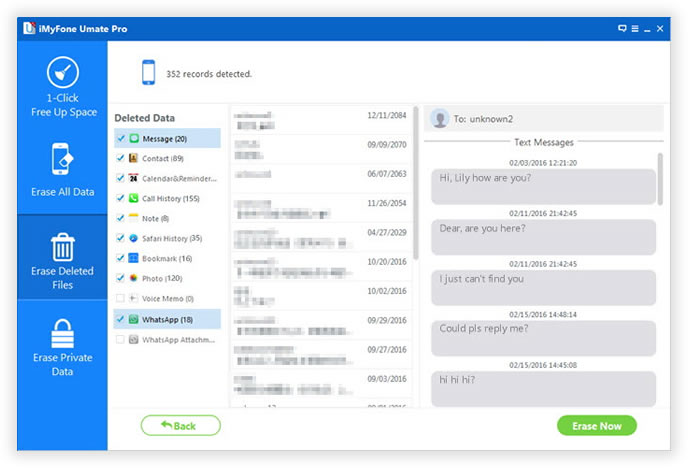
Step 4. Privew and Select the Data You Want to Erase

After scanning, all deleted data will be scanned out and presented as details, by default, all files will be selected. Unselect the files you wish to keep.

Step 5.Start Erasing All Data on iPhone Permanently

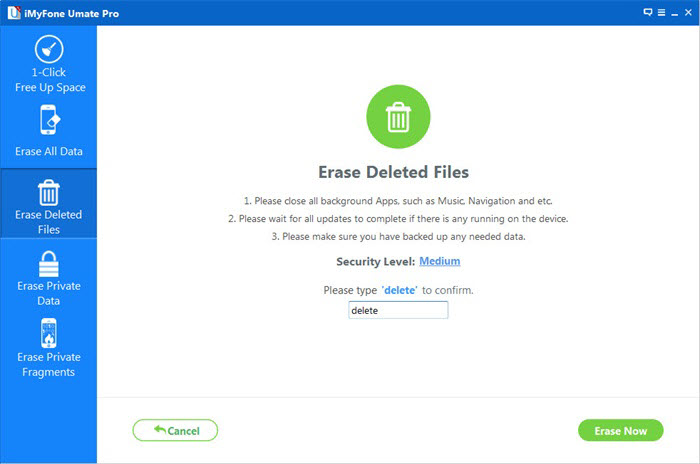
Input ‘delete ‘ and click Start Button to confirm that you are going to erase all the data on the iPhone. Then the program starts erasing apps, music, videos, photo, contacts, SMS and other files stored on the device. It only takes a few minutes to complete the task.

permanently erase iPhone data

Finish Erase All Data on iPhone and Set Your iPhone as a new one
Deletion process may take you some time, patience, stay connected iPhone 6S with the computer.

permanently delete data on iPhone

Now all the data and settings are removed from your iPhone 6S permanently. You should be no longer worries about your privacy being leaked by using this program.

d_win d_mac

Related Article:

How to Backup and Restore iPhone Data on Windows or Mac

How to Backup and Restore Data from iPhone 7/6S/6/SE

How to Erase All Content and Settings on iPhone Permanently

How to Permanently Erase Data from iPhone Before Selling

How to Manage iPhone 7 on Computer

Are you looking for an useful data manage tool to quickly manage your iPhone,iPad,iPod Touch on computer without iTunes?Want to simple manage the contacts,messages,music,photos,videos,apps on your iOS device?Do you want to transfer your personal files between your device and the local computer? Do you want to transfer videos from your old device to your new one? Do you want to transfer your iPod playlists to your iTunes? Do you want to export the text messages from your iPhone to your computer?No matter what you want, the following passages can gives you a perfect solution. It is a reliable steward of your iPhone/ iPad/ iPod data files.
iPhone 7 Manager

iPhone 7 Transfer & Manage Tool – Manage iPhone 7 on Computer

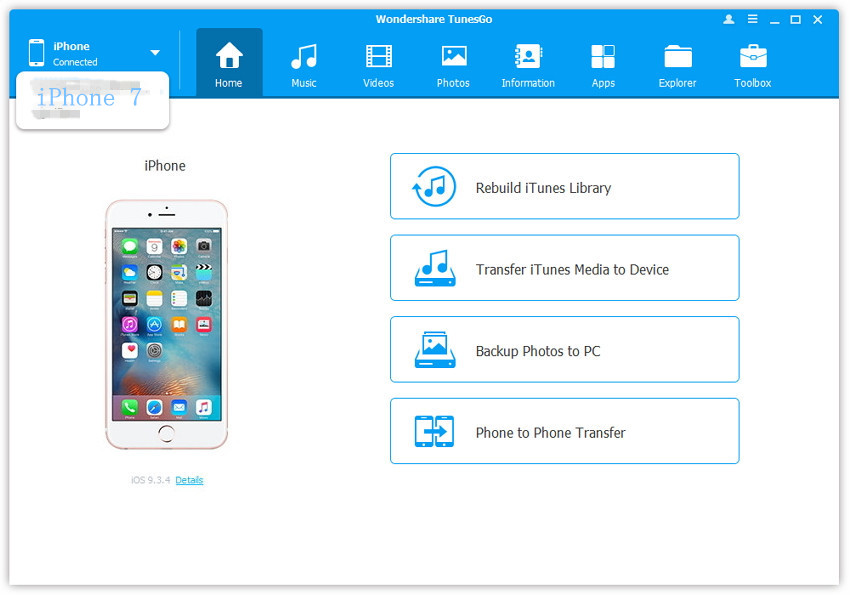
iPhone 7 Transfer & Manage Tool,which is the best iPhone data manage tool for managing iPhone 7 on computer.It help to transfer music, photos, videos and playlists between your iPhone, iPad,iPod and iTunes Library/PC,manage music, photos, contacts and SMS on your device freely.iPhone 7 Transfer & Manage Tool enables one click to transfer files on iPhone 7 conveniently,not only between iPhone 7 and the computer/iTunes,but also allow to transfer files between Android device and iOS device.

connect iphone 7 devices

Now More about iPhone 7 Transfer & Manage Tool – Must-Have Phone Manager
-Your one-stop solution that lets you manage the entire mobile lifestyle in one convenient place.
-Manage and backup contacts & SMS in a safer and simpler Way.
-No iTunes needed for all iOS-related features.
-Powerful file explorer.
-Save your mobile data with more efficient App management.

d_win d_mac

Part 1:Manage Music&Videos of iPhone 7 on Computer

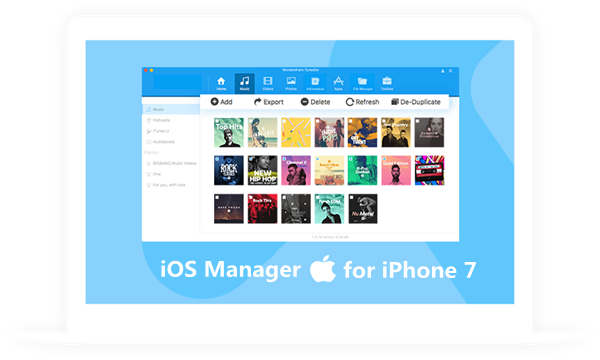
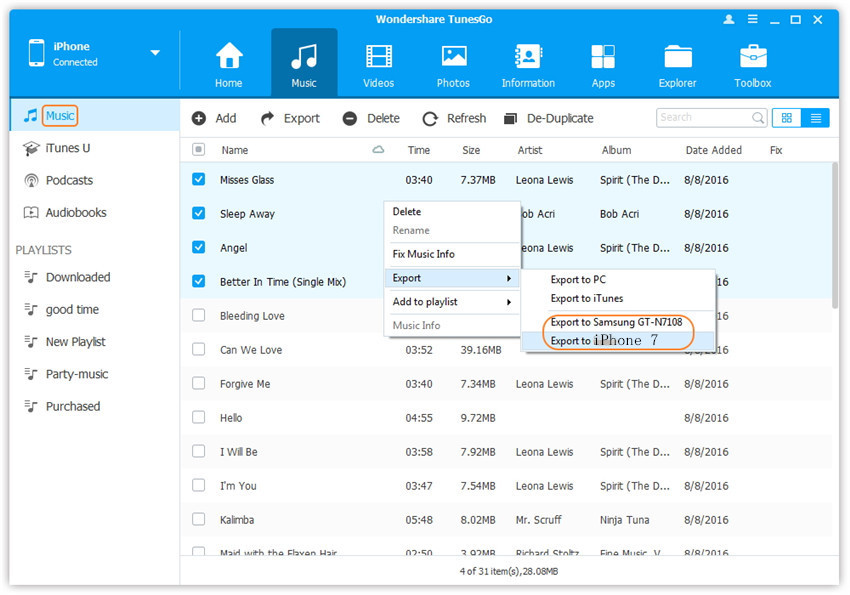
iPhone 7 Transfer & Manage Tool-transfer songs without iTunes, fix your music tags,erase duplicate tracks, and back up your entire music library to your computer.Transfer your music, videos, and other media freely between your devices without iTunes.

export music to devices

A. iTunes <-> iPhone/iPad/iPod/Android Devices
B. Computer <-> iPhone/iPad/iPod/Android Devices
C. iPhone/iPad/iPod/Android Devices <-> iPhone/iPad/iPod/Android Devices

Smart Transfer – Be the Master of Your Music Collection
• Transfer media files without iTunes restrictions
• Convert media files to iOS or Android-compatible formats before transferring
• Automatically fix music tags during the transfer
• Transfer the entire playlist with a single click
• Maintain audio quality after transfer
• Allow you to share purchased music with different Apple IDs, as well as through Google Play and Amazon

Fix ID3 Tags Instantly to Perfect Music Enjoyment
• Fix ID3 tags for iOS/Android/iPod devices, including album artwork, play counts, ratings and other related data
• Edit music info at your will

Keep Original Music and Skip Duplicates
Click the De-Duplicate button to remove duplicate music files and fully free up storage space on your device

Backup Music to Restore Your Personal Music Library Anytime
• Back up songs, playlists, and other media from your iOS, iPod, or Android device to your local music library
• Rebuild media library with the backup on any device

d_win d_mac

Part 2:Manage Photos of iPhone 7 on Computer

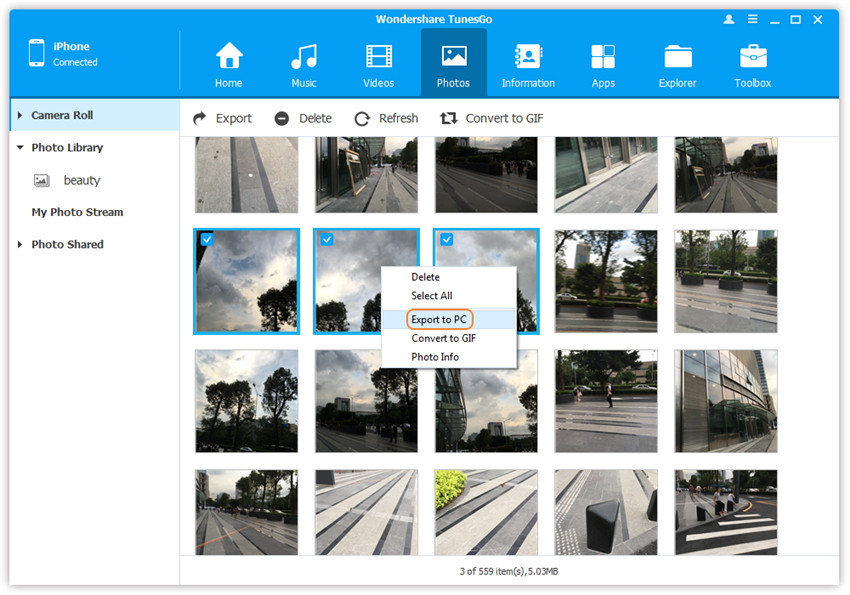
iPhone 7 Transfer & Manage Tool – The perfect tool our strongly recommend for you- Organize, enjoy and share every moment you take everyday.Export certain or all of your photos from your iOS or Android device to your computer.Quickly and easily create a backup of your entire photo library.

export iphone 7 photo to pc

Supported Photo Types
Android: · Photos · Albums · Photo Videos
iOS: · Photos · Albums · Camera Roll · Photo Library · iCloud Photo Library · Photo Stream · Photo Shared

Freely Dual-way Photo Transfer
• Transfer photos to iOS devices without iTunes
• Add Photos from PC/Camera/Camcorders to your phone
• Share photos between any two devices

Organize and Manage Your Photos Easily
• Delete multiple photos as a batch
• Preview photos in their original resolutions
• Import pictures to your iOS or Android device
• Create Albums on your mobile device directly
• Sort your photos with customized filters

Create and Edit Animated GIFs for Fun
• Create fantastic GIFs with Live photos/Motion photos to cherish your moments
• Create GIFs from multiple static images
• Convert any part of video to GIF

d_win d_mac

Part 3:Manage Apps of iPhone 7 on Computer

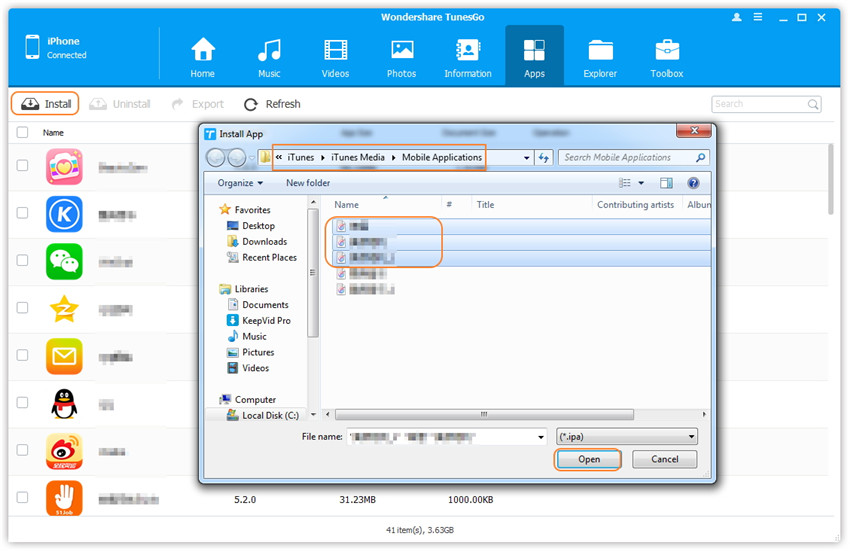
iPhone 7 Transfer & Manage Tool-Save your roaming data with efficient App management.Batch-install apps to save roaming data;batch-uninstall apps to save time. iPhone 7 Transfer & Manage Tool makes impossible possible.

install apps from computer to iphone 7 in batch

Install Apps as a Batch on iOS
• Batch-install multiple apps with independence from iTunes
• Batch-install multiple apps to save mobile data remarkably

Uninstall Unwanted Apps as a Batch
• Easily uninstall multiple apps at once

Back Up Your Favorite Apps
• Export all .ipa apps from your iOS device to your computer as a batch (iOS 9 or below)
• Save your exported apps on your computer as APK files

d_win d_mac

Part 4:Manage Contacts of iPhone 7 on Computer

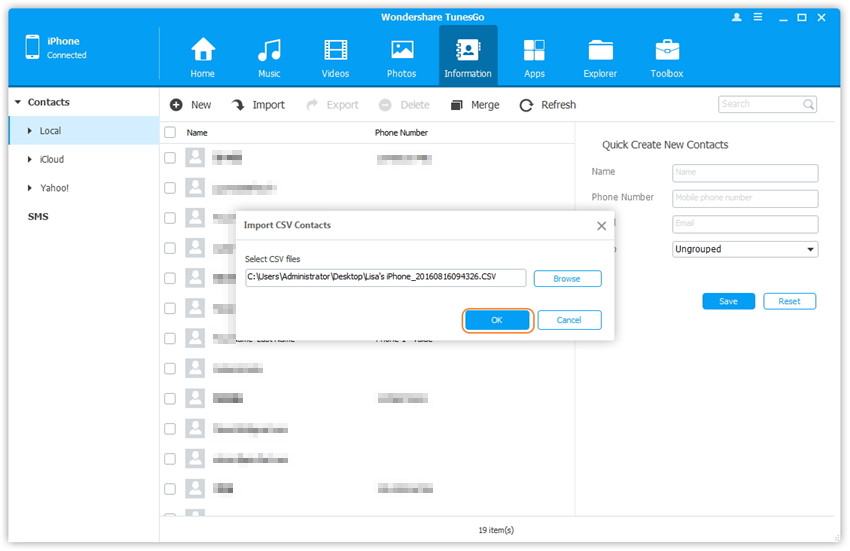
iPhone 7 Transfer & Manage Tool-Manage and backup contacts in a safer and simpler way.As the essential data on your phone, contacts should be taken good care of. This contact manager will help you to backup,import and manage them with ease.Import contacts to your iOS device from your computer, email accounts, cloud services, or another iOS or Android device.

transfer contacts from computer to iphone 7

Computer to iOS Device
Import contacts to your iOS device from your computer

iCloud to iOS Device
Merge iCloud contacts with your iPhone, iPad and iPod touch with ease

Between iOS and Android
Easily transfer contacts between an iOS device and an Android

Backup Contacts from Your Phone and Multiple Accounts
Create a Backup of Your iOS Contacts on Your Computer
• Fully supports vCard and CSV files
Save iCloud and Email Contacts
• Export contacts from iCloud, Gmail, Outlook, and other services from your phone to your computer

Never Mess up with the Duplicate Contacts
Merge duplicate contacts on iOS device into one complete contact.Customize the filters of contacts’ info, including phone numbers, email addresses, social accounts, etc,.

Manage Your Contacts in an Efficient Way
• Add contacts to your iOS device from your computer
• Edit iOS contacts on computer
• Delete unnecessary contacts in batch on iOS device

d_win d_mac

Part 5:Manage SMS of iPhone 7 on Computer

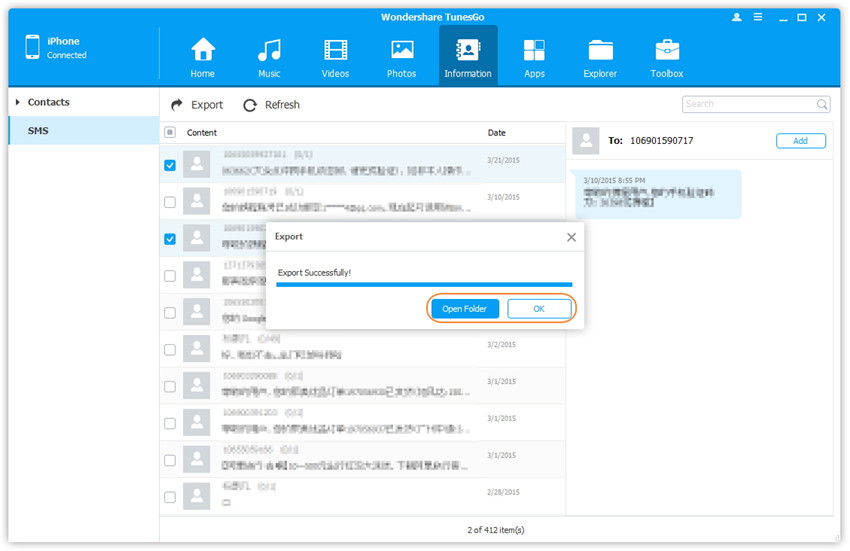
iPhone 7 Transfer & Manage Tool-Powerful message manager for iOS .It’s possible to free your eyes from the small screen now.You are allow to manage all the messages on your iOS devices on computer with the help of this powerful yet easy-to-use message manager.

export sms from iphone 7 to computer

Export Messages from iOS to Computer
• Export iMessages, SMS, MMS, and Message attachments to computer

Import Text Messages from Computer to iOS Device
• Restore SMS to your iOS devices from your backup
• Import multiple SMS to iOS devices as a batch

Send Texts From Your Computer
• Receive new text messages on your Computer instantly – No missed messages any more
• Type up the text messages on your computer and send them – Smooth input experience

d_win d_mac

Selection B: A Super iPhone 7 Manager Tool

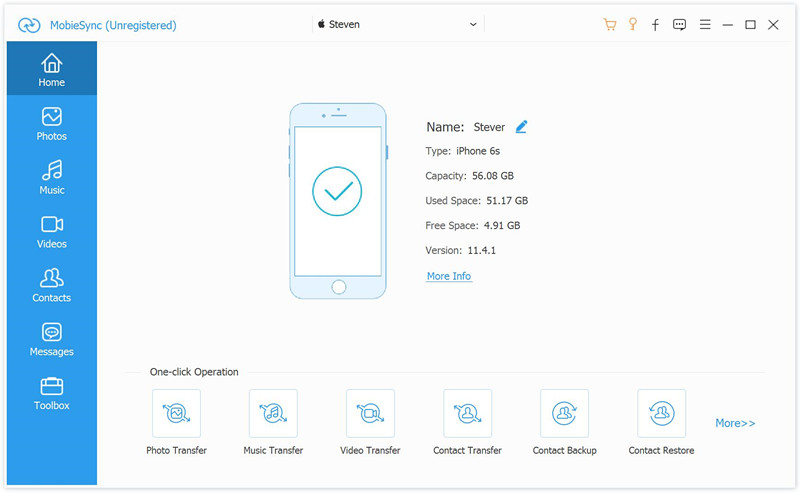
Mobile Sync is the second tool which we recommend for you. MobieSync is capable of directly transfer various iOS files between iPhone/iPad/iPod and computer; switch files between two iOS devices, such as, pictures, videos, music, contacts or other data. Furthermore, it can help you create the customized ringtones for iOS device; convert HEIC photos to JPEG/PNG. All in all, this tool can give users one-click way to manage & transfer iPhone/iPad/iPod data.

Mobile sync home page

Related Articles:

How to Transfer Videos to iPhone 7

How to Transfer Photos to iPhone 7

How to Transfer Music to iPhone 7

How to Sync Videos from Computer to iPhone 7

How to Transfer Music from Computer to iPhone 7

The Best iPhone 7 Manager

Install IPSW File on iPhone iPad with/without iTunes

There are many situations that we will make in daily,and need to install IPSW file on our iPhone/iPad,for example update iPhone from iOS 12 to iOS 13; download and install iOS 13 on iPhone, install iOS 12 on iPhone/iPad; downgrade iOS 13 to iOS 12 on iPhone and iPad; fix the software update failed error; get iPhone out of recovery mode/DFU mode; fix iPhone/iPad stuck in black screen of death; fix iPhone stuck at Apple logo; repair an iPhone stuck at looping on start; fix device abnormal system issue; failed restore device to factory reset, as well as fix iPhone stuck on recovery mode after iOS 13 update. You would be required to downgrade from iOS 13 to iOS 12, in order to fix/restore iPhone back to factory setting status. Whatever the case, we’ll walk you through the entire process to fix bricked iPhone/iPad and gets it back to normal status by re-installing IPSW files(firmware package) on iPhone/iPad with/without iTunes.But before we get into those,be sure to backup your device, in case something goes wrong during the procedure.We highly recommend that you don’t move forward until or unless you’ve made a proper backup of your device.
You may want to know:How to Backup iPhone to Computer

* 2 Ways to Downgrade your iPhone with Losing Data

* How to Recover Deleted Data on iPhone

* How to Restore iPhone Data from iTunes Backup

Download & install iOS IPSW File Manually for iPhone, iPad

There are a few routes you can take when it comes to installation of iOS.The manually one is to download & install iOS IPSW file on iPhone/iPad with iTunes,it’s easy to complete the restoring task via iTunes on device.However,it gain the big chance to lost data from device after using IPSW file to restore the jailbroken iPhone/iPad with iTunes.Below we have shown method on how to download & install iOS iPSW file manually for iPhone /iPad with iTunes.

Note:Backup iPhone before installing IPSW file on iPhone with iTunes

Part 1:Install IPSW File on iPhone iPad With iTunes (Lead to Data Loss)

Step 1.Download the iOS IPSW file[ links below ] that relates to your specific iOS device.
Step 2.Run iTunes.
Step 3.Connect your device to the computer.
Step 4.Open Device Summary for the iOS device you are updating.
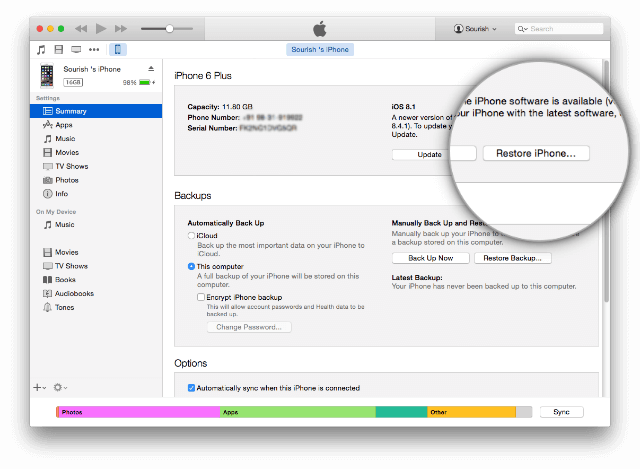
Step 5.Hold down the SHIFT [ Windows ] or ALT [ Mac ] key and click Restore in iTunes simultaneously iTunes restore.

itunes restore

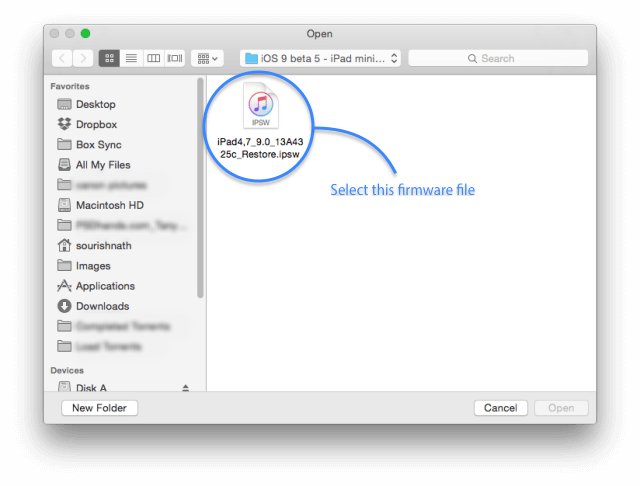
Step 6.Locate the iOS IPSW file you downloaded and select it.

select ipsw file

Step 7.Follow the on onscreen instructions and iTunes will begin the update process.
Step 8.When the update has finished, your iOS device will reboot into the iOS you select.

Please download the .IPSW files:

iOS firmware file for iPhone
iOS firmware file for iPad
iOS firmware file for iPod touch

Part 2:Install IPSW File on iPhone iPad Without iTunes (No Data Loss)

Another better way to use IPSW file to restore iPhone/iPad without iTunes is install IPSW file on device via IPSW Files Installation Tools or IPSW Restore Tool – iOS System Recovery.No matter the jailbroken or non-jailbroken iDevice,it will not lead to data loss in the whole restoring process.IPSW Files Installation Tools-iOS System Recovery perfectly help to install IPSW file on iPhone/iPad without iTunes,so you can use this auxiliary tools to update or downgrade your iOS devices without data loss, including the latest iOS 12 and iOS 12.1. What’s more,this program allow to restore deleted data from iPhone/iPad completely after losing data under any circumstances.Additionally,it also designed for restore iOS system to normal state on iPhone/iPad.

Features of iOS System Recovery:

* Provides the latest iOS 11 firmware package .IPSW files downloading and install on iPhone/iPad without data loss;
* Install IPSW file on iPhone/iPad without data loss;
* Fix/Repair iPhone iPad device stuck in Recovery Mode;
* Get iPhone iPad out of Apple Logo screen/ iTunes screen/ loading screen/ white screen;
* Fix iPhone iPad can’t enter the system;
* Without any data loss during the repairing process.
* Provides three recovery mode for lost contacts, iMessages/SMS/MMS, photos, videos, call logs, notes, etc, on iPhone iPad device: Directly recover data on iPhone iPad device; Restore data from iTunes backup; Retrieve data from iCloud backup.
* Supported iPhone, iPad devices: iPhone 11/iPhone 11 Pro(Max), iPhone XS/XS Max/X/8/7/6S/6S Plus/6/6 Plus/5S/5C/5/4S, iPad Air 2/3, iPad Pro 3, iPad Mini, iPod Touch 4/5, etc.

d_win d_mac

The following part we will take an example on how to install iOS 10.3.3 IPSW file on iPhone with IPSW Files Installation Tools-iOS System Recovery.

Easy Steps to Download and Install iOS 9/iOS 10 IPSW File on iPhone without Data Loss

Step 1.Run the IPSW Files Installation Tools and Connect iPhone to Computer

restore iPhone from ios 10 system to ios 9

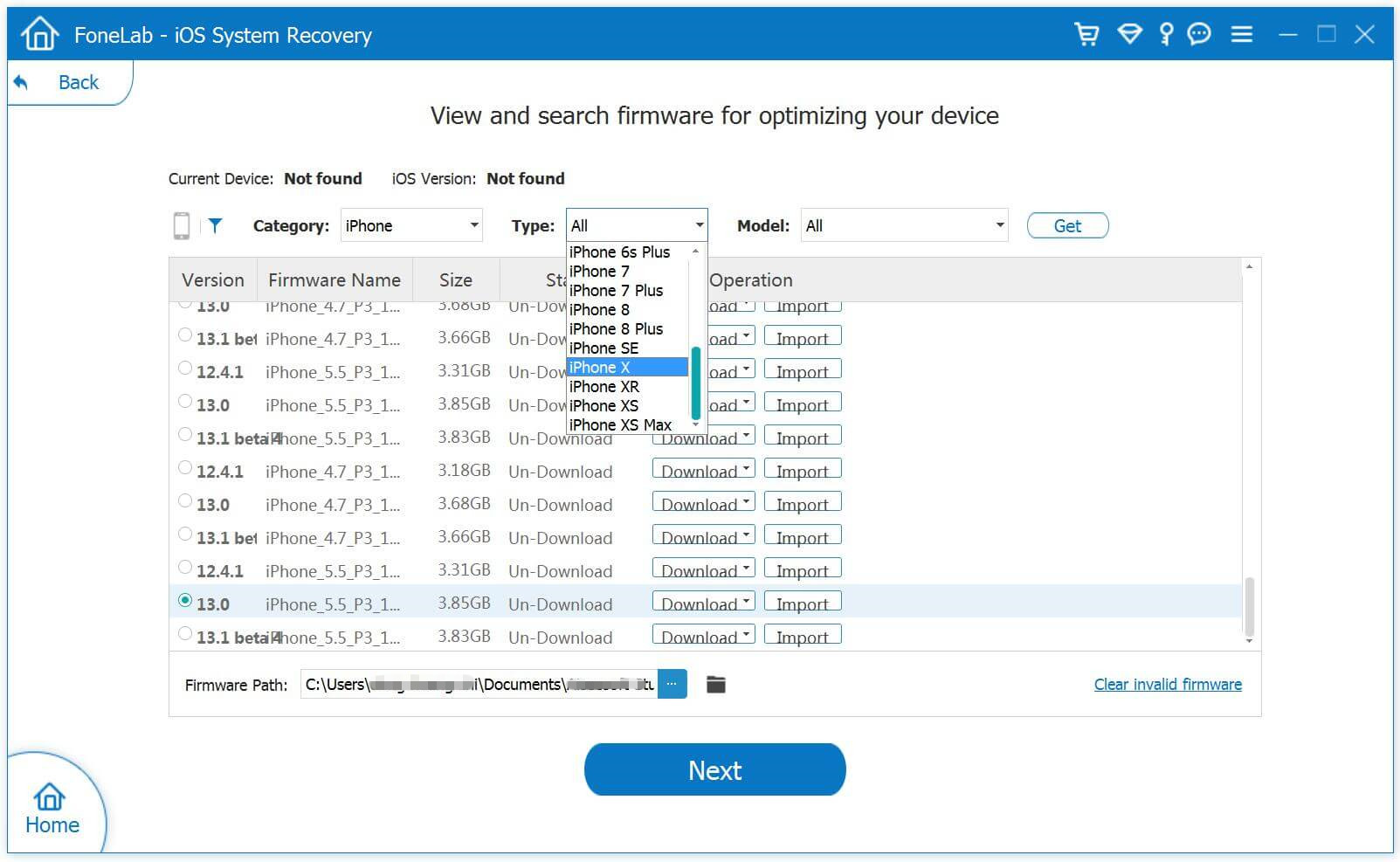
Step 2.Select iOS 12/11/10/9 Firmware Files and Download to iPhone

download iOS 11 Firmware to iPhone

Tips:The program provides iOS 10.3.3 and the newest iOS 11 official version firmware package for download.

1)If you want to install iOS 10 on your iPhone directly,please click the “Download” button to download the iOS 10.3.3 firmware files for your iPhone.

2)If you want to install iOS 10/iOS 9 or other older IPSW file on iPhone,please select and install the .IPSW files on your iPhone via IPSW Files Installation Tools(no data loss),then save it on your computer.

Please download the .IPSW files in below download page:

iOS firmware file for iPhone
iOS firmware file for iPad
iOS firmware file for iPod touch

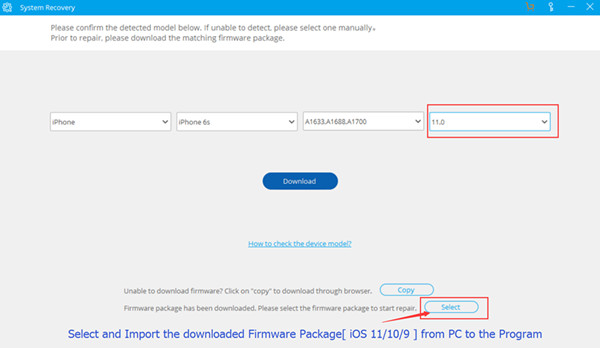
Step 3.Locate the Downloaded iOS 9/iOS 10 or iOS 11 .IPSW File from PC to Program
To install the iOS 9 or iOS 10 .IPSW File on your iPhone,please click the “Select” button the import the files to the IPSW Files Installation Tools and going on.

select and import ipsw file

Tips:If you want to install iOS 10.3.3 on your iPhone, iPad or iPod touch,please select,download and install it on your iOS devices directly,during the installing process,it won’t cause data loss.

Step 4.Install the iOS 11/10/9 IPSW File on iPhone without Data Loss

Install IPSW File on iPhone

Note:Once finish this restoring job, your iPhone/iPad/iPod Touch will be updated to the iOS version which you select. If your iOS device is a jailbroken one, then it will be updated to non-jailbroken.If you have unlocked your iOS device before, then it will be re-locked again.

Free download the IPSW Files Installation Tools and have a try!

d_win d_mac

Part 3: Install iOS Firmware Package to Unlock iPhone by using UkeySoft Unlocker

Some professional iPhone unlocking tools like UkeySoft Unlocker unlock iPhone by installing IPSW (iOS Firmware Package), so you can downgrade/update your iPhone through downloading and installing firmware package by using UkeySoft Unlocker, which is a good choice to install IPSW files on your iPhone, iPad and iPod touch at ease.

UkeySoft Unlocker is designed to unlock iPhone/iPad/iPod lock screens in different situations: locked, disabled, broken screen, black screen, unresponsive screen, Apple logo screen, recovery mode, DFU mode, etc. If your iPhone is disable, or you forget your iPhone screen passcode. Don’t worry, UkeySoft Unlocker can help you fix and unlock your disable/locked iPhone at ease.

How does UkeySoft work? Actually, UkeySoft Unlocker can help you download the matching firmware of your iPhone, iPad or iPod touch device, then re-install the downloaded firmware package to the device, your iPhone will unlock and restore to normal status after installing iOS firmware package completed.

More Features:

  • Remove screen passcode from iPhone and iPad.
  • Unlock your disabled iPhone at home, no tech knowledge required.
  • Remove iPhone passcode from locked, disabled, broken screen.
  • Unlock Apple ID without password.
  • Bypass iCloud activation lock in iOS 13, 12, 11 or Earlier.
  • Compatible with all iOS devices and the latest iOS 13.
  • Offers iOS 13, iOS 12, iOS 11 firmware package to download.
  • Directly reinstall firmware package, restore and unlock iPhone.

Guide: Re-install Firmware Package to Unlock a Disabled iPhone

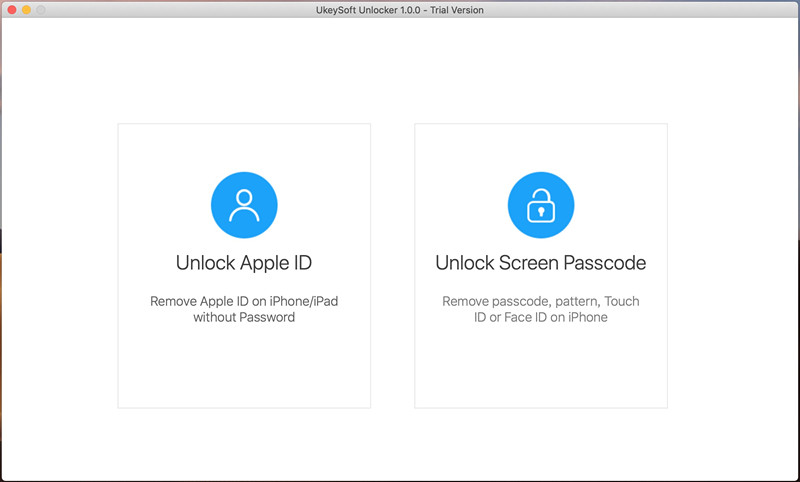
Step 1: Download and Launch the Software
The first thing you should do is download and launch UkeySoft Unlocker on your computer.

Launch UkeySoft Unlocker

Step 2: Connect iPhone to Computer
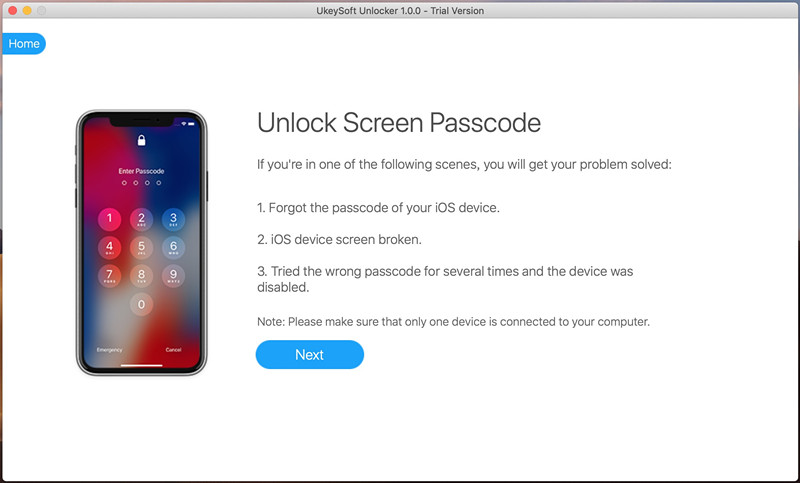
Click “Unlock Screen Passcode” function, then connect your iPhone to your computer.

Connect iPhone to Computer

Step 3: Enter Recovery Mode on iPhone
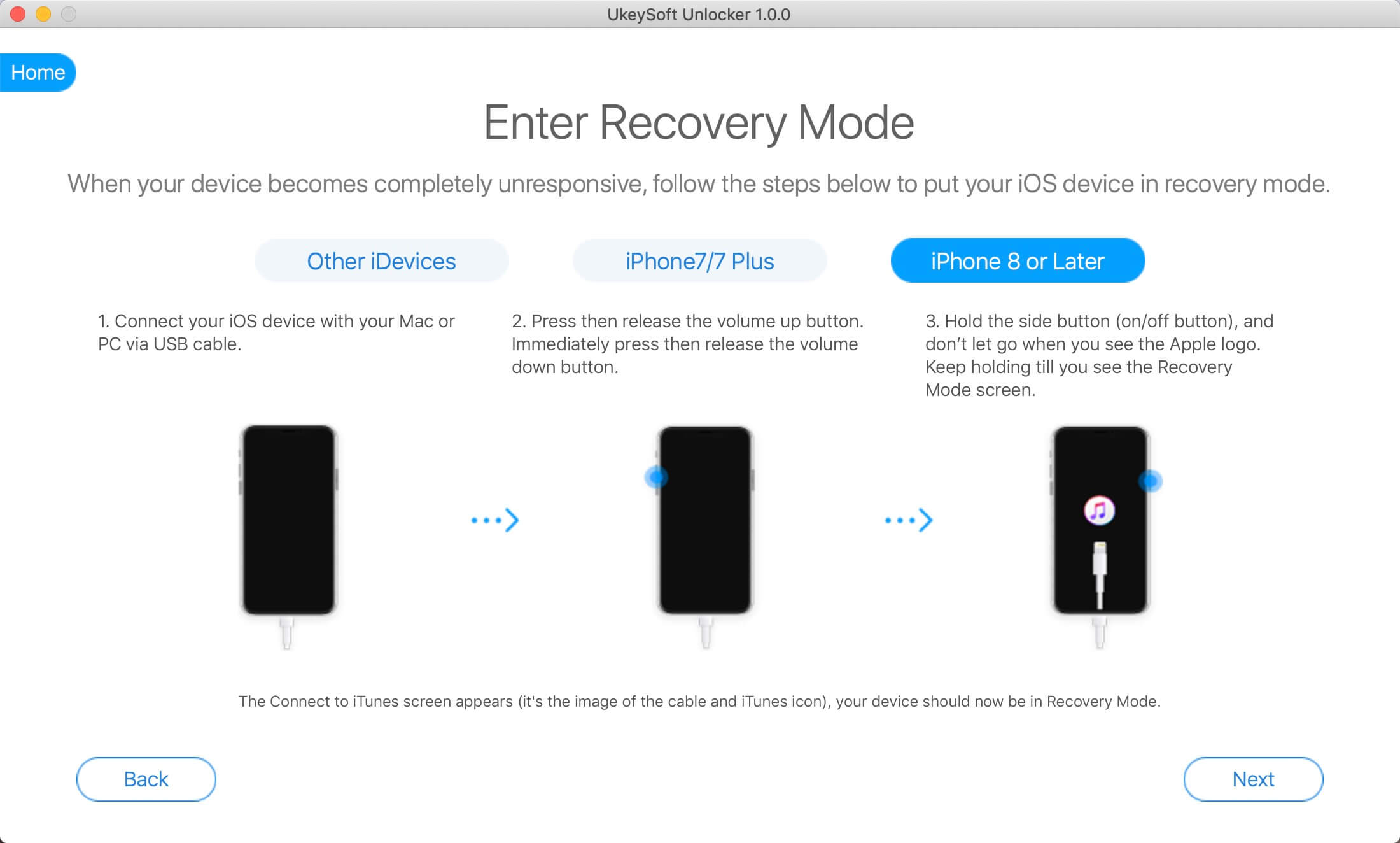
Switch off your phone. After your iPhone is switched off, press and hold the volume down button along with Power button for nearly 10 seconds. After the 10 seconds, you need to release the power button and keep holding the volume down button.
Also read: how to put other iPhone into recovery mode

Enter Recovery Mode on iPhone

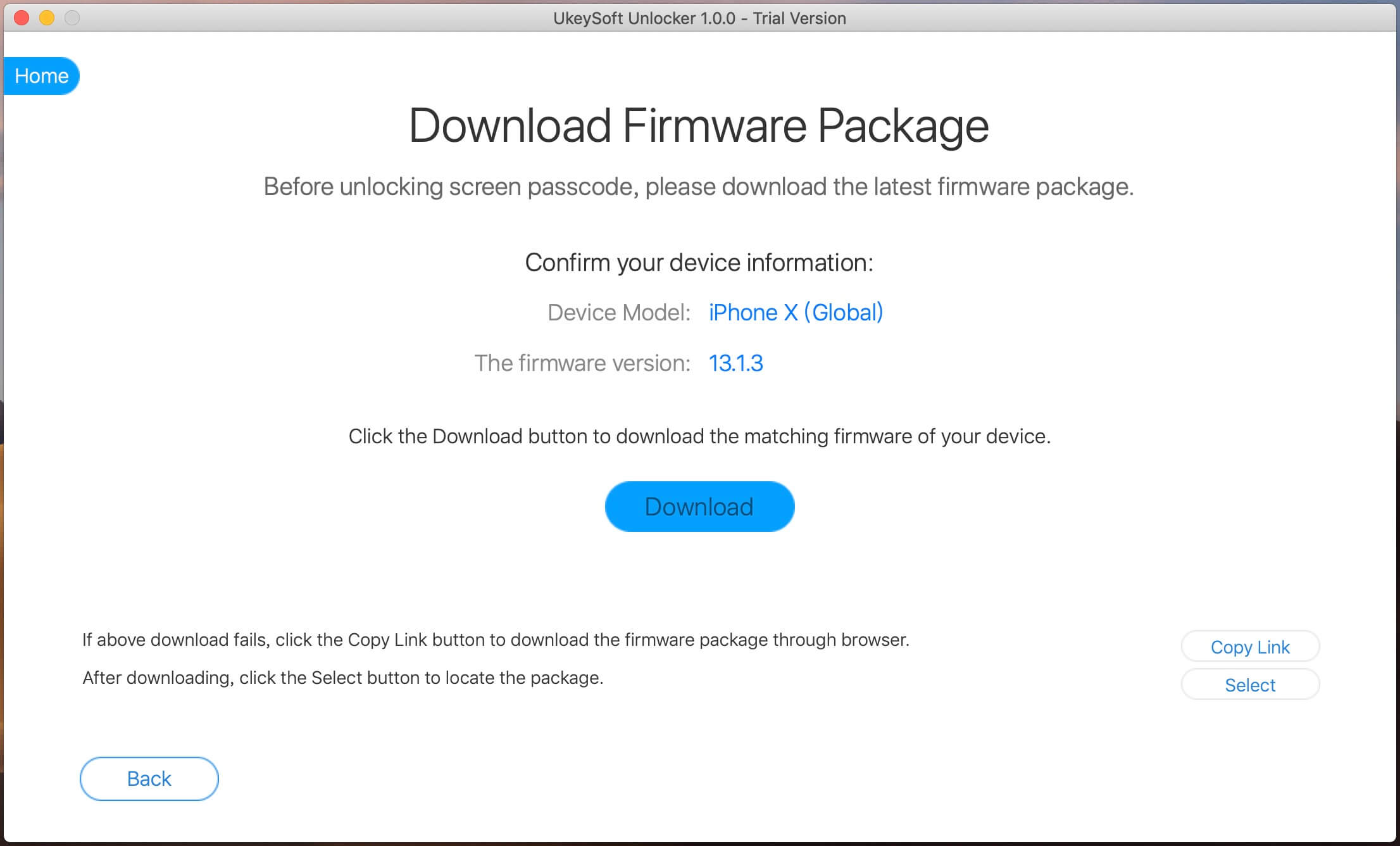
Step 4: Download Firmware Package
The software will show the information for your iPhone. If all the details are correct, click on the “Download” button to download the firmware.

detect iPhone version and download ipsw file

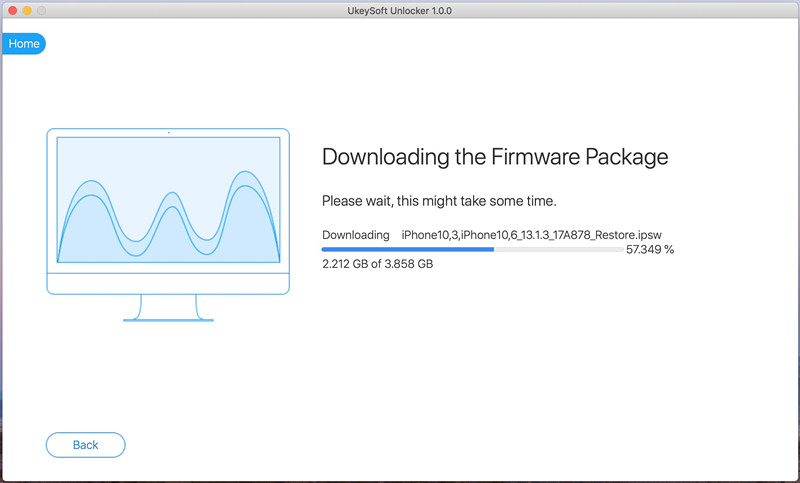
Start downloading firmware package for the iPhone.

download ipsw file for iPhone

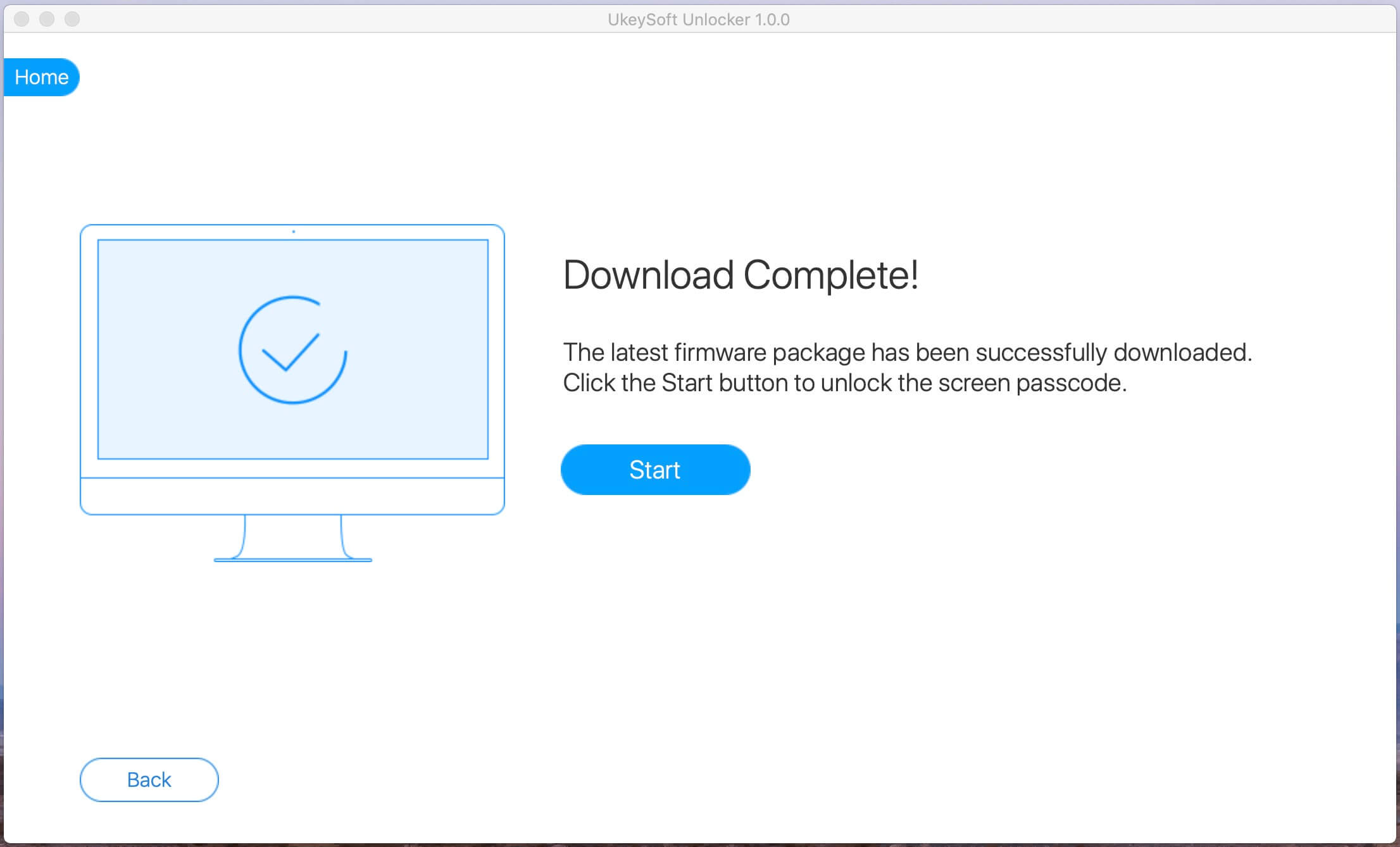
Step 5: Firmware Package Downloaded Completed
Firmware package download complete! Everything goes well, just click “Start” button to go on.

download ipsw file

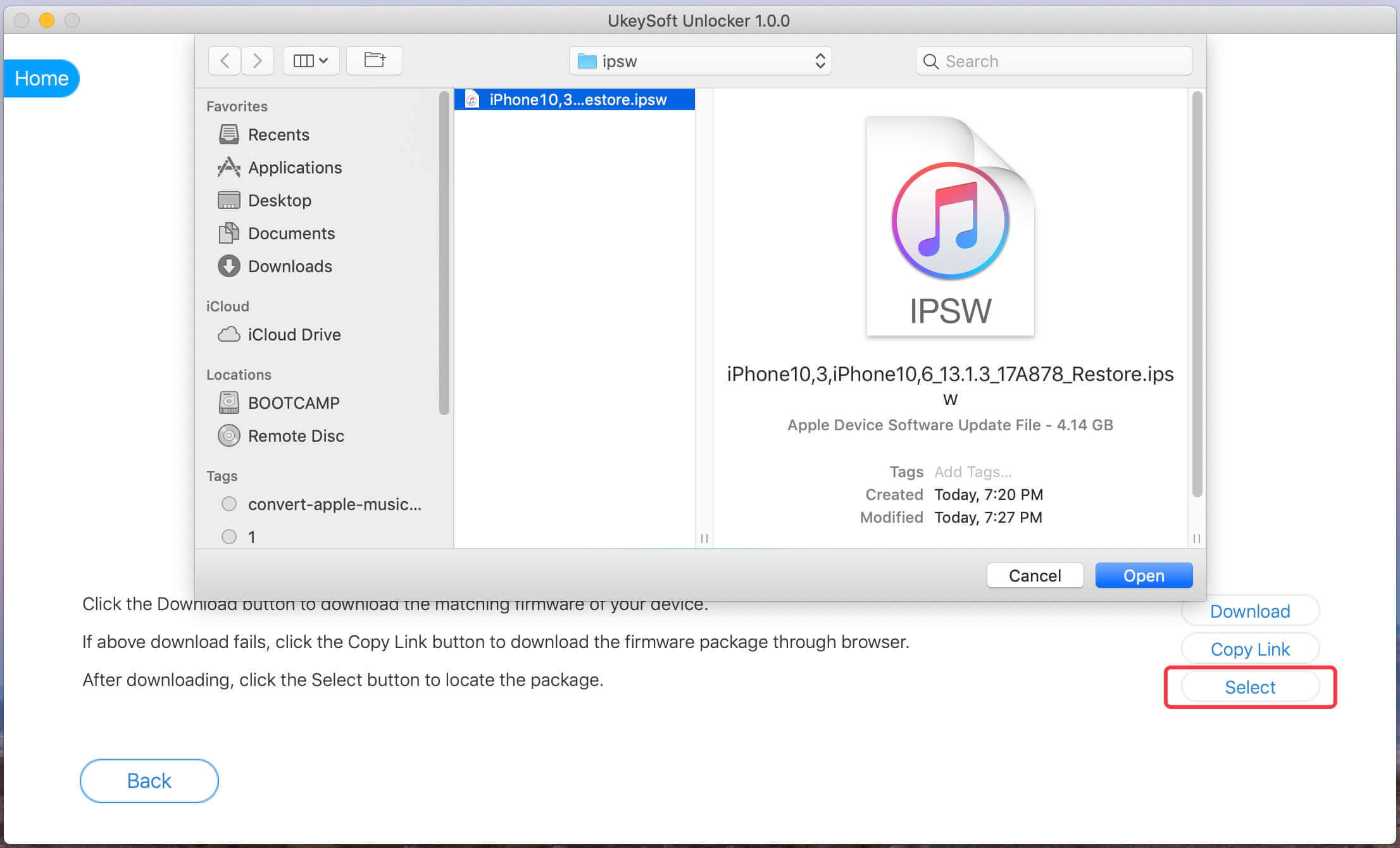
Tips: Or, you can click the “Copy Link” button and paste it into the browser to download the firmware package via the browser. After downloading complete, then click “Select” button to view and import the downloaded iOS Firmware package.

import ipsw file

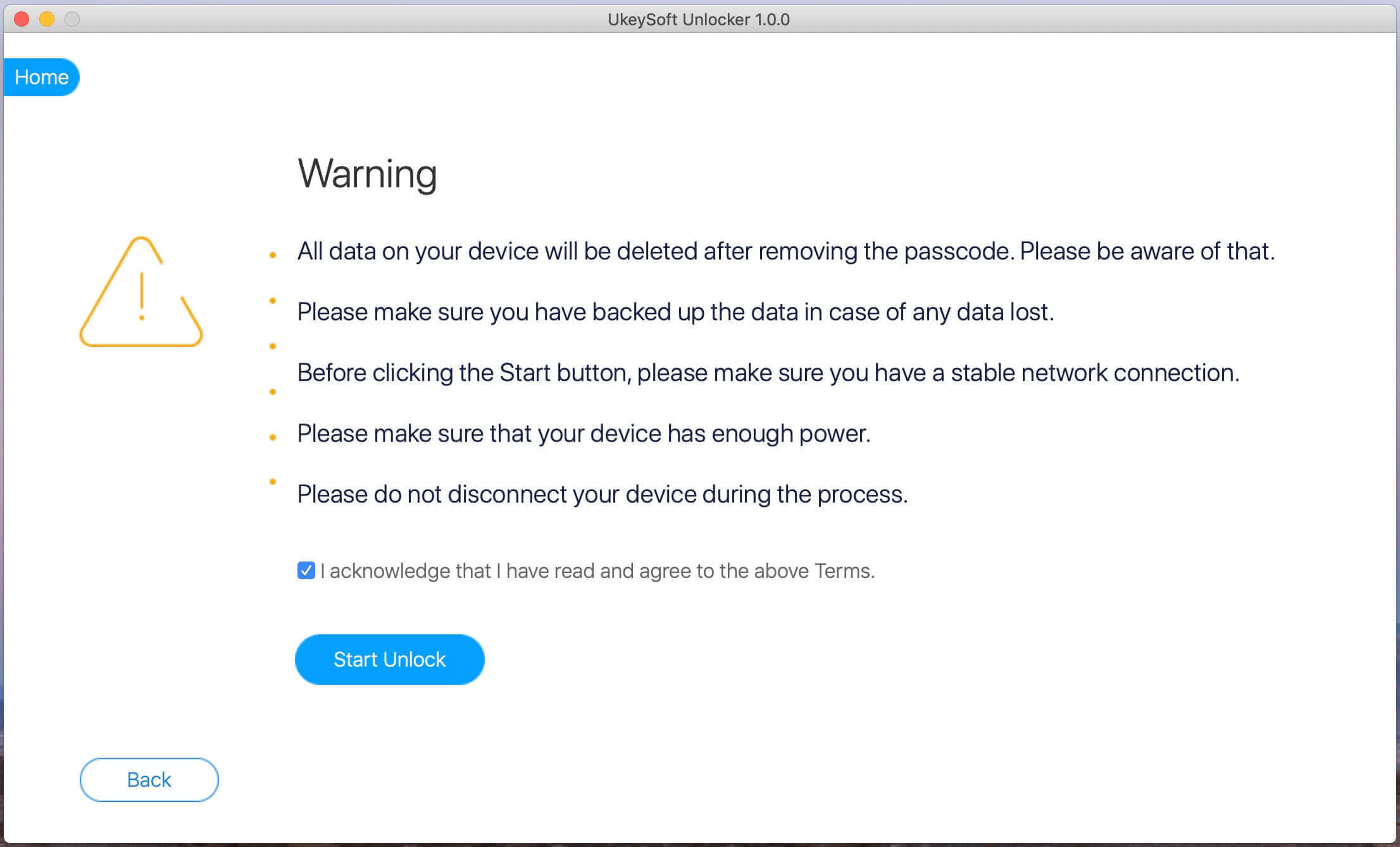
Step 6: Start Install Firmware Package to iPhone
When it finish verifying, click the “Start Unlock” button to begin installing the download IPSW firmware package to your iPhone.

Install Firmware Package to iPhone

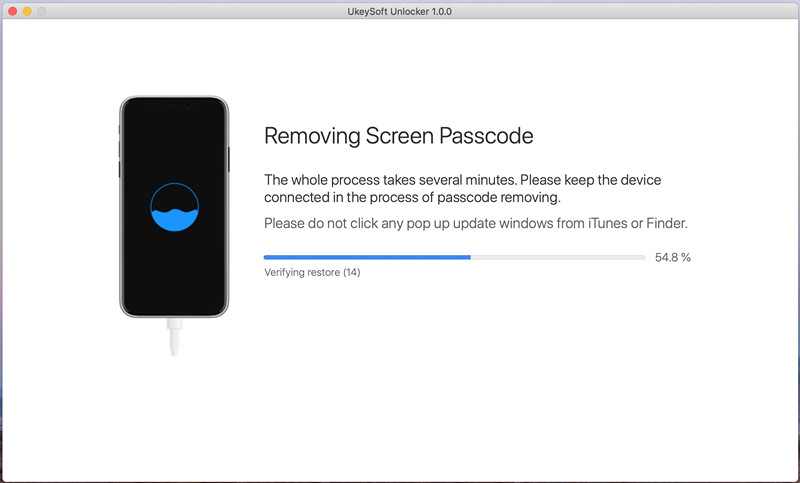
Step 7: Removing Screen Passcode
The software will install the IPSW files to the iPhone and unlock your iPhone.

Removing Screen Passcode

Step 8: iPhone Restarts automatically
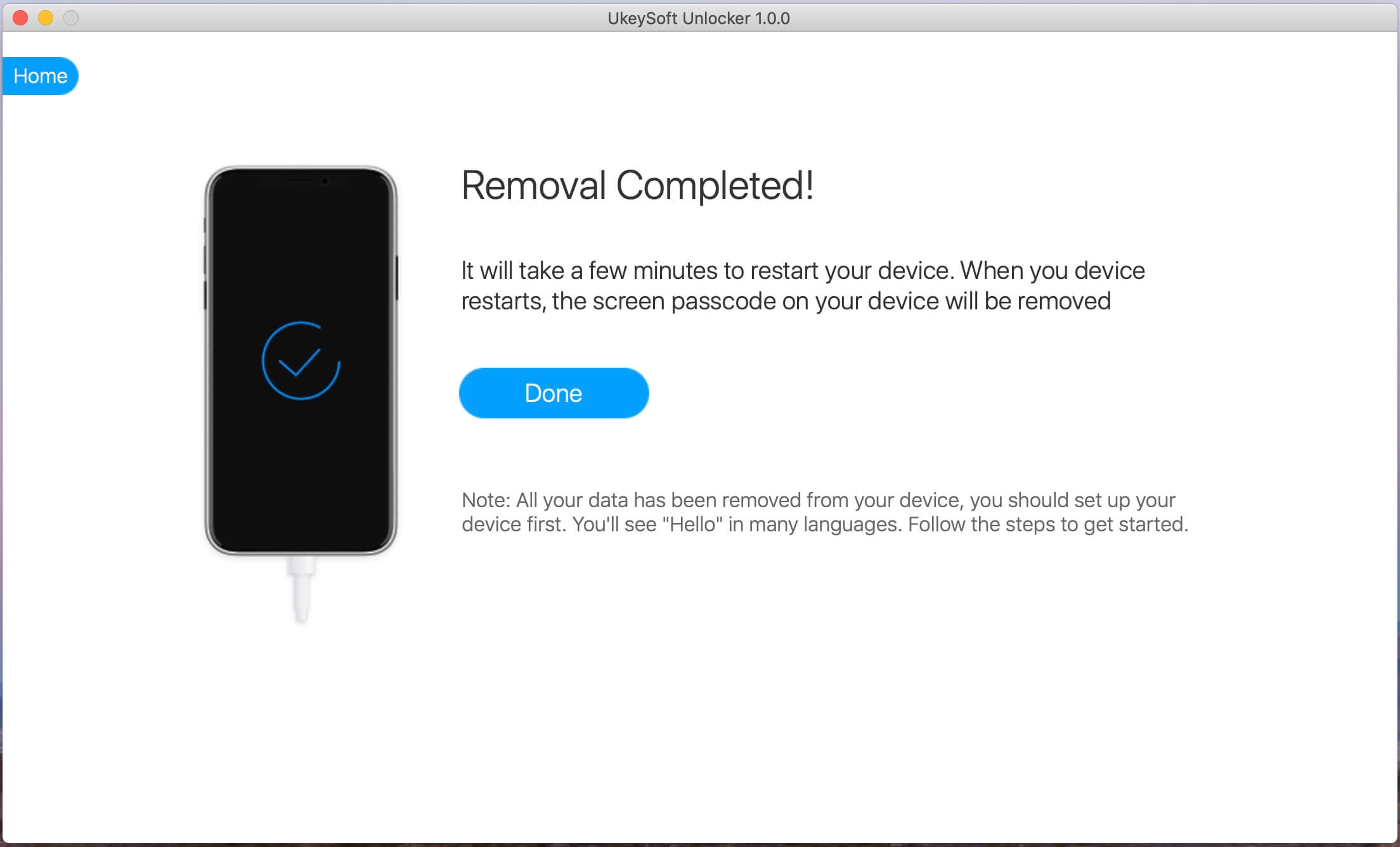
When you see below window, the passcode has been erased from your device successfully. The device is unlocked. It will take a few minutes to restart your device. After your iPhone restart, please go ahead to set your iPhone and access it.

unlock iPhone and restart

Also read: How to Reset Locked iPhone without Passcode

Related Article:

How to Upgrade iOS 9 to iOS 10 Beta on iPhone and iPad

How to Download & Install iOS 10 Beta 7 On iPhone

How to Downgrade iPhone from iOS 10 to iOS 9 without Data Loss

How to Recover iPhone Data after Downgrading iOS 10 Beta to iOS 9

How to Recover Lost Data from iPhone after iOS 10 Update

How to Recover Deleted Data from iPhone 7/SE/6S/6

How to Restore iPhone System to Normal after iOS 10 Update

How to Recover Photos from Huawei Mate 9

Summary:
Guide to restore deleted photos from Huawei Mate 9, get back deleted data on Android with professional Android Data Recovery program, extract existing data from Android.

“I always keep the habit of viewing these photos when I am free. But, yesterday, I did the foolish thing that I deleted all these precious photos by pressing on deleted button carelessly. I just need some help to restore those deleted photos from my Android Huawei Mate 9 phone. Please don’t ask me why I did this! It is really the most stupid thing I have ever done!”– Mario

Last year, Huawei made a name for itself when it teamed up with Google to manufacture the Nexus 6P. Trying to follow up on that success is no easy task but Huawei is back with the Mate 9.The Mate 9 carries similar traits present in the crowd-pleasing 6P. The primary selling point is the dual-lens Leica camera that comes with a 20-megapixel monochrome sensor and a 12-megapixel RGB sensor. Both sensors are used in conjunction through enhanced image fusion algorithms. The camera also comes with optical image stabilization and what Huawei is calling Hybrid Zoom.It also includes a 5.9-inch Full HD display, Kirin 960 processor with an octa-core i6 co-processor,4GB of RAM, 64GB of storage with microSD expandability and a 4,000mAh battery.

Recover Deleted Photos on Huawei Mate 9

Many people may encounter the problem of deleting some valuable photos from Android phone such as Huawei Mate 9,Samsung Galaxy S6/S7, HTC One M8/M9, Motorola, Sony, etc accidentally. Here comes a great solution. Android Data Recovery develops a powerful Android recovery function to help solve this problem.With Android Data Recovery,you are allow to restore deleted photos from Huawei Mate 9 as well as any Android device easily.Except photos,this powerful data recovery program also help to restore various of data,including contacts,messages,videos,audio,WhatsApp messages,call logs,documents.

d_win d_mac

How to Restore Deleted Photos from Huawei Mate 9

Step 1.Run Program on Computer
First of all,please download and run Android Data Recovery on computer.

connect mate 9 with computer

Step 2.Enable the USB Debugging on Huawei Mate 9
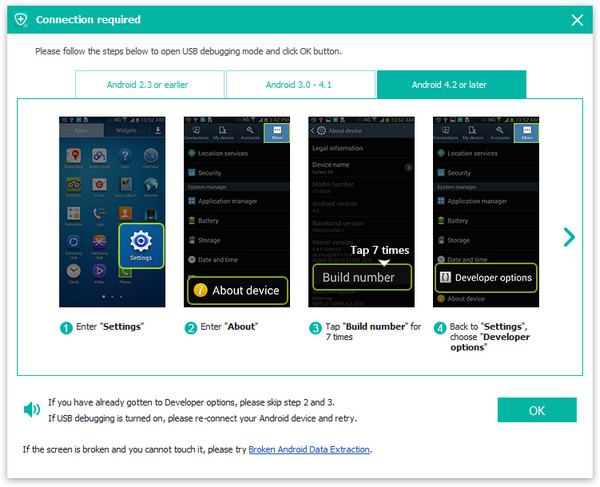
You should enable USB debugging on your Huawei Mate 9 before connecting the device to the computer.There are several ways for you to run the USB debugging for Android.

enable usb debugging on mate 9

Step 3.Select Photo File to Scan by Program
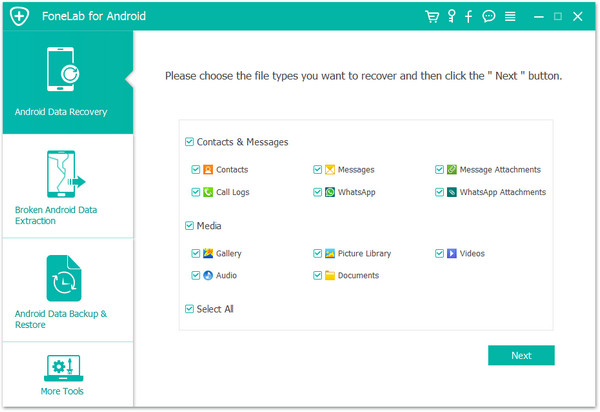
When you enabled USB debugging for your Huawei Mate 9,it will be detected by the program in seconds.Now you are allow to selectively choose which type of files to be scanned by program.If you just need to restore deleted photos on device,you can click “Gallery” only.Then click “Next” to go on.

select data to scan on mate 9

Step 4.Begin to Scan Deleted Photos from Huawei Mate 9
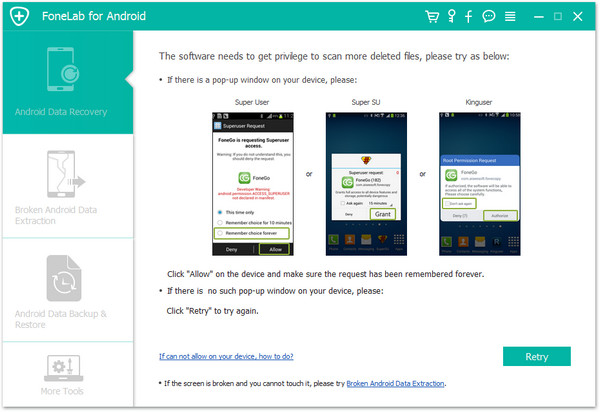
Android Data Recovery start to scan the deleted photos on Huawei Mate 9.Once you see the window below,you should move to your Huawei phone,tap on the “Allow” on the phone screen,then back to the computer and click on the “Start” button to continue.

allow the super user request

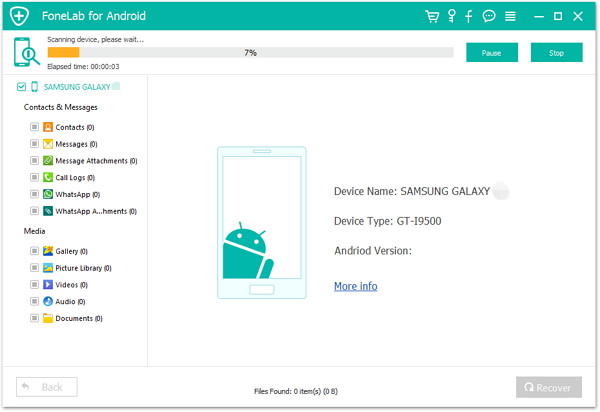
Now the program will analyze the situations of data on your Huawei Mate 9.

analyze data on huawei mate 9

Step 5.Preview and Selectively Restore Deleted Photos from Huawei Mate 9
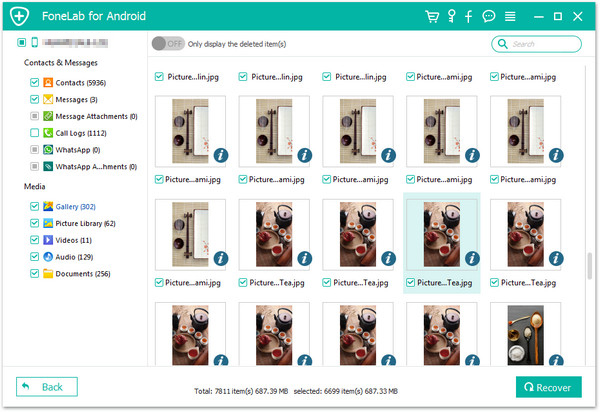
In the last step,all data will be scanned out by program,now you are allow to select the detail photos to preview and choose more than one photo for recovery by clicking “Recover”.Then it will restore all selected photos to your computer.Done.

restore deleted photo from huawei mate 9

d_win d_mac

Related Article:

How to Restore Data from Huawei Mate 9

How to Recover Lost Data from Android SD Card

How to Restore Lost Data from Rooting Android

How to Recover Data from Broken Android

Download iOS Firmware File for iPod Touch

Apple has just made available for download iOS 10 IPSW links for iPhone, iPad, and iPod touch devices.Here,you can download the iOS 11 firmware files for iPod Touch 6G.Those of you who are looking to update this latest firmware can now do so the easy way by simply using the OTA update method that should be available on all compatible iPhone, iPad, and iPod touch devices. Alternatively, there’s always the trusty restore method of using iTunes and direct-downloadable iOS 9 or iOS 8 IPSW file for your device.

* Install iOS 11 on iPhone iPad or iPod Touch 6G Manually with Firmware in iTunes

* How to Restore iPhone/iPad/iPod Touch System to Normal

* How to Recover Lost Data from iPhone/iPad/iPod After iOS 11 Update

Part 1:Download iOS 11 Firmware File for iPod Touch

iOS 11 (iPod touch 6G): iPodtouch_11.0_15A372_Restore.ipsw

Part 1:Download iOS 10 Firmware File for iPod Touch

iOS 10.0.1 (iPod touch 6G): iPodtouch_10.0.1_14A403_Restore.ipsw
iOS 10.0.2 (iPod Touch 6G): iPodtouch_10.0.2_14A456_Restore.ipsw
iOS 10.1 (iPod touch 6G): iPodtouch_10.1_14B72_Restore.ipsw

iOS 10.1.1 (iPod touch 6G): iPodtouch_10.1.1_14B150_Restore.ipsw

iOS 10.2 (iPod touch 6G): iPodtouch_10.2_14C92_Restore.ipsw
iOS 10.2.1 (iPod touch 6G): iPodtouch_10.2.1_14D27_Restore.ipsw

iOS 10.3 (iPod touch 6G): iPodtouch_10.3_14E277_Restore.ipsw
iOS 10.3.1 (iPod touch 6G): iPodtouch_10.3.1_14E304_Restore.ipsw
iOS 10.3.2 (iPod touch 6G): iPodtouch_10.3.2_14F89_Restore.ipsw
iOS 10.3.3 (iPod touch 6G): iPodtouch_10.3.3_14G60_Restore.ipsw

Part 2:Download iOS 9 Firmware File for iPod Touch

iOS 9.0 (iPod touch 5G): iPod5,1_9.0_13A344_Restore.ipsw
iOS 9.0 (iPod touch 6G): iPod7,1_9.0_13A344_Restore.ipsw
iOS 9.0.1 (iPhone 5G): iPod5,1_9.0.1_13A404_Restore.ipsw
iOS 9.0.1 (iPhone 6G): iPod7,1_9.0.1_13A404_Restore.ipsw
iOS 9.0.2 (iPod touch 5G): iPod5,1_9.0.2_13A452_Restore.ipsw
iOS 9.0.2 (iPod touch 6G): iPod7,1_9.0.2_13A452_Restore.ipsw

iOS 9.1 (iPod touch 5G): iPod5,1_9.1_13B143_Restore.ipsw
iOS 9.1 (iPod touch 6G): iPod7,1_9.1_13B143_Restore.ipsw

iOS 9.2 (iPod touch 5G): iPod5,1_9.2_13C75_Restore.ipsw
iOS 9.2 (iPod touch 6G): iPod7,1_9.2_13C75_Restore.ipsw
iOS 9.2.1 (iPod touch 5G): iPod5,1_9.2.1_13D15_Restore.ipsw
iOS 9.2.1 (iPod touch 6G): iPod7,1_9.2.1_13D15_Restore.ipsw

iOS 9.3 (iPod touch 5G): iPod5,1_9.3_13E233_Restore.ipsw
iOS 9.3 (iPod touch 6G): iPod7,1_9.3_13E233_Restore.ipsw
iOS 9.3.1 (iPod touch 5G): iPod5,1_9.3.1_13E238_Restore.ipsw
iOS 9.3.1 (iPod touch 6G): iPod7,1_9.3.1_13E238_Restore.ipsw
iOS 9.3.2 (iPod touch 5G): iPod5,1_9.3.2_13F69_Restore.ipsw
iOS 9.3.2 (iPod touch 6G): iPod7,1_9.3.2_13F69_Restore.ipsw
iOS 9.3.3 (iPod touch 5G): iPod5,1_9.3.3_13G34_Restore.ipsw
iOS 9.3.3 (iPod touch 6G): iPod7,1_9.3.3_13G34_Restore.ipsw
iOS 9.3.4 (iPod touch 5G): iPod5,1_9.3.4_13G35_Restore.ipsw
iOS 9.3.4 (iPod touch 6G): iPod7,1_9.3.4_13G35_Restore.ipsw
iOS 9.3.5 (iPod touch 5G): iPod5,1_9.3.5_13G36_Restore.ipsw
iOS 9.3.5 (iPod touch 6G): iPod7,1_9.3.5_13G36_Restore.ipsw

Part 3:Download iOS 8 Firmware File for iPod Touch

iOS 8.0 (iPod touch 5G): iPod5,1_8.0_12A365_Restore.ipsw
iOS 8.0.1 (iPod touch 5G): iPod5,1_8.0.1_12A402_Restore.ipsw
iOS 8.0.2 (iPod touch 5G): iPod5,1_8.0.2_12A405_Restore.ipsw

iOS 8.1.0 (iPod touch 5G): iPod5,1_8.1_12B411_Restore.ipsw
iOS 8.1.1 (iPod touch 5G): iPod5,1_8.1.1_12B435_Restore.ipsw
iOS 8.1.2 (iPod touch 5G): iPod5,1_8.1.2_12B440_Restore.ipsw
iOS 8.1.3 (iPod touch 5G): iPod5,1_8.1.3_12B466_Restore.ipsw

iOS 8.2 (iPod touch 5G): iPod5,1_8.2_12D508_Restore.ipsw

iOS 8.3 (iPod touch 5G): iPod5,1_8.3_12F69_Restore.ipsw

iOS 8.4.0 (iPod touch 5G): iPod5,1_8.4_12H143_Restore.ipsw
iOS 8.4.0 (iPod touch 6G): iPod7,1_8.4_12H143_Restore.ipsw
iOS 8.4.1 (iPod touch 5G): iPod5,1_8.4.1_12H321_Restore.ipsw
iOS 8.4.1 (iPod touch 6G): iPod7,1_8.4.1_12H321_Restore.ipsw

Related Article:

How to Download iOS Firmware File for iPhone

How to Download iOS Firmware File for iPad

How to Fix the Issue of iTunes Can’t Read Data of iPhone

How to Fix iOS 10 System Update Failed


Download iOS Firmware File for iPad

The following links are directly to the IPSW files as found on Apple servers.Below are download links to all versions of iPad firmware,for example,you can download iOS 11 firmware for iPad Pro, iPad Air, iPad mini,you can also find updated IPSW here, including that available for other iOS based devices like iPhone and iPod touch.Updating and restoring with firmware is considered somewhat advanced, if you have never used IPSW before you can learn how here. Users must download the appropriate version for their iPad in order to work properly, using outdated or improper firmware will fail. Additionally, unsigned iOS versions will also fail during recovery and restore, making it essential to either check the signing of prior versions, which usually lasts briefly, or perhaps more pragmatic, simply use the latest version available for the iPad.

* How to Install IPSW File on iPad without Data Loss

* How to Fix an iPad Stuck on Apple Logo After iOS 11 Update

* How to Recover Lost Data on iPad After iOS 9/10/11 Update

Part 0:Download iOS 11 Firmware File for iPad

iOS 11 (iPad Air Wi-Fi): iPad_64bit_11.0_15A372_Restore.ipsw
iOS 11 (iPad Air Cellular): iPad_64bit_11.0_15A372_Restore.ipsw
iOS 11 (iPad Mini 2 Wi-Fi): iPad_64bit_11.0_15A372_Restore.ipsw
iOS 11 (iPad Mini 2 Cellular): iPad_64bit_11.0_15A372_Restore.ipsw
iOS 11 (iPad Air China): iPad_64bit_11.0_15A372_Restore.ipsw
iOS 11 (iPad Mini 2 China): iPad_64bit_11.0_15A372_Restore.ipsw
iOS 11 (iPad Mini 3 Wi-Fi): iPad_64bit_TouchID_11.0_15A372_Restore.ipsw
iOS 11 (iPad Mini 3 Cellular): iPad_64bit_TouchID_11.0_15A372_Restore.ipsw
iOS 11 (iPad Mini 3 China): iPad_64bit_TouchID_11.0_15A372_Restore.ipsw
iOS 11 (iPad Air 2 Wi-Fi): iPad_64bit_TouchID_11.0_15A372_Restore.ipsw
iOS 11 (iPad Air 2 Cellular): iPad_64bit_TouchID_11.0_15A372_Restore.ipsw
iOS 11 (iPad Mini 4 Wi-Fi): iPad_64bit_TouchID_11.0_15A372_Restore.ipsw
iOS 11 (iPad Mini 4 Cellular): iPad_64bit_TouchID_11.0_15A372_Restore.ipsw
iOS 11 (iPad Pro Wi-Fi): iPadPro_12.9_11.0_15A372_Restore.ipsw
iOS 11 (iPad Pro Cellular): iPadPro_12.9_11.0_15A372_Restore.ipsw
iOS 11 (iPad Pro 9.7 Wi-Fi): iPadPro_9.7_11.0_15A372_Restore.ipsw
iOS 11 (iPad Pro 9.7 Cellular): iPadPro_9.7_11.0_15A372_Restore.ipsw
iOS 11 (iPad 5 Wi-Fi): iPad_64bit_TouchID_ASTC_11.0_15A372_Restore.ipsw
iOS 11 (iPad 5 Cellular): iPad_64bit_TouchID_ASTC_11.0_15A372_Restore.ipsw
iOS 11 (iPad Pro 12.9 Wi-Fi 2nd Gen): iPad_Pro_HFR_11.0_15A372_Restore.ipsw
iOS 11 (iPad Pro 12.9 Cellular 2nd Gen): iPad_Pro_HFR_11.0_15A372_Restore.ipsw
iOS 11 (iPad Pro 10.5 Wi-Fi): iPad_Pro_HFR_11.0_15A372_Restore.ipsw
iOS 11 (iPad Pro 10.5 Cellular): iPad_Pro_HFR_11.0_15A372_Restore.ipsw

Part 1:Download iOS 10 Firmware File for iPad

iOS 10.1 (iPad 4 Wi-Fi): iPad_32bit_10.1_14B72_Restore.ipsw
iOS 10.1 (iPad 4 GSM): iPad_32bit_10.1_14B72_Restore.ipsw
iOS 10.1 (iPad 4 GSM_CDMA): iPad_32bit_10.1_14B72_Restore.ipsw
iOS 10.1 (iPad Air Wi-Fi): iPad_64bit_10.1_14B72_Restore.ipsw
iOS 10.1 (iPad Air Cellular): iPad_64bit_10.1_14B72_Restore.ipsw
iOS 10.1 (iPad Mini 2 Wi-Fi): iPad_64bit_10.1_14B72_Restore.ipsw
iOS 10.1 (1.0 (iPad Mini 2 Cellular): iPad_64bit_10.1_14B72_Restore.ipsw
iOS 10.1 (iPad Air China): iPad_64bit_10.1_14B72_Restore.ipsw
iOS 10.1 (iPad Mini 2 China): iPad_64bit_10.1_14B72_Restore.ipsw
iOS 10.1 (iPad Mini 3 Wi-Fi): iPad_64bit_TouchID_10.1_14B72_Restore.ipsw
iOS 10.1 (iPad Mini 3 Cellular): iPad_64bit_TouchID_10.1_14B72_Restore.ipsw
iOS 10.1 (iPad Mini 3 China): iPad_64bit_TouchID_10.1_14B72_Restore.ipsw
iOS 10.1 (iPad Air 2 Wi-Fi): iPad_64bit_TouchID_10.1_14B72_Restore.ipsw
iOS 10.1 (iPad Air 2 Cellular): iPad_64bit_TouchID_10.1_14B72_Restore.ipsw
iOS 10.1 (iPad Mini 4 Wi-Fi): iPad_64bit_TouchID_10.1_14B72_Restore.ipsw
iOS 10.1 (iPad Mini 4 Cellular): iPad_64bit_TouchID_10.1_14B72_Restore.ipsw
iOS 10.1 (iPad Pro Wi-Fi): iPadPro_12.9_10.1_14B72_Restore.ipsw
iOS 10.1 (iPad Pro Cellular): iPadPro_12.9_10.1_14B72_Restore.ipsw
iOS 10.1 (iPad Pro 9.7 Wi-Fi): iPadPro_9.7_10.1_14B72_Restore.ipsw
iOS 10.1 (iPad Pro 9.7 Cellular): iPadPro_9.7_10.1_14B72_Restore.ipsw

iOS 10.0.1 (iPad 4 Wi-Fi): iPad_32bit_10.0.1_14A403_Restore.ipsw
iOS 10.0.1 (iPad 4 GSM): iPad_32bit_10.0.1_14A403_Restore.ipsw
iOS 10.0.1 (iPad 4 GSM_CDMA): iPad_32bit_10.0.1_14A403_Restore.ipsw
iOS 10.0.1 (iPad Air Wi-Fi): iPad_64bit_10.0.1_14A403_Restore.ipsw
iOS 10.0.1 (iPad Air Cellular): iPad_64bit_10.0.1_14A403_Restore.ipsw
iOS 10.0.1 (iPad Mini 2 Wi-Fi): iPad_64bit_10.0.1_14A403_Restore.ipsw
iOS 10.0.1 (iPad Mini 2 Cellular): iPad_64bit_10.0.1_14A403_Restore.ipsw
iOS 10.0.1 (iPad Air China): iPad_64bit_10.0.1_14A403_Restore.ipsw
iOS 10.0.1 (iPad Mini 2 China): iPad_64bit_10.0.1_14A403_Restore.ipsw
iOS 10.0.1 (iPad Mini 3 Wi-Fi): iPad_64bit_TouchID_10.0.1_14A403_Restore.ipsw
iOS 10.0.1 (iPad Mini 3 Cellular): iPad_64bit_TouchID_10.0.1_14A403_Restore.ipsw
iOS 10.0.1 (iPad Mini 3 China): iPad_64bit_TouchID_10.0.1_14A403_Restore.ipsw
iOS 10.0.1 (iPad Air 2 Wi-Fi): iPad_64bit_TouchID_10.0.1_14A403_Restore.ipsw
iOS 10.0.1 (iPad Air 2 Cellular): iPad_64bit_TouchID_10.0.1_14A403_Restore.ipsw
iOS 10.0.1 (iPad Mini 4 Wi-Fi): iPad_64bit_TouchID_10.0.1_14A403_Restore.ipsw
iOS 10.0.1 (iPad Mini 4 Cellular): iPad_64bit_TouchID_10.0.1_14A403_Restore.ipsw
iOS 10.0.1 (iPad Pro Wi-Fi): iPadPro_12.9_10.0.1_14A403_Restore.ipsw
iOS 10.0.1 (iPad Pro Cellular): iPadPro_12.9_10.0.1_14A403_Restore.ipsw
iOS 10.0.1 (iPad Pro 9.7 Wi-Fi): iPadPro_9.7_10.0.1_14A403_Restore.ipsw
iOS 10.0.1 (iPad Pro 9.7 Cellular): iPadPro_9.7_10.0.1_14A403_Restore.ipsw
iOS 10.0.2 (iPad 4 Wi-Fi): iPad_32bit_10.0.2_14A456_Restore.ipsw
iOS 10.0.2 (iPad 4 GSM): iPad_32bit_10.0.2_14A456_Restore.ipsw
iOS 10.0.2 (iPad 4 GSM_CDMA): iPad_32bit_10.0.2_14A456_Restore.ipsw
iOS 10.0.2 (iPad Air Wi-Fi): iPad_64bit_10.0.2_14A456_Restore.ipsw
iOS 10.0.2 (iPad Air Cellular): iPad_64bit_10.0.2_14A456_Restore.ipsw
iOS 10.0.2 (iPad Mini 2 Wi-Fi): iPad_64bit_10.0.2_14A456_Restore.ipsw
iOS 10.0.2 (iPad Mini 2 Cellular): iPad_64bit_10.0.2_14A456_Restore.ipsw
iOS 10.0.2 (iPad Air China): iPad_64bit_10.0.2_14A456_Restore.ipsw
iOS 10.0.2 (iPad Mini 2 China): iPad_64bit_10.0.2_14A456_Restore.ipsw
iOS 10.0.2 (iPad Mini 3 Wi-Fi): iPad_64bit_TouchID_10.0.2_14A456_Restore.ipsw
iOS 10.0.2 (iPad Mini 3 Cellular): iPad_64bit_TouchID_10.0.2_14A456_Restore.ipsw
iOS 10.0.2 (iPad Mini 3 China): iPad_64bit_TouchID_10.0.2_14A456_Restore.ipsw
iOS 10.0.2 (iPad Air 2 Wi-Fi): iPad_64bit_TouchID_10.0.2_14A456_Restore.ipsw
iOS 10.0.2 (iPad Air 2 Cellular): iPad_64bit_TouchID_10.0.2_14A456_Restore.ipsw
iOS 10.0.2 (iPad Mini 4 Wi-Fi): iPad_64bit_TouchID_10.0.2_14A456_Restore.ipsw
iOS 10.0.2 (iPad Mini 4 Cellular): iPad_64bit_TouchID_10.0.2_14A456_Restore.ipsw
iOS 10.0.2 (iPad Pro Wi-Fi): iPadPro_12.9_10.0.2_14A456_Restore.ipsw
iOS 10.0.2 (iPad Pro Cellular): iPadPro_12.9_10.0.2_14A456_Restore.ipsw
iOS 10.0.2 (iPad Pro 9.7 Wi-Fi): iPadPro_9.7_10.0.2_14A456_Restore.ipsw
iOS 10.0.2 (iPad Pro 9.7 Cellular): iPadPro_9.7_10.0.2_14A456_Restore.ipsw

iOS 10.1 (iPad 4 Wi-Fi): iPad_32bit_10.1_14B72_Restore.ipsw
iOS 10.1 (iPad 4 GSM): iPad_32bit_10.1_14B72_Restore.ipsw
iOS 10.1 (iPad 4 GSM_CDMA): iPad_32bit_10.1_14B72_Restore.ipsw
iOS 10.1 (iPad Air Wi-Fi): iPad_64bit_10.1_14B72_Restore.ipsw
iOS 10.1 (iPad Air Cellular): iPad_64bit_10.1_14B72_Restore.ipsw
iOS 10.1 (iPad Mini 2 Wi-Fi): iPad_64bit_10.1_14B72_Restore.ipsw
iOS 10.1 (1.0 (iPad Mini 2 Cellular): iPad_64bit_10.1_14B72_Restore.ipsw
iOS 10.1 (iPad Air China): iPad_64bit_10.1_14B72_Restore.ipsw
iOS 10.1 (iPad Mini 2 China): iPad_64bit_10.1_14B72_Restore.ipsw
iOS 10.1 (iPad Mini 3 Wi-Fi): iPad_64bit_TouchID_10.1_14B72_Restore.ipsw
iOS 10.1 (iPad Mini 3 Cellular): iPad_64bit_TouchID_10.1_14B72_Restore.ipsw
iOS 10.1 (iPad Mini 3 China): iPad_64bit_TouchID_10.1_14B72_Restore.ipsw
iOS 10.1 (iPad Air 2 Wi-Fi): iPad_64bit_TouchID_10.1_14B72_Restore.ipsw
iOS 10.1 (iPad Air 2 Cellular): iPad_64bit_TouchID_10.1_14B72_Restore.ipsw
iOS 10.1 (iPad Mini 4 Wi-Fi): iPad_64bit_TouchID_10.1_14B72_Restore.ipsw
iOS 10.1 (iPad Mini 4 Cellular): iPad_64bit_TouchID_10.1_14B72_Restore.ipsw
iOS 10.1 (iPad Pro Wi-Fi): iPadPro_12.9_10.1_14B72_Restore.ipsw
iOS 10.1 (iPad Pro Cellular): iPadPro_12.9_10.1_14B72_Restore.ipsw
iOS 10.1 (iPad Pro 9.7 Wi-Fi): iPadPro_9.7_10.1_14B72_Restore.ipsw
iOS 10.1 (iPad Pro 9.7 Cellular): iPadPro_9.7_10.1_14B72_Restore.ipsw
iOS 10.1.1 (iPad 4 Wi-Fi): iPad_32bit_10.1.1_14B150_Restore.ipsw
iOS 10.1.1 (iPad 4 GSM): iPad_32bit_10.1.1_14B150_Restore.ipsw
iOS 10.1.1 (iPad 4 GSM_CDMA): iPad_32bit_10.1.1_14B150_Restore.ipsw
iOS 10.1.1 (iPad Air Wi-Fi): iPad_64bit_10.1.1_14B150_Restore.ipsw
iOS 10.1.1 (iPad Air Cellular): iPad_64bit_10.1.1_14B150_Restore.ipsw
iOS 10.1.1 (iPad Mini 2 Wi-Fi): iPad_64bit_10.1.1_14B150_Restore.ipsw
iOS 10.1.1 (iPad Mini 2 Cellular): iPad_64bit_10.1.1_14B150_Restore.ipsw
iOS 10.1.1 (iPad Air China): iPad_64bit_10.1.1_14B150_Restore.ipsw
iOS 10.1.1 (iPad Mini 2 China): iPad_64bit_10.1.1_14B150_Restore.ipsw
iOS 10.1.1 (iPad Mini 3 Wi-Fi): iPad_64bit_TouchID_10.1.1_14B150_Restore.ipsw
iOS 10.1.1 (iPad Mini 3 Cellular):iPad_64bit_TouchID_10.1.1_14B150_Restore.ipsw
iOS 10.1.1 (iPad Mini 3 China): iPad_64bit_TouchID_10.1.1_14B150_Restore.ipsw
iOS 10.1.1 (iPad Air 2 Wi-Fi): iPad_64bit_TouchID_10.1.1_14B150_Restore.ipsw
iOS 10.1.1 (iPad Air 2 Cellular): iPad_64bit_TouchID_10.1.1_14B150_Restore.ipsw
iOS 10.1.1 (iPad Mini 4 Wi-Fi): iPad_64bit_TouchID_10.1.1_14B150_Restore.ipsw
iOS 10.1.1 (iPad Mini 4 Cellular):iPad_64bit_TouchID_10.1.1_14B150_Restore.ipsw
iOS 10.1.1 (iPad Pro Wi-Fi): iPadPro_12.9_10.1.1_14B150_Restore.ipsw
iOS 10.1.1 (iPad Pro Cellular): iPadPro_12.9_10.1.1_14B150_Restore.ipsw
iOS 10.1.1 (iPad Pro 9.7 Wi-Fi): iPadPro_9.7_10.1.1_14B150_Restore.ipsw
iOS 10.1.1 (iPad Pro 9.7 Cellular): iPadPro_9.7_10.1.1_14B150_Restore.ipsw

iOS 10.2 (iPad 4 Wi-Fi): iPad_32bit_10.2_14C92_Restore.ipsw
iOS 10.2 (iPad 4 GSM): iPad_32bit_10.2_14C92_Restore.ipsw
iOS 10.2 (iPad 4 GSM_CDMA): iPad_32bit_10.2_14C92_Restore.ipsw
iOS 10.2 (iPad Air Wi-Fi): iPad_64bit_10.2_14C92_Restore.ipsw
iOS 10.2 (iPad Air Cellular): iPad_64bit_10.2_14C92_Restore.ipsw
iOS 10.2 (iPad Mini 2 Wi-Fi): iPad_64bit_10.2_14C92_Restore.ipsw
iOS 10.2 (iPad Mini 2 Cellular): iPad_64bit_10.2_14C92_Restore.ipsw
iOS 10.2 (iPad Air China): iPad_64bit_10.2_14C92_Restore.ipsw
iOS 10.2 (iPad Mini 2 China): iPad_64bit_10.2_14C92_Restore.ipsw
iOS 10.2 (iPad Mini 3 Wi-Fi): iPad_64bit_TouchID_10.2_14C92_Restore.ipsw
iOS 10.2 (iPad Mini 3 Cellular): iPad_64bit_TouchID_10.2_14C92_Restore.ipsw
iOS 10.2 (iPad Mini 3 China): iPad_64bit_TouchID_10.2_14C92_Restore.ipsw
iOS 10.2 (iPad Air 2 Wi-Fi): iPad_64bit_TouchID_10.2_14C92_Restore.ipsw
iOS 10.2 (iPad Air 2 Cellular): iPad_64bit_TouchID_10.2_14C92_Restore.ipsw
iOS 10.2 (iPad Mini 4 Wi-Fi): iPad_64bit_TouchID_10.2_14C92_Restore.ipsw
iOS 10.2 (iPad Mini 4 Cellular): iPad_64bit_TouchID_10.2_14C92_Restore.ipsw
iOS 10.2 (iPad Pro Wi-Fi): iPadPro_12.9_10.2_14C92_Restore.ipsw
iOS 10.2 (iPad Pro Cellular): iPadPro_12.9_10.2_14C92_Restore.ipsw
iOS 10.2 (iPad Pro 9.7 Wi-Fi): iPadPro_9.7_10.2_14C92_Restore.ipsw
iOS 10.2 (iPad Pro 9.7 Cellular): iPadPro_9.7_10.2_14C92_Restore.ipsw
iOS 10.2.1 (iPad 4 Wi-Fi): iPad_32bit_10.2.1_14D27_Restore.ipsw
iOS 10.2.1 (iPad 4 GSM): iPad_32bit_10.2.1_14D27_Restore.ipsw
iOS 10.2.1 (iPad 4 GSM_CDMA): iPad_32bit_10.2.1_14D27_Restore.ipsw
iOS 10.2.1 (iPad Air Wi-Fi): iPad_64bit_10.2.1_14D27_Restore.ipsw
iOS 10.2.1 (iPad Air Cellular): iPad_64bit_10.2.1_14D27_Restore.ipsw
iOS 10.2.1 (iPad Mini 2 Wi-Fi): iPad_64bit_10.2.1_14D27_Restore.ipsw
iOS 10.2.1 (iPad Mini 2 Cellular): iPad_64bit_10.2.1_14D27_Restore.ipsw
iOS 10.2.1 (iPad Air China): iPad_64bit_10.2.1_14D27_Restore.ipsw
iOS 10.2.1 (iPad Mini 2 China): iPad_64bit_10.2.1_14D27_Restore.ipsw
iOS 10.2.1 (iPad Mini 3 Wi-Fi): iPad_64bit_TouchID_10.2.1_14D27_Restore.ipsw
iOS 10.2.1 (iPad Mini 3 Cellular): iPad_64bit_TouchID_10.2.1_14D27_Restore.ipsw
iOS 10.2.1 (iPad Mini 3 China): iPad_64bit_TouchID_10.2.1_14D27_Restore.ipsw
iOS 10.2.1 (iPad Air 2 Wi-Fi): iPad_64bit_TouchID_10.2.1_14D27_Restore.ipsw
iOS 10.2.1 (iPad Air 2 Cellular): iPad_64bit_TouchID_10.2.1_14D27_Restore.ipsw
iOS 10.2.1 (iPad Mini 4 Wi-Fi): iPad_64bit_TouchID_10.2.1_14D27_Restore.ipsw
iOS 10.2.1 (iPad Mini 4 Cellular): iPad_64bit_TouchID_10.2.1_14D27_Restore.ipsw
iOS 10.2.1 (iPad Pro Wi-Fi): iPadPro_12.9_10.2.1_14D27_Restore.ipsw
iOS 10.2.1 (iPad Pro Cellular): iPadPro_12.9_10.2.1_14D27_Restore.ipsw
iOS 10.2.1 (iPad Pro 9.7 Wi-Fi): iPadPro_9.7_10.2.1_14D27_Restore.ipsw
iOS 10.2.1 (iPad Pro 9.7 Cellular): iPadPro_9.7_10.2.1_14D27_Restore.ipsw

iOS 10.3 (iPad 4 Wi-Fi): iPad_32bit_10.3_14E277_Restore.ipsw
iOS 10.3 (iPad 4 GSM): iPad_32bit_10.3_14E277_Restore.ipsw
iOS 10.3 (iPad 4 GSM_CDMA): iPad_32bit_10.3_14E277_Restore.ipsw
iOS 10.3 (iPad Air Wi-Fi): iPad_64bit_10.3_14E277_Restore.ipsw
iOS 10.3 (iPad Air Cellular): iPad_64bit_10.3_14E277_Restore.ipsw
iOS 10.3 (iPad Mini 2 Wi-Fi): iPad_64bit_10.3_14E277_Restore.ipsw
iOS 10.3 (iPad Mini 2 Cellular): iPad_64bit_10.3_14E277_Restore.ipsw
iOS 10.3 (iPad Air China): iPad_64bit_10.3_14E277_Restore.ipsw
iOS 10.3 (iPad Mini 2 China): iPad_64bit_10.3_14E277_Restore.ipsw
iOS 10.3 (iPad Mini 3 Wi-Fi): iPad_64bit_TouchID_10.3_14E277_Restore.ipsw
iOS 10.3 (iPad Mini 3 Cellular): iPad_64bit_TouchID_10.3_14E277_Restore.ipsw
iOS 10.3 (iPad Mini 3 China): iPad_64bit_TouchID_10.3_14E277_Restore.ipsw
iOS 10.3 (iPad Air 2 Wi-Fi): iPad_64bit_TouchID_10.3_14E277_Restore.ipsw
iOS 10.3 (iPad Air 2 Cellular): iPad_64bit_TouchID_10.3_14E277_Restore.ipsw
iOS 10.3 (iPad Mini 4 Wi-Fi): iPad_64bit_TouchID_10.3_14E277_Restore.ipsw
iOS 10.3 (iPad Mini 4 Cellular): iPad_64bit_TouchID_10.3_14E277_Restore.ipsw
iOS 10.3 (iPad Pro Wi-Fi): iPadPro_12.9_10.3_14E277_Restore.ipsw
iOS 10.3 (iPad Pro Cellular): iPadPro_12.9_10.3_14E277_Restore.ipsw
iOS 10.3 (iPad Pro 9.7 Wi-Fi): iPadPro_9.7_10.3_14E277_Restore.ipsw
iOS 10.3 (iPad Pro 9.7 Cellular): iPadPro_9.7_10.3_14E277_Restore.ipsw
iOS 10.3.1 (iPad 4 Wi-Fi): iPad_32bit_10.3.1_14E304_Restore.ipsw
iOS 10.3.1 (iPad 4 GSM): iPad_32bit_10.3.1_14E304_Restore.ipsw
iOS 10.3.1 (iPad 4 GSM_CDMA): iPad_32bit_10.3.1_14E304_Restore.ipsw
iOS 10.3.1 (iPad Air Wi-Fi): iPad_64bit_10.3.1_14E304_Restore.ipsw
iOS 10.3.1 (iPad Air Cellular): iPad_64bit_10.3.1_14E304_Restore.ipsw
iOS 10.3.1 (iPad Mini 2 Wi-Fi): iPad_64bit_10.3.1_14E304_Restore.ipsw
iOS 10.3.1 (iPad Mini 2 Cellular): iPad_64bit_10.3.1_14E304_Restore.ipsw
iOS 10.3.1 (iPad Air China): iPad_64bit_10.3.1_14E304_Restore.ipsw
iOS 10.3.1 (iPad Mini 2 China): iPad_64bit_10.3.1_14E304_Restore.ipsw
iOS 10.3.1 (iPad Mini 3 Wi-Fi): iPad_64bit_TouchID_10.3.1_14E304_Restore.ipsw
iOS 10.3.1 (iPad Mini 3 Cellular):iPad_64bit_TouchID_10.3.1_14E304_Restore.ipsw
iOS 10.3.1 (iPad Mini 3 China): iPad_64bit_TouchID_10.3.1_14E304_Restore.ipsw
iOS 10.3.1 (iPad Air 2 Wi-Fi): iPad_64bit_TouchID_10.3.1_14E304_Restore.ipsw
iOS 10.3.1 (iPad Air 2 Cellular): iPad_64bit_TouchID_10.3.1_14E304_Restore.ipsw
iOS 10.3.1 (iPad Mini 4 Wi-Fi): iPad_64bit_TouchID_10.3.1_14E304_Restore.ipsw
iOS 10.3.1 (iPad Mini 4 Cellular):iPad_64bit_TouchID_10.3.1_14E304_Restore.ipsw
iOS 10.3.1 (iPad Pro Wi-Fi): iPadPro_12.9_10.3.1_14E304_Restore.ipsw
iOS 10.3.1 (iPad Pro Cellular): iPadPro_12.9_10.3.1_14E304_Restore.ipsw
iOS 10.3.1 (iPad Pro 9.7 Wi-Fi): iPadPro_9.7_10.3.1_14E304_Restore.ipsw
iOS 10.3.1 (iPad Pro 9.7 Cellular): iPadPro_9.7_10.3.1_14E304_Restore.ipsw
iOS 10.3.1 (iPad 5 Wi-Fi): iPad_6,11_iPad_6,12_10.3.1_14E304_Restore.ipsw
iOS 10.3.1 (iPad 5 Cellular): iPad_6,11_iPad_6,12_10.3.1_14E304_Restore.ipsw

iOS 10.3.2 (iPad 4 Wi-Fi): iPad_32bit_10.3.2_14F89_Restore.ipsw
iOS 10.3.2 (iPad 4 GSM): iPad_32bit_10.3.2_14F89_Restore.ipsw
iOS 10.3.2 (iPad 4 GSM_CDMA): iPad_32bit_10.3.2_14F89_Restore.ipsw
iOS 10.3.2 (iPad Air Wi-Fi): iPad_64bit_10.3.2_14F89_Restore.ipsw
iOS 10.3.2 (iPad Air Cellular): iPad_64bit_10.3.2_14F89_Restore.ipsw
iOS 10.3.2 (iPad Mini 2 Wi-Fi): iPad_64bit_10.3.2_14F89_Restore.ipsw
iOS 10.3.2 (iPad Mini 2 Cellular): iPad_64bit_10.3.2_14F89_Restore.ipsw
iOS 10.3.2 (iPad Air China): iPad_64bit_10.3.2_14F89_Restore.ipsw
iOS 10.3.2 (iPad Mini 2 China): iPad_64bit_10.3.2_14F89_Restore.ipsw
iOS 10.3.2 (iPad Mini 3 Wi-Fi): iPad_64bit_TouchID_10.3.2_14F89_Restore.ipsw
iOS 10.3.2 (iPad Mini 3 Cellular): iPad_64bit_TouchID_10.3.2_14F89_Restore.ipsw
iOS 10.3.2 (iPad Mini 3 China): iPad_64bit_TouchID_10.3.2_14F89_Restore.ipsw
iOS 10.3.2 (iPad Air 2 Wi-Fi): iPad_64bit_TouchID_10.3.2_14F89_Restore.ipsw
iOS 10.3.2 (iPad Air 2 Cellular): iPad_64bit_TouchID_10.3.2_14F89_Restore.ipsw
iOS 10.3.2 (iPad Mini 4 Wi-Fi): iPad_64bit_TouchID_10.3.2_14F89_Restore.ipsw
iOS 10.3.2 (iPad Mini 4 Cellular): iPad_64bit_TouchID_10.3.2_14F91_Restore.ipsw
iOS 10.3.2 (iPad Pro Wi-Fi): iPadPro_12.9_10.3.2_14F89_Restore.ipsw
iOS 10.3.2 (iPad Pro Cellular): iPadPro_12.9_10.3.2_14F89_Restore.ipsw
iOS 10.3.2 (iPad Pro 9.7 Wi-Fi): iPadPro_9.7_10.3.2_14F89_Restore.ipsw
iOS 10.3.2 (iPad Pro 9.7 Cellular): iPadPro_9.7_10.3.2_14F89_Restore.ipsw
iOS 10.3.2 (iPad 5 Cellular): iPad_6,11_iPad_6,12_10.3.2_14F90_Restore.ipsw
iOS 10.3.2 (iPad 5 Wi-Fi): iPad_6,11_iPad_6,12_10.3.2_14F90_Restore.ipsw

iOS 10.3.3 (iPad 4 Wi-Fi): iPad_32bit_10.3.3_14G60_Restore.ipsw
iOS 10.3.3 (iPad 4 GSM): iPad_32bit_10.3.3_14G60_Restore.ipsw
iOS 10.3.3 (iPad 4 GSM_CDMA): iPad_32bit_10.3.3_14G60_Restore.ipsw
iOS 10.3.3 (iPad Air Wi-Fi): iPad_64bit_10.3.3_14G60_Restore.ipsw
iOS 10.3.3 (iPad Air Cellular): iPad_64bit_10.3.3_14G60_Restore.ipsw
iOS 10.3.3 (iPad Mini 2 Wi-Fi): iPad_64bit_10.3.3_14G60_Restore.ipsw
iOS 10.3.3 (iPad Mini 2 Cellular): iPad_64bit_10.3.3_14G60_Restore.ipsw
iOS 10.3.3 (iPad Air China): iPad_64bit_10.3.3_14G60_Restore.ipsw
iOS 10.3.3 (iPad Mini 2 China): iPad_64bit_10.3.3_14G60_Restore.ipsw
iOS 10.3.3 (iPad Mini 3 Wi-Fi): iPad_64bit_TouchID_10.3.3_14G60_Restore.ipsw
iOS 10.3.3 (iPad Mini 3 Cellular): iPad_64bit_TouchID_10.3.3_14G60_Restore.ipsw
iOS 10.3.3 (iPad Mini 3 China): iPad_64bit_TouchID_10.3.3_14G60_Restore.ipsw
iOS 10.3.3 (iPad Air 2 Wi-Fi): iPad_64bit_TouchID_10.3.3_14G60_Restore.ipsw
iOS 10.3.3 (iPad Air 2 Cellular): iPad_64bit_TouchID_10.3.3_14G60_Restore.ipsw
iOS 10.3.3 (iPad Mini 4 Wi-Fi): iPad_64bit_TouchID_10.3.3_14G60_Restore.ipsw
iOS 10.3.3 (iPad Mini 4 Cellular): iPad_64bit_TouchID_10.3.3_14G60_Restore.ipsw
iOS 10.3.3 (iPad Pro Wi-Fi): iPadPro_12.9_10.3.3_14G60_Restore.ipsw
iOS 10.3.3 (iPad Pro Cellular): iPadPro_12.9_10.3.3_14G60_Restore.ipsw
iOS 10.3.3 (iPad Pro 9.7 Wi-Fi): iPadPro_9.7_10.3.3_14G60_Restore.ipsw
iOS 10.3.3 (iPad Pro 9.7 Cellular): iPadPro_9.7_10.3.3_14G60_Restore.ipsw
iOS 10.3.3 (iPad 5 Wi-Fi): iPad_6,11_iPad_6,12_10.3.3_14G60_Restore.ipsw
iOS 10.3.3 (iPad 5 Cellular): iPad_6,11_iPad_6,12_10.3.3_14G60_Restore.ipsw
iOS 10.3.3 (iPad Pro 12.9 Wi-Fi 2nd Gen):iPad_7,1_iPad_7,2_10.3.3_14G60_Restore.ipsw
iOS 10.3.3 (iPad Pro 12.9 Cellular 2nd Gen):iPad_7,1_iPad_7,2_10.3.3_14G60_Restore.ipsw
iOS 10.3.3 (iPad Pro 10.5 Wi-Fi): iPad_7,3_iPad_7,4_10.3.3_14G60_Restore.ipsw
iOS 10.3.3 (iPad Pro 10.5 Cellular):iPad_7,3_iPad_7,4_10.3.3_14G60_Restore.ipsw

Part 2:Download iOS 9 Firmware File for iPad

iOS 9.0 (iPad 2 Wi-Fi): iPad2,1_9.0_13A344_Restore.ipsw
iOS 9.0 (iPad 2 GSM): iPad2,2_9.0_13A344_Restore.ipsw
iOS 9.0 (iPad 2 CDMA): iPad2,3_9.0_13A344_Restore.ipsw
iOS 9.0 (iPad 2 New): iPad2,4_9.0_13A344_Restore.ipsw
iOS 9.0 (iPad Mini Wi-Fi): iPad2,5_9.0_13A344_Restore.ipsw
iOS 9.0 (iPad Mini GSM): iPad2,6_9.0_13A344_Restore.ipsw
iOS 9.0 (iPad Mini CDMA): iPad2,7_9.0_13A344_Restore.ipsw
iOS 9.0 (iPad 3 Wi-Fi): iPad3,1_9.0_13A344_Restore.ipsw
iOS 9.0 (iPad 3 CDMA): iPad3,2_9.0_13A344_Restore.ipsw
iOS 9.0 (iPad 3 GSM): iPad3,3_9.0_13A344_Restore.ipsw
iOS 9.0 (iPad 4 Wi-Fi): iPad3,4_9.0_13A344_Restore.ipsw
iOS 9.0 (iPad 4 GSM): iPad3,5_9.0_13A344_Restore.ipsw
iOS 9.0 (iPad 4 GSM+CDMA): iPad3,6_9.0_13A344_Restore.ipsw
iOS 9.0 (iPad Air Wi-Fi): iPad4,1_9.0_13A344_Restore.ipsw
iOS 9.0 (iPad Air Cellular): iPad4,2_9.0_13A344_Restore.ipsw
iOS 9.0 (iPad Air China): iPad4,3_9.0_13A344_Restore.ipsw
iOS 9.0 (iPad Mini 2 Wi-Fi): iPad4,4_9.0_13A344_Restore.ipsw
iOS 9.0 (iPad Mini 2 Cellular): iPad4,5_9.0_13A344_Restore.ipsw
iOS 9.0 (iPad Mini 2 China): iPad4,6_9.0_13A344_Restore.ipsw
iOS 9.0 (iPad Mini 3 Wi-Fi): iPad4,7_9.0_13A344_Restore.ipsw
iOS 9.0 (iPad Mini 3 Cellular): iPad4,8_9.0_13A344_Restore.ipsw
iOS 9.0 (iPad Mini 3 China): iPad4,9_9.0_13A344_Restore.ipsw
iOS 9.0 (iPad Air 2 Wi-Fi): iPad5,3_9.0_13A344_Restore.ipsw
iOS 9.0 (iPad Air 2 Cellular): iPad5,4_9.0_13A344_Restore.ipsw
iOS 9.0 (iPad Mini 4 Wi-Fi): iPad5,1_9.0_13A340_Restore.ipsw
iOS 9.0 (iPad Mini 4 Cellular): iPad5,2_9.0_13A340_Restore.ipsw
iOS 9.0.1 (iPad 2 Wi-Fi): iPad2,1_9.0.1_13A404_Restore.ipsw
iOS 9.0.1 (iPad 2 GSM): iPad2,2_9.0.1_13A404_Restore.ipsw
iOS 9.0.1 (iPad 2 CDMA): iPad2,3_9.0.1_13A404_Restore.ipsw
iOS 9.0.1 (iPad 2 New): iPad2,4_9.0.1_13A404_Restore.ipsw
iOS 9.0.1 (iPad Mini Wi-Fi): iPad2,5_9.0.1_13A404_Restore.ipsw
iOS 9.0.1 (iPad Mini GSM): iPad2,6_9.0.1_13A404_Restore.ipsw
iOS 9.0.1 (iPad Mini CDMA): iPad2,7_9.0.1_13A404_Restore.ipsw
iOS 9.0.1 (iPad 3 Wi-Fi): iPad3,1_9.0.1_13A404_Restore.ipsw
iOS 9.0.1 (iPad 3 CDMA): iPad3,2_9.0.1_13A404_Restore.ipsw
iOS 9.0.1 (iPad 3 GSM): iPad3,3_9.0.1_13A404_Restore.ipsw
iOS 9.0.1 (iPad 4 Wi-Fi): iPad3,4_9.0.1_13A404_Restore.ipsw
iOS 9.0.1 (iPad 4 GSM): iPad3,5_9.0.1_13A404_Restore.ipsw
iOS 9.0.1 (iPad 4 GSM+CDMA): iPad3,6_9.0.1_13A404_Restore.ipsw
iOS 9.0.1 (iPad Air Wi-Fi): iPad4,1_9.0.1_13A404_Restore.ipsw
iOS 9.0.1 (iPad Air Cellular): iPad4,2_9.0.1_13A404_Restore.ipsw
iOS 9.0.1 (iPad Air China): iPad4,3_9.0.1_13A404_Restore.ipsw
iOS 9.0.1 (iPad Mini 2 Wi-Fi): iPad4,4_9.0.1_13A404_Restore.ipsw
iOS 9.0.1 (iPad Mini 2 Cellular): iPad4,5_9.0.1_13A404_Restore.ipsw
iOS 9.0.1 (iPad Mini 2 China): iPad4,6_9.0.1_13A404_Restore.ipsw
iOS 9.0.1 (iPad Mini 3 Wi-Fi): iPad4,7_9.0.1_13A404_Restore.ipsw
iOS 9.0.1 (iPad Mini 3 Cellular): iPad4,8_9.0.1_13A404_Restore.ipsw
iOS 9.0.1 (iPad Mini 3 China): iPad4,9_9.0.1_13A404_Restore.ipsw
iOS 9.0.1 (iPad Air 2 Wi-Fi): iPad5,3_9.0.1_13A404_Restore.ipsw
iOS 9.0.1 (iPad Air 2 Cellular): iPad5,4_9.0.1_13A404_Restore.ipsw
iOS 9.0.1 (iPad Mini 4 Wi-Fi): iPad5,1_9.0.1_13A404_Restore.ipsw
iOS 9.0.1 (iPad Mini 4 Cellular): iPad5,2_9.0.1_13A404_Restore.ipsw
iOS 9.0.2 (iPad 2 Wi-Fi): iPad2,1_9.0.2_13A452_Restore.ipsw
iOS 9.0.2 (iPad 2 GSM): iPad2,2_9.0.2_13A452_Restore.ipsw
iOS 9.0.2 (iPad 2 CDMA): iPad2,3_9.0.2_13A452_Restore.ipsw
iOS 9.0.2 (iPad 2 New): iPad2,4_9.0.2_13A452_Restore.ipsw
iOS 9.0.2 (iPad 3 Wi-Fi): iPad3,1_9.0.2_13A452_Restore.ipsw
iOS 9.0.2 (iPad 3 CDMA): iPad3,2_9.0.2_13A452_Restore.ipsw
iOS 9.0.2 (iPad 3 GSM): iPad3,3_9.0.2_13A452_Restore.ipsw
iOS 9.0.2 (iPad Mini Wi-Fi): iPad2,5_9.0.2_13A452_Restore.ipsw
iOS 9.0.2 (iPad Mini GSM): iPad2,6_9.0.2_13A452_Restore.ipsw
iOS 9.0.2 (iPad Mini CDMA): iPad2,7_9.0.2_13A452_Restore.ipsw
iOS 9.0.2 (iPad 4 Wi-Fi): iPad3,4_9.0.2_13A452_Restore.ipsw
iOS 9.0.2 (iPad 4 GSM): iPad3,5_9.0.2_13A452_Restore.ipsw
iOS 9.0.2 (iPad 4 GSM_CDMA): iPad3,6_9.0.2_13A452_Restore.ipsw
iOS 9.0.2 (iPad Air Wi-Fi): iPad4,1_9.0.2_13A452_Restore.ipsw
iOS 9.0.2 (iPad Air Cellular): iPad4,2_9.0.2_13A452_Restore.ipsw
iOS 9.0.2 (iPad Mini 2 Wi-Fi): iPad4,4_9.0.2_13A452_Restore.ipsw
iOS 9.0.2 (iPad Mini 2 Cellular): iPad4,5_9.0.2_13A452_Restore.ipsw
iOS 9.0.2 (iPad Air China): iPad4,3_9.0.2_13A452_Restore.ipsw
iOS 9.0.2 (iPad Mini 2 China): iPad4,6_9.0.2_13A452_Restore.ipsw
iOS 9.0.2 (iPad Mini 3 Wi-Fi): iPad4,7_9.0.2_13A452_Restore.ipsw
iOS 9.0.2 (iPad Mini 3 Cellular): iPad4,8_9.0.2_13A452_Restore.ipsw
iOS 9.0.2 (iPad Mini 3 China): iPad4,9_9.0.2_13A452_Restore.ipsw
iOS 9.0.2 (iPad Air 2 Wi-Fi): iPad5,3_9.0.2_13A452_Restore.ipsw
iOS 9.0.2 (iPad Air 2 Cellular): iPad5,4_9.0.2_13A452_Restore.ipsw
iOS 9.0.2 (iPad Mini 4 Wi-Fi): iPad5,1_9.0.2_13A452_Restore.ipsw
iOS 9.0.2 (iPad Mini 4 Cellular): iPad5,2_9.0.2_13A452_Restore.ipsw

iOS 9.1.0 (iPad 2 Wi-Fi): iPad2,1_9.1_13B143_Restore.ipsw
iOS 9.1.0 (iPad 2 GSM): iPad2,2_9.1_13B143_Restore.ipsw
iOS 9.1.0 (iPad 2 CDMA): iPad2,3_9.1_13B143_Restore.ipsw
iOS 9.1.0 (iPad 2 New): iPad2,4_9.1_13B143_Restore.ipsw
iOS 9.1.0 (iPad 3 Wi-Fi): iPad3,1_9.1_13B143_Restore.ipsw
iOS 9.1.0 (iPad 3 CDMA): iPad3,2_9.1_13B143_Restore.ipsw
iOS 9.1.0 (iPad 3 GSM): iPad3,3_9.1_13B143_Restore.ipsw
iOS 9.1.0 (iPad Mini Wi-Fi): iPad2,5_9.1_13B143_Restore.ipsw
iOS 9.1.0 (iPad Mini GSM): iPad2,6_9.1_13B143_Restore.ipsw
iOS 9.1.0 (iPad Mini CDMA): iPad2,7_9.1_13B143_Restore.ipsw
iOS 9.1.0 (iPad 4 Wi-Fi): iPad3,4_9.1_13B143_Restore.ipsw
iOS 9.1.0 (iPad 4 GSM): iPad3,5_9.1_13B143_Restore.ipsw
iOS 9.1.0 (iPad 4 GSM_CDMA): iPad3,6_9.1_13B143_Restore.ipsw
iOS 9.1.0 (iPad Air Wi-Fi): iPad4,1_9.1_13B143_Restore.ipsw
iOS 9.1.0 (iPad Air Cellular): iPad4,2_9.1_13B143_Restore.ipsw
iOS 9.1.0 (iPad Mini 2 Wi-Fi): iPad4,4_9.1_13B143_Restore.ipsw
iOS 9.1.0 (iPad Mini 2 Cellular): iPad4,5_9.1_13B143_Restore.ipsw
iOS 9.1.0 (iPad Air China): iPad4,3_9.1_13B143_Restore.ipsw
iOS 9.1.0 (iPad Mini 2 China): iPad4,6_9.1_13B143_Restore.ipsw
iOS 9.1.0 (iPad Mini 3 Wi-Fi): iPad4,7_9.1_13B143_Restore.ipsw
iOS 9.1.0 (iPad Mini 3 Cellular): iPad4,8_9.1_13B143_Restore.ipsw
iOS 9.1.0 (iPad Mini 3 China): iPad4,9_9.1_13B143_Restore.ipsw
iOS 9.1.0 (iPad Air 2 Wi-Fi): iPad5,3_9.1_13B143_Restore.ipsw
iOS 9.1.0 (iPad Air 2 Cellular): iPad5,4_9.1_13B143_Restore.ipsw
iOS 9.1.0 (iPad Mini 4 Wi-Fi): iPad5,1_9.1_13B143_Restore.ipsw
iOS 9.1.0 (iPad Mini 4 Cellular): iPad5,2_9.1_13B143_Restore.ipsw

iOS 9.2 (iPad 2 Wi-Fi): iPad2,1_9.2_13C75_Restore.ipsw
iOS 9.2 (iPad 2 GSM): iPad2,2_9.2_13C75_Restore.ipsw
iOS 9.2 (iPad 2 CDMA): iPad2,3_9.2_13C75_Restore.ipsw
iOS 9.2 (iPad 2 New): iPad2,4_9.2_13C75_Restore.ipsw
iOS 9.2 (iPad 3 Wi-Fi): iPad3,1_9.2_13C75_Restore.ipsw
iOS 9.2 (iPad 3 CDMA): iPad3,2_9.2_13C75_Restore.ipsw
iOS 9.2 (iPad 3 GSM): iPad3,3_9.2_13C75_Restore.ipsw
iOS 9.2 (iPad Mini Wi-Fi): iPad2,5_9.2_13C75_Restore.ipsw
iOS 9.2 (iPad Mini GSM): iPad2,6_9.2_13C75_Restore.ipsw
iOS 9.2 (iPad Mini CDMA): iPad2,7_9.2_13C75_Restore.ipsw
iOS 9.2 (iPad 4 Wi-Fi): iPad3,4_9.2_13C75_Restore.ipsw
iOS 9.2 (iPad 4 GSM): iPad3,5_9.2_13C75_Restore.ipsw
iOS 9.2 (iPad 4 GSM_CDMA): iPad3,6_9.2_13C75_Restore.ipsw
iOS 9.2 (iPad Air Wi-Fi): iPad4,1_9.2_13C75_Restore.ipsw
iOS 9.2 (iPad Air Cellular): iPad4,2_9.2_13C75_Restore.ipsw
iOS 9.2 (iPad Mini 2 Wi-Fi): iPad4,4_9.2_13C75_Restore.ipsw
iOS 9.2 (iPad Mini 2 Cellular): iPad4,5_9.2_13C75_Restore.ipsw
iOS 9.2 (iPad Air China): iPad4,3_9.2_13C75_Restore.ipsw
iOS 9.2 (iPad Mini 2 China): iPad4,6_9.2_13C75_Restore.ipsw
iOS 9.2 (iPad Mini 3 Wi-Fi): iPad4,7_9.2_13C75_Restore.ipsw
iOS 9.2 (iPad Mini 3 Cellular): iPad4,8_9.2_13C75_Restore.ipsw
iOS 9.2 (iPad Mini 3 China): iPad4,9_9.2_13C75_Restore.ipsw
iOS 9.2 (iPad Air 2 Wi-Fi): iPad5,3_9.2_13C75_Restore.ipsw
iOS 9.2 (iPad Air 2 Cellular): iPad5,4_9.2_13C75_Restore.ipsw
iOS 9.2 (iPad Mini 4 Wi-Fi): iPad5,1_9.2_13C75_Restore.ipsw
iOS 9.2 (iPad Mini 4 Cellular): iPad5,2_9.2_13C75_Restore.ipsw
iOS 9.2 (iPad Pro Wi-Fi): iPad6,7_9.2_13C75_Restore.ipsw
iOS 9.2 (iPad Pro Cellular): iPad6,8_9.2_13C75_Restore.ipsw
iOS 9.2.1 (iPad 2 Wi-Fi): iPad2,1_9.2.1_13D15_Restore.ipsw
iOS 9.2.1 (iPad 2 GSM): iPad2,2_9.2.1_13D15_Restore.ipsw
iOS 9.2.1 (iPad 2 CDMA): iPad2,3_9.2.1_13D15_Restore.ipsw
iOS 9.2.1 (iPad 2 New): iPad2,4_9.2.1_13D15_Restore.ipsw
iOS 9.2.1 (iPad 3 Wi-Fi): iPad3,1_9.2.1_13D15_Restore.ipsw
iOS 9.2.1 (iPad 3 CDMA): iPad3,2_9.2.1_13D15_Restore.ipsw
iOS 9.2.1 (iPad 3 GSM): iPad3,3_9.2.1_13D15_Restore.ipsw
iOS 9.2.1 (iPad Mini Wi-Fi): iPad2,5_9.2.1_13D15_Restore.ipsw
iOS 9.2.1 (iPad Mini GSM): iPad2,6_9.2.1_13D15_Restore.ipsw
iOS 9.2.1 (iPad Mini CDMA): iPad2,7_9.2.1_13D15_Restore.ipsw
iOS 9.2.1 (iPad 4 Wi-Fi): iPad3,4_9.2.1_13D15_Restore.ipsw
iOS 9.2.1 (iPad 4 GSM): iPad3,5_9.2.1_13D15_Restore.ipsw
iOS 9.2.1 (iPad 4 GSM_CDMA): iPad3,6_9.2.1_13D15_Restore.ipsw
iOS 9.2.1 (iPad Air Wi-Fi): iPad4,1_9.2.1_13D15_Restore.ipsw
iOS 9.2.1 (iPad Air Cellular): iPad4,2_9.2.1_13D15_Restore.ipsw
iOS 9.2.1 (iPad Mini 2 Wi-Fi): iPad4,4_9.2.1_13D15_Restore.ipsw
iOS 9.2.1 (iPad Mini 2 Cellular): iPad4,5_9.2.1_13D15_Restore.ipsw
iOS 9.2.1 (iPad Air China): iPad4,3_9.2.1_13D15_Restore.ipsw
iOS 9.2.1 (iPad Mini 2 China): iPad4,6_9.2.1_13D15_Restore.ipsw
iOS 9.2.1 13D20 (iPad Mini 3 Wi-Fi): iPad4,7_9.2.1_13D20_Restore.ipsw
iOS 9.2.1 13D20 (iPad Mini 3 Cellular): iPad4,8_9.2.1_13D20_Restore.ipsw
iOS 9.2.1 13D20 (iPad Mini 3 China): iPad4,9_9.2.1_13D20_Restore.ipsw
iOS 9.2.1 13D20 (iPad Air 2 Wi-Fi): iPad5,3_9.2.1_13D20_Restore.ipsw
iOS 9.2.1 13D20 (iPad Air 2 Cellular): iPad5,4_9.2.1_13D20_Restore.ipsw
iOS 9.2.1 13D20 (iPad Mini 4 Wi-Fi): iPad5,1_9.2.1_13D20_Restore.ipsw
iOS 9.2.1 13D20 (iPad Mini 4 Cellular): iPad5,2_9.2.1_13D20_Restore.ipsw
iOS 9.2.1 13D20 (iPad Pro Wi-Fi): iPad6,7_9.2.1_13D20_Restore.ipsw
iOS 9.2.1 13D20 (iPad Pro Cellular): iPad6,8_9.2.1_13D20_Restore.ipsw

iOS 9.3 13E237 (iPad 2 Wi-Fi): iPad2,1_9.3_13E237_Restore.ipsw
iOS 9.3 13E236 (iPad 2 GSM): iPad2,2_9.3_13E236_Restore.ipsw
iOS 9.3 13E237 (iPad 2 CDMA): iPad2,3_9.3_13E237_Restore.ipsw
iOS 9.3 13E237 (iPad 2 New): iPad2,4_9.3_13E237_Restore.ipsw
iOS 9.3 13E237 (iPad 3 Wi-Fi): iPad3,1_9.3_13E237_Restore.ipsw
iOS 9.3 13E237 (iPad 3 CDMA): iPad3,2_9.3_13E237_Restore.ipsw
iOS 9.3 13E237 (iPad 3 GSM): iPad3,3_9.3_13E237_Restore.ipsw
iOS 9.3 13E237 (iPad Mini Wi-Fi): iPad2,5_9.3_13E237_Restore.ipsw
iOS 9.3 13E237 (iPad Mini GSM): iPad2,6_9.3_13E237_Restore.ipsw
iOS 9.3 13E237 (iPad Mini CDMA): iPad2,7_9.3_13E237_Restore.ipsw
iOS 9.3 13E237 (iPad 4 Wi-Fi): iPad3,4_9.3_13E237_Restore.ipsw
iOS 9.3 13E237 (iPad 4 GSM): iPad3,5_9.3_13E237_Restore.ipsw
iOS 9.3 13E237 (iPad 4 GSM_CDMA): iPad3,6_9.3_13E237_Restore.ipsw
iOS 9.3 13E237 (iPad Air Wi-Fi): iPad4,1_9.3_13E237_Restore.ipsw
iOS 9.3 13E237 (iPad Air Cellular): iPad4,2_9.3_13E237_Restore.ipsw
iOS 9.3 13E237 (iPad Mini 2 Wi-Fi): iPad4,4_9.3_13E237_Restore.ipsw
iOS 9.3 13E237 (iPad Mini 2 Cellular): iPad4,5_9.3_13E237_Restore.ipsw
iOS 9.3 13E237 (iPad Air China): iPad4,3_9.3_13E237_Restore.ipsw
iOS 9.3 13E237 (iPad Mini 2 China): iPad4,6_9.3_13E237_Restore.ipsw
iOS 9.3 (iPad Mini 3 Wi-Fi): iPad4,7_9.3_13E233_Restore.ipsw
iOS 9.3 (iPad Mini 3 Cellular): iPad4,8_9.3_13E233_Restore.ipsw
iOS 9.3 (iPad Mini 3 China): iPad4,9_9.3_13E233_Restore.ipsw
iOS 9.3 (iPad Air 2 Wi-Fi): iPad5,3_9.3_13E233_Restore.ipsw
iOS 9.3 (iPad Air 2 Cellular): iPad5,4_9.3_13E233_Restore.ipsw
iOS 9.3 (iPad Mini 4 Wi-Fi): iPad5,1_9.3_13E233_Restore.ipsw
iOS 9.3 (iPad Mini 4 Cellular): iPad5,2_9.3_13E233_Restore.ipsw
iOS 9.3 (iPad Pro Wi-Fi): iPad6,7_9.3_13E233_Restore.ipsw
iOS 9.3 (iPad Pro Cellular): iPad6,8_9.3_13E233_Restore.ipsw
iOS 9.3 (iPad Pro 9.7 Wi-Fi): iPad6,3_9.3_13E234_Restore.ipsw
iOS 9.3 (iPad Pro 9.7 Cellular): iPad6,4_9.3_13E234_Restore.ipsw
iOS 9.3.1 (iPad 2 Wi-Fi): iPad2,1_9.3.1_13E238_Restore.ipsw
iOS 9.3.1 (iPad 2 GSM): iPad2,2_9.3.1_13E238_Restore.ipsw
iOS 9.3.1 (iPad 2 CDMA): iPad2,3_9.3.1_13E238_Restore.ipsw
iOS 9.3.1 (iPad 2 New): iPad2,4_9.3.1_13E238_Restore.ipsw
iOS 9.3.1 (iPad 3 Wi-Fi): iPad3,1_9.3.1_13E238_Restore.ipsw
iOS 9.3.1 (iPad 3 CDMA): iPad3,2_9.3.1_13E238_Restore.ipsw
iOS 9.3.1 (iPad 3 GSM): iPad3,3_9.3.1_13E238_Restore.ipsw
iOS 9.3.1 (iPad Mini Wi-Fi): iPad2,5_9.3.1_13E238_Restore.ipsw
iOS 9.3.1 (iPad Mini GSM): iPad2,6_9.3.1_13E238_Restore.ipsw
iOS 9.3.1 (iPad Mini CDMA): iPad2,7_9.3.1_13E238_Restore.ipsw
iOS 9.3.1 (iPad 4 Wi-Fi): iPad3,4_9.3.1_13E238_Restore.ipsw
iOS 9.3.1 (iPad 4 GSM): iPad3,5_9.3.1_13E238_Restore.ipsw
iOS 9.3.1 (iPad 4 GSM_CDMA): iPad3,6_9.3.1_13E238_Restore.ipsw
iOS 9.3.1 (iPad Air Wi-Fi): iPad4,1_9.3.1_13E238_Restore.ipsw
iOS 9.3.1 (iPad Air Cellular): iPad4,2_9.3.1_13E238_Restore.ipsw
iOS 9.3.1 (iPad Mini 2 Wi-Fi): iPad4,4_9.3.1_13E238_Restore.ipsw
iOS 9.3.1 (iPad Mini 2 Cellular): iPad4,5_9.3.1_13E238_Restore.ipsw
iOS 9.3.1 (iPad Air China): iPad4,3_9.3.1_13E238_Restore.ipsw
iOS 9.3.1 (iPad Mini 2 China): iPad4,6_9.3.1_13E238_Restore.ipsw
iOS 9.3.1 (iPad Mini 3 Wi-Fi): iPad4,7_9.3.1_13E238_Restore.ipsw
iOS 9.3.1 (iPad Mini 3 Cellular): iPad4,8_9.3.1_13E238_Restore.ipsw
iOS 9.3.1 (iPad Mini 3 China): iPad4,9_9.3.1_13E238_Restore.ipsw
iOS 9.3.1 (iPad Air 2 Wi-Fi): iPad5,3_9.3.1_13E238_Restore.ipsw
iOS 9.3.1 (iPad Air 2 Cellular): iPad5,4_9.3.1_13E238_Restore.ipsw
iOS 9.3.1 (iPad Mini 4 Wi-Fi): iPad5,1_9.3.1_13E238_Restore.ipsw
iOS 9.3.1 (iPad Mini 4 Cellular): iPad5,2_9.3.1_13E238_Restore.ipsw
iOS 9.3.1 (iPad Pro Wi-Fi): iPad6,7_9.3.1_13E238_Restore.ipsw
iOS 9.3.1 (iPad Pro Cellular): iPad6,8_9.3.1_13E238_Restore.ipsw
iOS 9.3.1 (iPad Pro 9.7 Wi-Fi): iPad6,3_9.3.1_13E238_Restore.ipsw
iOS 9.3.1 (iPad Pro 9.7 Cellular): iPad6,4_9.3.1_13E238_Restore.ipsw
iOS 9.3.2 (iPad 2 Wi-Fi): iPad2,1_9.3.2_13F69_Restore.ipsw
iOS 9.3.2 (iPad 2 GSM): iPad2,2_9.3.2_13F69_Restore.ipsw
iOS 9.3.2 (iPad 2 CDMA): iPad2,3_9.3.2_13F69_Restore.ipsw
iOS 9.3.2 (iPad 2 New): iPad2,4_9.3.2_13F69_Restore.ipsw
iOS 9.3.2 (iPad 3 Wi-Fi): iPad3,1_9.3.2_13F69_Restore.ipsw
iOS 9.3.2 (iPad 3 CDMA): iPad3,2_9.3.2_13F69_Restore.ipsw
iOS 9.3.2 (iPad 3 GSM): iPad3,3_9.3.2_13F69_Restore.ipsw
iOS 9.3.2 (iPad Mini Wi-Fi): iPad2,5_9.3.2_13F69_Restore.ipsw
iOS 9.3.2 (iPad Mini GSM): iPad2,6_9.3.2_13F69_Restore.ipsw
iOS 9.3.2 (iPad Mini CDMA): iPad2,7_9.3.2_13F69_Restore.ipsw
iOS 9.3.2 (iPad 4 Wi-Fi): iPad3,4_9.3.2_13F69_Restore.ipsw
iOS 9.3.2 (iPad 4 GSM): iPad3,5_9.3.2_13F69_Restore.ipsw
iOS 9.3.2 (iPad 4 GSM_CDMA): iPad3,6_9.3.2_13F69_Restore.ipsw
iOS 9.3.2 (iPad Air Wi-Fi): iPad4,1_9.3.2_13F69_Restore.ipsw
iOS 9.3.2 (iPad Air Cellular): iPad4,2_9.3.2_13F69_Restore.ipsw
iOS 9.3.2 (iPad Mini 2 Wi-Fi): iPad4,4_9.3.2_13F69_Restore.ipsw
iOS 9.3.2 (iPad Mini 2 Cellular): iPad4,5_9.3.2_13F69_Restore.ipsw
iOS 9.3.2 (iPad Air China): iPad4,3_9.3.2_13F69_Restore.ipsw
iOS 9.3.2 (iPad Mini 2 China): iPad4,6_9.3.2_13F69_Restore.ipsw
iOS 9.3.2 (iPad Mini 3 Wi-Fi): iPad4,7_9.3.2_13F69_Restore.ipsw
iOS 9.3.2 (iPad Mini 3 Cellular): iPad4,8_9.3.2_13F69_Restore.ipsw
iOS 9.3.2 (iPad Mini 3 China): iPad4,9_9.3.2_13F69_Restore.ipsw
iOS 9.3.2 (iPad Air 2 Wi-Fi): iPad5,3_9.3.2_13F69_Restore.ipsw
iOS 9.3.2 (iPad Air 2 Cellular): iPad5,4_9.3.2_13F69_Restore.ipsw
iOS 9.3.2 (iPad Mini 4 Wi-Fi): iPad5,1_9.3.2_13F69_Restore.ipsw
iOS 9.3.2 (iPad Mini 4 Cellular): iPad5,2_9.3.2_13F69_Restore.ipsw
iOS 9.3.2 (iPad Pro Wi-Fi): iPad6,7_9.3.2_13F69_Restore.ipsw
iOS 9.3.2 (iPad Pro Cellular): iPad6,8_9.3.2_13F69_Restore.ipsw
iOS 9.3.2 (iPad Pro 9.7 Wi-Fi): iPad6,3_9.3.2_13F69_Restore.ipsw
iOS 9.3.2 (iPad Pro 9.7 Cellular): iPad6,4_9.3.2_13F69_Restore.ipsw
iOS 9.3.3 (iPad 2 Wi-Fi): iPad2,1_9.3.3_13G34_Restore.ipsw
iOS 9.3.3 (iPad 2 GSM): iPad2,2_9.3.3_13G34_Restore.ipsw
iOS 9.3.3 (iPad 2 CDMA): iPad2,3_9.3.3_13G34_Restore.ipsw
iOS 9.3.3 (iPad 2 New): iPad2,4_9.3.3_13G34_Restore.ipsw
iOS 9.3.3 (iPad 3 Wi-Fi): iPad3,1_9.3.3_13G34_Restore.ipsw
iOS 9.3.3 (iPad 3 CDMA): iPad3,2_9.3.3_13G34_Restore.ipsw
iOS 9.3.3 (iPad 3 GSM): iPad3,3_9.3.3_13G34_Restore.ipsw
iOS 9.3.3 (iPad Mini Wi-Fi): iPad2,5_9.3.3_13G34_Restore.ipsw
iOS 9.3.3 (iPad Mini GSM): iPad2,6_9.3.3_13G34_Restore.ipsw
iOS 9.3.3 (iPad Mini CDMA): iPad2,7_9.3.3_13G34_Restore.ipsw
iOS 9.3.3 (iPad 4 Wi-Fi): iPad3,4_9.3.3_13G34_Restore.ipsw
iOS 9.3.3 (iPad 4 GSM): iPad3,5_9.3.3_13G34_Restore.ipsw
iOS 9.3.3 (iPad 4 GSM_CDMA): iPad3,6_9.3.3_13G34_Restore.ipsw
iOS 9.3.3 (iPad Air Wi-Fi): iPad4,1_9.3.3_13G34_Restore.ipsw
iOS 9.3.3 (iPad Air Cellular): iPad4,2_9.3.3_13G34_Restore.ipsw
iOS 9.3.3 (iPad Mini 2 Wi-Fi): iPad4,4_9.3.3_13G34_Restore.ipsw
iOS 9.3.3 (iPad Mini 2 Cellular): iPad4,5_9.3.3_13G34_Restore.ipsw
iOS 9.3.3 (iPad Air China): iPad4,3_9.3.3_13G34_Restore.ipsw
iOS 9.3.3 (iPad Mini 2 China): iPad4,6_9.3.3_13G34_Restore.ipsw
iOS 9.3.3 (iPad Mini 3 Wi-Fi): iPad4,7_9.3.3_13G34_Restore.ipsw
iOS 9.3.3 (iPad Mini 3 Cellular): iPad4,8_9.3.3_13G34_Restore.ipsw
iOS 9.3.3 (iPad Mini 3 China): iPad4,9_9.3.3_13G34_Restore.ipsw
iOS 9.3.3 (iPad Air 2 Wi-Fi): iPad5,3_9.3.3_13G34_Restore.ipsw
iOS 9.3.3 (iPad Air 2 Cellular): iPad5,4_9.3.3_13G34_Restore.ipsw
iOS 9.3.3 (iPad Mini 4 Wi-Fi): iPad5,1_9.3.3_13G34_Restore.ipsw
iOS 9.3.3 (iPad Mini 4 Cellular): iPad5,2_9.3.3_13G34_Restore.ipsw
iOS 9.3.3 (iPad Pro Wi-Fi): iPad6,7_9.3.3_13G34_Restore.ipsw
iOS 9.3.3 (iPad Pro Cellular): iPad6,8_9.3.3_13G34_Restore.ipsw
iOS 9.3.3 (iPad Pro 9.7 Wi-Fi): iPad6,3_9.3.3_13G34_Restore.ipsw
iOS 9.3.3 (iPad Pro 9.7 Cellular): iPad6,4_9.3.3_13G34_Restore.ipsw
iOS 9.3.4 (iPad 2 Wi-Fi): iPad2,1_9.3.4_13G35_Restore.ipsw
iOS 9.3.4 (iPad 2 GSM): iPad2,2_9.3.4_13G35_Restore.ipsw
iOS 9.3.4 (iPad 2 CDMA): iPad2,3_9.3.4_13G35_Restore.ipsw
iOS 9.3.4 (iPad 2 New): iPad2,4_9.3.4_13G35_Restore.ipsw
iOS 9.3.4 (iPad 3 Wi-Fi): iPad3,1_9.3.4_13G35_Restore.ipsw
iOS 9.3.4 (iPad 3 CDMA): iPad3,2_9.3.4_13G35_Restore.ipsw
iOS 9.3.4 (iPad 3 GSM): iPad3,3_9.3.4_13G35_Restore.ipsw
iOS 9.3.4 (iPad Mini Wi-Fi): iPad2,5_9.3.4_13G35_Restore.ipsw
iOS 9.3.4 (iPad Mini GSM): iPad2,6_9.3.4_13G35_Restore.ipsw
iOS 9.3.4 (iPad Mini CDMA): iPad2,7_9.3.4_13G35_Restore.ipsw
iOS 9.3.4 (iPad 4 Wi-Fi): iPad3,4_9.3.4_13G35_Restore.ipsw
iOS 9.3.4 (iPad 4 GSM): iPad3,5_9.3.4_13G35_Restore.ipsw
iOS 9.3.4 (iPad 4 GSM_CDMA): iPad3,6_9.3.4_13G35_Restore.ipsw
iOS 9.3.4 (iPad Air Wi-Fi): iPad4,1_9.3.4_13G35_Restore.ipsw
iOS 9.3.4 (iPad Air Cellular): iPad4,2_9.3.4_13G35_Restore.ipsw
iOS 9.3.4 (iPad Mini 2 Wi-Fi): iPad4,4_9.3.4_13G35_Restore.ipsw
iOS 9.3.4 (iPad Mini 2 Cellular): iPad4,5_9.3.4_13G35_Restore.ipsw
iOS 9.3.4 (iPad Air China): iPad4,3_9.3.4_13G35_Restore.ipsw
iOS 9.3.4 (iPad Mini 2 China): iPad4,6_9.3.4_13G35_Restore.ipsw
iOS 9.3.4 (iPad Mini 3 Wi-Fi): iPad4,7_9.3.4_13G35_Restore.ipsw
iOS 9.3.4 (iPad Mini 3 Cellular): iPad4,8_9.3.4_13G35_Restore.ipsw
iOS 9.3.4 (iPad Mini 3 China): iPad4,9_9.3.4_13G35_Restore.ipsw
iOS 9.3.4 (iPad Air 2 Wi-Fi): iPad5,3_9.3.4_13G35_Restore.ipsw
iOS 9.3.4 (iPad Air 2 Cellular): iPad5,4_9.3.4_13G35_Restore.ipsw
iOS 9.3.4 (iPad Mini 4 Wi-Fi): iPad5,1_9.3.4_13G35_Restore.ipsw
iOS 9.3.4 (iPad Mini 4 Cellular): iPad5,2_9.3.4_13G35_Restore.ipsw
iOS 9.3.4 (iPad Pro Wi-Fi): iPad6,7_9.3.4_13G35_Restore.ipsw
iOS 9.3.4 (iPad Pro Cellular): iPad6,8_9.3.4_13G35_Restore.ipsw
iOS 9.3.4 (iPad Pro 9.7 Wi-Fi): iPad6,3_9.3.4_13G35_Restore.ipsw
iOS 9.3.4 (iPad Pro 9.7 Cellular): iPad6,4_9.3.4_13G35_Restore.ipsw
iOS 9.3.5 (iPad 2 Wi-Fi): iPad2,1_9.3.5_13G36_Restore.ipsw
iOS 9.3.5 (iPad 2 GSM): iPad2,2_9.3.5_13G36_Restore.ipsw
iOS 9.3.5 (iPad 2 CDMA): iPad2,3_9.3.5_13G36_Restore.ipsw
iOS 9.3.5 (iPad 2 New): iPad2,4_9.3.5_13G36_Restore.ipsw
iOS 9.3.5 (iPad 3 Wi-Fi): iPad3,1_9.3.5_13G36_Restore.ipsw
iOS 9.3.5 (iPad 3 CDMA): iPad3,2_9.3.5_13G36_Restore.ipsw
iOS 9.3.5 (iPad 3 GSM): iPad3,3_9.3.5_13G36_Restore.ipsw
iOS 9.3.5 (iPad Mini Wi-Fi): iPad2,5_9.3.5_13G36_Restore.ipsw
iOS 9.3.5 (iPad Mini GSM): iPad2,6_9.3.5_13G36_Restore.ipsw
iOS 9.3.5 (iPad Mini CDMA): iPad2,7_9.3.5_13G36_Restore.ipsw
iOS 9.3.5 (iPad 4 Wi-Fi): iPad3,4_9.3.5_13G36_Restore.ipsw
iOS 9.3.5 (iPad 4 GSM): iPad3,5_9.3.5_13G36_Restore.ipsw
iOS 9.3.5 (iPad 4 GSM_CDMA): iPad3,6_9.3.5_13G36_Restore.ipsw
iOS 9.3.5 (iPad Air Wi-Fi): iPad4,1_9.3.5_13G36_Restore.ipsw
iOS 9.3.5 (iPad Air Cellular): iPad4,2_9.3.5_13G36_Restore.ipsw
iOS 9.3.5 (iPad Mini 2 Wi-Fi): iPad4,4_9.3.5_13G36_Restore.ipsw
iOS 9.3.5 (iPad Mini 2 Cellular): iPad4,5_9.3.5_13G36_Restore.ipsw
iOS 9.3.5 (iPad Air China): iPad4,3_9.3.5_13G36_Restore.ipsw
iOS 9.3.5 (iPad Mini 2 China): iPad4,6_9.3.5_13G36_Restore.ipsw
iOS 9.3.5 (iPad Mini 3 Wi-Fi): iPad4,7_9.3.5_13G36_Restore.ipsw
iOS 9.3.5 (iPad Mini 3 Cellular): iPad4,8_9.3.5_13G36_Restore.ipsw
iOS 9.3.5 (iPad Mini 3 China): iPad4,9_9.3.5_13G36_Restore.ipsw
iOS 9.3.5 (iPad Air 2 Wi-Fi): iPad5,3_9.3.5_13G36_Restore.ipsw
iOS 9.3.5 (iPad Air 2 Cellular): iPad5,4_9.3.5_13G36_Restore.ipsw
iOS 9.3.5 (iPad Mini 4 Wi-Fi): iPad5,1_9.3.5_13G36_Restore.ipsw
iOS 9.3.5 (iPad Mini 4 Cellular): iPad5,2_9.3.5_13G36_Restore.ipsw
iOS 9.3.5 (iPad Pro Wi-Fi): iPad6,7_9.3.5_13G36_Restore.ipsw
iOS 9.3.5 (iPad Pro Cellular): iPad6,8_9.3.5_13G36_Restore.ipsw
iOS 9.3.5 (iPad Pro 9.7 Wi-Fi): iPad6,3_9.3.5_13G36_Restore.ipsw
iOS 9.3.5 (iPad Pro 9.7 Cellular): iPad6,4_9.3.5_13G36_Restore.ipsw

Part 3:Download iOS 8 Firmware File for iPad

iOS 8.0 (iPad 2 Wi-Fi): iPad2,1_8.0_12A365_Restore.ipsw
iOS 8.0 (iPad 2 GSM): iPad2,2_8.0_12A365_Restore.ipsw
iOS 8.0 (iPad 2 CDMA): iPad2,3_8.0_12A365_Restore.ipsw
iOS 8.0 (iPad 2 New): iPad2,4_8.0_12A365_Restore.ipsw
iOS 8.0 (iPad Mini Wi-Fi): iPad2,5_8.0_12A365_Restore.ipsw
iOS 8.0 (iPad Mini GSM): iPad2,6_8.0_12A365_Restore.ipsw
iOS 8.0 (iPad Mini CDMA): iPad2,7_8.0_12A365_Restore.ipsw
iOS 8.0 (iPad 3 Wi-Fi): iPad3,1_8.0_12A365_Restore.ipsw
iOS 8.0 (iPad 3 CDMA): iPad3,2_8.0_12A365_Restore.ipsw
iOS 8.0 (iPad 3 GSM): iPad3,3_8.0_12A365_Restore.ipsw
iOS 8.0 (iPad 4 Wi-Fi): iPad3,4_8.0_12A365_Restore.ipsw
iOS 8.0 (iPad 4 GSM): iPad3,5_8.0_12A365_Restore.ipsw
iOS 8.0 (iPad 4 GSM+CDMA): iPad3,6_8.0_12A365_Restore.ipsw
iOS 8.0 (iPad Air Wi-Fi): iPad4,1_8.0_12A365_Restore.ipsw
iOS 8.0 (iPad Air Cellular): iPad4,2_8.0_12A365_Restore.ipsw
iOS 8.0 (iPad Air China): iPad4,3_8.0_12A365_Restore.ipsw
iOS 8.0 (iPad Mini 2 Wi-Fi): iPad4,4_8.0_12A365_Restore.ipsw
iOS 8.0 (iPad Mini 2 Cellular): iPad4,5_8.0_12A365_Restore.ipsw
iOS 8.0 (iPad Mini 2 China): iPad4,6_8.0_12A365_Restore.ipsw
iOS 8.0.1 (iPad 2 Wi-Fi): iPad2,1_8.0.1_12A402_Restore.ipsw
iOS 8.0.1 (iPad 2 GSM): iPad2,2_8.0.1_12A402_Restore.ipsw
iOS 8.0.1 (iPad 2 CDMA): iPad2,3_8.0.1_12A402_Restore.ipsw
iOS 8.0.1 (iPad 2 New): iPad2,4_8.0.1_12A402_Restore.ipsw
iOS 8.0.1 (iPad Mini Wi-Fi): iPad2,5_8.0.1_12A402_Restore.ipsw
iOS 8.0.1 (iPad Mini GSM): iPad2,6_8.0.1_12A402_Restore.ipsw
iOS 8.0.1 (iPad Mini CDMA): iPad2,7_8.0.1_12A402_Restore.ipsw
iOS 8.0.1 (iPad 3 Wi-Fi): iPad3,1_8.0.1_12A402_Restore.ipsw
iOS 8.0.1 (iPad 3 CDMA): iPad3,2_8.0.1_12A402_Restore.ipsw
iOS 8.0.1 (iPad 3 GSM): iPad3,3_8.0.1_12A402_Restore.ipsw
iOS 8.0.1 (iPad 4 Wi-Fi): iPad3,4_8.0.1_12A402_Restore.ipsw
iOS 8.0.1 (iPad 4 GSM): iPad3,5_8.0.1_12A402_Restore.ipsw
iOS 8.0.1 (iPad 4 GSM+CDMA): iPad3,6_8.0.1_12A402_Restore.ipsw
iOS 8.0.1 (iPad Air Wi-Fi): iPad4,1_8.0.1_12A402_Restore.ipsw
iOS 8.0.1 (iPad Air Cellular): iPad4,2_8.0.1_12A402_Restore.ipsw
iOS 8.0.1 (iPad Air China): iPad4,3_8.0.1_12A402_Restore.ipsw
iOS 8.0.1 (iPad Mini 2 Wi-Fi): iPad4,4_8.0.1_12A402_Restore.ipsw
iOS 8.0.1 (iPad Mini 2 Cellular): iPad4,5_8.0.1_12A402_Restore.ipsw
iOS 8.0.1 (iPad Mini 2 China): iPad4,6_8.0.1_12A402_Restore.ipsw
iOS 8.0.2 (iPad 2 Wi-Fi): iPad2,1_8.0.2_12A405_Restore.ipsw
iOS 8.0.2 (iPad 2 GSM): iPad2,2_8.0.2_12A405_Restore.ipsw
iOS 8.0.2 (iPad 2 CDMA): iPad2,3_8.0.2_12A405_Restore.ipsw
iOS 8.0.2 (iPad 2 New): iPad2,4_8.0.2_12A405_Restore.ipsw
iOS 8.0.2 (iPad Mini Wi-Fi): iPad2,5_8.0.2_12A405_Restore.ipsw
iOS 8.0.2 (iPad Mini GSM): iPad2,6_8.0.2_12A405_Restore.ipsw
iOS 8.0.2 (iPad Mini CDMA): iPad2,7_8.0.2_12A405_Restore.ipsw
iOS 8.0.2 (iPad 3 Wi-Fi): iPad3,1_8.0.2_12A405_Restore.ipsw
iOS 8.0.2 (iPad 3 CDMA): iPad3,2_8.0.2_12A405_Restore.ipsw
iOS 8.0.2 (iPad 3 GSM): iPad3,3_8.0.2_12A405_Restore.ipsw
iOS 8.0.2 (iPad 4 Wi-Fi): iPad3,4_8.0.2_12A405_Restore.ipsw
iOS 8.0.2 (iPad 4 GSM): iPad3,5_8.0.2_12A405_Restore.ipsw
iOS 8.0.2 (iPad 4 GSM+CDMA): iPad3,6_8.0.2_12A405_Restore.ipsw
iOS 8.0.2 (iPad Air Wi-Fi): iPad4,1_8.0.2_12A405_Restore.ipsw
iOS 8.0.2 (iPad Air Cellular): iPad4,2_8.0.2_12A405_Restore.ipsw
iOS 8.0.2 (iPad Air China): iPad4,3_8.0.2_12A405_Restore.ipsw
iOS 8.0.2 (iPad Mini 2 Wi-Fi): iPad4,4_8.0.2_12A405_Restore.ipsw
iOS 8.0.2 (iPad Mini 2 Cellular): iPad4,5_8.0.2_12A405_Restore.ipsw
iOS 8.0.2 (iPad Mini 2 China): iPad4,6_8.0.2_12A405_Restore.ipsw

iOS 8.1 (iPad 2 Wi-Fi): iPad2,1_8.1_12B410_Restore.ipsw
iOS 8.1 (iPad 2 GSM): iPad2,2_8.1_12B410_Restore.ipsw
iOS 8.1 (iPad 2 CDMA): iPad2,3_8.1_12B410_Restore.ipsw
iOS 8.1 (iPad 2 New): iPad2,4_8.1_12B410_Restore.ipsw
iOS 8.1 (iPad Mini Wi-Fi): iPad2,5_8.1_12B410_Restore.ipsw
iOS 8.1 (iPad Mini GSM): iPad2,6_8.1_12B410_Restore.ipsw
iOS 8.1 (iPad Mini CDMA): iPad2,7_8.1_12B410_Restore.ipsw
iOS 8.1 (iPad 3 Wi-Fi): iPad3,1_8.1_12B410_Restore.ipsw
iOS 8.1 (iPad 3 CDMA): iPad3,2_8.1_12B410_Restore.ipsw
iOS 8.1 (iPad 3 GSM): iPad3,3_8.1_12B410_Restore.ipsw
iOS 8.1 (iPad 4 Wi-Fi): iPad3,4_8.1_12B410_Restore.ipsw
iOS 8.1 (iPad 4 GSM): iPad3,5_8.1_12B410_Restore.ipsw
iOS 8.1 (iPad 4 GSM+CDMA): iPad3,6_8.1_12B410_Restore.ipsw
iOS 8.1 (iPad Air Wi-Fi): iPad4,1_8.1_12B410_Restore.ipsw
iOS 8.1 (iPad Air Cellular): iPad4,2_8.1_12B410_Restore.ipsw
iOS 8.1 (iPad Air China): iPad4,3_8.1_12B410_Restore.ipsw
iOS 8.1 (iPad Mini 2 Wi-Fi): iPad4,4_8.1_12B410_Restore.ipsw
iOS 8.1 (iPad Mini 2 Cellular): iPad4,5_8.1_12B410_Restore.ipsw
iOS 8.1 (iPad Mini 2 China): iPad4,6_8.1_12B410_Restore.ipsw
iOS 8.1 (iPad Mini 3 Wi-Fi): iPad4,7_8.1_12B410_Restore.ipsw
iOS 8.1 (iPad Mini 3 Cellular): iPad4,8_8.1_12B410_Restore.ipsw
iOS 8.1 (iPad Mini 3 China): iPad4,9_8.1_12B410_Restore.ipsw
iOS 8.1 (iPad Air 2 Wi-Fi): iPad5,3_8.1_12B410_Restore.ipsw
iOS 8.1 (iPad Air 2 Cellular): iPad5,4_8.1_12B410_Restore.ipsw
iOS 8.1.1 (iPad 2 Wi-Fi): iPad2,1_8.1.1_12B435_Restore.ipsw
iOS 8.1.1 (iPad 2 GSM): iPad2,2_8.1.1_12B435_Restore.ipsw
iOS 8.1.1 (iPad 2 CDMA): iPad2,3_8.1.1_12B435_Restore.ipsw
iOS 8.1.1 (iPad 2 New): iPad2,4_8.1.1_12B435_Restore.ipsw
iOS 8.1.1 (iPad Mini Wi-Fi): iPad2,5_8.1.1_12B435_Restore.ipsw
iOS 8.1.1 (iPad Mini GSM): iPad2,6_8.1.1_12B435_Restore.ipsw
iOS 8.1.1 (iPad Mini CDMA): iPad2,7_8.1.1_12B435_Restore.ipsw
iOS 8.1.1 (iPad 3 Wi-Fi): iPad3,1_8.1.1_12B435_Restore.ipsw
iOS 8.1.1 (iPad 3 CDMA): iPad3,2_8.1.1_12B435_Restore.ipsw
iOS 8.1.1 (iPad 3 GSM): iPad3,3_8.1.1_12B435_Restore.ipsw
iOS 8.1.1 (iPad 4 Wi-Fi): iPad3,4_8.1.1_12B435_Restore.ipsw
iOS 8.1.1 (iPad 4 GSM): iPad3,5_8.1.1_12B435_Restore.ipsw
iOS 8.1.1 (iPad 4 GSM+CDMA): iPad3,6_8.1.1_12B435_Restore.ipsw
iOS 8.1.1 (iPad Air Wi-Fi): iPad4,1_8.1.1_12B435_Restore.ipsw
iOS 8.1.1 (iPad Air Cellular): iPad4,2_8.1.1_12B435_Restore.ipsw
iOS 8.1.1 (iPad Air China): iPad4,3_8.1.1_12B435_Restore.ipsw
iOS 8.1.1 (iPad Mini 2 Wi-Fi): iPad4,4_8.1.1_12B435_Restore.ipsw
iOS 8.1.1 (iPad Mini 2 Cellular): iPad4,5_8.1.1_12B435_Restore.ipsw
iOS 8.1.1 (iPad Mini 2 China): iPad4,6_8.1.1_12B435_Restore.ipsw
iOS 8.1.1 (iPad Mini 3 Wi-Fi): iPad4,7_8.1.1_12B436_Restore.ipsw
iOS 8.1.1 (iPad Mini 3 Cellular): iPad4,8_8.1.1_12B436_Restore.ipsw
iOS 8.1.1 (iPad Mini 3 China): iPad4,9_8.1.1_12B436_Restore.ipsw
iOS 8.1.1 (iPad Air 2 Wi-Fi): iPad5,3_8.1.1_12B436_Restore.ipsw
iOS 8.1.1 (iPad Air 2 Cellular): iPad5,4_8.1.1_12B436_Restore.ipsw
iOS 8.1.2 (iPad 2 Wi-Fi): iPad2,1_8.1.2_12B440_Restore.ipsw
iOS 8.1.2 (iPad 2 GSM): iPad2,2_8.1.2_12B440_Restore.ipsw
iOS 8.1.2 (iPad 2 CDMA): iPad2,3_8.1.2_12B440_Restore.ipsw
iOS 8.1.2 (iPad 2 New): iPad2,4_8.1.2_12B440_Restore.ipsw
iOS 8.1.2 (iPad Mini Wi-Fi): iPad2,5_8.1.2_12B440_Restore.ipsw
iOS 8.1.2 (iPad Mini GSM): iPad2,6_8.1.2_12B440_Restore.ipsw
iOS 8.1.2 (iPad Mini CDMA): iPad2,7_8.1.2_12B440_Restore.ipsw
iOS 8.1.2 (iPad 3 Wi-Fi): iPad3,1_8.1.2_12B440_Restore.ipsw
iOS 8.1.2 (iPad 3 CDMA): iPad3,2_8.1.2_12B440_Restore.ipsw
iOS 8.1.2 (iPad 3 GSM): iPad3,3_8.1.2_12B440_Restore.ipsw
iOS 8.1.2 (iPad 4 Wi-Fi): iPad3,4_8.1.2_12B440_Restore.ipsw
iOS 8.1.2 (iPad 4 GSM): iPad3,5_8.1.2_12B440_Restore.ipsw
iOS 8.1.2 (iPad 4 GSM+CDMA): iPad3,6_8.1.2_12B440_Restore.ipsw
iOS 8.1.2 (iPad Air Wi-Fi): iPad4,1_8.1.2_12B440_Restore.ipsw
iOS 8.1.2 (iPad Air Cellular): iPad4,2_8.1.2_12B440_Restore.ipsw
iOS 8.1.2 (iPad Air China): iPad4,3_8.1.2_12B440_Restore.ipsw
iOS 8.1.2 (iPad Mini 2 Wi-Fi): iPad4,4_8.1.2_12B440_Restore.ipsw
iOS 8.1.2 (iPad Mini 2 Cellular): iPad4,5_8.1.1_12B435_Restore.ipsw
iOS 8.1.2 (iPad Mini 2 China): iPad4,6_8.1.2_12B440_Restore.ipsw
iOS 8.1.2 (iPad Mini 3 Wi-Fi): iPad4,7_8.1.2_12B440_Restore.ipsw
iOS 8.1.2 (iPad Mini 3 Cellular): iPad4,8_8.1.1_12B436_Restore.ipsw
iOS 8.1.2 (iPad Mini 3 China): iPad4,9_8.1.2_12B440_Restore.ipsw
iOS 8.1.2 (iPad Air 2 Wi-Fi): iPad5,3_8.1.2_12B440_Restore.ipsw
iOS 8.1.2 (iPad Air 2 Cellular): iPad5,4_8.1.1_12B436_Restore.ipsw
iOS 8.1.3 (iPad 2 Wi-Fi): iPad2,1_8.1.3_12B466_Restore.ipsw
iOS 8.1.3 (iPad 2 GSM): iPad2,2_8.1.3_12B466_Restore.ipsw
iOS 8.1.3 (iPad 2 CDMA): iPad2,3_8.1.3_12B466_Restore.ipsw
iOS 8.1.3 (iPad 2 New): iPad2,4_8.1.3_12B466_Restore.ipsw
iOS 8.1.3 (iPad Mini Wi-Fi): iPad2,5_8.1.3_12B466_Restore.ipsw
iOS 8.1.3 (iPad Mini GSM): iPad2,6_8.1.3_12B466_Restore.ipsw
iOS 8.1.3 (iPad Mini CDMA): iPad2,7_8.1.3_12B466_Restore.ipsw
iOS 8.1.3 (iPad 3 Wi-Fi): iPad3,1_8.1.3_12B466_Restore.ipsw
iOS 8.1.3 (iPad 3 CDMA): iPad3,2_8.1.3_12B466_Restore.ipsw
iOS 8.1.3 (iPad 3 GSM): iPad3,3_8.1.3_12B466_Restore.ipsw
iOS 8.1.3 (iPad 4 Wi-Fi): iPad3,4_8.1.3_12B466_Restore.ipsw
iOS 8.1.3 (iPad 4 GSM): iPad3,5_8.1.3_12B466_Restore.ipsw
iOS 8.1.3 (iPad 4 GSM+CDMA): iPad3,6_8.1.3_12B466_Restore.ipsw
iOS 8.1.3 (iPad Air Wi-Fi): iPad4,1_8.1.3_12B466_Restore.ipsw
iOS 8.1.3 (iPad Air Cellular): iPad4,2_8.1.3_12B466_Restore.ipsw
iOS 8.1.3 (iPad Air China): iPad4,3_8.1.3_12B466_Restore.ipsw
iOS 8.1.3 (iPad Mini 2 Wi-Fi): iPad4,4_8.1.3_12B466_Restore.ipsw
iOS 8.1.3 (iPad Mini 2 Cellular): iPad4,5_8.1.3_12B466_Restore.ipsw
iOS 8.1.3 (iPad Mini 2 China): iPad4,6_8.1.3_12B466_Restore.ipsw
iOS 8.1.3 (iPad Mini 3 Wi-Fi): iPad4,7_8.1.3_12B466_Restore.ipsw
iOS 8.1.3 (iPad Mini 3 Cellular): iPad4,8_8.1.3_12B466_Restore.ipsw
iOS 8.1.3 (iPad Mini 3 China): iPad4,9_8.1.3_12B466_Restore.ipsw
iOS 8.1.3 (iPad Air 2 Wi-Fi): iPad5,3_8.1.3_12B466_Restore.ipsw
iOS 8.1.3 (iPad Air 2 Cellular): iPad5,4_8.1.3_12B466_Restore.ipsw

iOS 8.2 (iPad 2 Wi-Fi): iPad2,1_8.2_12D508_Restore.ipsw
iOS 8.2 (iPad 2 GSM): iPad2,2_8.2_12D508_Restore.ipsw
iOS 8.2 (iPad 2 CDMA): iPad2,3_8.2_12D508_Restore.ipsw
iOS 8.2 (iPad 2 New): iPad2,4_8.2_12D508_Restore.ipsw
iOS 8.2 (iPad Mini Wi-Fi): iPad2,5_8.2_12D508_Restore.ipsw
iOS 8.2 (iPad Mini GSM): iPad2,6_8.2_12D508_Restore.ipsw
iOS 8.2 (iPad Mini CDMA): iPad2,7_8.2_12D508_Restore.ipsw
iOS 8.2 (iPad 3 Wi-Fi): iPad3,1_8.2_12D508_Restore.ipsw
iOS 8.2 (iPad 3 CDMA): iPad3,2_8.2_12D508_Restore.ipsw
iOS 8.2 (iPad 3 GSM): iPad3,3_8.2_12D508_Restore.ipsw
iOS 8.2 (iPad 4 Wi-Fi): iPad3,4_8.2_12D508_Restore.ipsw
iOS 8.2 (iPad 4 GSM): iPad3,5_8.2_12D508_Restore.ipsw
iOS 8.2 (iPad 4 GSM+CDMA): iPad3,6_8.2_12D508_Restore.ipsw
iOS 8.2 (iPad Air Wi-Fi): iPad4,1_8.2_12D508_Restore.ipsw
iOS 8.2 (iPad Air Cellular): iPad4,2_8.2_12D508_Restore.ipsw
iOS 8.2 (iPad Air China): iPad4,3_8.2_12D508_Restore.ipsw
iOS 8.2 (iPad Mini 2 Wi-Fi): iPad4,4_8.2_12D508_Restore.ipsw
iOS 8.2 (iPad Mini 2 Cellular): iPad4,5_8.2_12D508_Restore.ipsw
iOS 8.2 (iPad Mini 2 China): iPad4,6_8.2_12D508_Restore.ipsw
iOS 8.2 (iPad Mini 3 Wi-Fi): iPad4,7_8.2_12D508_Restore.ipsw
iOS 8.2 (iPad Mini 3 Cellular): iPad4,8_8.2_12D508_Restore.ipsw
iOS 8.2 (iPad Mini 3 China): iPad4,9_8.2_12D508_Restore.ipsw
iOS 8.2 (iPad Air 2 Wi-Fi): iPad5,3_8.2_12D508_Restore.ipsw
iOS 8.2 (iPad Air 2 Cellular): iPad5,4_8.2_12D508_Restore.ipsw

iOS 8.3 (iPad 2 Wi-Fi): iPad2,1_8.3_12F69_Restore.ipsw
iOS 8.3 (iPad 2 GSM): iPad2,2_8.3_12F69_Restore.ipsw
iOS 8.3 (iPad 2 CDMA): iPad2,3_8.3_12F69_Restore.ipsw
iOS 8.3 (iPad 2 New): iPad2,4_8.3_12F69_Restore.ipsw
iOS 8.3 (iPad Mini Wi-Fi): iPad2,5_8.3_12F69_Restore.ipsw
iOS 8.3 (iPad Mini GSM): iPad2,6_8.3_12F69_Restore.ipsw
iOS 8.3 (iPad Mini CDMA): iPad2,7_8.3_12F69_Restore.ipsw
iOS 8.3 (iPad 3 Wi-Fi): iPad3,1_8.3_12F69_Restore.ipsw
iOS 8.3 (iPad 3 CDMA): iPad3,2_8.3_12F69_Restore.ipsw
iOS 8.3 (iPad 3 GSM): iPad3,3_8.3_12F69_Restore.ipsw
iOS 8.3 (iPad 4 Wi-Fi): iPad3,4_8.3_12F69_Restore.ipsw
iOS 8.3 (iPad 4 GSM): iPad3,5_8.3_12F69_Restore.ipsw
iOS 8.3 (iPad 4 GSM+CDMA): iPad3,6_8.3_12F69_Restore.ipsw
iOS 8.3 (iPad Air Wi-Fi): iPad4,1_8.3_12F69_Restore.ipsw
iOS 8.3 (iPad Air Cellular): iPad4,2_8.3_12F69_Restore.ipsw
iOS 8.3 (iPad Air China): iPad4,3_8.3_12F69_Restore.ipsw
iOS 8.3 (iPad Mini 2 Wi-Fi): iPad4,4_8.3_12F69_Restore.ipsw
iOS 8.3 (iPad Mini 2 Cellular): iPad4,5_8.3_12F69_Restore.ipsw
iOS 8.3 (iPad Mini 2 China): iPad4,6_8.3_12F69_Restore.ipsw
iOS 8.3 (iPad Mini 3 Wi-Fi): iPad4,7_8.3_12F69_Restore.ipsw
iOS 8.3 (iPad Mini 3 Cellular): iPad4,8_8.3_12F69_Restore.ipsw
iOS 8.3 (iPad Mini 3 China): iPad4,9_8.3_12F69_Restore.ipsw
iOS 8.3 (iPad Air 2 Wi-Fi): iPad5,3_8.3_12F69_Restore.ipsw
iOS 8.3 (iPad Air 2 Cellular): iPad5,4_8.3_12F69_Restore.ipsw

iOS 8.4 (iPad 2 Wi-Fi): iPad2,1_8.4_12H143_Restore.ipsw
iOS 8.4 (iPad 2 GSM): iPad2,2_8.4_12H143_Restore.ipsw
iOS 8.4 (iPad 2 CDMA): iPad2,3_8.4_12H143_Restore.ipsw
iOS 8.4 (iPad 2 New): iPad2,4_8.4_12H143_Restore.ipsw
iOS 8.4 (iPad Mini Wi-Fi): iPad2,5_8.4_12H143_Restore.ipsw
iOS 8.4 (iPad Mini GSM): iPad2,6_8.4_12H143_Restore.ipsw
iOS 8.4 (iPad Mini CDMA): iPad2,7_8.4_12H143_Restore.ipsw
iOS 8.4 (iPad 3 Wi-Fi): iPad3,1_8.4_12H143_Restore.ipsw
iOS 8.4 (iPad 3 CDMA): iPad3,2_8.4_12H143_Restore.ipsw
iOS 8.4 (iPad 3 GSM): iPad3,3_8.4_12H143_Restore.ipsw
iOS 8.4 (iPad 4 Wi-Fi): iPad3,4_8.4_12H143_Restore.ipsw
iOS 8.4 (iPad 4 GSM): iPad3,5_8.4_12H143_Restore.ipsw
iOS 8.4 (iPad 4 GSM+CDMA): iPad3,6_8.4_12H143_Restore.ipsw
iOS 8.4 (iPad Air Wi-Fi): iPad4,1_8.4_12H143_Restore.ipsw
iOS 8.4 (iPad Air Cellular): iPad4,2_8.4_12H143_Restore.ipsw
iOS 8.4 (iPad Air China): iPad4,3_8.4_12H143_Restore.ipsw
iOS 8.4 (iPad Mini 2 Wi-Fi): iPad4,4_8.4_12H143_Restore.ipsw
iOS 8.4 (iPad Mini 2 Cellular): iPad4,5_8.4_12H143_Restore.ipsw
iOS 8.4 (iPad Mini 2 China): iPad4,6_8.4_12H143_Restore.ipsw
iOS 8.4 (iPad Mini 3 Wi-Fi): iPad4,7_8.4_12H143_Restore.ipsw
iOS 8.4 (iPad Mini 3 Cellular): iPad4,8_8.4_12H143_Restore.ipsw
iOS 8.4 (iPad Mini 3 China): iPad4,9_8.4_12H143_Restore.ipsw
iOS 8.4 (iPad Air 2 Wi-Fi): iPad5,3_8.4_12H143_Restore.ipsw
iOS 8.4 (iPad Air 2 Cellular): iPad5,4_8.4_12H143_Restore.ipsw
iOS 8.4.1 (iPad 2 Wi-Fi): iPad2,1_8.4.1_12H321_Restore.ipsw
iOS 8.4.1 (iPad 2 GSM): iPad2,2_8.4.1_12H321_Restore.ipsw
iOS 8.4.1 (iPad 2 CDMA): iPad2,3_8.4.1_12H321_Restore.ipsw
iOS 8.4.1 (iPad 2 New): iPad2,4_8.4.1_12H321_Restore.ipsw
iOS 8.4.1 (iPad Mini Wi-Fi): iPad2,5_8.4.1_12H321_Restore.ipsw
iOS 8.4.1 (iPad Mini GSM): iPad2,6_8.4.1_12H321_Restore.ipsw
iOS 8.4.1 (iPad Mini CDMA): iPad2,7_8.4.1_12H321_Restore.ipsw
iOS 8.4.1 (iPad 3 Wi-Fi): iPad3,1_8.4.1_12H321_Restore.ipsw
iOS 8.4.1 (iPad 3 CDMA): iPad3,2_8.4.1_12H321_Restore.ipsw
iOS 8.4.1 (iPad 3 GSM): iPad3,3_8.4.1_12H321_Restore.ipsw
iOS 8.4.1 (iPad 4 Wi-Fi): iPad3,4_8.4.1_12H321_Restore.ipsw
iOS 8.4.1 (iPad 4 GSM): iPad3,5_8.4.1_12H321_Restore.ipsw
iOS 8.4.1 (iPad 4 GSM+CDMA): iPad3,6_8.4.1_12H321_Restore.ipsw
iOS 8.4.1 (iPad Air Wi-Fi): iPad4,1_8.4.1_12H321_Restore.ipsw
iOS 8.4.1 (iPad Air Cellular): iPad4,2_8.4.1_12H321_Restore.ipsw
iOS 8.4.1 (iPad Air China): iPad4,3_8.4.1_12H321_Restore.ipsw
iOS 8.4.1 (iPad Mini 2 Wi-Fi): iPad4,4_8.4.1_12H321_Restore.ipsw
iOS 8.4.1 (iPad Mini 2 Cellular): iPad4,5_8.4.1_12H321_Restore.ipsw
iOS 8.4.1 (iPad Mini 2 China): iPad4,6_8.4.1_12H321_Restore.ipsw
iOS 8.4.1 (iPad Mini 3 Wi-Fi): iPad4,7_8.4.1_12H321_Restore.ipsw
iOS 8.4.1 (iPad Mini 3 Cellular): iPad4,8_8.4.1_12H321_Restore.ipsw
iOS 8.4.1 (iPad Mini 3 China): iPad4,9_8.4.1_12H321_Restore.ipsw
iOS 8.4.1 (iPad Air 2 Wi-Fi): iPad5,3_8.4.1_12H321_Restore.ipsw
iOS 8.4.1 (iPad Air 2 Cellular): iPad5,4_8.4.1_12H321_Restore.ipsw

Related Article:

How to Download iOS Firmware File for iPhone

How to Download iOS Firmware File for iPod Touch

How to Install iOS 11/10/9 IPSW File on iPhone iPad Without Data Loss

How to Fix the Issue of iTunes Can’t Read Data of iPhone

iOS 10/11 Update Failed,How to Fix it?

IPSW Files Direct Download Links for iPhone[2019 Updated]

iOS 12.3.1 official version and iOS 13 beta is released, there are a large of iOS users can’t wait to update their device to the new version of iOS system. However, it’s said that,a coin has two sides, there is another part of iOS users consider that iOS 13 is not as useful as they think. So it’s no strange to downgrade iOS 13 to the previous iOS system on device. The following passages is contain several link that allow you to download iOS 13 IPSW files and iOS 13, iOS 11, iOS 10, iOS 9 and iOS 8 firmware file for iPhone, you could select the one match your device and have a try to download.

install ios 13 ipsw file

* How to Download & Install iOS 13 on Your iPhone

* Download and Install iOS 12 on iPhone without Data Loss

* How to Downgrade Your iPhone without Losing Data

* Install IPSW File on iPhone iPad with/without iTunes

Part 1: Download iOS 13 Beta Firmware File for iPhone

iOS 13 is available for iPhone XS Max, iPhone XS, iPhone XR, iPhone X, iPhone 8 Plus, iPhone 8, iPhone 7 Plus, iPhone 7, iPhone 6s Plus, iPhone 6s and iPhone SE. But the iPhone 6/6 Plus and older version doesn’t compatible with iOS 13.

Here, you can download the match iOS 13 beta IPSW for your iPhone, just click the download links below:

iOS 13 (iPhone 6s): Download iOS 13 Beta iPSW File from Google Drive
iOS 13 (iPhone 6s+): Download iOS 13 Beta iPSW File from Google Drive
iOS 13 (iPhone SE): Download iOS 13 Beta iPSW File from Google Drive
iOS 13 (iPhone 7): Download iOS 13 Beta iPSW File from Google Drive
iOS 13 (iPhone 7+): Download iOS 13 Beta iPSW File from Google Drive
iOS 13 (iPhone 8): Download iOS 13 Beta iPSW File from Google Drive
iOS 13 (iPhone 8 Plus): Download iOS 13 Beta iPSW File from Google Drive
iOS 13 (iPhone X): Download iOS 13 Beta iPSW File from Google Drive
iOS 13 (iPhone XS): Download iOS 13 Beta iPSW File from Google Drive
iOS 13 (iPhone XS Max): Download iOS 13 Beta iPSW File from Google Drive
iOS 13 (iPhone XR): Download iOS 13 Beta iPSW File from Google Drive

Part 3:Download iOS 11 Firmware File for iPhone

iOS 11.4 IPSW Downloads for iPhone
iOS 11.4 IPSW Direct Download Links for iPhone X

iOS 11.4 IPSW Direct Download Links for iPhone 8

iOS 11.4 IPSW Direct Download Links for iPhone 8 Plus

iOS 11.4 IPSW Direct Download Links for iPhone 7

iOS 11.4 IPSW Direct Download Links for iPhone 7 Plus

iOS 11.4 IPSW Direct Download Links for iPhone 6s

iOS 11.4 IPSW Direct Download Links for iPhone 6s Plus

iOS 11.4 IPSW Direct Download Links for iPhone 6

iOS 11.4 IPSW Direct Download Links for iPhone 6 Plus

iOS 11.4 IPSW Direct Download Links for iPhone SE

iOS 11.4 IPSW Direct Download Links for iPhone 5s

iOS 11.3 IPSW Downloads for iPhone
iOS 11.3 IPSW Direct Download Links for iPhone X

iOS 11.3 IPSW Direct Download Links for iPhone 8

iOS 11.3 IPSW Direct Download Links for iPhone 8 Plus

iOS 11.3 IPSW Direct Download Links for iPhone 7

iOS 11.3 IPSW Direct Download Links for iPhone 7 Plus

iOS 11.3 IPSW Direct Download Links for iPhone 6s

iOS 11.3 IPSW Direct Download Links for iPhone 6s Plus

iOS 11.3 IPSW Direct Download Links for iPhone 6

iOS 11.3 IPSW Direct Download Links for iPhone 6 Plus

iOS 11.3 IPSW Direct Download Links for iPhone SE

iOS 11.3 IPSW Direct Download Links for iPhone 5s

iOS 11.2 IPSW Downloads for iPhone
iOS 11.2 IPSW Direct Download Links for iPhone X

iOS 11.2 IPSW Direct Download Links for iPhone 8

iOS 11.2 IPSW Direct Download Links for iPhone 8 Plus

iOS 11.2 IPSW Direct Download Links for iPhone 7

iOS 11.2 IPSW Direct Download Links for iPhone 7 Plus

iOS 11.2 IPSW Direct Download Links for iPhone 6s

iOS 11.2 IPSW Direct Download Links for iPhone 6s Plus

iOS 11.2 IPSW Direct Download Links for iPhone 6

iOS 11.2 IPSW Direct Download Links for iPhone 6 Plus

iOS 11.2 IPSW Direct Download Links for iPhone SE

iOS 11.2 IPSW Direct Download Links for iPhone 5s

iOS 11.1 IPSW Downloads for iPhone
iOS 11.1 IPSW Direct Download Links for iPhone X
iOS 11.1 IPSW Direct Download Links for iPhone 8

iOS 11.1 IPSW Direct Download Links for iPhone 8 Plus

iOS 11.1 IPSW Direct Download Links for iPhone 7

iOS 11.1 IPSW Direct Download Links for iPhone 7 Plus

iOS 11.1 IPSW Direct Download Links for iPhone 6s

iOS 11.1 IPSW Direct Download Links for iPhone 6s Plus

iOS 11.1 IPSW Direct Download Links for iPhone 6

iOS 11.1 IPSW Direct Download Links for iPhone 6 Plus

iOS 11.1 IPSW Direct Download Links for iPhone SE

iOS 11.1 IPSW Direct Download Links for iPhone 5s

iOS 11.0 IPSW Downloads for iPhone
iOS 11 (iPhone 5s GSM): iPhone_4.0_64bit_11.0_15A372_Restore.ipsw
iOS 11 (iPhone 5s GSM+CDMA): iPhone_4.0_64bit_11.0_15A372_Restore.ipsw
iOS 11 (iPhone 6 Plus): iPhone_5.5_11.0_15A372_Restore.ipsw
iOS 11 (iPhone 6): iPhone_4.7_11.0_15A372_Restore.ipsw
iOS 11 (iPhone 6s): iPhone_4.7_11.0_15A372_Restore.ipsw
iOS 11 (iPhone 6s+): iPhone_5.5_11.0_15A372_Restore.ipsw
iOS 11 (iPhone SE): iPhone_4.0_64bit_11.0_15A372_Restore.ipsw
iOS 11 (iPhone 7 GSM+CDMA): iPhone_7_11.0_15A372_Restore.ipsw
iOS 11 (iPhone 7+ GSM+CDMA): iPhone_7Plus_11.0_15A372_Restore.ipsw
iOS 11 (iPhone 7 GSM): iPhone_7_11.0_15A372_Restore.ipsw
iOS 11 (iPhone 7+ GSM): iPhone_7Plus_11.0_15A372_Restore.ipsw
iOS 11: iPhone10,4_11.0_15A372_Restore.ipsw
iOS 11: iPhone10,5_11.0_15A372_Restore.ipsw
iOS 11: iPhone10,4_11.0_15A372_Restore.ipsw
iOS 11: iPhone10,5_11.0_15A372_Restore.ipsw

Part 4:Download iOS 10 Firmware File for iPhone

iOS 10.1 (iPhone 5 GSM): iPhone_4.0_32bit_10.1_14B72_Restore.ipsw
iOS 10.1 (iPhone 5 GSM+CDMA): iPhone_4.0_32bit_10.1_14B72_Restore.ipsw
iOS 10.1 (iPhone 5s GSM): iPhone_4.0_64bit_10.1_14B72_Restore.ipsw
iOS 10.1 (iPhone 5s GSM+CDMA): iPhone_4.0_64bit_10.1_14B72_Restore.ipsw
iOS 10.1 (iPhone 5c GSM): iPhone_4.0_32bit_10.1_14B72_Restore.ipsw
iOS 10.1 (iPhone 5c GSM+CDMA): iPhone_4.0_32bit_10.1_14B72_Restore.ipsw
iOS 10.1 (iPhone 6 Plus): iPhone_5.5_10.1_14B72_Restore.ipsw
iOS 10.1 (iPhone 6): iPhone_4.7_10.1_14B72_Restore.ipsw
iOS 10.1 (iPhone 6s): iPhone_4.7_10.1_14B72_Restore.ipsw
iOS 10.1 (iPhone 6s Plus): iPhone_5.5_10.1_14B72_Restore.ipsw
iOS 10.1 (iPhone SE): iPhoneSE_10.1_14B72_Restore.ipsw
iOS 10.1 (iPhone 7): iPhone_7_10.1_14B72c_Restore.ipsw
iOS 10.1 (iPhone 7 Plus): iPhone_7Plus_10.1_14B72c_Restore.ipsw

iOS 10.0.1 (iPhone 5 GSM): iPhone_4.0_32bit_10.0.1_14A403_Restore.ipsw
iOS 10.0.1 (iPhone 5 GSM+CDMA): iPhone_4.0_32bit_10.0.1_14A403_Restore.ipsw
iOS 10.0.1 (iPhone 5s GSM): iPhone_4.0_64bit_10.0.1_14A403_Restore.ipsw
iOS 10.0.1 (iPhone 5s GSM+CDMA):iPhone_4.0_64bit_10.0.1_14A403_Restore.ipsw
iOS 10.0.1 (iPhone 5c GSM): iPhone_4.0_32bit_10.0.1_14A403_Restore.ipsw
iOS 10.0.1 (iPhone 5c GSM+CDMA):iPhone_4.0_32bit_10.0.1_14A403_Restore.ipsw
iOS 10.0.1 (iPhone 6 Plus): iPhone_5.5_10.0.1_14A403_Restore.ipsw
iOS 10.0.1 (iPhone 6): iPhone_4.7_10.0.1_14A403_Restore.ipsw
iOS 10.0.1 (iPhone 6s): iPhone_4.7_10.0.1_14A403_Restore.ipsw
iOS 10.0.1 (iPhone 6s+): iPhone_5.5_10.0.1_14A403_Restore.ipsw
iOS 10.0.1 (iPhone SE): iPhoneSE_10.0.1_14A403_Restore.ipsw
iOS 10.0.1 (iPhone 7): iPhone9,1_10.0.1_14A403_Restore.ipsw
iOS 10.0.1 (iPhone 7 Plus): iPhone9,2_10.0.1_14A403_Restore.ipsw
iOS 10.0.2 (iPhone 5 GSM): iPhone_4.0_32bit_10.0.2_14A456_Restore.ipsw
iOS 10.0.2 (iPhone 5 GSM+CDMA): iPhone_4.0_32bit_10.0.2_14A456_Restore.ipsw
iOS 10.0.2 (iPhone 5s GSM): iPhone_4.0_64bit_10.0.2_14A456_Restore.ipsw
iOS 10.0.2 (iPhone 5s GSM+CDMA):iPhone_4.0_64bit_10.0.2_14A456_Restore.ipsw
iOS 10.0.2 (iPhone 5c GSM): iPhone_4.0_32bit_10.0.2_14A456_Restore.ipsw
iOS 10.0.2 (iPhone 5c GSM+CDMA):iPhone_4.0_32bit_10.0.2_14A456_Restore.ipsw
iOS 10.0.2 (iPhone 6 Plus): iPhone_5.5_10.0.2_14A456_Restore.ipsw
iOS 10.0.2 (iPhone 6): iPhone_4.7_10.0.2_14A456_Restore.ipsw
iOS 10.0.2 (iPhone 6s): iPhone_4.7_10.0.2_14A456_Restore.ipsw
iOS 10.0.2 (iPhone 6s Plus): iPhone_5.5_10.0.2_14A456_Restore.ipsw
iOS 10.0.2 (iPhone SE): iPhoneSE_10.0.2_14A456_Restore.ipsw
iOS 10.0.2 (iPhone 7): iPhone9,3_10.0.2_14A456_Restore.ipsw
iOS 10.0.2 (iPhone 7+): iPhone9,4_10.0.2_14A456_Restore.ipsw
iOS 10.0.3 (iPhone 7): iPhone9,1_10.0.3_14A551_Restore.ipsw
iOS 10.0.3 (iPhone 7 Plus): iPhone9,2_10.0.3_14A551_Restore.ipsw

iOS 10.1 (iPhone 5 GSM): iPhone_4.0_32bit_10.1_14B72_Restore.ipsw
iOS 10.1 (iPhone 5 GSM+CDMA): iPhone_4.0_32bit_10.1_14B72_Restore.ipsw
iOS 10.1 (iPhone 5s GSM): iPhone_4.0_64bit_10.1_14B72_Restore.ipsw
iOS 10.1 (iPhone 5s GSM+CDMA): iPhone_4.0_64bit_10.1_14B72_Restore.ipsw
iOS 10.1 (iPhone 5c GSM): iPhone_4.0_32bit_10.1_14B72_Restore.ipsw
iOS 10.1 (iPhone 5c GSM+CDMA): iPhone_4.0_32bit_10.1_14B72_Restore.ipsw
iOS 10.1 (iPhone 6 Plus): iPhone_5.5_10.1_14B72_Restore.ipsw
iOS 10.1 (iPhone 6): iPhone_4.7_10.1_14B72_Restore.ipsw
iOS 10.1 (iPhone 6s): iPhone_4.7_10.1_14B72_Restore.ipsw
iOS 10.1 (iPhone 6s Plus): iPhone_5.5_10.1_14B72_Restore.ipsw
iOS 10.1 (iPhone SE): iPhoneSE_10.1_14B72_Restore.ipsw
iOS 10.1 (iPhone 7): iPhone_7_10.1_14B72c_Restore.ipsw
iOS 10.1 (iPhone 7 Plus): iPhone_7Plus_10.1_14B72c_Restore.ipsw
iOS 10.1.1 (iPhone 5 GSM): iPhone_4.0_32bit_10.1.1_14B150_Restore.ipsw
iOS 10.1.1 (iPhone 5 GSM+CDMA):iPhone_4.0_32bit_10.1.1_14B150_Restore.ipsw
iOS 10.1.1 (iPhone 5s GSM): iPhone_4.0_64bit_10.1.1_14B150_Restore.ipsw
iOS 10.1.1 (iPhone 5s GSM+CDMA):iPhone_4.0_64bit_10.1.1_14B150_Restore.ipsw
iOS 10.1.1 (iPhone 5c GSM): iPhone_4.0_32bit_10.1.1_14B150_Restore.ipsw
iOS 10.1.1 (iPhone 5c GSM+CDMA):iPhone_4.0_32bit_10.1.1_14B150_Restore.ipsw
iOS 10.1.1 (iPhone 6 Plus): iPhone_5.5_10.1.1_14B150_Restore.ipsw
iOS 10.1.1 (iPhone 6): iPhone_4.7_10.1.1_14B150_Restore.ipsw
iOS 10.1.1 (iPhone 6s): iPhone_4.7_10.1.1_14B150_Restore.ipsw
iOS 10.1.1 (iPhone 6s Plus): iPhone_5.5_10.1.1_14B150_Restore.ipsw
iOS 10.1.1 (iPhone SE): iPhoneSE_10.1.1_14B150_Restore.ipsw
iOS 10.1.1 (iPhone 7): iPhone_7_10.1.1_14B150_Restore.ipsw
iOS 10.1.1 (iPhone 7 Plus): iPhone_7Plus_10.1.1_14B150_Restore.ipsw

iOS 10.2 (iPhone 5 GSM): iPhone_4.0_32bit_10.2_14C92_Restore.ipsw
iOS 10.2 (iPhone 5 GSM+CDMA): iPhone_4.0_32bit_10.2_14C92_Restore.ipsw
iOS 10.2 (iPhone 5s GSM): iPhone_4.0_64bit_10.2_14C92_Restore.ipsw
iOS 10.2 (iPhone 5s GSM+CDMA): iPhone_4.0_64bit_10.2_14C92_Restore.ipsw
iOS 10.2 (iPhone 5c GSM): iPhone_4.0_32bit_10.2_14C92_Restore.ipsw
iOS 10.2 (iPhone 5c GSM+CDMA): iPhone_4.0_32bit_10.2_14C92_Restore.ipsw
iOS 10.2 (iPhone 6 Plus): iPhone_5.5_10.2_14C92_Restore.ipsw
iOS 10.2 (iPhone 6): iPhone_4.7_10.2_14C92_Restore.ipsw
iOS 10.2 (iPhone 6s): iPhone_4.7_10.2_14C92_Restore.ipsw
iOS 10.2 (iPhone 6s Plus): iPhone_5.5_10.2_14C92_Restore.ipsw
iOS 10.2 (iPhone SE): iPhoneSE_10.2_14C92_Restore.ipsw
iOS 10.2 (iPhone 7): iPhone_7_10.2_14C92_Restore.ipsw
iOS 10.2 (iPhone 7 Plus): iPhone_7Plus_10.2_14C92_Restore.ipsw
iOS 10.2.1 (iPhone 5 GSM): iPhone_4.0_32bit_10.2.1_14D27_Restore.ipsw
iOS 10.2.1 (iPhone 5 GSM+CDMA): iPhone_4.0_32bit_10.2.1_14D27_Restore.ipsw
iOS 10.2.1 (iPhone 5s GSM): iPhone_4.0_64bit_10.2.1_14D27_Restore.ipsw
iOS 10.2.1 (iPhone 5s GSM+CDMA):iPhone_4.0_64bit_10.2.1_14D27_Restore.ipsw
iOS 10.2.1 (iPhone 5c GSM): iPhone_4.0_32bit_10.2.1_14D27_Restore.ipsw
iOS 10.2.1 (iPhone 5c GSM+CDMA):iPhone_4.0_32bit_10.2.1_14D27_Restore.ipsw
iOS 10.2.1 (iPhone 6 Pls): iPhone_5.5_10.2.1_14D27_Restore.ipsw
iOS 10.2.1 (iPhone 6): iPhone_4.7_10.2.1_14D27_Restore.ipsw
iOS 10.2.1 (iPhone 6s): iPhone_4.7_10.2.1_14D27_Restore.ipsw
iOS 10.2.1 (iPhone 6s Plus): iPhone_5.5_10.2.1_14D27_Restore.ipsw
iOS iOS 10.2.1 (iPhone SE): iPhoneSE_10.2.1_14D27_Restore.ipsw
iOS 10.2.1 (iPhone 7): iPhone_7_10.2.1_14D27_Restore.ipsw
iOS 10.2.1 (7+): iPhone_7Plus_10.2.1_14D27_Restore.ipsw

iOS 10.3 (iPhone 5 GSM): iPhone_4.0_32bit_10.3_14E277_Restore.ipsw
iOS 10.3 (iPhone 5 GSM+CDMA): iPhone_4.0_32bit_10.3_14E277_Restore.ipsw
iOS 10.3 (iPhone 5s GSM): iPhone_4.0_64bit_10.3_14E277_Restore.ipsw
iOS 10.3 (iPhone 5s GSM+CDMA): iPhone_4.0_64bit_10.3_14E277_Restore.ipsw
iOS 10.3 (iPhone 5c GSM): iPhone_4.0_32bit_10.3_14E277_Restore.ipsw
iOS 10.3 (iPhone 5c GSM+CDMA): iPhone_4.0_32bit_10.3_14E277_Restore.ipsw
iOS 10.3 (iPhone 6 Plus): iPhone_5.5_10.3_14E277_Restore.ipsw
iOS 10.3 (iPhone 6): iPhone_4.7_10.3_14E277_Restore.ipsw
iOS 10.3 (iPhone 6s): iPhone_4.7_10.3_14E277_Restore.ipsw
iOS 10.3 (iPhone 6s Plus): iPhone_5.5_10.3_14E277_Restore.ipsw
iOS 10.3 (iPhone SE): iPhone_4.0_64bit_10.3_14E277_Restore.ipsw
iOS 10.3 (iPhone 7): iPhone_7_10.3_14E277_Restore.ipsw
iOS 10.3 (iPhone 7 Plus): iPhone_7Plus_10.3_14E277_Restore.ipsw
iOS 10.3.1 (iPhone 5 GSM): iPhone_4.0_32bit_10.3.1_14E304_Restore.ipsw
iOS 10.3.1 (iPhone 5 GSM+CDMA):iPhone_4.0_32bit_10.3.1_14E304_Restore.ipsw
iOS 10.3.1 (iPhone 5s GSM): iPhone_4.0_64bit_10.3.1_14E304_Restore.ipsw
iOS 10.3.1 (iPhone 5s GSM+CDMA):iPhone_4.0_64bit_10.3.1_14E304_Restore.ipsw
iOS 10.3.1 (iPhone 5c GSM): iPhone_4.0_32bit_10.3.1_14E304_Restore.ipsw
iOS 10.3.1 (iPhone 5c GSM+CDMA):iPhone_4.0_32bit_10.3.1_14E304_Restore.ipsw
iOS 10.3.1 (iPhone 6 Plus): iPhone_5.5_10.3.1_14E304_Restore.ipsw
iOS 10.3.1 (iPhone 6): iPhone_4.7_10.3.1_14E304_Restore.ipsw
iOS 10.3.1 (iPhone 6s): iPhone_4.7_10.3.1_14E304_Restore.ipsw
iOS 10.3.1 (iPhone 6s Plus): iPhone_5.5_10.3.1_14E304_Restore.ipsw
iOS 10.3.1 (iPhone SE): iPhone_4.0_64bit_10.3.1_14E304_Restore.ipsw
iOS 10.3.1 (iPhone 7): iPhone_7_10.3.1_14E304_Restore.ipsw
iOS 10.3.1 (iPhone 7 Plus): iPhone_7Plus_10.3.1_14E304_Restore.ipsw
iOS 10.3.2 (iPhone 5 GSM): iPhone_4.0_32bit_10.3.2_14F89_Restore.ipsw
iOS 10.3.2 (iPhone 5 GSM+CDMA): iPhone_4.0_32bit_10.3.2_14F89_Restore.ipsw
iOS 10.3.2 (iPhone 5s GSM): iPhone_4.0_64bit_10.3.2_14F89_Restore.ipsw
iOS 10.3.2 (iPhone 5s GSM+CDMA): iPhone_4.0_64bit_10.3.2_14F89_Restore.ipsw
iOS 10.3.2 (iPhone 5c GSM): iPhone_4.0_32bit_10.3.2_14F89_Restore.ipsw
iOS 10.3.2 (iPhone 5c GSM+CDMA): iPhone_4.0_32bit_10.3.2_14F89_Restore.ipsw
iOS 10.3.2 (iPhone 6+): iPhone_5.5_10.3.2_14F89_Restore.ipsw
iOS 10.3.2 (iPhone 6): iPhone_4.7_10.3.2_14F89_Restore.ipsw
iOS 10.3.2 (iPhone 6s): iPhone_4.7_10.3.2_14F89_Restore.ipsw
iOS 10.3.2 (iPhone 6s Plus): iPhone_5.5_10.3.2_14F89_Restore.ipsw
iOS 10.3.2 (iPhone SE): iPhone_4.0_64bit_10.3.2_14F89_Restore.ipsw
iOS 10.3.2 (iPhone 7): iPhone_7_10.3.2_14F89_Restore.ipsw
iOS 10.3.2 (iPhone 7 Plus): iPhone_7Plus_10.3.2_14F89_Restore.ipsw
iOS 10.3.3 (iPhone 5 GSM): iPhone_4.0_32bit_10.3.3_14G60_Restore.ipsw
iOS 10.3.3 (iPhone 5 GSM+CDMA): iPhone_4.0_32bit_10.3.3_14G60_Restore.ipsw
iOS 10.3.3 (iPhone 5s GSM): iPhone_4.0_64bit_10.3.3_14G60_Restore.ipsw
iOS 10.3.3 (iPhone 5s GSM+CDMA):iPhone_4.0_64bit_10.3.3_14G60_Restore.ipsw
iOS 10.3.3 (iPhone 5c GSM): iPhone_4.0_32bit_10.3.3_14G60_Restore.ipsw
iOS 10.3.3 (iPhone 5c GSM+CDMA):iPhone_4.0_32bit_10.3.3_14G60_Restore.ipsw
iOS 10.3.3 (iPhone 6+): iPhone_5.5_10.3.3_14G60_Restore.ipsw
iOS 10.3.3 (iPhone 6): iPhone_4.7_10.3.3_14G60_Restore.ipsw
iOS 10.3.3 (iPhone 6s): iPhone_4.7_10.3.3_14G60_Restore.ipsw
iOS 10.3.3 (iPhone 6s Plus): iPhone_5.5_10.3.3_14G60_Restore.ipsw
iOS 10.3.3 (iPhone SE): iPhone_4.0_64bit_10.3.3_14G60_Restore.ipsw
iOS 10.3.3 (iPhone 7 GSM+CDMA): iPhone_7_10.3.3_14G60_Restore.ipsw
iOS 10.3.3 (iPhone 7+ GSM+CDMA): iPhone_7Plus_10.3.3_14G60_Restore.ipsw

Part 5:Download iOS 9 Firmware File for iPhone

iOS 9.0 (iPhone 4S): iPhone4,1_9.0_13A344_Restore.ipsw
iOS 9.0 (iPhone 5 GSM): iPhone5,1_9.0_13A344_Restore.ipsw
iOS 9.0 (iPhone 5 GSM+CDMA): iPhone5,2_9.0_13A344_Restore.ipsw
iOS 9.0 (iPhone 5c GSM): iPhone5,3_9.0_13A344_Restore.ipsw
iOS 9.0 (iPhone 5c GSM+CDMA): iPhone5,4_9.0_13A344_Restore.ipsw
iOS 9.0 (iPhone 5s GSM): iPhone6,1_9.0_13A344_Restore.ipsw
iOS 9.0 (iPhone 5s GSM+CDMA): iPhone6,2_9.0_13A344_Restore.ipsw
iOS 9.0 (iPhone 6 Plus): iPhone7,1_9.0_13A344_Restore.ipsw
iOS 9.0 (iPhone 6): iPhone7,2_9.0_13A344_Restore.ipsw
iOS 9.0 (iPhone 6s): iPhone8,1_9.0_13A342_Restore.ipsw
iOS 9.0 (iPhone 6s Plus): iPhone8,2_9.0_13A343_Restore.ipsw
iOS 9.0.1 (iPhone 4S): iPhone4,1_9.0.1_13A404_Restore.ipsw
iOS 9.0.1 (iPhone 5 GSM): iPhone5,1_9.0.1_13A404_Restore.ipsw
iOS 9.0.1 (iPhone 5 GSM+CDMA): iPhone5,2_9.0.1_13A404_Restore.ipsw
iOS 9.0.1 (iPhone 5c GSM): iPhone5,3_9.0.1_13A404_Restore.ipsw
iOS 9.0.1 (iPhone 5c GSM+CDMA): iPhone5,4_9.0.1_13A404_Restore.ipsw
iOS 9.0.1 (iPhone 5s GSM): iPhone6,1_9.0.1_13A404_Restore.ipsw
iOS 9.0.1 (iPhone 5s GSM+CDMA): iPhone6,2_9.0.1_13A404_Restore.ipsw
iOS 9.0.1 (iPhone 6+): iPhone7,1_9.0.1_13A404_Restore.ipsw
iOS 9.0.1 (iPhone 6): iPhone7,2_9.0.1_13A404_Restore.ipsw
iOS 9.0.1 (iPhone 6s): iPhone8,1_9.0_13A342_Restore.ipsw
iOS 9.0.1 (iPhone 6s Plus): iPhone8,2_9.0.1_13A405_Restore.ipsw
iOS 9.0.2 (iPhone 4S): iPhone4,1_9.0.2_13A452_Restore.ipsw
iOS 9.0.2 (iPhone 5 GSM): iPhone5,1_9.0.2_13A452_Restore.ipsw
iOS 9.0.2 (iPhone 5 GSM+CDMA): iPhone5,2_9.0.2_13A452_Restore.ipsw
iOS 9.0.2 (5s GSM): iPhone6,1_9.0.2_13A452_Restore.ipsw
iOS 9.0.2 (iPhone 5s GSM+CDMA): iPhone6,2_9.0.2_13A452_Restore.ipsw
iOS 9.0.2 (5c GSM): iPhone5,3_9.0.2_13A452_Restore.ipsw
iOS 9.0.2 (iPhone 5c GSM+CDMA): iPhone5,4_9.0.2_13A452_Restore.ipsw
iOS 9.0.2 (iPhone 6 Plus): iPhone7,1_9.0.2_13A452_Restore.ipsw
iOS 9.0.2 (iPhone 6): iPhone7,2_9.0.2_13A452_Restore.ipsw
iOS 9.0.2 (iPhone 6s): iPhone8,1_9.0.2_13A452_Restore.ipsw
iOS 9.0.2 (iPhone 6s Plus): iPhone8,2_9.0.2_13A452_Restore.ipsw

iOS 9.1.0 (iPhone 4S): iPhone4,1_9.1_13B143_Restore.ipsw
iOS 9.1.0 (iPhone 5 GSM): iPhone5,1_9.1_13B143_Restore.ipsw
iOS 9.1.0 (iPhone 5 GSM+CDMA): iPhone5,2_9.1_13B143_Restore.ipsw
iOS 9.1.0 (iPhone 5s GSM): iPhone6,1_9.1_13B143_Restore.ipsw
iOS 9.1.0 (iPhone 5s GSM+CDMA): iPhone6,2_9.1_13B143_Restore.ipsw
iOS 9.1.0 (iPhone 5c GSM): iPhone5,3_9.1_13B143_Restore.ipsw
iOS 9.1.0 (iPhone 5c GSM+CDMA): iPhone5,4_9.1_13B143_Restore.ipsw
iOS 9.1.0 (iPhone 6 Plus): iPhone7,1_9.1_13B143_Restore.ipsw
iOS 9.1.0 (iPhone 6): iPhone7,2_9.1_13B143_Restore.ipsw
iOS 9.1.0 (iPhone 6s): iPhone8,1_9.1_13B143_Restore.ipsw
iOS 9.1.0 (iPhone 6s Plus): iPhone8,2_9.1_13B143_Restore.ipsw

iOS 9.2 (iPhone 4S): iPhone4,1_9.2_13C75_Restore.ipsw
iOS 9.2 (iPhone 5 GSM): iPhone5,1_9.2_13C75_Restore.ipsw
iOS 9.2 (iPhone 5 GSM+CDMA): iPhone5,2_9.2_13C75_Restore.ipsw
iOS 9.2 (iPhone 5s GSM): iPhone6,1_9.2_13C75_Restore.ipsw
iOS 9.2 (iPhone 5s GSM+CDMA): iPhone6,2_9.2_13C75_Restore.ipsw
iOS 9.2 (iPhone 5c GSM): iPhone5,3_9.2_13C75_Restore.ipsw
iOS 9.2 (iPhone 5c GSM+CDMA): iPhone5,4_9.2_13C75_Restore.ipsw
iOS 9.2 (iPhone 6 Plus): iPhone7,1_9.2_13C75_Restore.ipsw
iOS 9.2 (iPhone 6): iPhone7,2_9.2_13C75_Restore.ipsw
iOS 9.2 (iPhone 6s): iPhone8,1_9.2_13C75_Restore.ipsw
iOS 9.2 (iPhone 6s Plus): iPhone8,2_9.2_13C75_Restore.ipsw
iOS 9.2.1 (iPhone 4S): iPhone4,1_9.2.1_13D15_Restore.ipsw
iOS 9.2.1 (iPhone 5 GSM): iPhone5,1_9.2.1_13D15_Restore.ipsw
iOS 9.2.1 (iPhone 5 GSM+CDMA): iPhone5,2_9.2.1_13D15_Restore.ipsw
iOS 9.2.1 (iPhone 5s GSM): iPhone6,1_9.2.1_13D15_Restore.ipsw
iOS 9.2.1 (iPhone 5s GSM+CDMA): iPhone6,2_9.2.1_13D15_Restore.ipsw
iOS 9.2.1 (iPhone 5c GSM): iPhone5,3_9.2.1_13D15_Restore.ipsw
iOS 9.2.1 (iPhone 5c GSM+CDMA): iPhone5,4_9.2.1_13D15_Restore.ipsw
iOS 9.2.1 Build 13D20 (iPhone 6 Plus): iPhone7,1_9.2.1_13D20_Restore.ipsw
iOS 9.2.1 Build 13D20 (iPhone 6): iPhone7,2_9.2.1_13D20_Restore.ipsw
iOS 9.2.1 Build 13D20 (iPhone 6s): iPhone8,1_9.2.1_13D20_Restore.ipsw
iOS 9.2.1 Build 13D20 (iPhone 6s Plus): iPhone8,2_9.2.1_13D20_Restore.ipsw

iOS 9.3 13E237 (iPhone 4S): iPhone4,1_9.3_13E237_Restore.ipsw
iOS 9.3 13E237 (iPhone 5 GSM): iPhone5,1_9.3_13E237_Restore.ipsw
iOS 9.3 13E237 (iPhone 5 GSM+CDMA): iPhone5,2_9.3_13E237_Restore.ipsw
iOS 9.3 13E237 (iPhone 5s GSM): iPhone6,1_9.3_13E237_Restore.ipsw
iOS 9.3 13E237 (iPhone 5s GSM+CDMA): iPhone6,2_9.3_13E237_Restore.ipsw
iOS 9.3 13E237 (iPhone 5c GSM): iPhone5,3_9.3_13E237_Restore.ipsw
iOS 9.3 13E237 (iPhone 5c GSM+CDMA): iPhone5,4_9.3_13E237_Restore.ipsw
iOS 9.3 13E233 (iPhone 6 Plus): iPhone7,1_9.3_13E233_Restore.ipsw
iOS 9.3 13E233 (iPhone 6): iPhone7,2_9.3_13E233_Restore.ipsw
iOS 9.3 13E234 (iPhone 6s): iPhone8,1_9.3_13E234_Restore.ipsw
iOS 9.3 13E234 (iPhone 6s Plus): iPhone8,2_9.3_13E234_Restore.ipsw
iOS 9.3 13E233 (iPhone SE): iPhone8,4_9.3_13E233_Restore.ipsw
iOS 9.3.1 (iPhone 4S): iPhone4,1_9.3.1_13E238_Restore.ipsw
iOS 9.3.1 (iPhone 5 GSM): iPhone5,1_9.3.1_13E238_Restore.ipsw
iOS 9.3.1 (iPhone 5 GSM+CDMA): iPhone5,2_9.3.1_13E238_Restore.ipsw
iOS 9.3.1 (iPhone 5s GSM): iPhone6,1_9.3.1_13E238_Restore.ipsw
iOS 9.3.1 (iPhone 5s GSM+CDMA): iPhone6,2_9.3.1_13E238_Restore.ipsw
iOS 9.3.1 (iPhone 5c GSM): iPhone5,3_9.3.1_13E238_Restore.ipsw
iOS 9.3.1 (iPhone 5c GSM+CDMA): iPhone5,4_9.3.1_13E238_Restore.ipsw
iOS 9.3.1 (iPhone 6 Plus): iPhone7,1_9.3.1_13E238_Restore.ipsw
iOS 9.3.1 (iPhone 6): iPhone7,2_9.3.1_13E238_Restore.ipsw
iOS 9.3.1 (iPhone 6s): iPhone8,1_9.3.1_13E238_Restore.ipsw
iOS 9.3.1 (iPhone 6s Plus): iPhone8,2_9.3.1_13E238_Restore.ipsw
iOS 9.3.1 (iPhone SE): iPhone8,4_9.3.1_13E238_Restore.ipsw
iOS 9.3.2 (4S): iPhone4,1_9.3.2_13F69_Restore.ipsw
iOS 9.3.2 (iPhone 5 GSM): iPhone5,1_9.3.2_13F69_Restore.ipsw
iOS 9.3.2 (iPhone 5 GSM+CDMA): iPhone5,2_9.3.2_13F69_Restore.ipsw
iOS 9.3.2 (iPhone 5s GSM): iPhone6,1_9.3.2_13F69_Restore.ipsw
iOS 9.3.2 (iPhone 5s GSM+CDMA): iPhone6,2_9.3.2_13F69_Restore.ipsw
iOS 9.3.2 (iPhone 5c GSM): iPhone5,3_9.3.2_13F69_Restore.ipsw
iOS 9.3.2 (iPhone 5c GSM+CDMA): iPhone5,4_9.3.2_13F69_Restore.ipsw
iOS 9.3.2 (iPhone 6 Plus): iPhone7,1_9.3.2_13F69_Restore.ipsw
iOS 9.3.2 (iPhone 6): iPhone7,2_9.3.2_13F69_Restore.ipsw
iOS 9.3.2 (iPhone 6s): iPhone8,1_9.3.2_13F69_Restore.ipsw
iOS 9.3.2 (iPhone 6s+): iPhone8,2_9.3.2_13F69_Restore.ipsw
iOS 9.3.2 (iPhone SE): iPhone8,4_9.3.2_13F69_Restore.ipsw
iOS 9.3.3 (iPhone 4S): iPhone4,1_9.3.3_13G34_Restore.ipsw
iOS 9.3.3 (iPhone 5 GSM): iPhone5,1_9.3.3_13G34_Restore.ipsw
iOS 9.3.3 (iPhone 5 GSM+CDMA): iPhone5,2_9.3.3_13G34_Restore.ipsw
iOS 9.3.3 (iPhone 5s GSM): iPhone6,1_9.3.3_13G34_Restore.ipsw
iOS 9.3.3 (iPhone 5s GSM+CDMA): iPhone6,2_9.3.3_13G34_Restore.ipsw
iOS 9.3.3 (iPhone 5c GSM): iPhone5,3_9.3.3_13G34_Restore.ipsw
iOS 9.3.3 (iPhone 5c GSM+CDMA): iPhone5,4_9.3.3_13G34_Restore.ipsw
iOS 9.3.3 (iPhone 6 Plus): iPhone7,1_9.3.3_13G34_Restore.ipsw
iOS 9.3.3 (iPhone 6): iPhone7,2_9.3.3_13G34_Restore.ipsw
iOS 9.3.3 (iPhone 6s): iPhone8,1_9.3.3_13G34_Restore.ipsw
iOS 9.3.3 (iPhone 6s Plus): iPhone8,2_9.3.3_13G34_Restore.ipsw
iOS 9.3.3 (iPhone SE): iPhone8,4_9.3.3_13G34_Restore.ipsw
iOS 9.3.4 (iPhone 4S): iPhone4,1_9.3.4_13G35_Restore.ipsw
iOS 9.3.4 (iPhone 5 GSM): iPhone5,1_9.3.4_13G35_Restore.ipsw
iOS 9.3.4 (iPhone 5 GSM+CDMA): iPhone5,2_9.3.4_13G35_Restore.ipsw
iOS 9.3.4 (iPhone 5s GSM): iPhone6,1_9.3.4_13G35_Restore.ipsw
iOS 9.3.4 (iPhone 5s GSM+CDMA): iPhone6,2_9.3.4_13G35_Restore.ipsw
iOS 9.3.4 (iPhone 5c GSM): iPhone5,3_9.3.4_13G35_Restore.ipsw
iOS 9.3.4 (iPhone 5c GSM+CDMA): iPhone5,4_9.3.4_13G35_Restore.ipsw
iOS 9.3.4 (iPhone 6 Plus): iPhone7,1_9.3.4_13G35_Restore.ipsw
iOS 9.3.4 (iPhone 6): iPhone7,2_9.3.4_13G35_Restore.ipsw
iOS 9.3.4 (iPhone 6s): iPhone8,1_9.3.4_13G35_Restore.ipsw
iOS 9.3.4 (iPhone 6s Plus): iPhone8,2_9.3.4_13G35_Restore.ipsw
iOS 9.3.4 (iPhone SE): iPhone8,4_9.3.4_13G35_Restore.ipsw
iOS 9.3.5 (iPhone 4S): iPhone4,1_9.3.5_13G36_Restore.ipsw
iOS 9.3.5 (iPhone 5 GSM): iPhone5,1_9.3.5_13G36_Restore.ipsw
iOS 9.3.5 (iPhone 5 GSM+CDMA): iPhone5,2_9.3.5_13G36_Restore.ipsw
iOS 9.3.5 (iPhone 5s GSM): iPhone6,1_9.3.5_13G36_Restore.ipsw
iOS 9.3.5 (iPhone 5s GSM+CDMA): iPhone6,2_9.3.5_13G36_Restore.ipsw
iOS 9.3.5 (iPhone 5c GSM): iPhone5,3_9.3.5_13G36_Restore.ipsw
iOS 9.3.5 (iPhone 5c GSM+CDMA): iPhone5,4_9.3.5_13G36_Restore.ipsw
iOS 9.3.5 (iPhone 6 Plus): iPhone7,1_9.3.5_13G36_Restore.ipsw
iOS 9.3.5 (iPhone 6): iPhone7,2_9.3.5_13G36_Restore.ipsw
iOS 9.3.5 (iPhone 6s): iPhone8,1_9.3.5_13G36_Restore.ipsw
iOS 9.3.5 (iPhone 6s Plus): iPhone8,2_9.3.5_13G36_Restore.ipsw
iOS 9.3.5 (iPhone SE): iPhone8,4_9.3.5_13G36_Restore.ipsw

Part 6:Download iOS 8 Firmware File for iPhone

iOS 8.0 (iPhone 4S): iPhone4,1_8.0_12A365_Restore.ipsw
iOS 8.0 (iPhone 5 GSM): iPhone5,1_8.0_12A365_Restore.ipsw
iOS 8.0 (iPhone 5 GSM+CDMA): iPhone5,2_8.0_12A365_Restore.ipsw
iOS 8.0 (iPhone 5c GSM): iPhone5,3_8.0_12A365_Restore.ipsw
iOS 8.0 (iPhone 5c GSM+CDMA): iPhone5,4_8.0_12A365_Restore.ipsw
iOS 8.0 (iPhone 5s GSM): iPhone6,1_8.0_12A365_Restore.ipsw
iOS 8.0 (iPhone 5s GSM+CDMA): iPhone6,2_8.0_12A365_Restore.ipsw
iOS 8.0 (iPhone 6 Plus): iPhone7,1_8.0_12A366_Restore.ipsw
iOS 8.0 (iPhone 6): iPhone7,2_8.0_12A365_Restore.ipsw
iOS 8.0.1 (iPhone 4S): iPhone4,1_8.0.1_12A402_Restore.ipsw
iOS 8.0.1 (iPhone 5 GSM): iPhone5,1_8.0.1_12A402_Restore.ipsw
iOS 8.0.1 (iPhone 5 GSM+CDMA): iPhone5,2_8.0.1_12A402_Restore.ipsw
iOS 8.0.1 (iPhone 5c GSM): iPhone5,3_8.0.1_12A402_Restore.ipsw
iOS 8.0.1 (iPhone 5c GSM+CDMA): iPhone5,4_8.0.1_12A402_Restore.ipsw
iOS 8.0.1 (iPhone 5s GSM): iPhone6,1_8.0.1_12A402_Restore.ipsw
iOS 8.0.1 (iPhone 5s GSM+CDMA): iPhone6,2_8.0.1_12A402_Restore.ipsw
iOS 8.0.1 (iPhone 6 Plus): iPhone7,1_8.0.1_12A402_Restore.ipsw
iOS 8.0.1 (iPhone 6): iPhone7,2_8.0.1_12A402_Restore.ipsw
iOS 8.0.2 (iPhone 4S): iPhone4,1_8.0.2_12A405_Restore.ipsw
iOS 8.0.2 (iPhone 5 GSM): iPhone5,1_8.0.2_12A405_Restore.ipsw
iOS 8.0.2 (iPhone 5 GSM+CDMA): iPhone5,2_8.0.2_12A405_Restore.ipsw
iOS 8.0.2 (iPhone 5c GSM): iPhone5,3_8.0.2_12A405_Restore.ipsw
iOS 8.0.2 (iPhone 5c GSM+CDMA): iPhone5,4_8.0.2_12A405_Restore.ipsw
iOS 8.0.2 (iPhone 5s GSM): iPhone6,1_8.0.2_12A405_Restore.ipsw
iOS 8.0.2 (iPhone 5s GSM+CDMA): iPhone6,2_8.0.2_12A405_Restore.ipsw
iOS 8.0.2 (iPhone 6 Plus): iPhone7,1_8.0.2_12A405_Restore.ipsw
iOS 8.0.2 (iPhone 6): iPhone7,2_8.0.2_12A405_Restore.ipsw

iOS 8.1 (iPhone 4S): iPhone4,1_8.1_12B411_Restore.ipsw
iOS 8.1 (iPhone 5 GSM): iPhone5,1_8.1_12B411_Restore.ipsw
iOS 8.1 (iPhone 5 GSM+CDMA): iPhone5,2_8.1_12B411_Restore.ipsw
iOS 8.1 (iPhone 5c GSM): iPhone5,3_8.1_12B411_Restore.ipsw
iOS 8.1 (iPhone 5c GSM+CDMA): iPhone5,4_8.1_12B411_Restore.ipsw
iOS 8.1 (iPhone 5s GSM): iPhone6,1_8.1_12B411_Restore.ipsw
iOS 8.1 (iPhone 5s GSM+CDMA): iPhone6,2_8.1_12B411_Restore.ipsw
iOS 8.1 (iPhone 6 Plus): iPhone7,1_8.1_12B411_Restore.ipsw
iOS 8.1 (iPhone 6): iPhone7,2_8.1_12B411_Restore.ipsw
iOS 8.1.1 (iPhone 4S): iPhone4,1_8.1.1_12B435_Restore.ipsw
iOS 8.1.1 (iPhone 5 GSM): iPhone5,1_8.1.1_12B435_Restore.ipsw
iOS 8.1.1 (iPhone 5 GSM+CDMA): iPhone5,2_8.1.1_12B435_Restore.ipsw
iOS 8.1.1 (iPhone 5c GSM): iPhone5,3_8.1.1_12B435_Restore.ipsw
iOS 8.1.1 (iPhone 5c GSM+CDMA): iPhone5,4_8.1.1_12B435_Restore.ipsw
iOS 8.1.1 (iPhone 5s GSM): iPhone6,1_8.1.1_12B435_Restore.ipsw
iOS 8.1.1 (iPhone 5s GSM+CDMA): iPhone6,2_8.1.1_12B435_Restore.ipsw
iOS 8.1.1 (iPhone 6 Plus): iPhone7,1_8.1.1_12B436_Restore.ipsw
iOS 8.1.1 (iPhone 6): iPhone7,2_8.1.1_12B436_Restore.ipsw
iOS 8.1.2 (iPhone 4S): iPhone4,1_8.1.2_12B440_Restore.ipsw
iOS 8.1.2 (iPhone 5 GSM): iPhone5,1_8.1.2_12B440_Restore.ipsw
iOS 8.1.2 (iPhone 5 GSM+CDMA): iPhone5,2_8.1.2_12B440_Restore.ipsw
iOS 8.1.2 (iPhone 5c GSM): iPhone5,3_8.1.2_12B440_Restore.ipsw
iOS 8.1.2 (iPhone 5c GSM+CDMA): iPhone5,4_8.1.2_12B440_Restore.ipsw
iOS 8.1.2 (iPhone 5s GSM): iPhone6,1_8.1.2_12B440_Restore.ipsw
iOS 8.1.2 (iPhone 5s GSM+CDMA): iPhone6,2_8.1.2_12B440_Restore.ipsw
iOS 8.1.2 (iPhone 6 Plus): iPhone7,1_8.1.2_12B440_Restore.ipsw
iOS 8.1.2 (iPhone 6): iPhone7,2_8.1.2_12B440_Restore.ipsw
iOS 8.1.3 (iPhone 4S): iPhone4,1_8.1.3_12B466_Restore.ipsw
iOS 8.1.3 (iPhone 5 GSM): iPhone5,1_8.1.3_12B466_Restore.ipsw
iOS 8.1.3 (iPhone 5 GSM+CDMA): iPhone5,2_8.1.3_12B466_Restore.ipsw
iOS 8.1.3 (iPhone 5c GSM): iPhone5,3_8.1.3_12B466_Restore.ipsw
iOS 8.1.3 (iPhone 5c GSM+CDMA): iPhone5,4_8.1.3_12B466_Restore.ipsw
iOS 8.1.3 (iPhone 5s GSM): iPhone6,1_8.1.3_12B466_Restore.ipsw
iOS 8.1.3 (iPhone 5s GSM+CDMA): iPhone6,2_8.1.3_12B466_Restore.ipsw
iOS 8.1.3 (iPhone 6 Plus): iPhone7,1_8.1.3_12B466_Restore.ipsw
iOS 8.1.3 (iPhone 6): iPhone7,2_8.1.3_12B466_Restore.ipsw

iOS 8.2 (iPhone 4S): iPhone4,1_8.2_12D508_Restore.ipsw
iOS 8.2 (iPhone 5 GSM): iPhone5,1_8.2_12D508_Restore.ipsw
iOS 8.2 (iPhone 5 GSM+CDMA): iPhone5,2_8.2_12D508_Restore.ipsw
iOS 8.2 (iPhone 5c GSM): iPhone5,3_8.2_12D508_Restore.ipsw
iOS 8.2 (iPhone 5c GSM+CDMA): iPhone5,4_8.2_12D508_Restore.ipsw
iOS 8.2 (iPhone 5s GSM): iPhone6,1_8.2_12D508_Restore.ipsw
iOS 8.2 (iPhone 5s GSM+CDMA): iPhone6,2_8.2_12D508_Restore.ipsw
iOS 8.2 (iPhone 6 Plus): iPhone7,1_8.2_12D508_Restore.ipsw
iOS 8.2 (iPhone 6): iPhone7,2_8.2_12D508_Restore.ipsw

iOS 8.3 (iPhone 4S): iPhone4,1_8.3_12F70_Restore.ipsw
iOS 8.3 (iPhone 5 GSM): iPhone5,1_8.3_12F70_Restore.ipsw
iOS 8.3 (iPhone 5 GSM+CDMA): iPhone5,2_8.3_12F70_Restore.ipsw
iOS 8.3 (iPhone 5c GSM): iPhone5,3_8.3_12F70_Restore.ipsw
iOS 8.3 (iPhone 5c GSM+CDMA): iPhone5,4_8.3_12F70_Restore.ipsw
iOS 8.3 (iPhone 5s GSM): iPhone6,1_8.3_12F70_Restore.ipsw
iOS 8.3 (iPhone 5s GSM+CDMA): iPhone6,2_8.3_12F70_Restore.ipsw
iOS 8.3 (iPhone 6 Plus): iPhone7,1_8.3_12F70_Restore.ipsw
iOS 8.3 (iPhone 6): iPhone7,2_8.3_12F70_Restore.ipsw

iOS 8.4 (iPhone 4S): iPhone4,1_8.4_12H143_Restore.ipsw
iOS 8.4 (iPhone 5 GSM): iPhone5,1_8.4_12H143_Restore.ipsw
iOS 8.4 (iPhone 5 GSM+CDMA): iPhone5,2_8.4_12H143_Restore.ipsw
iOS 8.4 (iPhone 5c GSM): iPhone5,3_8.4_12H143_Restore.ipsw
iOS 8.4 (iPhone 5c GSM+CDMA): iPhone5,4_8.4_12H143_Restore.ipsw
iOS 8.4 (iPhone 5s GSM): iPhone6,1_8.4_12H143_Restore.ipsw
iOS 8.4 (iPhone 5s GSM+CDMA): iPhone6,2_8.4_12H143_Restore.ipsw
iOS 8.4 (iPhone 6 Plus): iPhone7,1_8.4_12H143_Restore.ipsw
iOS 8.4 (iPhone 6): iPhone7,2_8.4_12H143_Restore.ipsw
iOS 8.4.1 (iPhone 4S): iPhone4,1_8.4.1_12H321_Restore.ipsw
iOS 8.4.1 (iPhone 5 GSM): iPhone5,1_8.4.1_12H321_Restore.ipsw
iOS 8.4.1 (iPhone 5 GSM+CDMA): iPhone5,2_8.4.1_12H321_Restore.ipsw
iOS 8.4.1 (iPhone 5c GSM): iPhone5,3_8.4.1_12H321_Restore.ipsw
iOS 8.4.1 (iPhone 5c GSM+CDMA): iPhone5,4_8.4.1_12H321_Restore.ipsw
iOS 8.4.1 (iPhone 5s GSM): iPhone6,1_8.4.1_12H321_Restore.ipsw
iOS 8.4.1 (iPhone 5s GSM+CDMA): iPhone6,2_8.4.1_12H321_Restore.ipsw
iOS 8.4.1 (iPhone 6+): iPhone7,1_8.4.1_12H321_Restore.ipsw
iOS 8.4.1 (iPhone 6): iPhone7,2_8.4.1_12H321_Restore.ipsw

Related Article

How to Install IPSW File on iPhone without Data Loss

How to Download iOS Firmware File for iPad

How to Download iOS Firmware File for iPod Touch

How to Fix the Issue of iTunes Can’t Read Data of iPhone

How to Fix iOS 10/11 System Update Failed

How to Fix iPhone Stuck in Recovery Mode